Video Compressor : Save Space
Download on App Store

This page is not an official page of the app or its developer, but an independent editorial publication created for informational and commentary purposes. Unless expressly stated otherwise, neither the app nor its developer is affiliated with, endorsed by, sponsored by, authorized by, or otherwise officially connected with MWM, Apple, Google Play, the app publisher, or the app's developer, and nothing on this page implies that the app was developed using MWM's services. Any trademarks, logos, screenshots, and other content remain the property of their respective owners.


Logo of Video Compressor : Save Space
Download on App Store

Video Compressor : Save Space

Stop deleting your favorite memories. Free up gigabytes of storage instantly with advanced compression, batch processing, and high-speed conversion for all your social sharing needs.

Key Figures

Downloads

61K+

User Rating

4.7/5

Total Ratings

1K+

Publisher

Inverse.AI

Category

Photo & Video

Locales

7

Latest Version

8.25

Size

44.4 MB

First Released

Dec 29, 2020
Features

Everything You Need to Reclaim Your Phone Storage

Compress, convert, and organize your video library with professional-grade tools designed to save space without losing the quality of your favorite memories.

Shrink Files by Up to 95%

Turn massive 4K videos into compact, shareable files and finally stop the constant 'Storage Almost Full' notifications on your iPhone.

Lossless Quality Comparison

Use our side-by-side preview to compare original and compressed footage, ensuring your videos stay crystal clear before you hit save.

The following screenshots and description are sourced directly from the app's official store listing and are the property of the app developer.

App Store

Screenshots
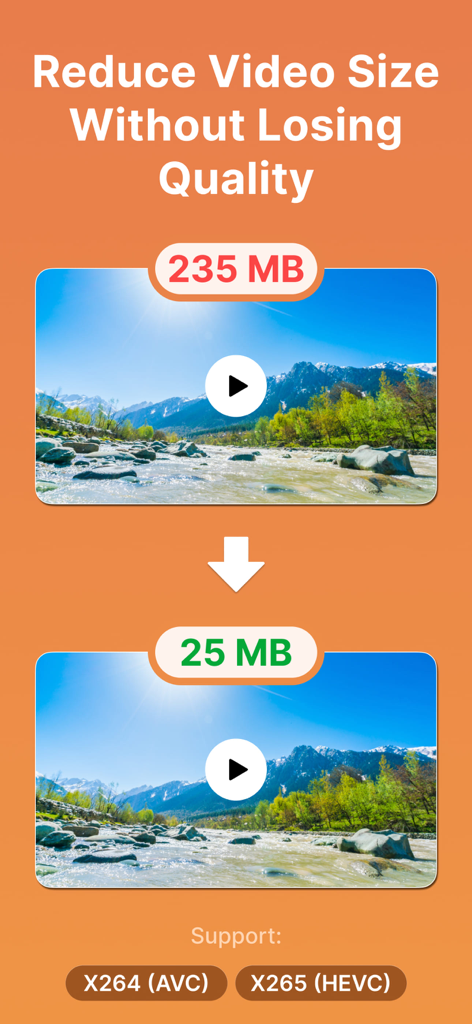
Video Compressor : Save Space - Comparison showing a video file size reduced from 235 MB to 25 MB without losing quality
Comparison showing a video file size reduced from 235 MB to 25 MB without losing quality

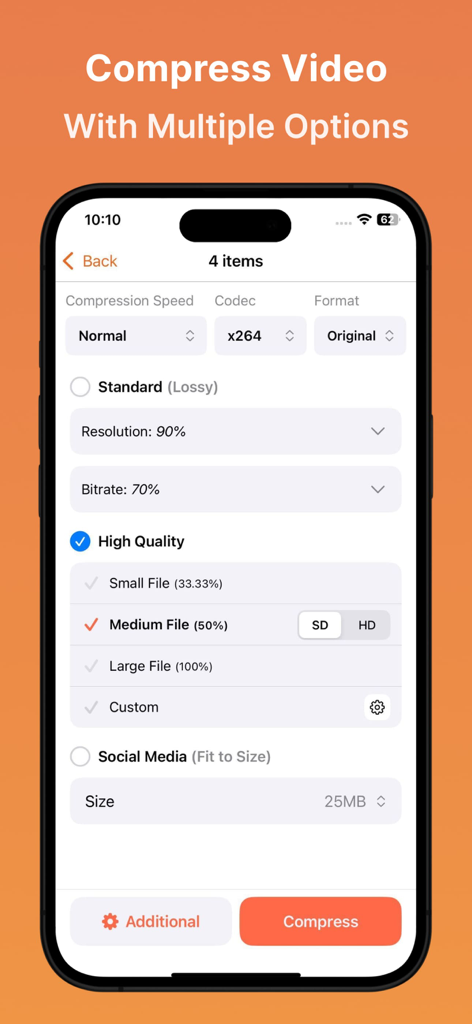
Video Compressor : Save Space - Interface of the Video Compressor app showing multiple compression settings for resolution, bitrate, and file quality.
Interface of the Video Compressor app showing multiple compression settings for resolution, bitrate, and file quality.

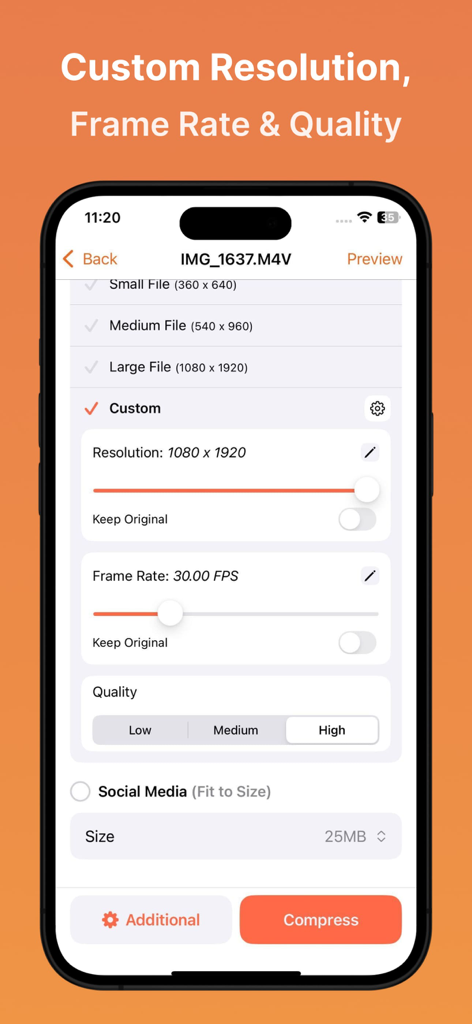
Video Compressor : Save Space - Mobile app interface showing custom video compression settings for resolution frame rate and quality
Mobile app interface showing custom video compression settings for resolution frame rate and quality

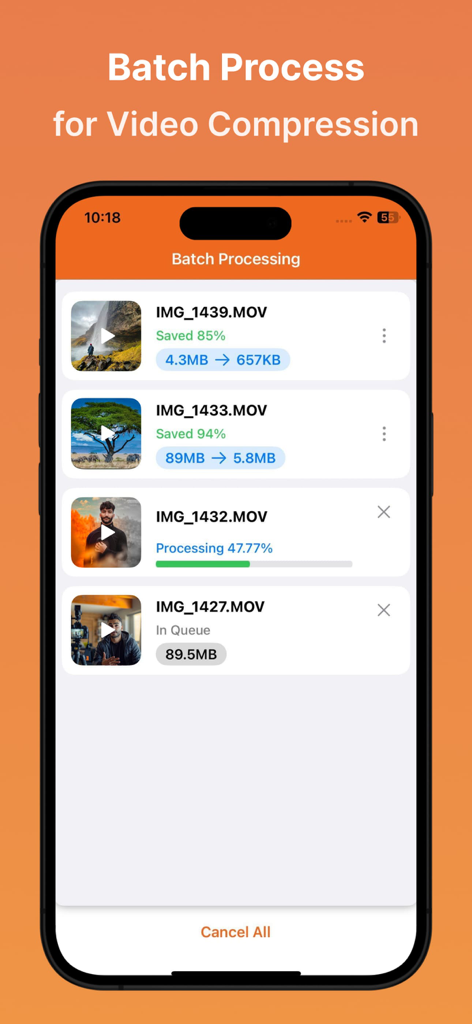
Video Compressor : Save Space - Mobile app interface showing multiple videos being compressed simultaneously in batch mode to save storage space.
Mobile app interface showing multiple videos being compressed simultaneously in batch mode to save storage space.

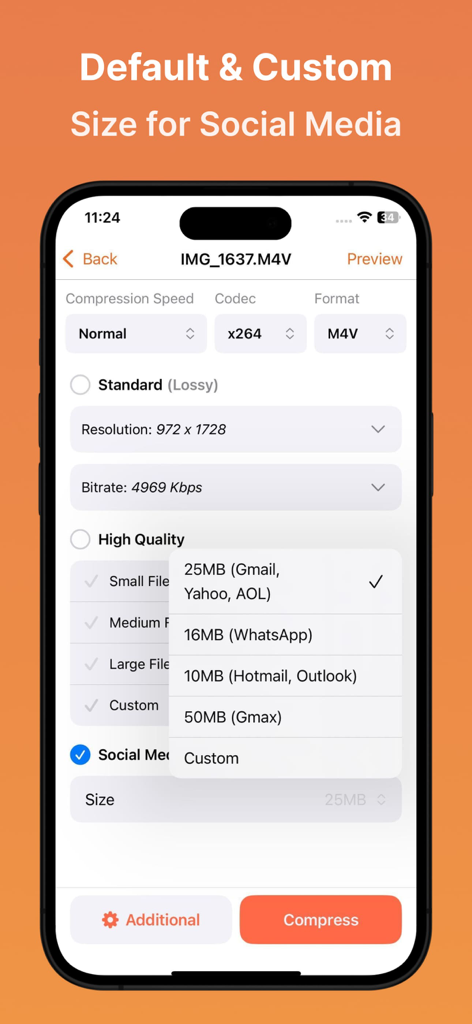
Video Compressor : Save Space - Video Compressor app interface showing preset file size options for Gmail, WhatsApp, and Outlook.

Video Compressor app interface showing preset file size options for Gmail, WhatsApp, and Outlook.
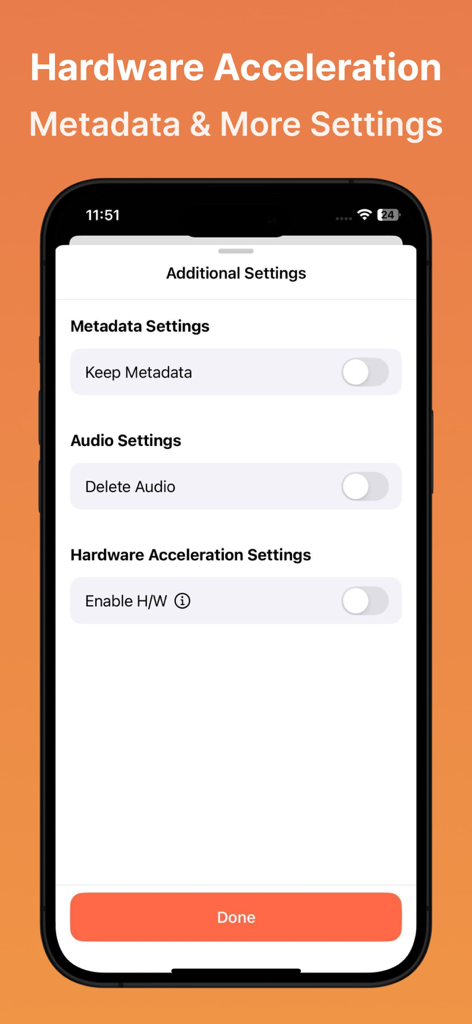
Video Compressor : Save Space - The additional settings menu of the Video Compressor app showing metadata, audio, and hardware acceleration toggles.
The additional settings menu of the Video Compressor app showing metadata, audio, and hardware acceleration toggles.

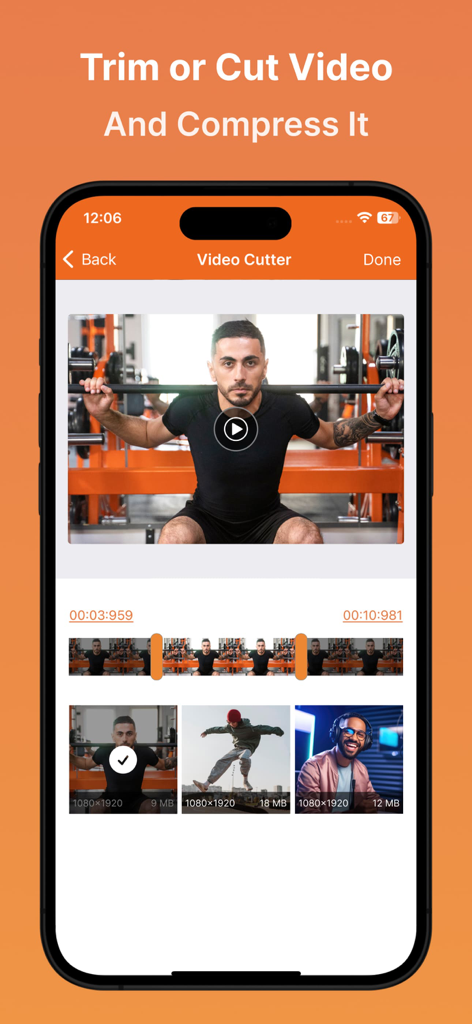
Video Compressor : Save Space - Mobile app interface showing the video cutter and trimmer feature with a timeline and video gallery
Mobile app interface showing the video cutter and trimmer feature with a timeline and video gallery

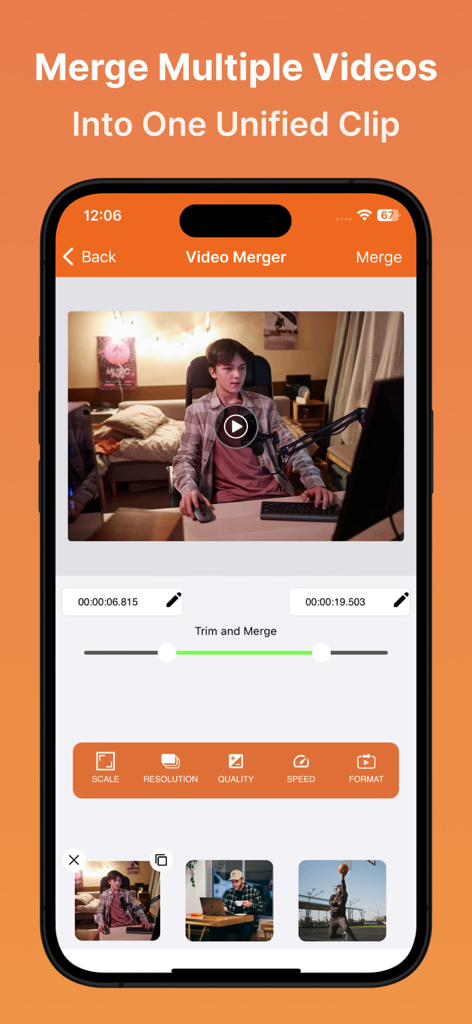
Video Compressor : Save Space - Smartphone screen showing the video merger interface with multiple video clips and editing tools
Smartphone screen showing the video merger interface with multiple video clips and editing tools

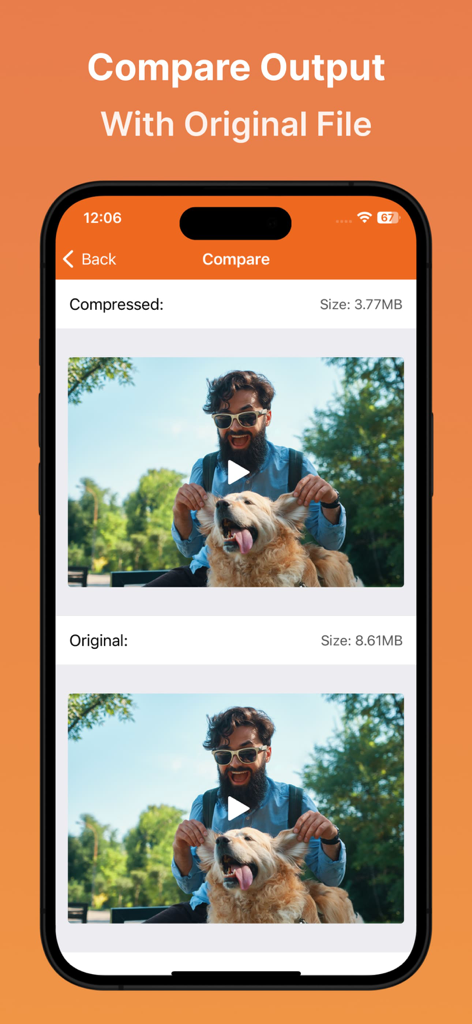
Video Compressor : Save Space - A side-by-side comparison screen in the Video Compressor app showing an original video file versus a compressed output to verify quality.

A side-by-side comparison screen in the Video Compressor app showing an original video file versus a compressed output to verify quality.

Description

Video Compressor & Converter provides users with default compression/preset profiles to reduce the size of the video. Users can choose desired compression quality, compression speed, cut, trim and change video resolution. Users can also convert any format video to any other format. Easily merge and join videos to play together. This Video Compressor can compress an uncompressed video without losing quality using X264 codec. It can also compress a compressed video by decreasing the quality which is Resolution. It supports many video formats. Supported Video Formats MP4, MKV, AVI, 3GP, FLV, MTS, MPEG, MPG, WMV, M4V, MOV, VOB. KEY FEATURES: - Compress an uncompressed video by keeping original quality. - Choose from predefined multiple compression profiles with different quality and size settings. - Compress video to a manually inputted size. - Shows a preview of small duration for the chosen compression settings before the compression process starts. Helps users to understand the quality of the compression beforehand. - Queue multiple videos to compress them in batch mode. - Choose Compression process speed. Higher the speed larger the compressed video size. - Compresses a video by decreasing resolution, video bitrate. In this option the user can see the estimated compressed video size before compressing. This doesn’t preserve original quality. - Compare compressed and original video by playing them simultaneously in the same screen. - Reduces video size, shrink video, save and clear device's storage space. - High quality video compression and Low quality video compression. - Medium compression option will be completed much faster than the High compression. But High compression will shrink the size much more than Medium compression. - Has the option to compress and convert video very fast. - Change any video format to any other format. - Import files from Photos(gallery), Cloud, and Via Wi-fi. - Clean UI design and super easy to use. - Keep video quality sharp. - Convert video to MP4, MKV, AVI, 3GP, FLV, MTS, M2TS, TS, M4V, MOV formats.(PRO Feature) - Convert video from MP4, MKV, AVI, 3GP, FLV, MTS, MPEG, MPG, WMV, M4V, MOV, VOB formats. - Easily Locate Compressed Videos on Output section. - Marge and Join Videos. - Change aspect ratios while merging. - Trim Videos. - Play Compressed and Converted Video. - Share compressed, converted and size-reduced videos. - Shrink the video to the specific size - Control video bitrate manually. - Choose custom resolution. - Cut, Trim, convert and compress. BEFORE AND AFTER SAMPLES Before: 72.7MB — After: 7.7MB (89.41% smaller) Before: 194.6MB — After: 8.6MB (95.58% smaller) Before: 1.37GB — After: 628.7MB (54.11% smaller) This is the best Video compressor and converter app in the market which provides many options for compressing your video. Also, you can compress videos in batch mode by queuing multiple videos. You can choose desired compression quality, compression speed, video resolution, bitrate etc. Video Compressor Compact Video Terms of Use at https://docs.google.com/document/d/1sjCpwsrHCufCvdOi6c0rd7Isu33_STR30NmX1YIn8Uo Video Compressor Compact Video Privacy Policy at https://docs.google.com/document/d/12EmYbpJ_HTufXgKW1R4pl0ftmNxsE8w_evvmoDSMDlM/edit

Download

Download on App Store

This page is not an official page of the app or its developer, but an independent editorial publication created for informational and commentary purposes. Unless expressly stated otherwise, neither the app nor its developer is affiliated with, endorsed by, sponsored by, authorized by, or otherwise officially connected with MWM, Apple, Google Play, the app publisher, or the app's developer, and nothing on this page implies that the app was developed using MWM's services. Any trademarks, logos, screenshots, and other content remain the property of their respective owners.








