
This page is not an official page of the app or its developer, but an independent editorial publication created for informational and commentary purposes. Unless expressly stated otherwise, neither the app nor its developer is affiliated with, endorsed by, sponsored by, authorized by, or otherwise officially connected with MWM, Apple, Google Play, the app publisher, or the app's developer, and nothing on this page implies that the app was developed using MWM's services. Any trademarks, logos, screenshots, and other content remain the property of their respective owners.


Video Converter - mp4 to mp3
Complexity? Gone. It gives users raw power over their digital media, turning format headaches into effortless control.
Downloads
2.5M+User Rating
Total Ratings
129Publisher
Category
UtilitiesLocales
33Latest Version
2.10Size
137.9 MBFirst Released
Mar 19, 2018An all-in-one mobile media solution for digital content creators and individual users.
Analysis of 'Video Converter - mp4 to mp3' Key Features
Comprehensive Video & Audio Conversion
The app provides extensive capabilities to convert videos into popular formats like MP4, MOV, and MKV, and audio into MP3, WAV, or FLAC. It also allows extraction of audio from video files and fine-tuning of resolution, bitrate, and frame rate.
Advanced Codec Support
This tool features inbuilt support for a broad spectrum of video and audio codecs, including H.264, H.265, VP9, and FLAC, ensuring compatibility with various media sources and platforms.
Efficient Video Compression
It allows users to significantly reduce video file sizes, conserving storage space and facilitating quicker sharing, all while maintaining desirable video quality.
Essential Video & Audio Editing Tools
The app offers fundamental editing functionalities such as trimming unwanted sections, cropping video frames, and merging multiple video clips into a single file, streamlining content creation workflows.
Customizable Video Enhancements
This tool features options to personalize videos by adding watermarks (text, stickers, emojis), setting custom cover art, adjusting playback speed, and applying creative effects like reverse play and rotation.
Image Format Conversion
It provides the utility to convert between common image formats such as JPG, PNG, HEIC, and GIF, offering an all-in-one media management solution.
The following screenshots and description are sourced directly from the app's official store listing and are the property of the app developer.
App Store
Screenshots
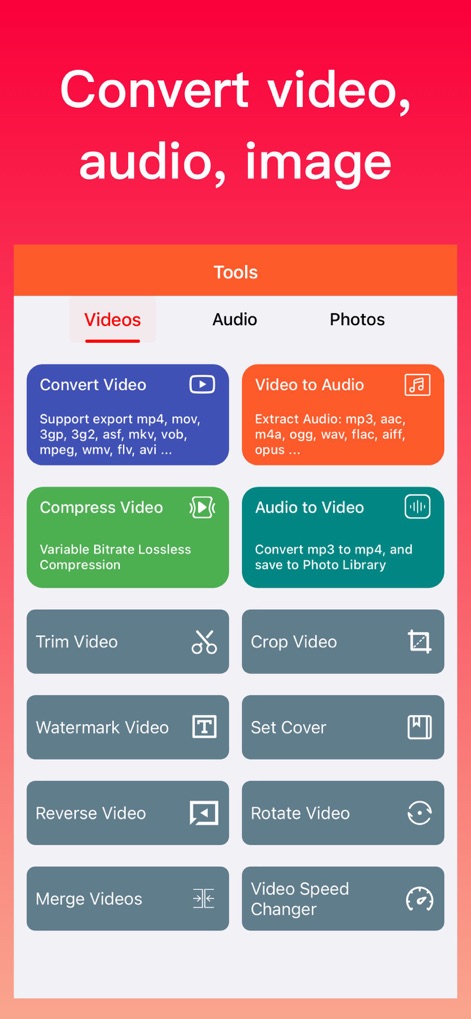
Discover the app's intuitive main dashboard, showcasing categorized tool selections like 'Convert Video' and 'Trim Video' for quick access to essential media functions.
Unified Media Toolkit

Fine-tune video conversions with granular control over 'Output Format' and 'Video Resolution' to achieve desired quality and compatibility.
Precision Video Output
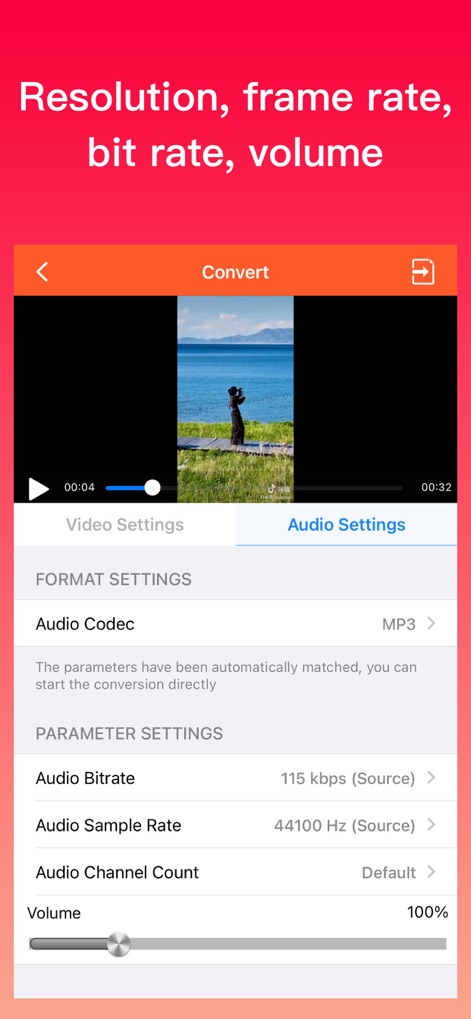
Customize audio output settings by selecting specific 'Audio Codecs' and adjusting the 'Volume' to perfectly match your project requirements.
Tailored Audio Profiles

Experience seamless playback with the app's integrated media player, offering intuitive controls for adjusting 'Volume' and 'Playback Speed'.
Integrated Media Player

Easily manage your converted and edited media with a clear file list, displaying key details such as 'Name' and 'Size' for effortless organization.
Organized File Management
Description
Download
More Like This
Top-ranked apps in the same category

Google LLC

Google Chrome
Google LLC

中国移动(手机营业厅)
China Mobile Online Services Co., Ltd.

Google Authenticator
Google LLC

Cleanup: Phone Storage Cleaner
DEEP FLOW SOFTWARE SERVICES - FZCO

gov.br
Servicos e Informacoes do Brasil

Super VPN Fly 2026
YUNFAN TECHNOLOGY CO., LIMITED

CNH do Brasil
Servicos e Informacoes do Brasil

百度-AI智能搜索
Beijing Baidu Netcom Science & Technology Co.,Ltd
This page is not an official page of the app or its developer, but an independent editorial publication created for informational and commentary purposes. Unless expressly stated otherwise, neither the app nor its developer is affiliated with, endorsed by, sponsored by, authorized by, or otherwise officially connected with MWM, Apple, Google Play, the app publisher, or the app's developer, and nothing on this page implies that the app was developed using MWM's services. Any trademarks, logos, screenshots, and other content remain the property of their respective owners.