
This page is not an official page of the app or its developer, but an independent editorial publication created for informational and commentary purposes. Unless expressly stated otherwise, neither the app nor its developer is affiliated with, endorsed by, sponsored by, authorized by, or otherwise officially connected with MWM, Apple, Google Play, the app publisher, or the app's developer, and nothing on this page implies that the app was developed using MWM's services. Any trademarks, logos, screenshots, and other content remain the property of their respective owners.


Video to Live Wallpaper
Your videos, your lock screen. This app puts dynamic personalization in users' hands, effortlessly.
Downloads
250k+User Rating
Total Ratings
4.5KPublisher
Category
Photo & VideoLocales
1Latest Version
1.0.273Size
42.8 MBFirst Released
Nov 29, 2021An evaluation of key functionalities for dynamic iOS lock screen personalization.
App Feature Analysis: Video to Live Wallpaper
Video to Live Photo Conversion
The app allows users to transform any video from their camera roll into a dynamic Live Photo with a single tap, without any time limits, enabling highly personalized and expressive lock screens.
Enhanced Data Privacy and Offline Mode
This tool works entirely offline, processing all media directly on the device. It ensures users' personal data is never sent to external servers or the internet, upholding strict privacy standards.
Multiple Photos to Live Photo
It allows users to select up to 10 pictures from their camera roll and convert them into a single, dynamic Live Photo, offering creative flexibility for photo-based animated backgrounds.
Broad iOS Device Compatibility
The app is available for all iOS devices, ensuring a wide range of users can access and utilize its personalization features on their iPhones and iPads.
Frequently Asked Questions
Everything you need to know about Video to Live Wallpaper
What is Video to Live Wallpaper?
Video to Live Wallpaper transforms videos or sequences of pictures into Live Photos. Users can then animate these Live Photos as their lock screen wallpaper on iOS devices.
How does Video to Live Wallpaper convert videos to Live Photos?
Video to Live Wallpaper allows users to select any video from their camera roll and convert it into a Live Photo with a single tap, without a 5-second time limit.
Can I convert multiple photos into a Live Photo with Video to Live Wallpaper?
Yes, Video to Live Wallpaper converts up to 10 pictures from your camera roll into a dynamic Live Photo. This creates an animated Live Photo from a sequence of images.
Does Video to Live Wallpaper work offline?
Yes, Video to Live Wallpaper works entirely offline. It uses your device's computational power to create Live Photos, ensuring your data remains private and is not sent externally.
Does Video to Live Wallpaper send user data to external servers?
No, Video to Live Wallpaper does not send user data to the Internet or external servers. It respects data privacy by processing all Live Photo creations on your device.
Which devices are compatible with Video to Live Wallpaper?
Video to Live Wallpaper is available for all iOS devices. Users can install and operate the app on any compatible Apple device running the iOS operating system.
How do I view the animation of a Live Photo created by Video to Live Wallpaper?
Users can view the animation of a Live Photo created by Video to Live Wallpaper by long pressing or using 3D Touch on the image on their device.
Does Video to Live Wallpaper provide a tutorial for setting Live Photos as wallpaper?
Yes, Video to Live Wallpaper includes a 'Live Wallpaper Tutorial' feature. This guides users on how to properly set up a Live Photo as their device's wallpaper.
The following screenshots and description are sourced directly from the app's official store listing and are the property of the app developer.
App Store
Screenshots

This screenshot displays the app's intuitive starting interface, presenting clear options like "Convert Video" and "Convert Photos" for immediate creative action.
Effortless Conversion Options
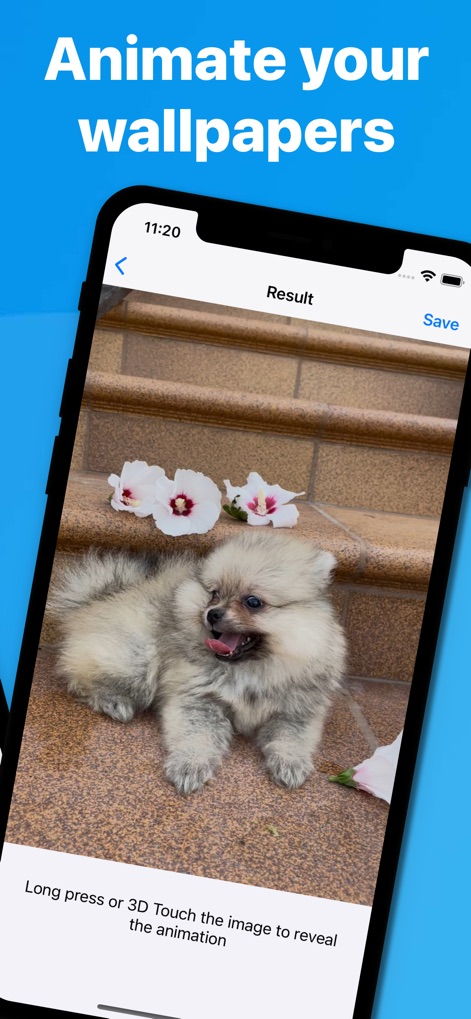
This image highlights the successful conversion of media into a dynamic Live Photo, complete with instructions for users to "Long press or 3D Touch the image to reveal the animation" and an easy "Save" option.
Live Photo Creation
Description
Download
More Like This
Apps with similar features and user experience

ImgPlay: GIF Maker & Meme
ImgBase, Inc.

quickLive-Video2Live Wallpaper
Changshu Chuang Shi Media Technology Co., Ltd.

Live - LivePhoto maker
Beyond Trading

Patternator Video Wallpapers
Bazaart Ltd.

GIF Maker & Editor Pro
Chengdu Siwen Culture Media Co., Ltd.

Gif Maker-meme & video to gifs
姿凤 陈

Mematic - The Meme Maker
Trilliarden Entertainment GmbH

Video to Live ◦
Anish Modan

Boomerang - Video Maker
Video Bakery Ltd.
This page is not an official page of the app or its developer, but an independent editorial publication created for informational and commentary purposes. Unless expressly stated otherwise, neither the app nor its developer is affiliated with, endorsed by, sponsored by, authorized by, or otherwise officially connected with MWM, Apple, Google Play, the app publisher, or the app's developer, and nothing on this page implies that the app was developed using MWM's services. Any trademarks, logos, screenshots, and other content remain the property of their respective owners.