
This page is not an official page of the app or its developer, but an independent editorial publication created for informational and commentary purposes. Unless expressly stated otherwise, neither the app nor its developer is affiliated with, endorsed by, sponsored by, authorized by, or otherwise officially connected with MWM, Apple, Google Play, the app publisher, or the app's developer, and nothing on this page implies that the app was developed using MWM's services. Any trademarks, logos, screenshots, and other content remain the property of their respective owners.


VivaCut - AI Video Editor
Amateur footage disappears. The app delivers a director's toolkit, transforming raw clips into polished, cinematic narratives with precision typically found on high-end desktops.
Downloads
12.5M+User Rating
Total Ratings
911.8KPublisher
Category
Photo & VideoLocales
19Latest Version
4.5.6Size
318.5 MBFirst Released
Nov 28, 2019VivaCut - AI Video Editor: Key Feature Analysis
An evaluation of essential functionalities for creative content creators and social media enthusiasts.
Multi-layer Timeline & Overlays
The app provides an intuitive multi-layer timeline, allowing users to combine video clips, images, and text with precision, along with advanced blending modes and overlay options for complex visual compositions.
Advanced Visual Effects & Transitions
This tool features a wide array of trending visual effects, including Glitch, VHS, RGB, and Trippy filters, alongside cinematic transition effects to create dynamic and engaging video sequences.
Keyframe Animation & Masking
It allows users to apply keyframe animations to various elements like masks, text, and stickers, combined with versatile masking tools (linear, radial, etc.) for precise control over visual effects and compositions.
Precision Editing Tools
The app provides professional tools for trimming, cutting, and splicing video clips with frame-by-frame accuracy, alongside flexible speed control options for creating captivating slow-motion or fast-paced sequences.
Audio Integration & Music Markers
This tool features extensive audio capabilities, allowing users to add free music, extract audio from videos, and use music markers to synchronize visual effects and transitions with the rhythm.
High-Resolution Export
It allows users to export finished video projects in high-definition 1080p and even 4K quality, ensuring professional visual fidelity for sharing across various platforms.
Picture-in-Picture & Collage
The app supports Picture-in-Picture functionality for creating double exposures and overlay effects, along with collage features to seamlessly integrate multiple images and videos.
Video Adjustment & Enhancement
It allows users to fine-tune video aesthetics through comprehensive adjustment controls for brightness, contrast, saturation, hue, color temperature, and vignetting, enhancing overall video quality.
Frequently Asked Questions
Everything you need to know about VivaCut - AI Video Editor
What is VivaCut - AI Video Editor?
VivaCut is a professional AI video editor app designed for full-screen video creation. It allows users to produce artistic films, share memories, and edit videos with advanced tools and effects.
Does VivaCut support multi-layer video editing?
Yes, VivaCut provides an intuitive multi-layer timeline for precise frame-by-frame editing. This feature allows users to create complex video collages and overlays with multiple video tracks.
Can I use Chroma Key in VivaCut for green screen effects?
Yes, VivaCut offers a Chroma Key feature. This tool enables users to remove backgrounds, like green screens, for professional video compositing and special effects within the app.
What visual effects does VivaCut provide?
VivaCut offers various visual effects including VHS, RGB, Trippy, Glitch, GB, Grainy, and Fisheye. It also includes cool transition effects and specific glitch effects for creative video editing.
Does VivaCut include keyframe animation?
Yes, VivaCut features Keyframe Animation. Users can apply keyframes to Mask, Video Collage, Text, Stickers, and Emoji for precise control over the motion and properties of visual elements.
What are the export resolution options in VivaCut?
VivaCut allows users to export videos in high-quality custom resolutions, including 1080p and 4K. This ensures professional output for various sharing platforms and display needs.
How does the VivaCut subscription work?
VivaCut offers monthly or annual subscriptions for unlimited feature access. Subscriptions auto-renew unless canceled 24 hours prior to the period end and are managed through your iTunes Account.
Can I add animated text to my videos in VivaCut?
Yes, VivaCut includes animated text tools. This feature allows users to add dynamic text elements with various styles and effects to their videos for enhanced visual engagement and storytelling.
Can I control video speed in VivaCut?
Yes, VivaCut offers a Speed Control feature. Users can create fast and slow-motion effects to adjust the pace of their videos, enhancing dramatic or comedic moments with precise timing.
Does VivaCut allow combining or blending video clips?
Yes, VivaCut allows users to combine and blend video clips. Features like "Combine video clips" merge content, while "Blend videos" offers modes such as Color Burn, Multiply, and Screen for creative layering.
The following screenshots and description are sourced directly from the app's official store listing and are the property of the app developer.
App Store
Screenshots
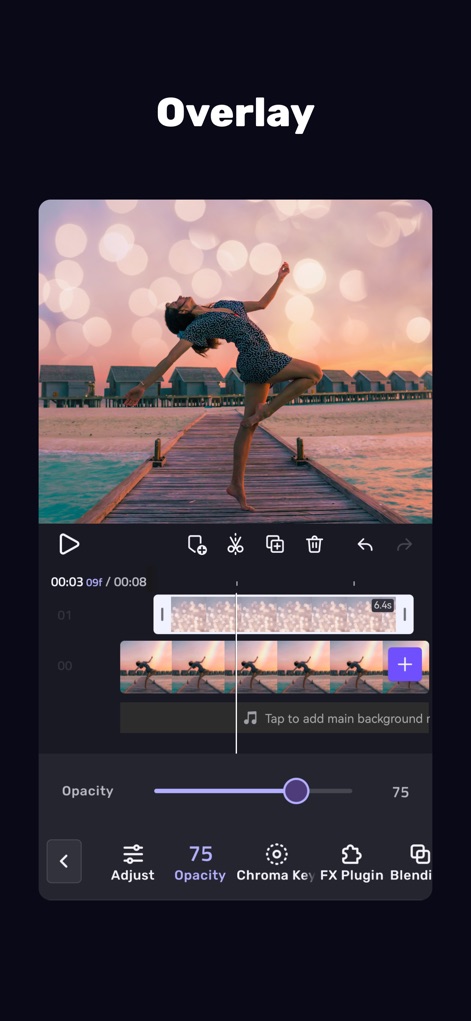
Dynamic Overlays
Users can seamlessly integrate stunning bokeh overlays and fine-tune their appearance with precise opacity control for cinematic results.

Intuitive Editing
This tool offers a streamlined multi-layer timeline for complex edits and provides quick access to essential features like VFX and Overlay options.

Creative Animations
Explore a range of dynamic 3D animation effects, such as the 3D Line, and easily adjust their duration for perfect timing within the video.

Powerful VFX Palette
The app provides a vast palette of visual effects, including Glitch and VHS, allowing creators to preview and apply them in real-time for impactful visuals.

Dynamic Text Creation
Add dynamic text to videos with customizable styles like Glow, choosing from an extensive collection of font presets to match any aesthetic.

Advanced Keyframe Mastery
Achieve sophisticated animations with precise keyframe controls for elements like Position and fine-tune movements using detailed transform options.

Seamless Green Screen
Users can effortlessly remove backgrounds with the intelligent chroma key feature and refine the selection using the adjustable accuracy slider for perfect composites.
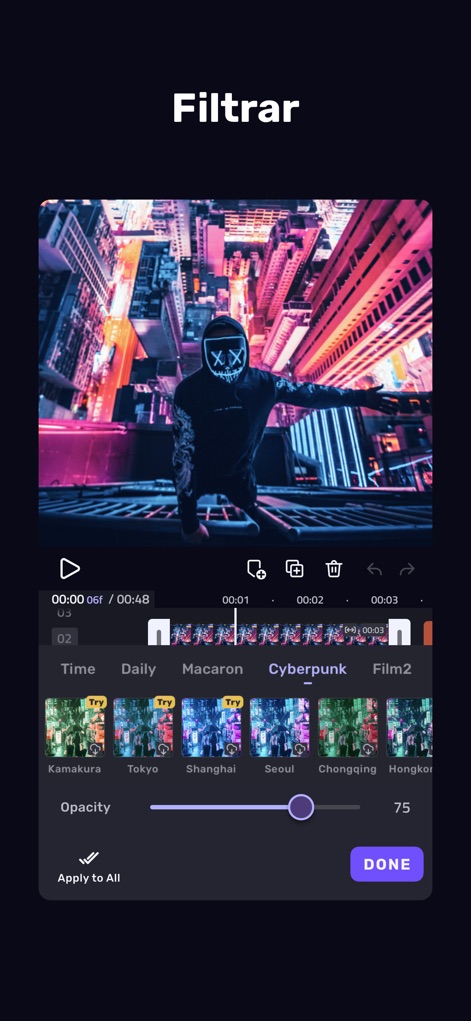
Artistic Filter Library
Enhance video aesthetics with a rich library of thematic filter categories like Cyberpunk, and control their intensity with the adjustable opacity slider.
Description
Download
More Like This
Apps with similar features and user experience

Edits: Video Editor
Instagram, Inc.

VLLO- Video Editor, Vlog Edits
vimosoft

YouCut - AI Video Editor
SHANTANU PTE. LTD.

必剪-B站官方出品
Shanghai Bilibili Animation Co.,Ltd

剪影 - 视频剪辑 & 卡点影集制作
Shanghai Jian Ji Software Technology Co., Ltd

Videoshop - Video Editor
Jajijujejo Inc.

VDIT - Video Maker & Editor
ImgBase, Inc.

Video Editor with Music・VidLab
Onelight Apps CY Ltd

Video Maker-movie maker&Editor
Changsha Fugui Bamboo Network Technology Co., Ltd.
This page is not an official page of the app or its developer, but an independent editorial publication created for informational and commentary purposes. Unless expressly stated otherwise, neither the app nor its developer is affiliated with, endorsed by, sponsored by, authorized by, or otherwise officially connected with MWM, Apple, Google Play, the app publisher, or the app's developer, and nothing on this page implies that the app was developed using MWM's services. Any trademarks, logos, screenshots, and other content remain the property of their respective owners.