
This page is not an official page of the app or its developer, but an independent editorial publication created for informational and commentary purposes. Unless expressly stated otherwise, neither the app nor its developer is affiliated with, endorsed by, sponsored by, authorized by, or otherwise officially connected with MWM, Apple, Google Play, the app publisher, or the app's developer, and nothing on this page implies that the app was developed using MWM's services. Any trademarks, logos, screenshots, and other content remain the property of their respective owners.


Watch Faces Gallery & Creator
Stop settling. This app hands you the keys to an Apple Watch that actually looks like yours.
Downloads
1M+User Rating
Total Ratings
67.0KPublisher
Category
LifestyleLocales
11Latest Version
2.0.1Size
122.6 MBFirst Released
Aug 22, 2022An evaluation of core functionalities designed for Apple Watch personalization enthusiasts.
Key Features Analysis: Watch Faces Gallery & Creator
Custom Watch Face Editor
The app provides a robust editor that enables users to design personalized watch faces using their own photos, templates, stickers, filters, text, and diverse fonts, offering extensive creative control.
Integrated Health & Fitness Widgets
It features widgets that display vital health and activity data, such as steps, calories, heart rate, and activity, directly on watch faces and phone widgets, leveraging HealthKit for comprehensive utility.
Extensive Watch Face Gallery
This tool offers access to a vast collection of over 16,000 pre-designed watch faces, encompassing a wide range of styles, colors, and thematic designs to suit diverse aesthetic preferences.
Weekly Content Updates
The app ensures a continuous influx of new watch face categories and designs through weekly updates, allowing users to stay current with evolving trends and refresh their device's appearance regularly.
Dynamic Animated Watch Faces
It supports animated watch faces, providing dynamic and visually engaging options that enhance the aesthetic appeal of the Apple Watch, offering a premium customization experience.
Broad Apple Watch Compatibility
The app ensures compatibility across all versions of the Apple Watch, including dedicated designs for older series, making its personalization features accessible to a wide user base.
Frequently Asked Questions
Everything you need to know about Watch Faces Gallery & Creator
How many watch faces does Watch Faces Gallery & Creator offer?
Yes, Watch Faces Gallery & Creator offers over 16,000 watch faces. This extensive collection includes diverse styles, colors, and designs for Apple Watch users.
Does Watch Faces Gallery & Creator allow users to create custom watch faces?
Yes, Watch Faces Gallery & Creator includes a cool watch face editor. Users can add photos, choose templates, change time styles, add stickers, filters, draw, and include text with different fonts and extensions.
Is Watch Faces Gallery & Creator compatible with all Apple Watch models?
Yes, Watch Faces Gallery & Creator is compatible with all Apple Watch versions. The app designs dials specifically for older models like Series 1, 2, and 3, ensuring broad device support.
Does Watch Faces Gallery & Creator support animated watch faces?
Yes, Watch Faces Gallery & Creator provides animated watch faces. For these to function correctly on Apple Watch Series 5, 6, and 7, users must turn off the "Always On" feature.
Does Watch Faces Gallery & Creator display health data from HealthKit?
Yes, Watch Faces Gallery & Creator integrates with HealthKit. It uses HealthKit to display health and activity data such as steps, heart rate, and calories in watch face complications and phone widgets.
Does Watch Faces Gallery & Creator receive regular updates for new designs?
Yes, Watch Faces Gallery & Creator provides weekly updates. These updates include new dial categories and notifications to users, ensuring fresh content availability.
Can Watch Faces Gallery & Creator provide widgets for the iPhone?
Yes, Watch Faces Gallery & Creator offers various widgets for your iPhone. These widgets display different data types, including steps, calendar, time, calories, and photos.
What personalization options are available in the Watch Faces Gallery & Creator editor?
The Watch Faces Gallery & Creator editor allows extensive personalization. Features include adding personal photos, choosing templates, modifying time styles, applying stickers and filters, drawing, and adding text with different fonts and extensions.
What types of complications and widgets does Watch Faces Gallery & Creator offer?
Watch Faces Gallery & Creator provides a wide range of complications and widgets. These include displays for steps, calendar, time, calories, photos, heart rate, and activity, available in various styles.
Where can I find the Privacy Policy for Watch Faces Gallery & Creator?
The Privacy Policy for Watch Faces Gallery & Creator is available at http://project5791294.tilda.ws/privacy-policy. This link is provided in the app's description.
The following screenshots and description are sourced directly from the app's official store listing and are the property of the app developer.
App Store
Screenshots

Discover an expansive library of watch faces, featuring classic designs and clear digital time displays.
Vast Collection Awaits
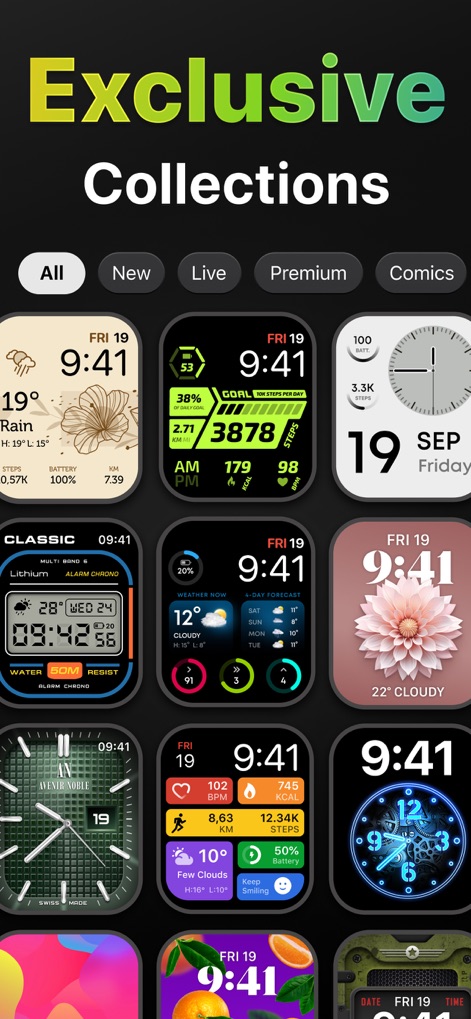
Explore diverse watch face categories, from dynamic live options to exclusive premium designs, all within a visually rich grid layout.
Curated Face Collections
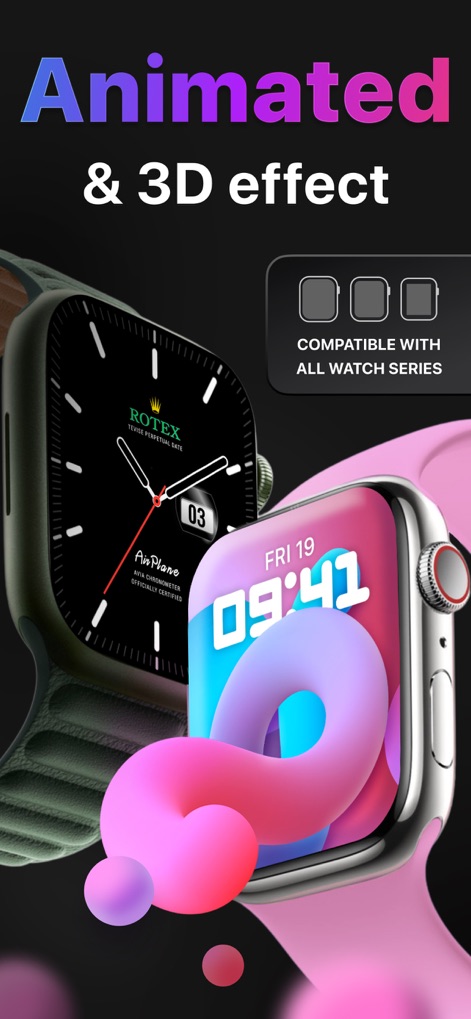
Experience animated and 3D effect watch faces, showcasing vibrant abstract designs and sophisticated mechanical movements compatible with all Apple Watch series.
Dynamic Visual Effects
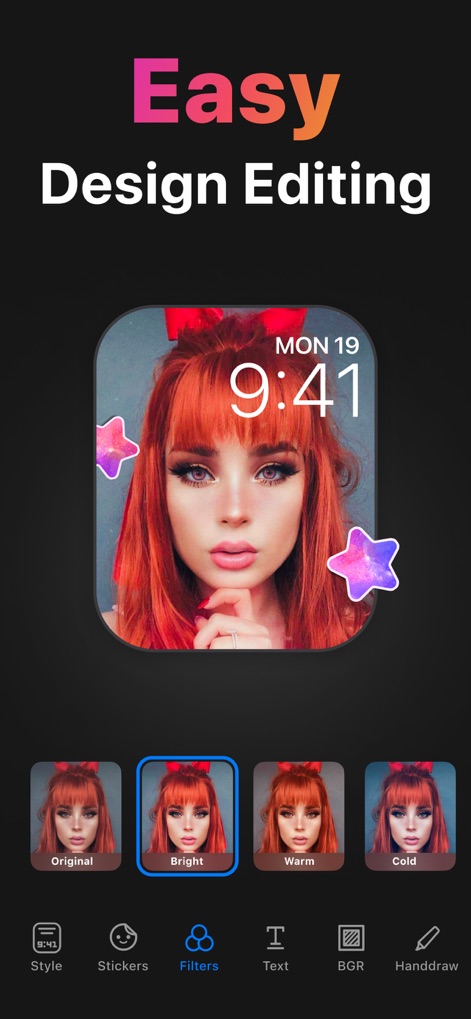
Customize watch faces effortlessly with a photo background and a suite of editing tools, including various filters and decorative stickers.
Intuitive Editor Controls

Enhance your iPhone home screen with stylish widgets, showcasing essential data like step counts and motivational quotes in diverse visual styles.
Smart Widget Integration

Navigate through organized watch face categories like 'Complications' and 'Mechanism Live', and access key features via the intuitive bottom navigation bar.
Explore Face Categories

Browse an array of captivating 'Fluid Live' watch faces, featuring dynamic visuals such as liquid art and colorful abstract patterns.
Immersive Live Options

Preview a comprehensive activity watch face, displaying real-time metrics like steps counter and heart rate alongside an "Install Watch Face" call to action.
Detailed Activity Faces

View a detailed 'Tiles' watch face, presenting multiple data points like heart rate and battery life in a clear, segmented layout, ready for installation.
Informative Tile Layouts
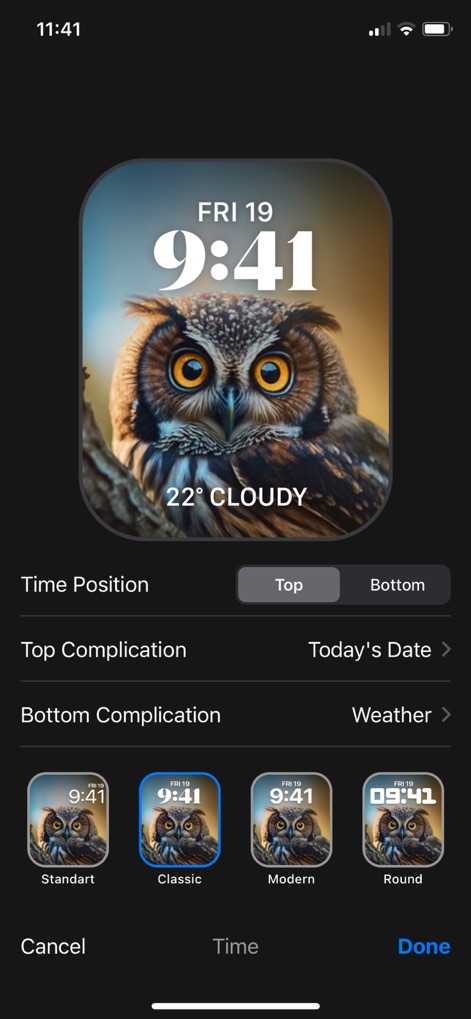
Personalize watch faces by adjusting time position and selecting complications like 'Today's Date' or 'Weather', with various visual styles available.
Advanced Customization Options
Description
Download
More Like This
Apps with similar features and user experience
Walbum™ - Watch Faces Gallery
怡飞 王

Watchfaces - Watch Wallpaper
亚伦 陈

Watch Faces & Widget Gallery
Hyperday MB
Watch Faces by Facer
Little Labs, Inc.
Watch Faces & Widgets Gallery
GANYMEDES POINT SP Z O O
Buddywatch - Watch Faces
BUDDY SRLS
Watch Faces Gallery & Themes
Mikael Melkonyan
Watch Faces Gallery - Widgets.
European apps solutions LTD
Watch Faces Gallery-Widget
Jinan Feiniao culture media Co., Ltd
This page is not an official page of the app or its developer, but an independent editorial publication created for informational and commentary purposes. Unless expressly stated otherwise, neither the app nor its developer is affiliated with, endorsed by, sponsored by, authorized by, or otherwise officially connected with MWM, Apple, Google Play, the app publisher, or the app's developer, and nothing on this page implies that the app was developed using MWM's services. Any trademarks, logos, screenshots, and other content remain the property of their respective owners.