
This page is not an official page of the app or its developer, but an independent editorial publication created for informational and commentary purposes. Unless expressly stated otherwise, neither the app nor its developer is affiliated with, endorsed by, sponsored by, authorized by, or otherwise officially connected with MWM, Apple, Google Play, the app publisher, or the app's developer, and nothing on this page implies that the app was developed using MWM's services. Any trademarks, logos, screenshots, and other content remain the property of their respective owners.


Watch Faces & Widgets Gallery
Unleash your Watch's true aesthetic and utility. The app offers a trove of designs and dynamic complications, transforming your wrist into a personalized command center.
Downloads
750k+User Rating
Total Ratings
27.5KPublisher
Category
LifestyleLocales
12Latest Version
1.5.1Size
148.4 MBFirst Released
Jul 10, 2024An in-depth look at the core functionalities enhancing Apple Watch personalization and utility for design-conscious users.
Key Features Analysis: Watch Faces & Widgets Gallery
Custom Watch Face Creator
It allows users to create their own unique watch faces from scratch, empowering them with ultimate personalization and creative expression to truly reflect their individuality.
Comprehensive Complication Support
The app integrates various functional complications such as weather, health metrics (steps, heart rate, calories), calendar events, date, and battery status, enhancing the Apple Watch's utility with vital, glanceable information.
Extensive Watch Face Gallery
The app provides a vast and diverse collection of pre-designed watch faces, catering to various styles and preferences, allowing users to easily find designs that match their individuality and mood.
Community Sharing & Discovery
Users can share their self-created or favorite watch faces with friends and the wider community, fostering interaction and enabling the discovery of new and unique designs from other users.
Dynamic Watch Face Options
This tool features a range of watch face types, including static, animated, and those with integrated complications, providing users with dynamic visual experiences and functional glanceable information.
Daily Design Updates
The app ensures a fresh and current experience by providing new watch faces every day, allowing users to stay on trend and frequently update their device's aesthetic.
Frequently Asked Questions
Everything you need to know about Watch Faces & Widgets Gallery
What is the Watch Faces Club app?
The Watch Faces Club app provides a large collection of designer watch faces for Apple Watch, including static, animated, and complication-rich designs. Users can also create and share their own watch faces daily.
What types of watch faces does Watch Faces Club offer?
The Watch Faces Club app offers static, animated, and watch faces with complications. It features unique designs from leading creators, catering to all styles for Apple Watch users.
Can I create and share my own watch faces with Watch Faces Club?
Yes, the Watch Faces Club app allows users to create their own personal watch faces. Users can also share their custom designs with friends and other members within the club.
How often does Watch Faces Club add new watch faces?
New watch faces are added to the Watch Faces Club app every day. This ensures users have a constant supply of trendy and unique designs for their Apple Watch.
What complications are available in the Watch Faces Club app?
The Watch Faces Club app offers complications for weather, health (steps, heart rate, distance, calories), calendar, date, and battery. These enhance the functionality of watch faces.
Which Apple Watch models support Watch Faces Club complications?
Watch faces with complications in Watch Faces Club are compatible with Apple Watch Series 4, 5, 6, 7, 8, 9, SE, SE 2, ULTRA, and ULTRA 2 models.
Do animated watch faces in Watch Faces Club require disabling "Always On"?
Yes, animated watch faces in the Watch Faces Club app require the "Always On" feature to be disabled on the Apple Watch for proper functionality.
How often do Watch Faces Club complications update?
Complications in the Watch Faces Club app update every 15 minutes. This frequency is due to technical limitations imposed by the Apple Watch operating system.
Does Watch Faces Club access my Apple Health app data?
Yes, the Watch Faces Club app accesses Health app data to display activity metrics like steps, heart rate, and calories burned on watch faces. User access must be granted.
Does Watch Faces Club share my geolocation data?
No, the Watch Faces Club app does not share user geolocation data with third parties. Geolocation access is solely used for displaying accurate weather forecasts on watch faces.
Where can I find the Terms of Use for Watch Faces Club?
The Terms of Use for the Watch Faces Club app are available via a link provided in the app's information section: https://watch-faces-club.tilda.ws/tou.
How do I contact support for the Watch Faces Club app?
Yes, users can contact support for the Watch Faces Club app via email at help.watchfacesclub@gmail.com. This contact information is listed in the app's description.
The following screenshots and description are sourced directly from the app's official store listing and are the property of the app developer.
App Store
Screenshots

See how the app offers an expansive library of over 10,000 watch faces, exemplified by a sophisticated chronograph-style design.
Vast Collection Revealed
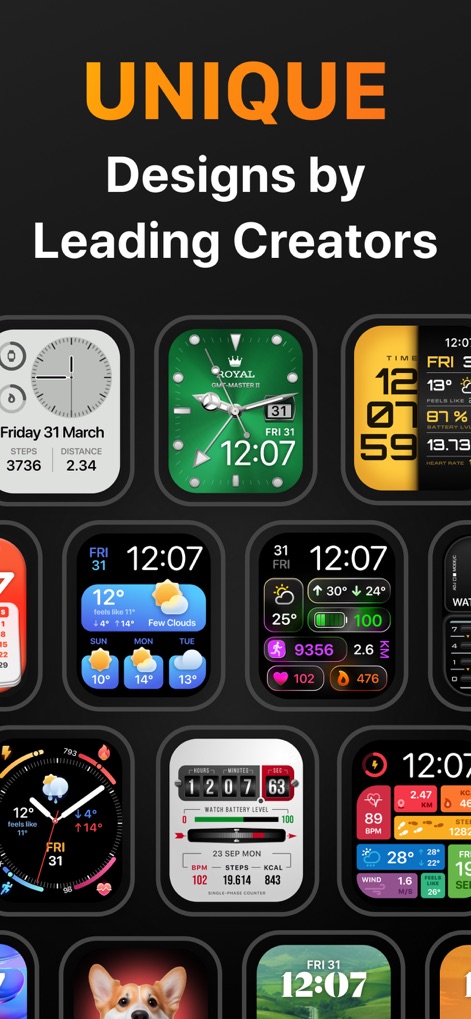
Explore the app's commitment to unique designs from leading creators, showcasing a diverse grid of styles and functional complications like steps and weather.
Curated Unique Designs
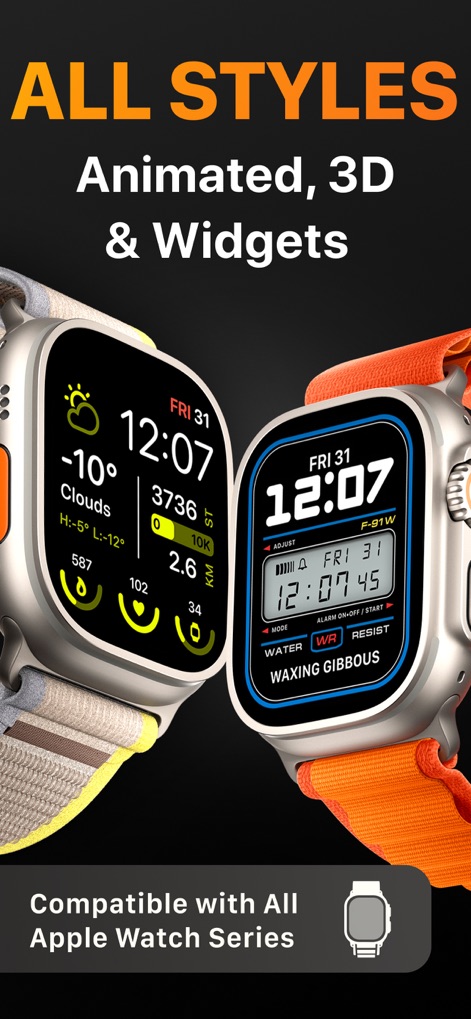
Discover the app's versatility, supporting all Apple Watch series with a range of styles from animated designs to detailed widgets.
Versatile Style Options

Observe how users can craft their personal watch faces, allowing for custom image backgrounds, such as the vibrant butterfly, and the integration of simple complications.
Personalization Workshop

View the app's integrated community hub, where users can share their designs in the club and browse popular categories like "New" and "Neon", indicated by user likes.
Community Sharing Hub

Navigate the comprehensive gallery, featuring a convenient search bar for discovery and organized sections such as "Trending" and "Basic Colors."
Explore The Gallery

Delve into the "Basic Colors" collection, presenting a range of minimalist watch faces consistently featuring essential health complications like steps and calories.
Color Palette Choices
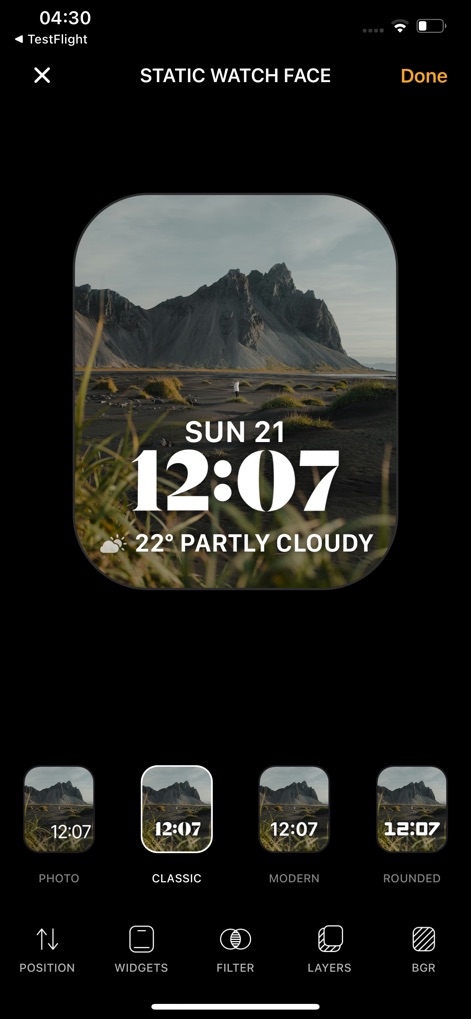
Access the advanced customization tools, including robust options for "WIDGETS" and "FILTER", allowing users to precisely tailor their watch face backgrounds and elements.
Advanced Customization Tools
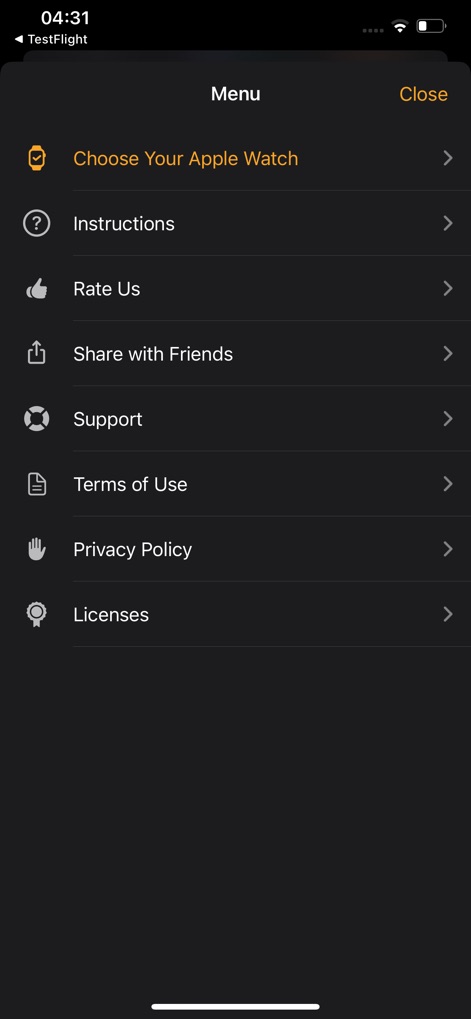
Examine the app's comprehensive menu, providing access to practical support features like "Instructions" and "Support", alongside crucial policy documents including "Terms of Use" and "Privacy Policy".
App Settings & Support
Description
Download
More Like This
Apps with similar features and user experience
Walbum™ - Watch Faces Gallery
怡飞 王

Watchfaces - Watch Wallpaper
亚伦 陈

Watch Faces & Widget Gallery
Hyperday MB
Watch Faces by Facer
Little Labs, Inc.
Buddywatch - Watch Faces
BUDDY SRLS
Watch Faces Gallery & Creator
Artem Vasiliuk

Watch Faces Gallery & Themes
Mikael Melkonyan
Watch Faces Gallery - Widgets.
European apps solutions LTD
Watch Faces Gallery-Widget
Jinan Feiniao culture media Co., Ltd
This page is not an official page of the app or its developer, but an independent editorial publication created for informational and commentary purposes. Unless expressly stated otherwise, neither the app nor its developer is affiliated with, endorsed by, sponsored by, authorized by, or otherwise officially connected with MWM, Apple, Google Play, the app publisher, or the app's developer, and nothing on this page implies that the app was developed using MWM's services. Any trademarks, logos, screenshots, and other content remain the property of their respective owners.