
このページはアプリまたはその開発者の公式ページではなく、情報提供および論評を目的として作成された独立した編集出版物です。明示的に別段の記載がない限り、アプリおよびその開発者は、MWM、Apple、Google Play、アプリのパブリッシャー、またはアプリの開発者と提携、承認、後援、認可、またはその他の公式的な関係はなく、このページのいかなる内容も、アプリがMWMのサービスを使用して開発されたことを意味するものではありません。すべての商標、ロゴ、スクリーンショット、その他のコンテンツはそれぞれの所有者の財産です。


Filmmaker Pro - Video Editor
デバイス上で完結する映像スタジオが、ユーザーをプロの領域へ導く。Filmmaker Proは、個人のデータ主権を守りながら、表現の限界を押し広げさせる。
ダウンロード
12.5M+ユーザー評価
評価数
358.8K開発元
カテゴリ
Photo & Video対応言語
13最新バージョン
12.6.4サイズ
1.1 GBリリース日
2016年4月7日「Filmmaker Pro - Video Editor」詳細分析
モバイルデバイスにおけるプロフェッショナル品質の映像制作を再定義する主要機能
プライバシーを重視したローカル処理
本アプリは、すべてのデータ処理をデバイス上で完結させ、ユーザーデータの収集や保存を行いません。AIモデルもアプリ内に組み込まれており、プライバシーを懸念するクリエイターに安心して利用いただけます。
高度なVFX機能
クロマキー(グリーンバック合成)、キーフレームアニメーション、モーショントラッキングといった、デスクトップレベルの高度な視覚効果機能をモバイルデバイスで実現します。ユーザーはプロフェッショナルな映像表現を追求できます。
4Kビデオサポートと無制限トラック
iPhone SE以降およびiPad Proでの4Kビデオ編集をサポートし、無制限のビデオクリップ、オーディオトラック、ナレーション、テキストオーバーレイを追加可能です。これにより、高品質かつ複雑なプロジェクト構築を可能にします。
包括的なカラーグレーディング
明るさ、コントラスト、彩度、露出、ホワイトバランスといった詳細なビデオグレーディング機能に加え、30種類のプロフェッショナルフィルターを提供します。ユーザーは映像の色合いを自在に調整し、独自の雰囲気を創出できます。
豊富なテキスト&グラフィック素材
79種類のクラシックフォント、複数のカスタムフォントコレクション、17種類のプレミアムテキストアニメーション、220種類の美しいグラフィックやラベルを提供します。ユーザーは視覚的に魅力的なテキストやグラフィックでコンテンツを強化できます。
著作権フリー音楽&効果音
256曲の著作権フリー音楽トラックと豊富な効果音コレクションが利用可能です。これにより、ユーザーは著作権の心配なく、プロフェッショナルなサウンドトラックを動画に追加できます。
リアルタイムプレビューと効率的な編集ワークフロー
フィルターやエフェクトのリアルタイム再生をサポートし、カラーコード化されたタイムラインビューによってアセット管理を容易にします。ユーザーは編集結果を即座に確認しながら、効率的に作業を進めることができます。
直感的なPiP機能
ビデオ、写真、GIFのピクチャーインピクチャーに対応しており、複数レイヤーのコンテンツを簡単に作成できます。ユーザーは視覚的に複雑でダイナミックな動画構成を実現可能です。
よくある質問
について知っておくべきこと Filmmaker Pro - Video Editor
Does Filmmaker Pro collect or store user data?
No, Filmmaker Pro does not collect or store any user data. All processing occurs locally on the device, and all AI models are included within the app bundle.
Does Filmmaker Pro support 4K video editing?
Yes, Filmmaker Pro supports 4K video editing. This feature is available on iPhone SE and later models, as well as all iPad Pro devices.
What video editing features are available in Filmmaker Pro?
Filmmaker Pro offers a wide range of video editing capabilities, including trimming, splitting, duplicating clips, adjusting playback speed, volume control, reverse video, 46 transitions, 30 filters, video grading, and real-time effects playback.
Does Filmmaker Pro - Video Editor have a green screen feature?
Yes, Filmmaker Pro includes Chroma Key (Green Screen) functionality. This feature allows users to perform green screen effects directly within the app.
How many royalty-free music tracks are included with Filmmaker Pro?
Filmmaker Pro offers 256 royalty-free music tracks and a Sound Effects Collection for use in your projects. Users can trim audio tracks and adjust playback speed.
Does Filmmaker Pro offer Picture-in-Picture effects?
Yes, Filmmaker Pro provides Picture-in-Picture (PiP) functionality. This includes support for Picture-in-Picture Video, Picture-in-Picture Photo, and Picture-in-Picture GIF effects.
Are there text animation options in Filmmaker Pro?
Filmmaker Pro provides 17 premium text animation options, 9 standard text animation options, and a "Stroke Path" animation for drawing text on videos. Users can curve text and adjust its duration.
Does Filmmaker Pro - Video Editor have an auto-save feature?
Yes, Filmmaker Pro includes an auto-save feature. This ensures that all edits made within the app are continuously saved and not lost during usage.
Is motion tracking available in Filmmaker Pro?
Yes, Filmmaker Pro offers motion tracking. This advanced video editing feature is included to allow users to track movement within their videos.
Does Filmmaker Pro support audio ducking?
Yes, Filmmaker Pro includes audio ducking. This feature allows users to automatically reduce the volume of background audio when a voiceover or other primary audio track is present.
Does Filmmaker Pro include face editing tools?
Yes, Filmmaker Pro offers various face editing tools, including options to adjust nose, lips, eyes, and eyebrows for pose, size, slimness, and width.
How does the Filmmaker Pro All Access Subscription work?
The All Access Subscription in Filmmaker Pro is billed monthly or annually, based on the selected plan. Subscriptions auto-renew unless cancelled 24 hours before the current period ends.
How do I cancel my Filmmaker Pro subscription?
You can manage your Filmmaker Pro subscription and turn off auto-renewal by accessing your Account Settings after purchase through iTunes.
以下のスクリーンショットと説明は、アプリの公式ストアリスティングから直接取得されたものであり、アプリ開発者の所有物です。
アプリストア
スクリーンショット
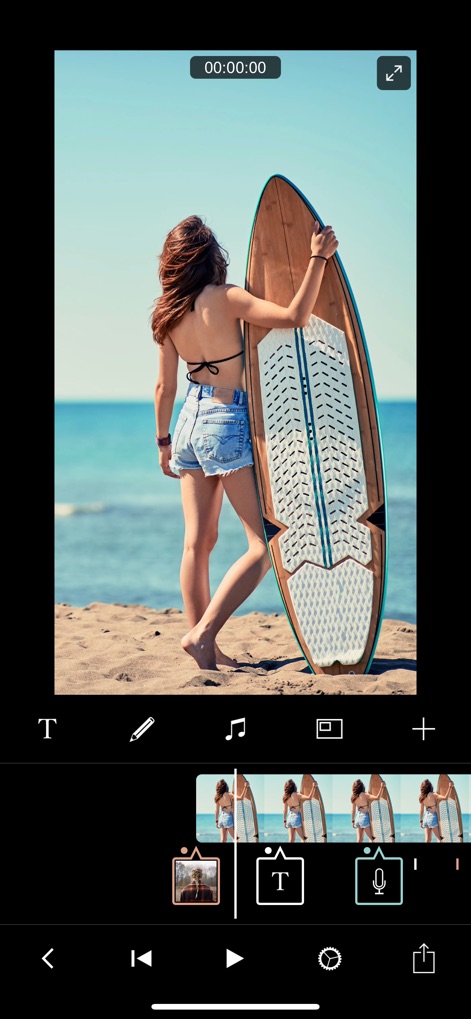
直感的なタイムライン
カラフルに色分けされたタイムラインでアセットを明確に区別し、テキストや音声オーバーレイを直感的な操作で簡単に追加・管理できます。
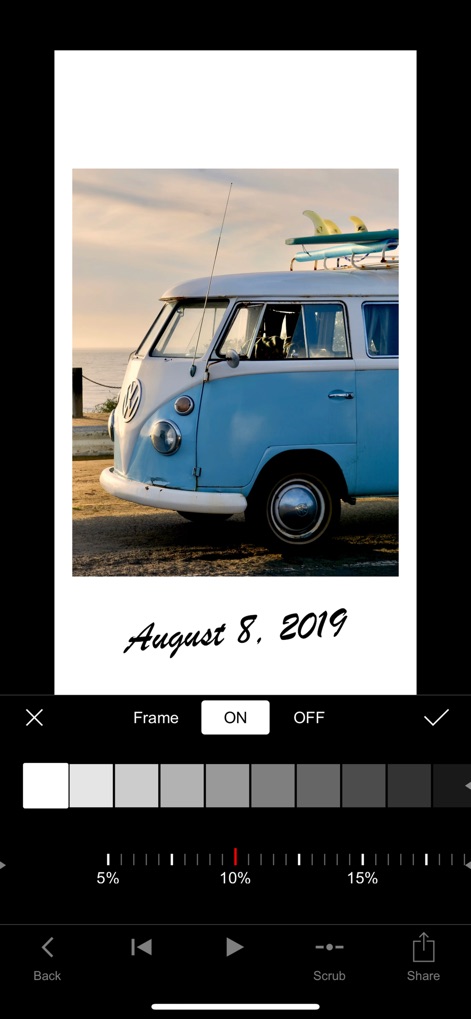
写真の質感とフレーム
画像にカスタマイズ可能なフレームを適用して視覚的な魅力を高め、詳細な色調調整スライダーで完璧な仕上がりを実現できます。

豊富な音楽ライブラリ
「今人気」や「ライフスタイルVlog」などの豊富なカテゴリから、動画の雰囲気に合ったロイヤリティフリーの音楽トラックを簡単に見つけて追加できます。

多彩なキャプション表現
このツールは、ユーザーが多様なキャプションスタイルから選択し、動画に合った表現豊かなテキストをリアルタイムでプレビューしながら追加することを可能にします。

個性的なテキスト演出
「スペシャル」や「ムービー」などの豊富なフォントカテゴリから選択し、動画に「YOLO」のような目を引くテキストオーバーレイを簡単に追加できます。
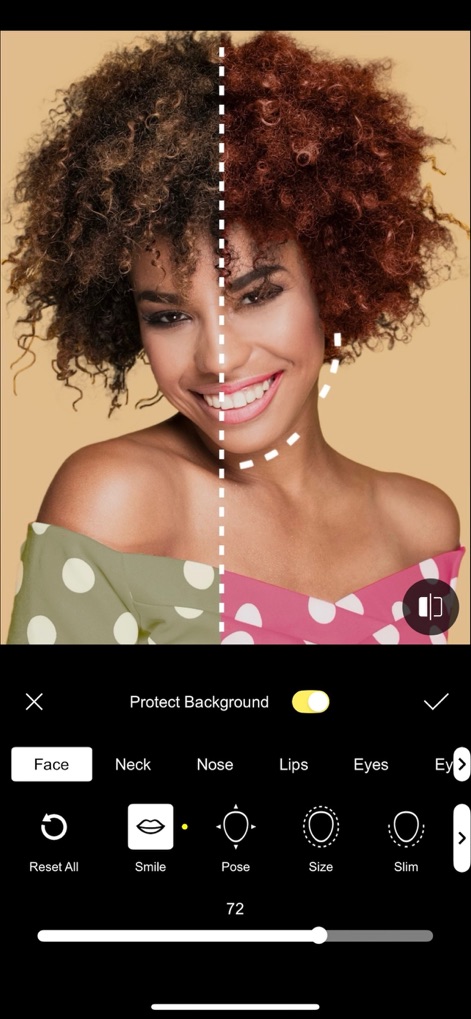
プロフェッショナルな顔補正
ユーザーは顔の特定部位(唇や鼻など)を細かく調整し、リアルタイムの比較表示でレタッチ効果を正確に確認できます。
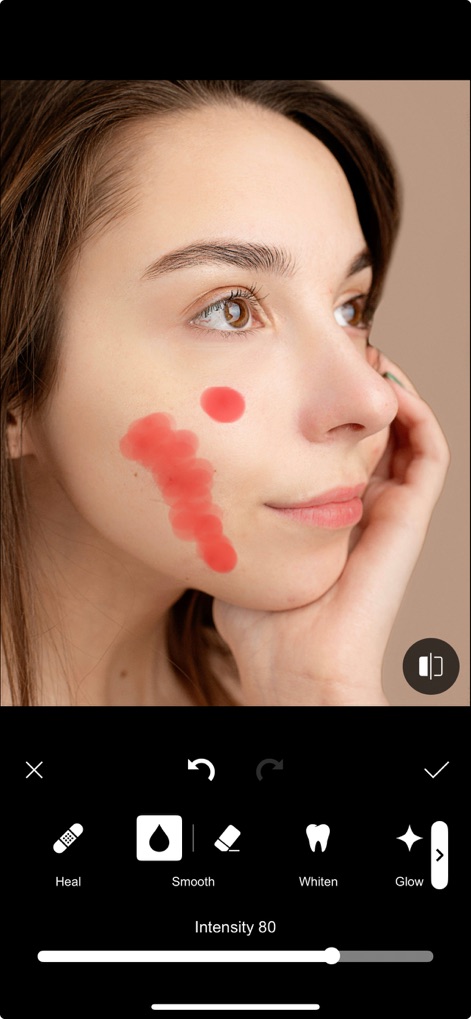
繊細な肌レタッチ
「スムース」や「ホワイトン」などの肌補正ツールを使用して、画像の肌質を改善し、強度調整スライダーで自然な仕上がりを実現できます。

高度な音声ミキシング
ユーザーは、オーディオトラックのフェードイン/アウトを柔軟に調整できるだけでなく、「Fade ducks」機能で背景音楽とナレーションのバランスを最適化できます。

創造的なPiP編集
メイン動画に別の動画を重ねるピクチャーインピクチャー機能を利用し、重ねた動画のサイズや位置を自由に調整して、より複雑な構成を作成できます。

魅力的なアニメーション
このアプリは、「いいね」や「購読」といったアニメーションステッカーを通じて、動画に視覚的な魅力を加え、ソーシャルメディアでのエンゲージメントを高めることを可能にします。
説明
Download
類似アプリ
似た機能とユーザー体験を持つアプリ

VN: AI Video Editor
Ubiquiti Labs, LLC

Splice - Video Editor & Maker
Bending Spoons Apps ApS

Blurrr-Music video editor
TBPS INTERNATIONAL TECHNOLOGY PTE. LTD.

Node Video
小为 罗

Time Cut: Smooth Slow Motion
立亚 林

LumaFusion
Luma Touch LLC

Slow Motion Video Fx Editor
Brain Craft Ltd

WEILO - My Last Video Editor
vimosoft

Video Effects Editor: Riveo
Forge and Form GmbH
このページはアプリまたはその開発者の公式ページではなく、情報提供および論評を目的として作成された独立した編集出版物です。明示的に別段の記載がない限り、アプリおよびその開発者は、MWM、Apple、Google Play、アプリのパブリッシャー、またはアプリの開発者と提携、承認、後援、認可、またはその他の公式的な関係はなく、このページのいかなる内容も、アプリがMWMのサービスを使用して開発されたことを意味するものではありません。すべての商標、ロゴ、スクリーンショット、その他のコンテンツはそれぞれの所有者の財産です。