
このページはアプリまたはその開発者の公式ページではなく、情報提供および論評を目的として作成された独立した編集出版物です。明示的に別段の記載がない限り、アプリおよびその開発者は、MWM、Apple、Google Play、アプリのパブリッシャー、またはアプリの開発者と提携、承認、後援、認可、またはその他の公式的な関係はなく、このページのいかなる内容も、アプリがMWMのサービスを使用して開発されたことを意味するものではありません。すべての商標、ロゴ、スクリーンショット、その他のコンテンツはそれぞれの所有者の財産です。


Filmr - Pro Video Editor
スマホひとつで、動画が無限の可能性を秘めた武器となる。Filmoraは、平凡なコンテンツを瞬時に視線強奪する作品へと変貌させる。
ダウンロード
5M+ユーザー評価
評価数
50.0K開発元
カテゴリ
Photo & Video対応言語
28最新バージョン
8.5.12サイズ
309.0 MBリリース日
2017年5月21日モバイルコンテンツクリエイター向けの強力かつ直感的なビデオ編集ソリューション
Filmr - Pro Video Editorの機能分析
直感的で使いやすいインターフェース
ユーザーはビデオ編集の経験がなくても、非常に直感的なインターフェースを通じて簡単にプロ品質の動画を作成できます。
多彩な高度編集ツール
ユーザーは、トリミング、速度調整、音楽ライブラリ、テキスト、150以上のステッカーとフィルター、アニメーション、映画のようなトランジションなど、幅広い編集ツールを活用して動画を強化できます。
撮影、編集、共有の一貫したワークフロー
アプリ内で動画の撮影、編集、そして主要なソーシャルメディアプラットフォームへの共有まで、一連のワークフローをシームレスに完結できます。
主要SNSへの直接共有と柔軟なエクスポート
ユーザーは編集した動画をInstagram、TikTok、YouTubeなどの主要なソーシャルメディアプラットフォームへ直接共有できるほか、様々な解像度とフレームレートでのエクスポートが可能です。
多様なコンテンツ形式の作成支援
ユーザーは、広告、ソーシャルメディア投稿、リール、ストップモーション、スライドショー、チュートリアルなど、多岐にわたるコンテンツ形式をプロのように作成できます。
高品質な内蔵カメラ機能
ユーザーは4K 60fpsでの撮影、前面・背面カメラの同時使用、ARキャラクターとのインタラクションなど、内蔵カメラの高度な機能を活用して高品質な映像をキャプチャできます。
豊富な音楽ライブラリとボイスオーバー
ユーザーは、幅広いジャンルの音楽が揃ったライブラリからBGMを選択したり、独自の音楽やボイスオーバーを追加して動画に合わせた音響効果を実現できます。
プロサブスクリプションによるプレミアム機能
プロサブスクリプションに加入することで、ウォーターマークの削除、プレミアムフィルター、アニメーション、音楽、高度なカラーグレーディングなど、プロフェッショナルな動画作成に不可欠な機能が利用可能になります。
以下のスクリーンショットと説明は、アプリの公式ストアリスティングから直接取得されたものであり、アプリ開発者の所有物です。
アプリストア
スクリーンショット

ユーザーはこの直感的なインターフェースで、プロレベルのビデオを簡単に作成でき、編集可能なタイムラインと再生コントロールが視覚的に確認できます。
プロの動画を簡単に

このアプリは、ユーザーが移動中でも4K 60fpsの高品質なビデオを編集することを可能にし、タイムラインでの精密なクリップ管理と、豊富な編集オプションを提供します。
4K 60fps編集

本ツールは、明るさやコントラストなどの詳細な設定を含む高度なカラーグレーディング機能を提供し、ユーザーはビデオの雰囲気を自由に調整できます。
高度な色調整
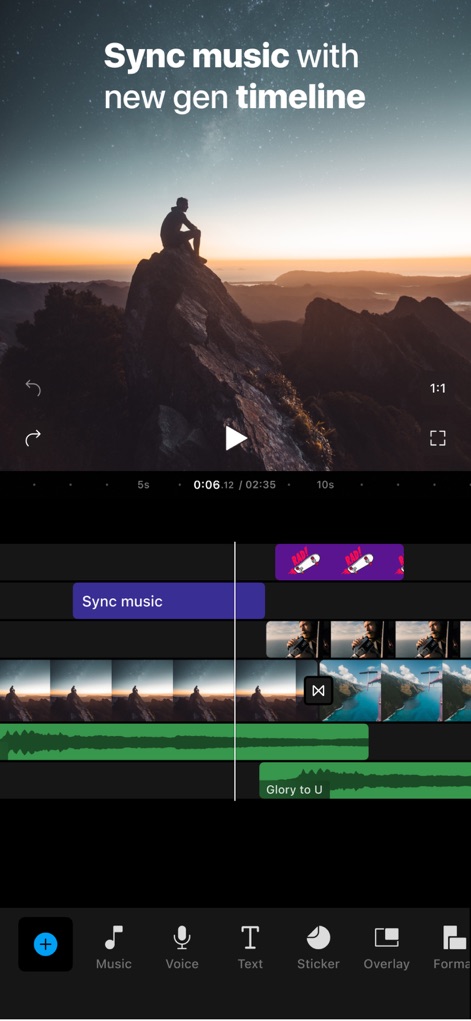
この革新的なタイムラインは、ビデオクリップと音楽を完璧に同期させることを可能にし、ユーザーはオーディオトラックの視覚的表示とクリップの配置を正確に制御できます。
音楽と同期する
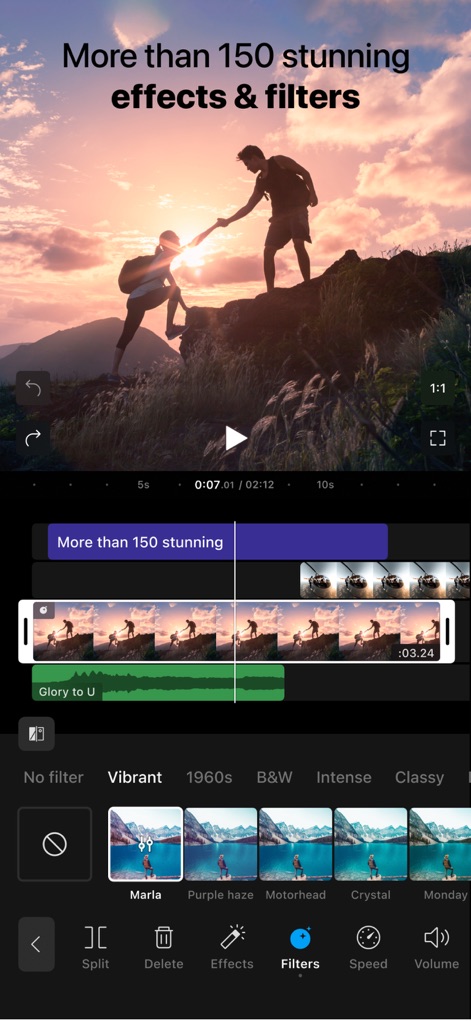
このアプリは150以上の魅力的なエフェクトとフィルターを提供し、ユーザーは「Vibrant」や「1960s」といった多様なスタイルから選択して、ビデオを魅力的に演出できます。
豊富なエフェクト

ユーザーは直感的な速度調整機能を使って、ビデオを簡単にスローモーションに編集でき、精密なタイムラインコントロールで最適な再生速度を設定できます。
スローモーション編集

本ツールは、「Slide」や「Dissolve」などの多様でスムーズなトランジションを提供し、ユーザーはクリップ間の切り替えをプロフェッショナルな品質で実現できます。
スムーズな切り替え
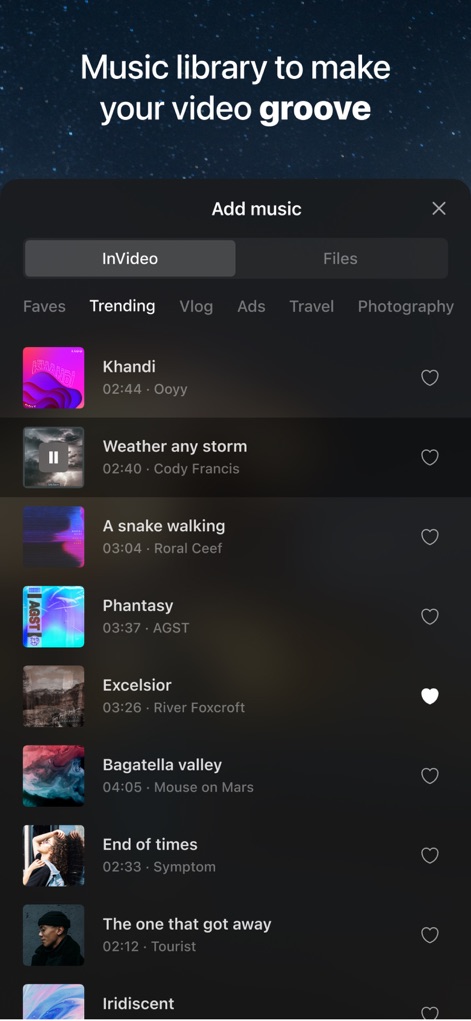
このアプリは、ジャンル別に分類された「Trending」や「Vlog」を含む広範な音楽ライブラリを提供し、ユーザーはビデオに最適なサウンドトラックを簡単に見つけて追加できます。
豊富な音楽ライブラリ

ユーザーはGIPHYが提供する膨大なステッカーライブラリから選択でき、「Thumbs Up」や「Subscribe」など、ビデオコンテンツをより魅力的にする多様なグラフィックを追加できます。
大量のステッカー
説明
Download
類似アプリ
似た機能とユーザー体験を持つアプリ

Edits: Video Editor
Instagram, Inc.

VLLO- Video Editor, Vlog Edits
vimosoft

YouCut - AI Video Editor
SHANTANU PTE. LTD.

必剪-B站官方出品
Shanghai Bilibili Animation Co.,Ltd

剪影 - 视频剪辑 & 卡点影集制作
Shanghai Jian Ji Software Technology Co., Ltd

Videoshop - Video Editor
Jajijujejo Inc.

VDIT - Video Maker & Editor
ImgBase, Inc.

Video Editor with Music・VidLab
Onelight Apps CY Ltd

Video Maker-movie maker&Editor
Changsha Fugui Bamboo Network Technology Co., Ltd.
このページはアプリまたはその開発者の公式ページではなく、情報提供および論評を目的として作成された独立した編集出版物です。明示的に別段の記載がない限り、アプリおよびその開発者は、MWM、Apple、Google Play、アプリのパブリッシャー、またはアプリの開発者と提携、承認、後援、認可、またはその他の公式的な関係はなく、このページのいかなる内容も、アプリがMWMのサービスを使用して開発されたことを意味するものではありません。すべての商標、ロゴ、スクリーンショット、その他のコンテンツはそれぞれの所有者の財産です。