
このページはアプリまたはその開発者の公式ページではなく、情報提供および論評を目的として作成された独立した編集出版物です。明示的に別段の記載がない限り、アプリおよびその開発者は、MWM、Apple、Google Play、アプリのパブリッシャー、またはアプリの開発者と提携、承認、後援、認可、またはその他の公式的な関係はなく、このページのいかなる内容も、アプリがMWMのサービスを使用して開発されたことを意味するものではありません。すべての商標、ロゴ、スクリーンショット、その他のコンテンツはそれぞれの所有者の財産です。

FTPManager - FTP, SFTP client
あなたのiPhone/iPadを強力なターミナルに変え、ファイルサーバーを指先で完全に支配する。これは単なる転送ツールではない、これはリモートワークにおけるあなたの新たな武器だ。
ダウンロード
1M+ユーザー評価
評価数
3.1K開発元
カテゴリ
Business対応言語
14最新バージョン
8.6.3サイズ
93.0 MBリリース日
2012年5月16日高度なモバイルファイル管理ソリューションの評価
FTPManager アプリ主要機能分析
高機能テキストエディタ
アプリは、構文ハイライト表示(HTML, JavaScript, CSS, Swiftなど)、行番号表示、および全文検索機能を備えた高機能なテキストエディタを内蔵しており、コード編集作業を効率化します。
セキュアなサーバー接続
アプリは、FTPおよびSFTP(SSH)サーバーへのセキュアな接続を提供し、ファイル転送の安全性を確保します。
広範なファイル形式サポート
本ツールは、テキスト、ドキュメント、写真、音楽、ビデオを含む広範なファイル形式をサポートしており、多様なコンテンツを管理およびプレビューできます。
包括的なファイル転送
アプリは、FTPサーバー、iPhone、iPad間でのファイルコピー、およびドラッグ&ドロップによる直感的な転送をサポートし、多様な作業フローに対応します。
高度なファイル管理
ユーザーは、リモートサーバー上のファイルを直接アクセス、コピー、移動、名前変更、および削除する包括的な管理機能を利用できます。
iPadでの複数ウィンドウ
iPadユーザーは、複数ウィンドウ機能を利用して複数のファイルを同時に操作でき、生産性とマルチタスク能力が大幅に向上します。
写真同期とバックアップ
ユーザーは、iOSフォトライブラリとサーバー間で写真をコピー、バックアップ、および同期することができ、デジタル資産の管理と保護を強化します。
アプリ内FTPサーバー
本ツールは、アプリ内でFTPサーバー機能を提供し、Wi-Fi経由でコンピューターとiOSデバイス間でファイルを簡単に転送することを可能にします。
高度なファイル検索とソート
ユーザーは、多数のファイルの中から特定の項目を効率的に見つけるため、およびコンテンツを整理するために、ソートおよび検索機能を利用できます。
近距離ファイル転送
アプリは、Wi-FiやLTE接続なしで2つのiOSデバイス間で直接ファイルを転送する機能を提供し、オフライン環境でのファイル共有を可能にします。
よくある質問
について知っておくべきこと FTPManager - FTP, SFTP client
What is FTPManager?
FTPManager is a fully-featured FTP client that allows users to access, manage, and transfer files on FTP and SFTP servers directly from their iPhone or iPad. It supports streaming media and includes a text editor.
Does FTPManager support SFTP connections?
Yes, FTPManager supports SFTP (SSH) servers. It also accesses FTP (FTP over TLS) servers, ensuring secure file transfers and management capabilities directly from your device.
Can users manage files directly from the FTPManager app?
Yes, FTPManager allows users to copy, move, rename, and delete files on remote servers. It also supports sorting, searching, and copying files among FTP servers, iPhones, and iPads.
Can I stream videos and music with FTPManager?
Yes, FTPManager enables streaming of music and videos directly from your FTP server to your iPhone or iPad. This feature allows immediate playback without full downloads.
Does FTPManager include an in-app FTP server?
Yes, FTPManager features an in-app FTP server. This allows for file transfers between your computer and your iPhone/iPad over a Wi-Fi connection, simplifying local data exchange.
Does FTPManager offer a dark mode interface?
Yes, FTPManager supports Dark Mode. This feature provides an alternative color scheme for improved viewing comfort in low-light environments and can reduce eye strain.
Can I use multiple windows with FTPManager on an iPad?
Yes, FTPManager supports multiple windows on the iPad. This functionality enhances productivity by allowing users to view and interact with different sections of the app simultaneously.
What are the file transfer capabilities of FTPManager?
FTPManager supports copying files among servers, cloud storage, iPhone, and iPad. It also handles photo transfers between iOS photo libraries and servers, syncs files, and enables nearby file transfers.
Does FTPManager support nearby file transfers without Wi-Fi?
Yes, FTPManager facilitates nearby file transfers directly between two iOS devices. This feature operates without requiring a Wi-Fi or LTE connection, enabling convenient offline sharing.
What document formats does FTPManager support for viewing?
FTPManager supports various document formats including PDF, WORD, EXCEL, PPT, PAGES, NUMBERS, KEYNOTE, and EPUB. This allows users to view common office and e-book files.
What features are included in the FTPManager text editor?
The FTPManager text editor provides line numbers, syntax highlighting for languages like HTML, JavaScript, CSS, and Swift, and full-text search capabilities. This assists in editing code and text files.
What is the difference between the free and Pro versions of FTPManager?
The free version of FTPManager permits only one connection to an FTP server. To create more connections and access full features, users must purchase the Pro version.
What types of connections are displayed in FTPManager?
FTPManager displays connections to various servers like 'skyjos.com', 'TS-216', '192.168.2.2', and 'My VPS'. It also lists local options like 'My Files', 'Photo Library', and 'Nearby File Transfer'.
How does a user add a new connection in FTPManager?
Users add a new connection by tapping the '+' icon, which presents options to connect via FTP (File Transfer Protocol), SFTP (SSH File Transfer Protocol), or Dropbox.
How does FTPManager display files?
FTPManager displays files with details such as Name, Date, Size, and Type, and allows for sorting. Users can switch between a list view and a grid view for better organization.
以下のスクリーンショットと説明は、アプリの公式ストアリスティングから直接取得されたものであり、アプリ開発者の所有物です。
アプリストア
スクリーンショット

このアプリは、「マイファイル」への迅速なアクセスと、複数のFTP/SFTPサーバー接続を一元的に表示し管理できるダッシュボードを提供します。
接続を簡単管理

ユーザーは、新しいサーバー接続を設定する際に、FTPやSFTPといった主要なプロトコルオプションから選択できます。
新規接続設定

様々な種類のファイルをグリッド形式で表示し、画像やドキュメントのサムネイルを通じて視覚的にコンテンツを識別できます。
直感的なファイル表示

リスト形式でファイルを一覧表示し、チェックボックスを利用した複数選択機能で、一括ダウンロードや削除などの操作を効率的に行えます。
効率的な一括操作
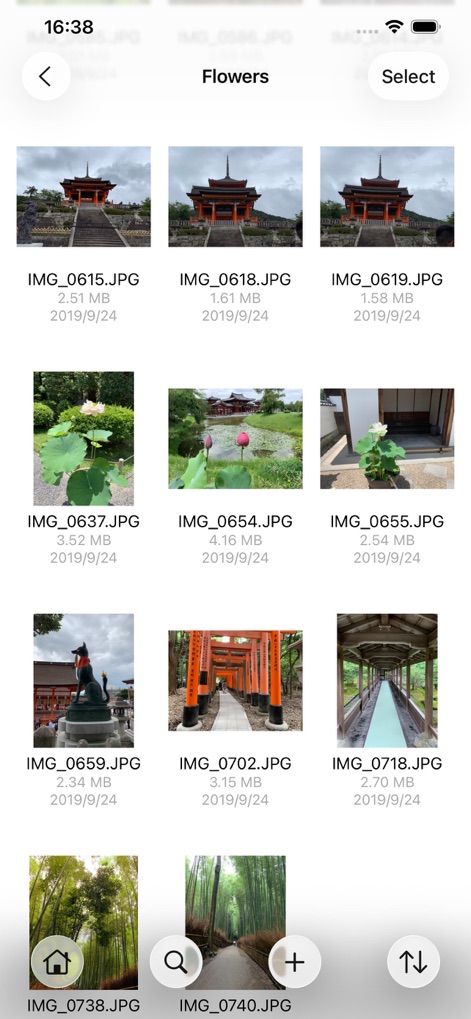
画像ファイルがグリッドビューでサムネイル表示され、ファイル名とサイズを確認しながら、目的の画像ファイルを迅速に特定できます。
画像ファイルをプレビュー

組み込みエディタは、HTMLコードのシンタックスハイライトと行番号表示に対応し、開発者の効率的な作業をサポートします。
高度なコード編集

PDFドキュメントを内蔵ビューアで快適に閲覧でき、検索機能とページ番号表示で必要な情報を素早く見つけられます。
ドキュメント閲覧機能

DOCXファイルなどの一般的なドキュメント形式をアプリ内で直接プレビューでき、ユーザーはストレスなく内容を確認できます。
幅広いファイル対応
説明
Download
類似アプリ
似た機能とユーザー体験を持つアプリ

xTerminal - SSH Terminal Shell
婉媚 邵

SSH Client - Secure ShellFish
Anders Borum

FTP Client Pro
Anders Havn

Termux
FREE AI UTILS COMPANY LIMITED

TN5250
Jan Frydendal

Blink Shell, Build & Code
Blink Shell, Inc

Terminal#
Vasiliy Shaydullin

Prompt 3
Panic, Inc.

NovaAccess - Tailnet Tools
GalaxNet Ltd.
このページはアプリまたはその開発者の公式ページではなく、情報提供および論評を目的として作成された独立した編集出版物です。明示的に別段の記載がない限り、アプリおよびその開発者は、MWM、Apple、Google Play、アプリのパブリッシャー、またはアプリの開発者と提携、承認、後援、認可、またはその他の公式的な関係はなく、このページのいかなる内容も、アプリがMWMのサービスを使用して開発されたことを意味するものではありません。すべての商標、ロゴ、スクリーンショット、その他のコンテンツはそれぞれの所有者の財産です。