
このページはアプリまたはその開発者の公式ページではなく、情報提供および論評を目的として作成された独立した編集出版物です。明示的に別段の記載がない限り、アプリおよびその開発者は、MWM、Apple、Google Play、アプリのパブリッシャー、またはアプリの開発者と提携、承認、後援、認可、またはその他の公式的な関係はなく、このページのいかなる内容も、アプリがMWMのサービスを使用して開発されたことを意味するものではありません。すべての商標、ロゴ、スクリーンショット、その他のコンテンツはそれぞれの所有者の財産です。


Terminal#
DevOpsやシステム管理者向けに設計された、安全で強力なターミナルインターフェースでワークフローを強化しましょう。モバイルデバイスから直接、リモートサーバーを管理し、ログを監視し、稼働時間を維持します。
ダウンロード
213K+ユーザー評価
評価数
0開発元
カテゴリ
Developer Tools対応言語
6最新バージョン
1.4サイズ
6.0 MBリリース日
2022年7月20日プロフェッショナルグレードのサーバー管理
Terminal#は、システム管理者やデベロッパーが、デスクトップなしで稼働時間を確保しながら、あらゆるiOSデバイスからインフラストラクチャを完全に制御できるようにします。
安全なSSHプロトコル
暗号化されたデータ転送により、サーバーの認証情報とリモートセッションを常に保護し、絶対的なプライバシーを確保します。
オンコール対応の柔軟性
ラップトップはもう不要です。iPhoneまたはiPadから直接、Linuxクラスター、クラウドインスタンス、またはRaspberry Piを管理できます。
よくある質問
について知っておくべきこと Terminal#
Terminal#とは何ですか?
Terminal#は、モバイルデバイスから直接サーバーを安全に管理するためのSSHクライアントです。外出先での効率的なサーバー管理のための強力なターミナルインターフェースを備えています。
Terminal#はどのように安全なサーバー接続を保証しますか?
Terminal#はSSHプロトコルを利用して安全な接続を保証します。このプロトコルはデータ転送を暗号化し、サーバー管理を保護し、機密情報を保護します。
Terminal#アプリを使用して複数のサーバーを管理できますか?
はい、Terminal#アプリは複数のサーバーの管理をサポートしています。ユーザーは「サーバー」画面でサーバー接続を追加および整理し、集中管理ハブを提供します。
ユーザーはTerminal#で新しいサーバー接続をどのように追加しますか?
ユーザーは「サーバー」タブに移動して「サーバーの追加」をタップすることで、Terminal#で新しいサーバー接続を追加します。その後、ユーザー名、アドレス、ポート、認証情報を入力します。
Terminal#ではサーバーにどのような認証オプションが利用可能ですか?
Terminal#は、サーバー接続にパスワードとキーの2つの認証オプションを提供します。ユーザーは、新しいサーバーエントリを設定する際に、好みの安全な方法を選択します。
Terminal#でターミナルフォントサイズをカスタマイズできますか?
はい、Terminal#ではターミナルフォントサイズをカスタマイズできます。ユーザーは、アプリの「設定」メニューの「ターミナル」セクションでこの設定を調整し、可読性を確保します。
Terminal#はモバイルサーバー管理アプリケーションですか?
はい、Terminal#はモバイルサーバー管理アプリケーションとして機能します。管理者や開発者は、柔軟性のためにモバイルデバイスから直接サーバーを安全に制御できます。
ユーザーはTerminal#のサブスクリプションをどのようにキャンセルできますか?
ユーザーはiTunesおよびApp StoreのApple ID設定を通じてTerminal#サブスクリプションをキャンセルします。現在の期間が終了する少なくとも24時間前に、自動更新を無効にすることができます。
アクティブなTerminal#サブスクリプションのキャンセルは可能ですか?
いいえ、アクティブなTerminal#サブスクリプションのキャンセルは、アクティブ期間中は利用できません。サブスクリプションを購入すると、未使用の無料トライアル期間は失効します。
Terminal#アプリはダークテーマをサポートしていますか?
はい、Terminal#アプリはダークテーマをサポートしています。ユーザーは、アプリの「設定」メニューの「テーマ」セクションで「ダークモード」、「ライトモード」、または「システムに従う」を選択します。
Terminal#のプライバシーポリシーにはどこでアクセスできますか?
Terminal#のプライバシーポリシーは、アプリの説明にあるリンク:https://www.making-app.com/remterm/ からアクセスできます。これにより、データ処理方法が概要されています。
Terminal#はサーバープロセス情報を表示できますか?
はい、Terminal#はサーバープロセス情報を表示します。ターミナルインターフェースは、CPU使用率、メモリ割り当て、アクティブなタスクなどのシステム詳細を表示し、監視を容易にします。
以下のスクリーンショットと説明は、アプリの公式ストアリスティングから直接取得されたものであり、アプリ開発者の所有物です。
アプリストア
スクリーンショット
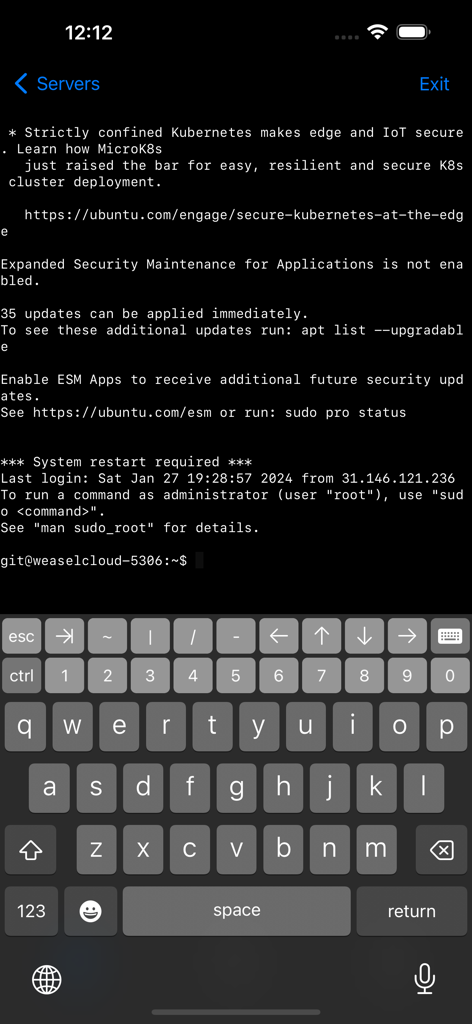
開発者用キーボードを備えたUbuntuサーバーのターミナルセッションを表示するモバイルSSHクライアント
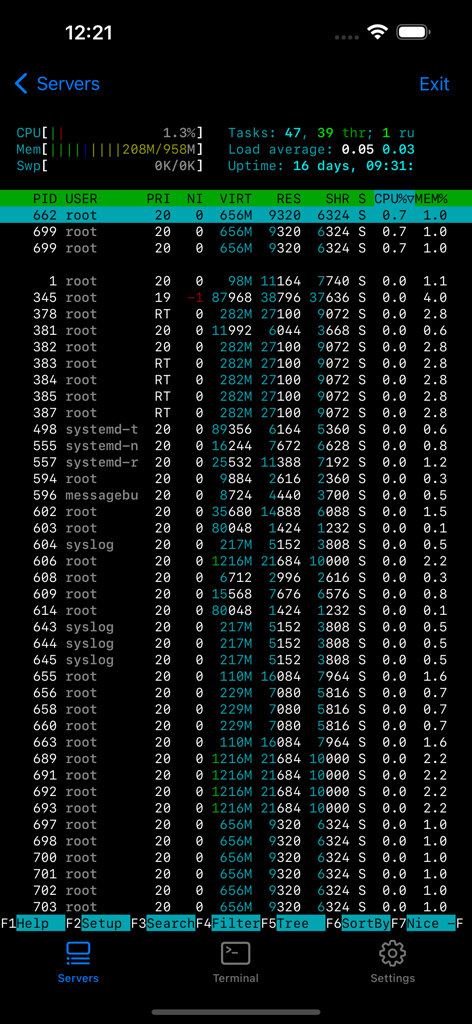
サーバープロセスの監視とシステム統計を表示するターミナルインターフェース
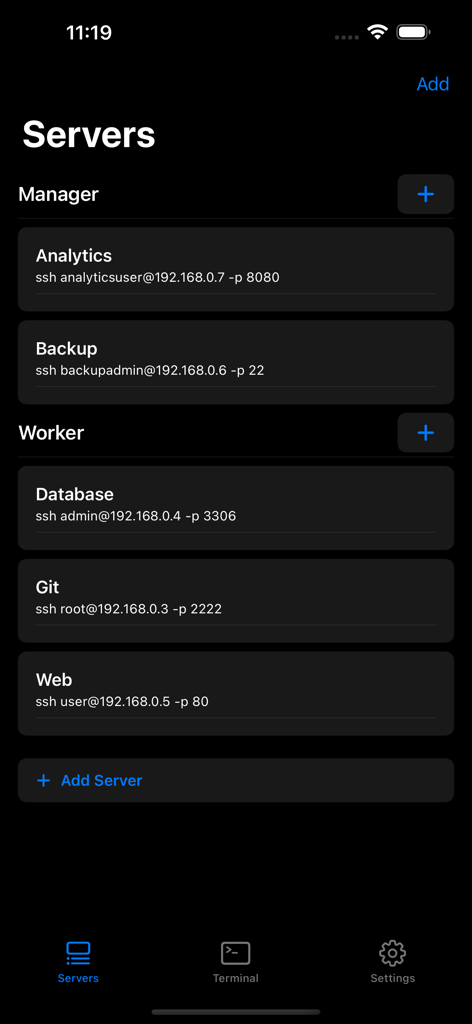
マネージャーとワーカーの役割で分類された構成済みSSHサーバーのリストを表示するTerminal#アプリのインターフェース
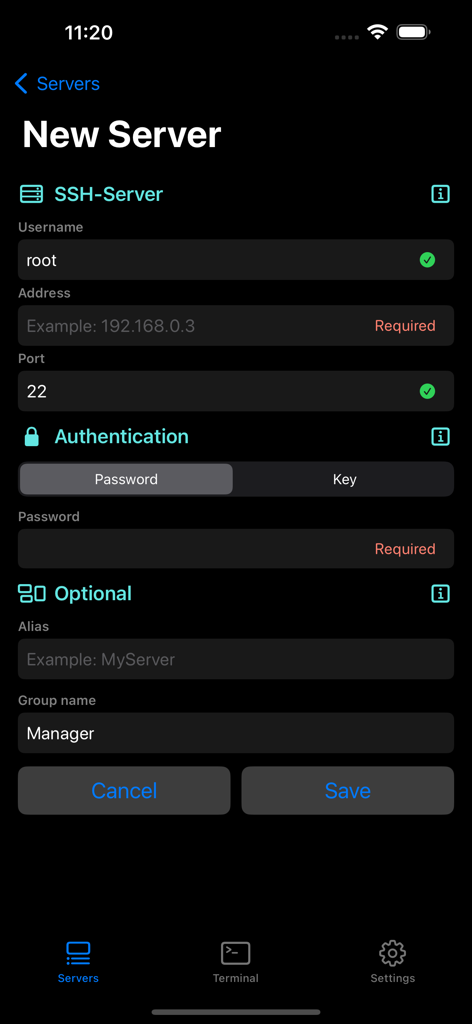
Terminal sharpアプリで新しいSSHサーバー接続のセットアップフォームを表示するモバイル画面
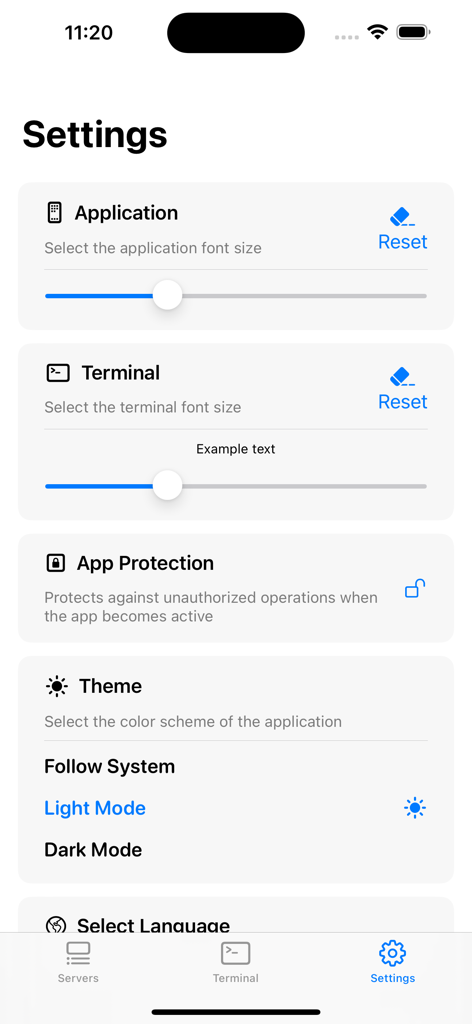
フォントサイズとテーマ設定を表示するTerminal#アプリの設定インターフェース
説明
Download
類似アプリ
似た機能とユーザー体験を持つアプリ

xTerminal - SSH Terminal Shell
婉媚 邵

SSH Client - Secure ShellFish
Anders Borum

FTPManager - FTP, SFTP client
Skyjos Co., Ltd.

FTP Client Pro
Anders Havn

Termux
FREE AI UTILS COMPANY LIMITED
TN5250
Jan Frydendal

Blink Shell, Build & Code
Blink Shell, Inc

Prompt 3
Panic, Inc.

NovaAccess - Tailnet Tools
GalaxNet Ltd.
このページはアプリまたはその開発者の公式ページではなく、情報提供および論評を目的として作成された独立した編集出版物です。明示的に別段の記載がない限り、アプリおよびその開発者は、MWM、Apple、Google Play、アプリのパブリッシャー、またはアプリの開発者と提携、承認、後援、認可、またはその他の公式的な関係はなく、このページのいかなる内容も、アプリがMWMのサービスを使用して開発されたことを意味するものではありません。すべての商標、ロゴ、スクリーンショット、その他のコンテンツはそれぞれの所有者の財産です。