
このページはアプリまたはその開発者の公式ページではなく、情報提供および論評を目的として作成された独立した編集出版物です。明示的に別段の記載がない限り、アプリおよびその開発者は、MWM、Apple、Google Play、アプリのパブリッシャー、またはアプリの開発者と提携、承認、後援、認可、またはその他の公式的な関係はなく、このページのいかなる内容も、アプリがMWMのサービスを使用して開発されたことを意味するものではありません。すべての商標、ロゴ、スクリーンショット、その他のコンテンツはそれぞれの所有者の財産です。


Qustodio Parental Control App
Qustodioは、デジタル世界における子どもの行動を透明化する。親は、目に見えないオンラインの脅威から子どもを遠ざけ、そのデジタル生活を健全な軌道に乗せる力を手に入れる。
ダウンロード
1M+ユーザー評価
評価数
19.0K開発元
カテゴリ
Lifestyle対応言語
8最新バージョン
182.35.0サイズ
149.5 MBリリース日
2020年5月13日子供のオンライン安全、スクリーンタイム、デジタルウェルビーイング、および物理的な位置情報管理に対する包括的ソリューションの評価。
Qustodio Parental Control App: テックアナリストによる機能分析
コンテンツフィルタリングと安全な検索
本アプリは、不適切なウェブサイト、ポルノ、ギャンブル、その他望ましくないコンテンツをブロックし、GoogleやYouTubeなどの検索エンジンで不適切な結果をフィルタリングする機能を提供します。これにより、子供のオンライン体験が保護されます。
スクリーンタイム管理
ユーザーは、子供のデバイス使用に対して毎日のスクリーンタイム制限を設定し、インターネットの一時停止、特定の時間のアクセス制限、およびゲームやアプリの使用時間制限を設けることが可能です。これにより、健全なデジタル習慣が育成されます。
GPS位置情報追跡
本ツールは、子供のリアルタイムの位置情報を監視し、紛失した子供の携帯電話を見つける機能を提供します。保護者は、子供が移動中でも現在地を特定できます。
ソーシャルメディア監視
このアプリは、WhatsApp、Instagram、Lineといった主要なソーシャルメディアプラットフォーム上での子供の活動を監視し、不適切なやり取りや問題行動に関するアラートを提供します。
アプリとゲームのブロック
ユーザーは、子供のデバイス上にある特定のアプリやゲームをブロックする機能を利用できます。これにより、子供が不適切または過度な使用をする可能性のあるアプリケーションへのアクセスを制限することが可能です。
検索およびメッセージアラート
本ツールは、AIを活用した検索アラートとSMSメッセージアラートを提供します。これにより、保護者は子供のオンライン検索やテキストメッセージにおける潜在的な危険や不適切な内容について迅速に通知を受け取ることができます。
よくある質問
について知っておくべきこと Qustodio Parental Control App
What is Qustodio Parental Control App?
Qustodio Parental Control App is an award-winning tool that helps parents manage their children's digital use. It offers features like screen time limits, app blocking, GPS tracking, and content filtering to ensure online safety.
How does Qustodio Parental Control App monitor social media?
Qustodio Parental Control App provides social media monitoring alerts for platforms such as WhatsApp, Instagram, and Line. It also allows parents to manage access to social media apps like TikTok, Facebook, and Snapchat.
Can I set daily screen time limits with Qustodio Parental Control App?
Yes, Qustodio Parental Control App allows parents to set daily screen time limits for their children. It also enables scheduling restricted times and custom routines for apps and websites.
Does Qustodio Parental Control App include GPS location tracking?
Yes, the Qustodio Parental Control App includes GPS location monitoring, allowing parents to track their child's location. It also enables finding a child's phone and saving favorite places.
How do I get Qustodio Parental Control App working on my child's device?
To use Qustodio Parental Control App, first download it onto your own device. Then, download the companion Kids App Qustodio onto your child’s device(s) for the two apps to work together.
Can Qustodio Parental Control App block games and other apps?
Yes, Qustodio Parental Control App allows parents to block specific games and applications. It also provides the ability to set limits on games and apps for controlled usage.
Does Qustodio Parental Control App send alerts for suspicious activity?
Yes, Qustodio Parental Control App sends various alerts. These include notifications for web activity, blocked websites, search alerts, SMS message alerts, and social monitoring alerts.
Is there a free trial available for Qustodio Parental Control App?
The Qustodio Premium family parental control app offers a free trial period. Any unused portion of this free trial is ended upon purchase confirmation of an annual subscription.
What is the pricing model for Qustodio Parental Control App?
Qustodio Parental Control App offers a basic plan with some features and a premium plan for full access. Premium is available as an annual subscription, charged to your iTunes account upon purchase confirmation.
Does Qustodio Parental Control App allow co-parenting or multi-parent access?
Yes, Qustodio Parental Control App supports co-parenting. It allows users to invite another parent or guardian to monitor and set rules for their child through a multi-parent login.
Does Qustodio Parental Control App sell user data to third parties?
No, Qustodio Parental Control App states explicitly that it does not and will not sell user data to third parties. Child's screen time activity is for parents' eyes only.
Can I pause the internet instantly with Qustodio Parental Control App?
Yes, Qustodio Parental Control App allows parents to pause the internet at the click of a button. This feature helps nurture healthy digital habits.
What languages does Qustodio Parental Control App support?
Qustodio Parental Control App is available in English, Spanish, French, German, Italian, Chinese, Japanese, Dutch, and Brazilian Portuguese.
Can Qustodio Parental Control App track calls and messages?
Yes, Qustodio Parental Control App provides features to track calls and messages. It also offers SMS message alerts and social media monitoring.
Does Qustodio Parental Control App filter inappropriate content on search engines?
Yes, Qustodio Parental Control App enforces safe search. It filters out inappropriate results on search engines like Google, Bing, and YouTube to protect children online.
以下のスクリーンショットと説明は、アプリの公式ストアリスティングから直接取得されたものであり、アプリ開発者の所有物です。
アプリストア
スクリーンショット

このダッシュボードでは、保護されている家族の数を示すアイコンと、お子様の現在のデジタル活動状況に関する明確な時間表示が確認できます。
デジタル活動を一元管理

ユーザーは曜日ごとにスクリーンタイムの許容時間を設定でき、選択した曜日の時間制限が中央の円グラフで視覚的に表示されます。
スクリーン時間制限を設定
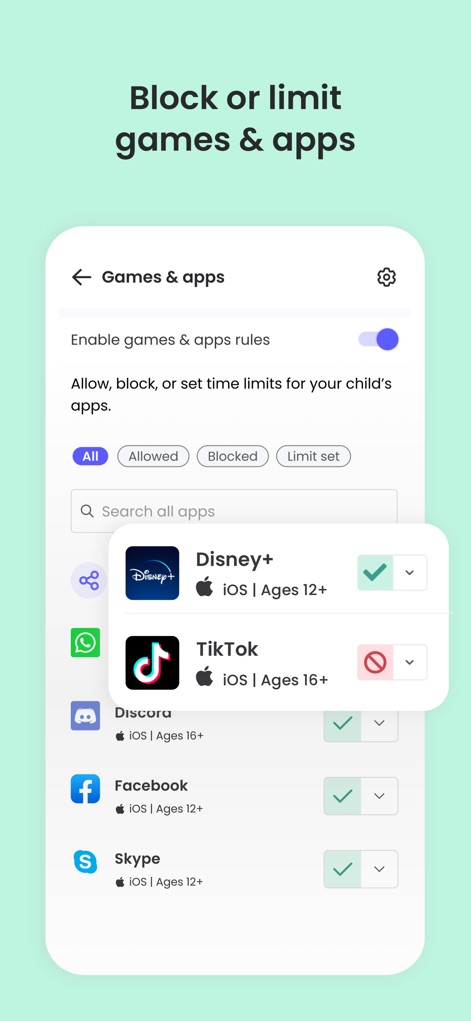
本機能では、ゲームやアプリのルールを有効にするためのトグルスイッチと、個々のアプリケーション(例:TikTok)をブロックするオプションが提供されます。
アプリ利用を管理
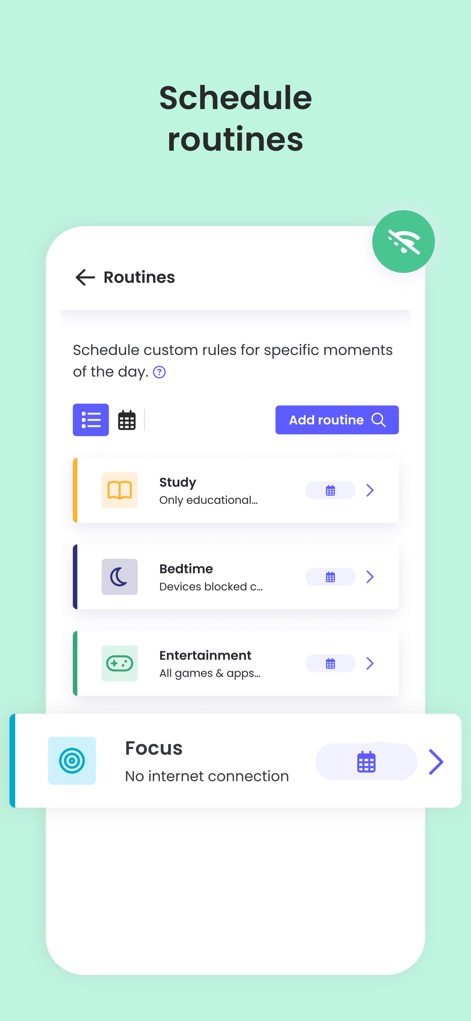
保護者はカスタムルーティンをスケジュールに追加でき、各ルーティン(例:学習、就寝)に対して、インターネット接続の管理やアプリのブロックを設定できます。
ルーティンをスケジュール

このタイムラインでは、いじめを示唆するメッセージアラートや、不適切な検索ワード(例:「sad songs to cry」)に対する検索アラートがリアルタイムで表示されます。
リアルタイムアラートを受信
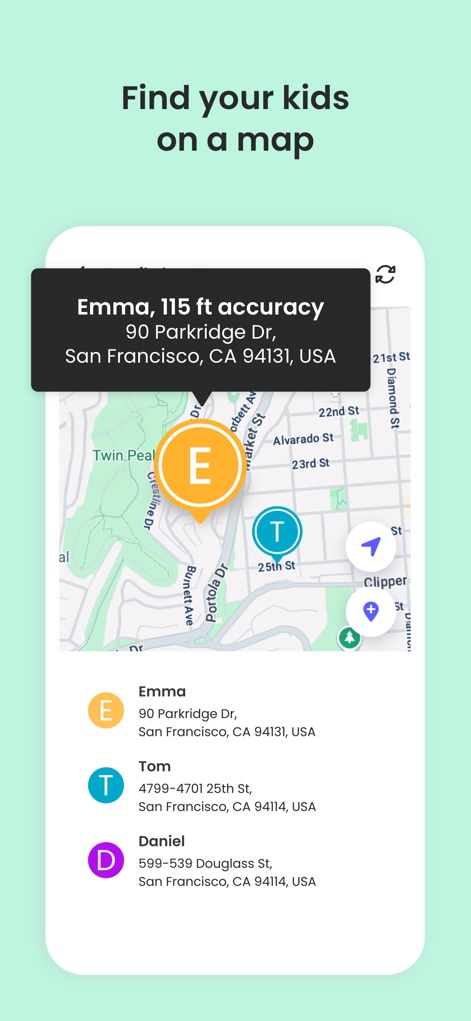
地図機能により、お子様(例:EmmaとTom)の正確な現在地がアイコンで示され、それぞれの詳細な住所情報がリスト形式で確認できます。
お子様の現在地を特定

本機能は、お子様と連絡先(例:Mom, Julie)間の通話回数とメッセージ数を表示し、特定の電話番号からの通話やメッセージのブロック状況も確認できます。
通話・メッセージ追跡

ソーシャルメディアの利用ルールを有効にするトグルスイッチがあり、TikTokのような特定のソーシャルメディアアプリへのアクセスを許可またはブロックする設定が可能です。
ソーシャルメディア管理

この画面では、共同保護者として他のアカウントを招待するための入力フィールドが提供され、招待された保護者のプロフィールアイコンが表示されます。
共同保護者と協力

保護者はボタン一つでインターネット接続を一時停止でき、お子様のデバイス画面にはインターネットが一時停止中であることを示すメッセージが表示されます。
インターネットを一時停止
説明
Download
類似アプリ
似た機能とユーザー体験を持つアプリ

Findos - Find My Device
Pollux Bilisim Teknolojileri Sanayi ve Ticaret Limited Sirketi

Boost Family Guard
Smith Micro Software, Inc.

Google Family Link
Google LLC

Findmykids: GPS Phone Tracker
LETEM LTD

Nintendo Switch Parental Cont…
Nintendo Co., Ltd.

Parental Control App Kids360
ANKO SOLUTIONS LLC

JusTalk Kids - Safe Messenger
Ningbo Jus Internet Technology Co., Ltd.

FlashGet Kids:parental control
HONGKONG FLASHGET NETWORK TECHNOLOGY CO., LIMITED

Parental Control App: AirDroid
SAND STUDIO CORPORATION LIMITED
このページはアプリまたはその開発者の公式ページではなく、情報提供および論評を目的として作成された独立した編集出版物です。明示的に別段の記載がない限り、アプリおよびその開発者は、MWM、Apple、Google Play、アプリのパブリッシャー、またはアプリの開発者と提携、承認、後援、認可、またはその他の公式的な関係はなく、このページのいかなる内容も、アプリがMWMのサービスを使用して開発されたことを意味するものではありません。すべての商標、ロゴ、スクリーンショット、その他のコンテンツはそれぞれの所有者の財産です。