
このページはアプリまたはその開発者の公式ページではなく、情報提供および論評を目的として作成された独立した編集出版物です。明示的に別段の記載がない限り、アプリおよびその開発者は、MWM、Apple、Google Play、アプリのパブリッシャー、またはアプリの開発者と提携、承認、後援、認可、またはその他の公式的な関係はなく、このページのいかなる内容も、アプリがMWMのサービスを使用して開発されたことを意味するものではありません。すべての商標、ロゴ、スクリーンショット、その他のコンテンツはそれぞれの所有者の財産です。


VivaCut - AI Video Editor
クリエイターは、デスクトップ級の多層編集と視覚効果を指先で操る。このアプリは、妥協なき映像表現を可能にする。
ダウンロード
12.5M+ユーザー評価
評価数
911.8K開発元
カテゴリ
Photo & Video対応言語
19最新バージョン
4.5.6サイズ
318.5 MBリリース日
2019年11月28日アプリケーション分析: VivaCut - AI Video Editor
プロフェッショナルなモバイル動画編集の可能性を徹底解剖
多層タイムライン
複数の動画、画像、テキストレイヤーを正確に配置し、複雑な視覚表現を実現します。
高解像度エクスポート
作成した動画を1080pおよび4Kの高画質で出力し、各種プラットフォームで最高の品質で共有できます。
キーフレームアニメーション
マスク、コラージュ、テキスト、スタンプなどに動的な動きを適用し、プロフェッショナルなアニメーションを自由に作成できます。
高度なブレンドモード
複数のクリップをカラーバーン、乗算、スクリーンなどの強力なブレンドモードで合成し、ユニークで視覚的に魅力的な効果を生み出します。
視覚効果とグリッチエフェクト
VHS、RGB、トリッピー、グリッチなど、トレンドを取り入れた多様な視覚効果を動画に適用し、個性的でインパクトのある映像を制作できます。
マスク機能による高度な合成
線形、ミラー、放射状、長方形、楕円などのマスクを適用し、動画の一部を強調したり、複雑な合成を実現したりできます。
豊富なトランジション効果
映画のようなオーバーレイや多様な切り替え効果を使用して、クリップ間の接続を滑らかかつ魅力的に演出します。
ピクチャーインピクチャー (PiP)
複数のクリップを組み合わせることで、二重露光効果や目を引くYouTube動画など、創造的なオーバーレイを簡単に作成できます。
高速・低速モーションコントロール
動画の再生速度を自由に調整し、ドラマチックなスローモーションやテンポの良いクイックモーションを加えて、映像にリズムと感情を与えます。
音楽マーカーとオーディオ抽出
音楽トラックにマーカーを設定してリズムに合わせてエフェクトを追加したり、既存の動画から音声を抽出して再利用したりできます。
よくある質問
について知っておくべきこと VivaCut - AI Video Editor
What is VivaCut - AI Video Editor?
VivaCut is a professional AI video editor app designed for full-screen video creation. It allows users to produce artistic films, share memories, and edit videos with advanced tools and effects.
Does VivaCut support multi-layer video editing?
Yes, VivaCut provides an intuitive multi-layer timeline for precise frame-by-frame editing. This feature allows users to create complex video collages and overlays with multiple video tracks.
Can I use Chroma Key in VivaCut for green screen effects?
Yes, VivaCut offers a Chroma Key feature. This tool enables users to remove backgrounds, like green screens, for professional video compositing and special effects within the app.
What visual effects does VivaCut provide?
VivaCut offers various visual effects including VHS, RGB, Trippy, Glitch, GB, Grainy, and Fisheye. It also includes cool transition effects and specific glitch effects for creative video editing.
Does VivaCut include keyframe animation?
Yes, VivaCut features Keyframe Animation. Users can apply keyframes to Mask, Video Collage, Text, Stickers, and Emoji for precise control over the motion and properties of visual elements.
What are the export resolution options in VivaCut?
VivaCut allows users to export videos in high-quality custom resolutions, including 1080p and 4K. This ensures professional output for various sharing platforms and display needs.
How does the VivaCut subscription work?
VivaCut offers monthly or annual subscriptions for unlimited feature access. Subscriptions auto-renew unless canceled 24 hours prior to the period end and are managed through your iTunes Account.
Can I add animated text to my videos in VivaCut?
Yes, VivaCut includes animated text tools. This feature allows users to add dynamic text elements with various styles and effects to their videos for enhanced visual engagement and storytelling.
Can I control video speed in VivaCut?
Yes, VivaCut offers a Speed Control feature. Users can create fast and slow-motion effects to adjust the pace of their videos, enhancing dramatic or comedic moments with precise timing.
Does VivaCut allow combining or blending video clips?
Yes, VivaCut allows users to combine and blend video clips. Features like "Combine video clips" merge content, while "Blend videos" offers modes such as Color Burn, Multiply, and Screen for creative layering.
以下のスクリーンショットと説明は、アプリの公式ストアリスティングから直接取得されたものであり、アプリ開発者の所有物です。
アプリストア
スクリーンショット
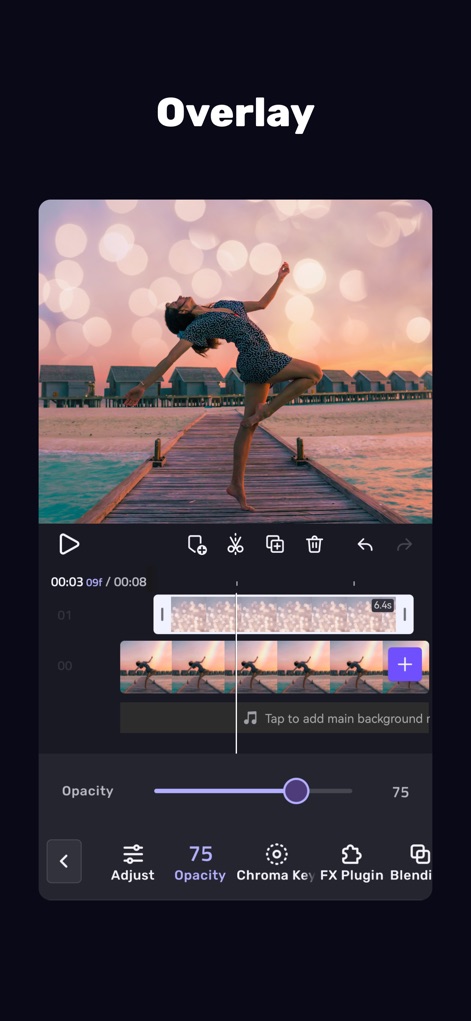
クリエイティブな重ね合わせ
ユーザーは、動画に美しいオーバーレイ効果を適用し、不透明度スライダーで繊細な調整を行うことができます。

直感的な編集体験
このアプリは、ユーザーが複数のレイヤーを管理できるマルチレイヤータイムラインと、豊富なVFXを組み合わせてプロフェッショナルな動画を作成することを可能にします。

ダイナミックな画面演出
動画クリップに3Dトランジションエフェクトを適用し、持続時間を細かく調整することで、視覚的に魅力的なアニメーションを作成できます。

多彩な視覚効果
VHSやグリッチエフェクトを含む多種多様な視覚効果ライブラリから選択し、動画を劇的に変化させることが可能です。

魅力的なテキスト追加
動画にカスタムテキストオーバーレイを追加し、ネオンやグローなどの多様なテキストスタイルから選択して、メッセージを際立たせることができます。

高度なキーフレーム制御
キーフレームアニメーションを活用してオブジェクトの動きを精密に制御し、X・Y・Z軸の回転調整によって複雑なダイナミクスを実現します。

プロフェッショナルな合成
クロマキー機能を使用して背景を簡単に除去し、精度スライダーで細部まで調整することで、シームレスな合成を実現できます。
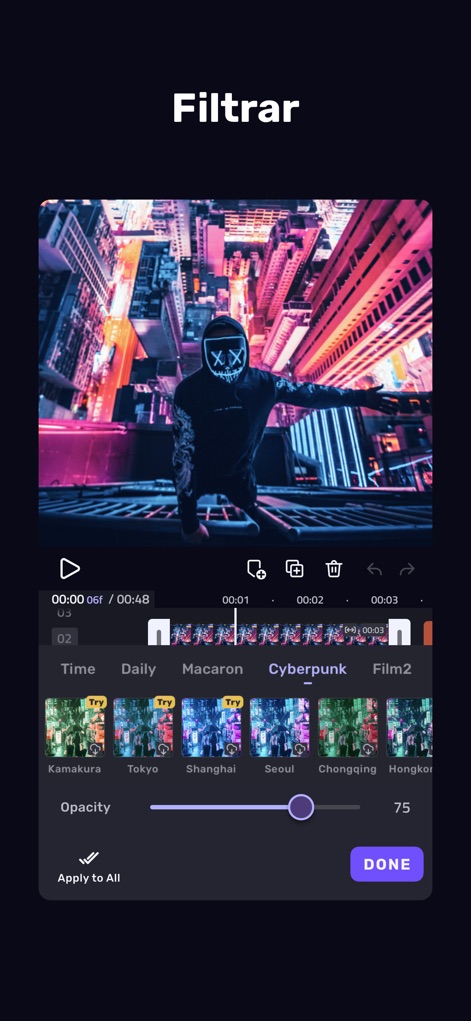
洗練されたフィルタ
ユーザーは、多種多様なフィルタープリセットから選択し、不透明度を調整することで、動画に理想的な色彩と雰囲気を与えることができます。
説明
Download
類似アプリ
似た機能とユーザー体験を持つアプリ

Edits: Video Editor
Instagram, Inc.

VLLO- Video Editor, Vlog Edits
vimosoft

YouCut - AI Video Editor
SHANTANU PTE. LTD.

必剪-B站官方出品
Shanghai Bilibili Animation Co.,Ltd

剪影 - 视频剪辑 & 卡点影集制作
Shanghai Jian Ji Software Technology Co., Ltd

Videoshop - Video Editor
Jajijujejo Inc.

VDIT - Video Maker & Editor
ImgBase, Inc.

Video Editor with Music・VidLab
Onelight Apps CY Ltd

Video Maker-movie maker&Editor
Changsha Fugui Bamboo Network Technology Co., Ltd.
このページはアプリまたはその開発者の公式ページではなく、情報提供および論評を目的として作成された独立した編集出版物です。明示的に別段の記載がない限り、アプリおよびその開発者は、MWM、Apple、Google Play、アプリのパブリッシャー、またはアプリの開発者と提携、承認、後援、認可、またはその他の公式的な関係はなく、このページのいかなる内容も、アプリがMWMのサービスを使用して開発されたことを意味するものではありません。すべての商標、ロゴ、スクリーンショット、その他のコンテンツはそれぞれの所有者の財産です。