
이 페이지는 앱이나 개발자의 공식 페이지가 아니며, 정보 제공 및 논평을 목적으로 작성된 독립 편집 간행물입니다. 명시적으로 달리 언급되지 않는 한, 해당 앱이나 개발자는 MWM, Apple, Google Play, 앱 퍼블리셔 또는 앱 개발자와 제휴, 보증, 후원, 승인 또는 공식적으로 연결되어 있지 않으며, 이 페이지의 어떤 내용도 해당 앱이 MWM의 서비스를 사용하여 개발되었음을 의미하지 않습니다. 모든 상표, 로고, 스크린샷 및 기타 콘텐츠는 해당 소유자의 자산입니다.

ES File Explorer
모바일 기기의 한계를 비웃는 자. 당신의 손에서 파일, 코드, 서버를 길들이는 궁극의 도구다.
다운로드
12.5M+사용자 평점
총 평가 수
286.8K개발사
카테고리
Productivity지원 언어
24최신 버전
2.8.6크기
263.2 MB출시일
2019년 3월 23일ES 파일 탐색기: 고급 사용자를 위한 다기능 파일 관리 솔루션 분석
테크 분석가가 평가한 핵심 기능 및 영향력 점수
내장 코드 편집기
이 앱은 JSON, JS, LOG, Java, PHP, Swift, XML, NET 등 47가지 코드 형식의 브라우징 및 편집을 지원하며, 코드 테마 전환, 글꼴 크기 조정, 인코딩 형식 조정 기능을 제공하여 개발자들이 모바일 환경에서 코드를 효율적으로 관리하고 수정할 수 있게 합니다.
원격 서버 연결
이 앱은 SMB, FTP, WebDAV와 같은 원격 서비스 액세스를 지원하여, 사용자가 로컬 네트워크 드라이브, FTP 서버 및 웹 기반 분산 작성 및 버전 관리 디렉터리에 효율적으로 접근하고 관리할 수 있도록 합니다.
클라우드 스토리지 통합
이 도구는 Baidu 네트워크 디스크, Google Drive, OneDrive, Dropbox 등 주요 네트워크 디스크를 지원하며, 여러 계정 동시 로그인을 통해 사용자가 파일을 다운로드할 필요 없이 클라우드 저장소의 파일에 직접 접근하고 사용할 수 있도록 합니다.
고급 파일 관리
이 앱은 파일 생성, 이름 변경, 이동, 삭제 등 기본적인 파일 관리 기능을 제공하며, 이름, 날짜, 크기별 파일 정렬을 지원합니다. 특히 iPad 버전에서는 분할 화면, PIP, 앱 간 드래그 앤 드롭과 같은 고급 기능을 제공하여 효율적인 파일 관리를 가능하게 합니다.
자동 백업 및 동기화
이 도구는 시스템 앨범 및 ES 로컬 파일을 Baidu 네트워크 디스크, SMB, FTP, WebDAV와 같은 다양한 원격 저장소로 증분 백업하는 기능을 지원하여, 사용자의 중요한 데이터를 안전하게 보관하고 관리할 수 있도록 돕습니다.
내장 PDF 편집기
이 도구는 PDF 파일 브라우징 기능을 제공하며, 하이라이트, 밑줄, 취소선, 펜 등 다양한 편집 기능을 통해 PDF 문서를 모바일에서 효율적으로 관리하고 수정할 수 있게 합니다.
앱 잠금 기능
이 도구는 애플리케이션 잠금 기능을 제공하여, 사용자의 개인 정보와 안전을 보호하며 중요한 파일이나 앱에 대한 무단 접근을 방지합니다.
유연한 파일 전송
이 도구는 WiFi를 통한 모바일-PC 간 파일 전송과 얼굴을 맞대고 빠른 전송 기능을 통해 모바일 기기 간 파일 공유를 지원하여, 다양한 환경에서 유연한 데이터 이동을 가능하게 합니다.
압축 및 압축 해제
사용자는 ZIP, RAR, 7Z 형식 파일의 압축 및 압축 해제를 지원하며, 중국어 암호까지 지원하여 다양한 압축 파일을 효율적으로 다룰 수 있습니다.
휴지통 기능
이 앱은 삭제된 ES 로컬 파일을 임시로 휴지통에 보관하는 기능을 제공하여, 사용자가 실수로 파일을 삭제했을 경우 데이터 손실을 방지하고 복구할 수 있도록 지원합니다.
자주 묻는 질문
에 대해 알아야 할 모든 것 ES File Explorer
What is ES File Explorer?
ES File Explorer is a versatile local and network file management tool. It allows users to manage, transfer, compress, decompress files, and access cloud storage. It also integrates players, editors, and other utility functions.
How does ES File Explorer enable file transfer?
ES File Explorer facilitates file transfer through two main methods: WiFi transmission between mobile devices and computers, and face-to-face quick transfers directly between mobile phones.
What archive formats does ES File Explorer support for compression?
ES File Explorer supports compression and decompression for ZIP, RAR, and 7Z archive formats. It also includes the capability to support Chinese passwords for encrypted archives.
Can I watch videos with double speed playback in ES File Explorer?
Yes, ES File Explorer features a built-in audio and video player. This player supports double-speed playback (0.5x to 2.0x), background playback, and small window playback for media files.
Which cloud storage services integrate with ES File Explorer?
ES File Explorer offers netdisk aggregation, allowing access to files on Baidu network disk, Google Drive, OneDrive, and Dropbox. Users can log in with multiple accounts simultaneously for convenience.
What premium features does ES PRO unlock in ES File Explorer?
Purchasing ES PRO in ES File Explorer unlocks all premium features. It is a subscription service billed monthly or annually, providing access to enhanced functionalities beyond the standard offering.
How do I manage my ES File Explorer PRO subscription auto-renewal?
You can manage or disable the auto-renewal of your ES File Explorer PRO subscription through your Apple ID account settings. Ensure auto-renew is turned off at least 24 hours before the current period ends.
Does ES File Explorer include a dark mode feature?
Yes, ES File Explorer includes a dark mode feature. This functionality provides late-night eye protection, enhancing user comfort during extended use in low-light environments.
Can ES File Explorer edit PDF documents?
Yes, ES File Explorer has a built-in PDF editor. It enables PDF file browsing and supports editing functions like highlighting, underlining, strikethrough, and using a pen tool.
What programming languages can the ES File Explorer code editor support?
The ES File Explorer built-in code editor supports browsing and editing 47 code formats. These include popular languages and file types such as JSON, JS, LOG, JAVA, PHP, SWIFT, XML, and NET.
다음 스크린샷과 설명은 앱의 공식 스토어 목록에서 직접 가져온 것이며 앱 개발자의 자산입니다.
앱 스토어
스크린샷

압축 파일 관리
이 도구는 ZIP, RAR, 7Z 파일 압축 해제를 지원하며, 다양한 압축 및 해제 옵션을 팝업 메뉴에서 제공합니다.

간편한 파일 전송
이 앱은 기기 간 빠르고 효율적인 파일 전송을 지원하며, '보내기' 및 '받기' 버튼으로 전송 기능을 실행할 수 있습니다.

동영상 재생 속도
사용자는 내장된 오디오 및 비디오 플레이어에서 다양한 배속 조절 옵션을 통해 동영상을 시청하며, 현재 재생 속도를 확인할 수 있습니다.
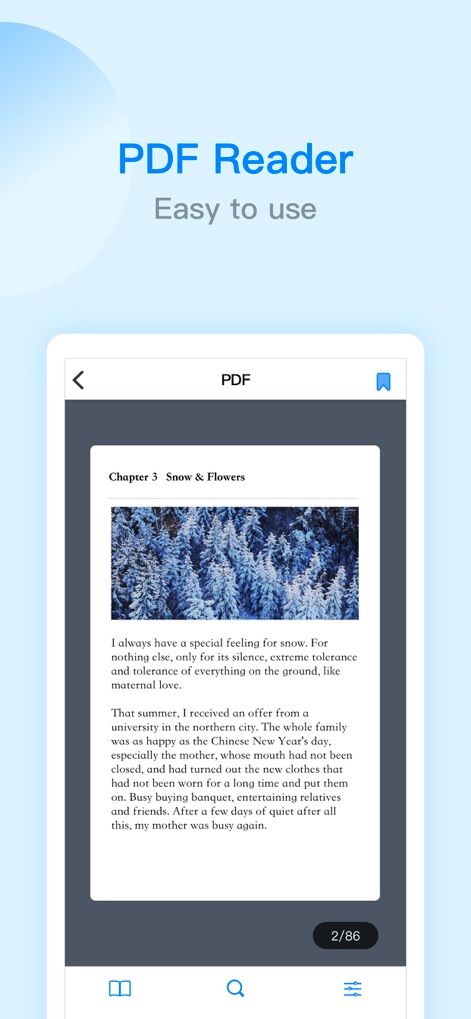
직관적인 PDF 뷰어
이 앱은 PDF 문서의 내용을 깔끔하게 표시하며, 하단에는 현재 페이지 번호와 총 페이지 수를 함께 보여줍니다.

어둠 모드 지원
이 앱은 눈의 피로를 줄여주는 어둠 모드를 제공하며, 파일 목록과 하단 메뉴 바가 어두운 배경으로 표시됩니다.
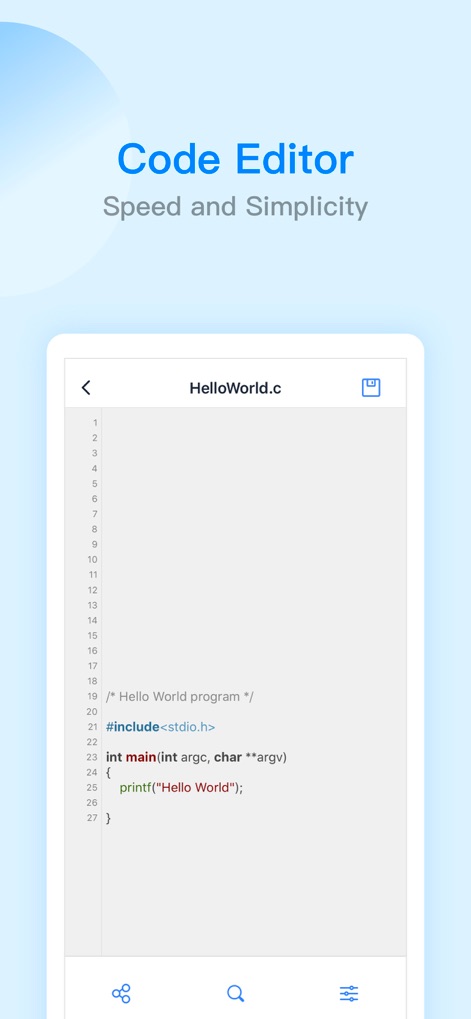
통합 코드 편집기
이 도구는 구문 강조 기능으로 가독성을 높인 코드 편집 환경을 제공하며, 'Hello World'와 같은 C 언어 코드를 표시합니다.

효율적인 전자책 리더
사용자는 이 앱의 내장 리더를 통해 전자책을 읽을 수 있으며, 텍스트 크기 조절 및 다양한 배경 색상 테마를 선택할 수 있습니다.
설명
Download
비슷한 앱
유사한 기능과 사용자 경험을 가진 앱

PDF PRO Scan Image & Documents
Balzo srl

The PDF Scanner, PDF editor HQ
NEXT K.U.M. LTD

CamScanner - PDF Scanner App
INTSIG Information Co., Ltd

Adobe Scan: PDF & OCR Scanner
Adobe Inc.

WPS Office: PDF, Docs, Sheets
KINGSOFT OFFICE SOFTWARE CORPORATION LIMITED

iLovePDF - PDF Editor & Scan
ILOVEPDF S.L.

Scanner App: Genius Scan
The Grizzly Labs

Microsoft Lens: PDF Scanner
Microsoft Corporation

Clear Scan: Doc Scanner App
INDY MOBILE APP COMPANY LIMITED
이 페이지는 앱이나 개발자의 공식 페이지가 아니며, 정보 제공 및 논평을 목적으로 작성된 독립 편집 간행물입니다. 명시적으로 달리 언급되지 않는 한, 해당 앱이나 개발자는 MWM, Apple, Google Play, 앱 퍼블리셔 또는 앱 개발자와 제휴, 보증, 후원, 승인 또는 공식적으로 연결되어 있지 않으며, 이 페이지의 어떤 내용도 해당 앱이 MWM의 서비스를 사용하여 개발되었음을 의미하지 않습니다. 모든 상표, 로고, 스크린샷 및 기타 콘텐츠는 해당 소유자의 자산입니다.