
이 페이지는 앱이나 개발자의 공식 페이지가 아니며, 정보 제공 및 논평을 목적으로 작성된 독립 편집 간행물입니다. 명시적으로 달리 언급되지 않는 한, 해당 앱이나 개발자는 MWM, Apple, Google Play, 앱 퍼블리셔 또는 앱 개발자와 제휴, 보증, 후원, 승인 또는 공식적으로 연결되어 있지 않으며, 이 페이지의 어떤 내용도 해당 앱이 MWM의 서비스를 사용하여 개발되었음을 의미하지 않습니다. 모든 상표, 로고, 스크린샷 및 기타 콘텐츠는 해당 소유자의 자산입니다.


My Scans, best PDF Scanner App
종이 더미에 파묻혔습니까? 이 앱은 당신의 책상을 날려버리고 문서를 디지털 권력으로 만듭니다.
다운로드
2.5M+사용자 평점
총 평가 수
121.1K개발사
카테고리
Productivity지원 언어
20최신 버전
5.10크기
112.9 MB출시일
2015년 7월 30일전문가 및 바쁜 사용자를 위한 핵심 기능 평가
My Scans, 최고의 PDF 스캐너 앱 분석
여러 기기 간 문서 동기화
이 앱은 여러 기기에서 문서가 자동으로 동기화되도록 하여 사용자가 어떤 기기에서든 최신 버전의 문서에 접근하고 작업할 수 있도록 합니다.
클라우드 백업
이 앱은 스캔된 문서의 클라우드 백업 기능을 제공하여 중요한 데이터를 안전하게 보관하고 손실 위험으로부터 보호합니다.
검색 가능한 PDF 문서 생성
이 도구는 스캔된 문서를 검색 가능한 PDF 형식으로 변환하여 사용자가 텍스트 내용을 기반으로 문서를 신속하게 찾을 수 있도록 지원합니다.
클라우드 협업 (그룹 문서 관리)
이 앱은 클라우드 기반의 협업 기능을 제공하여 팀원들이 공유된 문서를 함께 관리하고 작업할 수 있도록 지원합니다.
클라우드 공유 (파일 및 폴더 링크 공유)
이 도구는 파일 및 폴더에 대한 링크를 통해 문서를 안전하게 공유할 수 있는 기능을 갖추고 있어 효율적인 외부 협업을 가능하게 합니다.
브라우저를 통한 클라우드 문서 접근
이 도구는 웹 브라우저를 통해 클라우드에 저장된 문서에 접근할 수 있도록 해주어 사용자가 앱 설치 없이도 언제 어디서든 문서에 접근할 수 있게 합니다.
자동 문서 가장자리 감지 및 자르기
이 앱은 문서의 가장자리를 자동으로 감지하고 자르기 기능을 제공하여 사용자가 빠르고 정확하게 스캔 이미지를 확보할 수 있게 해줍니다.
고급 파일 및 폴더 정리
이 앱은 강력한 파일 및 폴더 정리 시스템을 갖추고 있어 사용자가 스캔된 문서를 효율적으로 분류하고 관리할 수 있도록 합니다.
이미지/PDF 형식으로 문서 공유
이 도구는 스캔된 문서를 이미지 또는 PDF 형식으로 쉽게 공유할 수 있는 기능을 제공하여 협업과 문서 배포를 용이하게 합니다.
단일 문서에 여러 페이지 포함
이 앱은 여러 페이지를 하나의 PDF 문서로 통합하는 기능을 제공하여 복잡한 문서를 체계적으로 관리할 수 있도록 돕습니다.
자주 묻는 질문
에 대해 알아야 할 모든 것 My Scans, best PDF Scanner App
What is the primary function of the My Scans app?
My Scans is a document scanner and organizer for iPhone and iPad. It converts photos of documents into searchable PDFs by detecting edges, allowing users to efficiently manage and share their digital documents.
Can My Scans create searchable PDF documents?
Yes, My Scans detects document edges from photos and converts them into searchable PDF documents. This advanced feature is available when the My Scans Free version is upgraded to the full version.
Does My Scans offer cloud synchronization and collaboration?
Yes, My Scans provides cloud collaboration, sharing, backup, and cross-device syncing via Top App Cloud. Users can access files through a web browser and work with shared folders when the cloud service is enabled.
What is the subscription cost for My Scans Cloud?
The Top App Cloud Subscription for My Scans costs $2.99 per month or $19.99 annually. This payment is processed through your iTunes Account and automatically renews unless turned off.
Are export functions included in the free version of My Scans?
No, export functions in My Scans require an in-app purchase to 'Upgrade to PRO' or enabling the 'Top App Cloud' service. The free version allows testing but restricts export capabilities.
How can I share documents from the My Scans app?
My Scans allows sharing documents as images or PDFs, direct printing, and sending faxes. Cloud sharing links are also available with the Top App Cloud service to easily distribute your scanned files.
How do I cancel my Top App Cloud subscription for My Scans?
To cancel your Top App Cloud Subscription for My Scans, access your user Account Settings after purchase. Auto-renewal can be turned off there, but no cancellation is permitted during the active subscription period.
Does My Scans provide tools to edit scanned documents?
Yes, My Scans includes tools for editing scanned documents. Users can apply blur, use a pencil, add signatures, and insert text directly onto their documents within the app interface.
다음 스크린샷과 설명은 앱의 공식 스토어 목록에서 직접 가져온 것이며 앱 개발자의 자산입니다.
앱 스토어
스크린샷
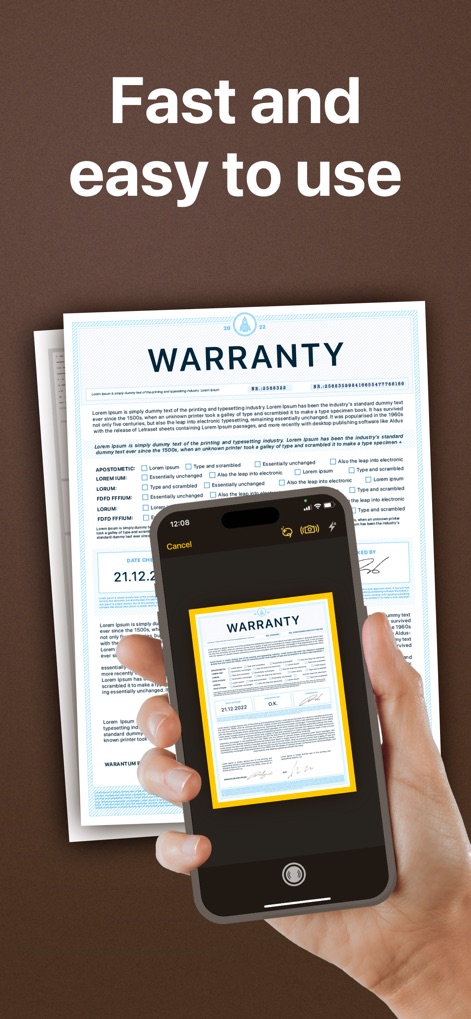
이 앱은 문서 테두리 자동 감지 기능과 즉각적인 미리 보기를 제공하여 사용자가 종이 문서를 빠르게 디지털화할 수 있도록 돕습니다.
빠르고 간편한 스캔

이 앱은 체계적인 파일 및 폴더 정리 기능을 통해 사용자의 모든 스캔 문서를 깔끔하게 분류하고, 쉽게 접근할 수 있도록 직관적인 인터페이스를 제공합니다.
효율적인 문서 관리

사용자는 이 앱에서 흐림, 서명 추가 등 다양한 편집 도구를 활용하여 문서 내용을 수정하고, 'Needs Revision' 스탬프와 같은 주석을 간편하게 추가할 수 있습니다.
정교한 문서 편집
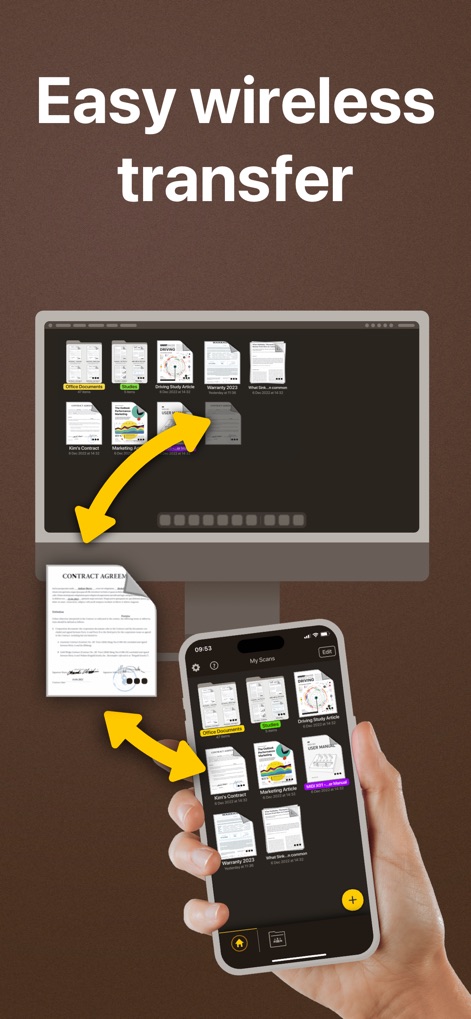
이 앱은 사용자가 iPhone에서 데스크톱 컴퓨터로 문서를 손쉽게 무선으로 전송할 수 있게 하여, 모바일 환경과 데스크톱 환경 간의 원활한 동기화 및 협업을 지원합니다.
간편한 무선 전송

이 앱을 통해 사용자는 여러 국가로 팩스를 간편하게 보낼 수 있으며, 직관적인 인터페이스에서 팩스 번호와 페이지 범위를 쉽게 설정하여 문서를 발송할 수 있습니다.
손쉬운 팩스 발송
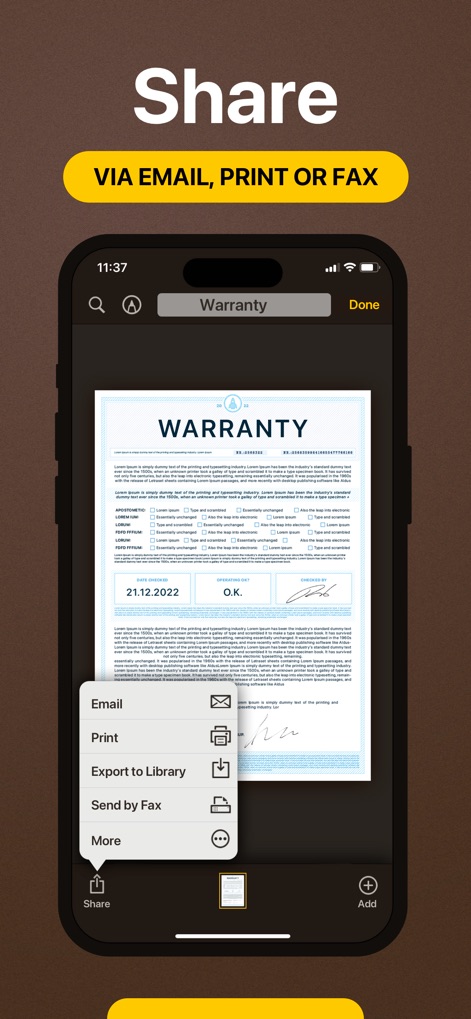
이 앱은 사용자가 스캔한 문서를 이메일, 인쇄 또는 팩스 등 다양한 방법으로 공유할 수 있도록 지원하며, 단일 화면에서 모든 공유 기능을 편리하게 접근할 수 있도록 통합된 인터페이스를 제공합니다.
다중 공유 옵션
설명
Download
비슷한 앱
유사한 기능과 사용자 경험을 가진 앱

PDF PRO Scan Image & Documents
Balzo srl

The PDF Scanner, PDF editor HQ
NEXT K.U.M. LTD

CamScanner - PDF Scanner App
INTSIG Information Co., Ltd

Adobe Scan: PDF & OCR Scanner
Adobe Inc.

WPS Office: PDF, Docs, Sheets
KINGSOFT OFFICE SOFTWARE CORPORATION LIMITED

iLovePDF - PDF Editor & Scan
ILOVEPDF S.L.

Scanner App: Genius Scan
The Grizzly Labs

Microsoft Lens: PDF Scanner
Microsoft Corporation

Clear Scan: Doc Scanner App
INDY MOBILE APP COMPANY LIMITED
이 페이지는 앱이나 개발자의 공식 페이지가 아니며, 정보 제공 및 논평을 목적으로 작성된 독립 편집 간행물입니다. 명시적으로 달리 언급되지 않는 한, 해당 앱이나 개발자는 MWM, Apple, Google Play, 앱 퍼블리셔 또는 앱 개발자와 제휴, 보증, 후원, 승인 또는 공식적으로 연결되어 있지 않으며, 이 페이지의 어떤 내용도 해당 앱이 MWM의 서비스를 사용하여 개발되었음을 의미하지 않습니다. 모든 상표, 로고, 스크린샷 및 기타 콘텐츠는 해당 소유자의 자산입니다.