Notebloc Scanner - Scan to PDF
다운로드: App Store

이 페이지는 앱이나 개발자의 공식 페이지가 아니며, 정보 제공 및 논평을 목적으로 작성된 독립 편집 간행물입니다. 명시적으로 달리 언급되지 않는 한, 해당 앱이나 개발자는 MWM, Apple, Google Play, 앱 퍼블리셔 또는 앱 개발자와 제휴, 보증, 후원, 승인 또는 공식적으로 연결되어 있지 않으며, 이 페이지의 어떤 내용도 해당 앱이 MWM의 서비스를 사용하여 개발되었음을 의미하지 않습니다. 모든 상표, 로고, 스크린샷 및 기타 콘텐츠는 해당 소유자의 자산입니다.

로고: Notebloc Scanner - Scan to PDF
다운로드: App Store

Notebloc Scanner - Scan to PDF

비싼 구독료 없이 워터마크 제거, 무제한 페이지, 무료 OCR 기능을 통해 노트, 영수증, 스케치를 디지털화하는 수백만 명의 학생 및 전문가와 함께하세요.

주요 수치

다운로드

1M+

사용자 평점

4.8/5

총 평가 수

10K+

개발사

Notebloc Scanner SCP

카테고리

Productivity

지원 언어

3

최신 버전

3.11

크기

99.5 MB

출시일

2016년 2월 28일
기능

더 스마트하게, 더 쉽게 스캔하세요

학생과 프리랜서가 몇 초 만에 문서를 디지털화, 정리 및 공유할 수 있도록 설계된 전문가급 스캔 도구입니다.

무제한 무료 스캔

워터마크, 구독료, 제한적인 페이지 수 없이 고품질 PDF를 만드세요.

완벽한 원근 보정

스캔을 자동으로 정렬하고 조명을 조정하여 손글씨 노트와 영수증을 전문가 수준으로 만들어 줍니다.

FAQ

자주 묻는 질문

에 대해 알아야 할 모든 것 Notebloc Scanner - Scan to PDF

Notebloc Scanner는 무료로 사용할 수 있나요?

네, Notebloc Scanner는 iPhone 및 iPad에서 문서를 디지털화하고 편집할 수 있는 무제한 사용을 제공하는 무료 문서 스캐너 앱입니다.

Notebloc Scanner의 주요 기능은 무엇인가요?

Notebloc Scanner의 기능에는 문서를 PDF로 스캔, 일괄 스캔, 16개 언어로 텍스트 추출을 위한 OCR, 이미지 편집, 스캔한 파일 구성 등이 있습니다. 또한 자동으로 원근를 보정합니다.

Notebloc Scanner에는 OCR 기능이 포함되어 있나요?

네, Notebloc Scanner에는 이미지에서 텍스트를 영어 및 기타 15개 언어로 추출하기 위한 광학 문자 인식(OCR)이 포함되어 있습니다. 사용자는 추출된 텍스트를 복사, 편집 또는 공유할 수 있습니다.

다음 스크린샷과 설명은 앱의 공식 스토어 목록에서 직접 가져온 것이며 앱 개발자의 자산입니다.

앱 스토어

스크린샷
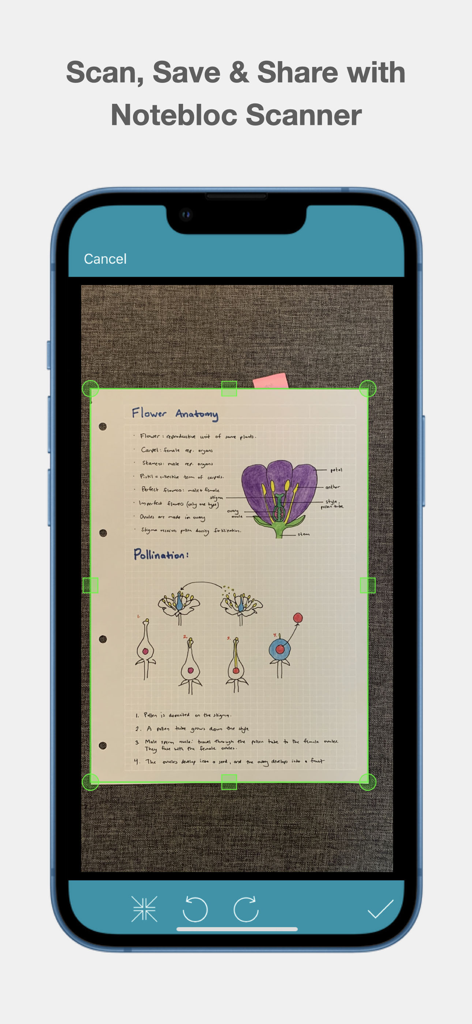
Notebloc Scanner - Scan to PDF - 초록색 자르기 표시가 있는 생물학 손글씨 노트를 디지털화하기 위해 Notebloc 스캐너를 사용하는 스마트폰 화면
초록색 자르기 표시가 있는 생물학 손글씨 노트를 디지털화하기 위해 Notebloc 스캐너를 사용하는 스마트폰 화면

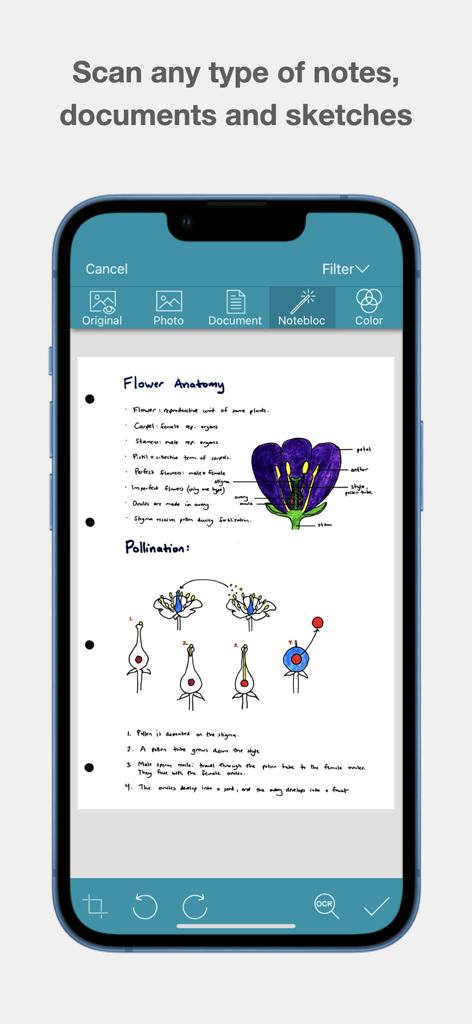
Notebloc Scanner - Scan to PDF - 생물학 노트와 꽃의 구조 스케치가 스캔된 문서가 표시된 Notebloc 스캐너 앱의 인터페이스
생물학 노트와 꽃의 구조 스케치가 스캔된 문서가 표시된 Notebloc 스캐너 앱의 인터페이스

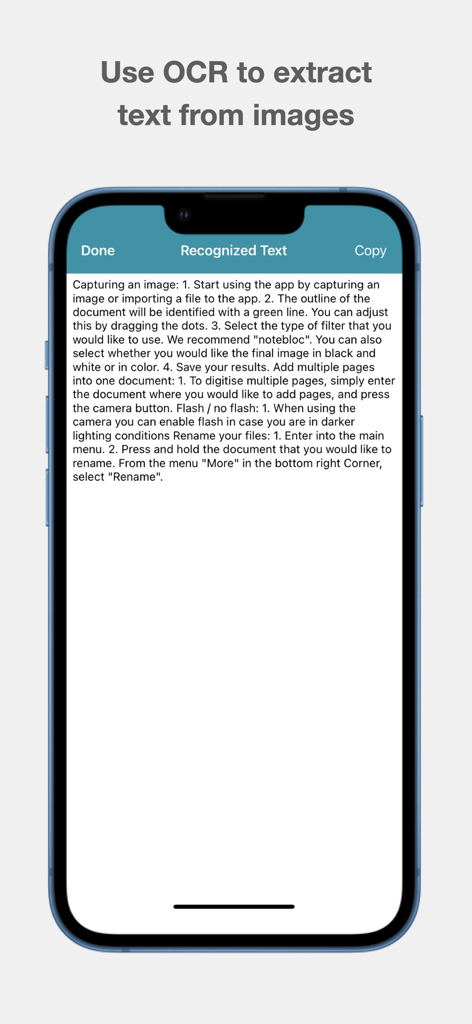
Notebloc Scanner - Scan to PDF - 스캔된 문서에서 텍스트를 추출하는 OCR 기능을 보여주는 Notebloc 스캐너 앱의 스크린샷
스캔된 문서에서 텍스트를 추출하는 OCR 기능을 보여주는 Notebloc 스캐너 앱의 스크린샷

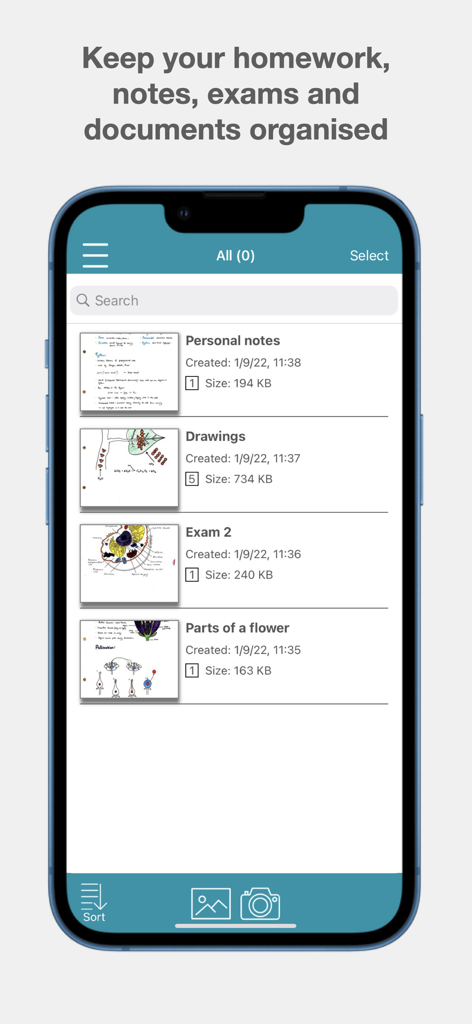
Notebloc Scanner - Scan to PDF - 노트, 그림, 시험을 위해 정리된 폴더를 보여주는 Notebloc 스캐너 앱의 인터페이스

노트, 그림, 시험을 위해 정리된 폴더를 보여주는 Notebloc 스캐너 앱의 인터페이스

설명

Scan documents for free with Notebloc Scanner, the best free document scanner on App Store. It is fast and safe. Use it to scan documents and turn them into PDF, as well as to save and share notes, drawings or any other type of document. It is the preferred scanner app among the educational community and widely used by professionals from all fields. Use it to scan documents to PDF, as well as to save and share notes. Notebloc Scanner App is one of the best and most recommended free scanner apps for your iPhone or iPad. It is the only free scanner offering unlimited usage. Notebloc Scanner App offers 100% free digitalization and editing tools for documents that are not included in the free version in the other scanner apps. For example: unlimited document creation, multiple pages scan (batch scanning), text extraction (extract text from image using our OCR), share and copy documents. These are the main functionalities of the best free scanner in the App Store: - Scan free documents such as drawings, sketches, images, photos, receipts or invoices. It is very useful for scanning notes since they will become legible and clear: Notebloc: PDF scanner automatically corrects perspective and light conditions in your scanned documents. - This free scanner will allow you to scan several pages consecutively (Batch Scanning). - You can scan documents without watermarks. - With Notebloc Scanner App you can cut and edit images to save them and convert them to PDF. - Add pages to a document is another of the features that you can perform with this intuitive scanning app. - Convert PDF from scanned images and modify the size of the PDFs. -Import images from your devide and convert them to PDF will be very easy and fast with Notebloc PDF scanner. -Notebloc PDF scanner also allows you to extract of text from image, through OCR in English and 15 other languages. Use the feature to extract text from an image and copy, edit or share it. In addition to scanning free documents, Notebloc Free Document Scanner offers you very useful tools for you to have your notes well organized and structured. The document scanner Notebloc will be useful: - Students: With the free scanner, scan your notes and also notes from your teachers. Organize them according to your subjects, and so you will have them organized to study for your exams and be able to review your notes from where you are. - Teachers: Notebloc PDF scanner is a very useful tool to create PDF from notes or photocopies that you want to share with your students. You can use this free scanner to send PDFs for your students. - Professionals: Notebloc Scanner helps you to keep your invoices safe, together with other important documents relative to your activity. Scan to PDF and easily arrange all your documents. Share them with your manager or peers by email directly from your PDF scanner. - Artists: The Notebloc free scanner is your perfect ally if you want to digitize your art and share it online or keep it in your portfolio. You can scan your drawings to edit them. Scanning documents for free has never been so fast and easy! About Notebloc Scanner App: Notebloc is a technology and innovation company from Spain. In order to unite the analog and digital world, in 2016 we developed Notebloc Scanner. Download the best free document scanner. Converting documents to PDF had never been so simple! Terms of service: https://www.apple.com/legal/internet-services/itunes/dev/stdeula/

Download

다운로드: App Store

이 페이지는 앱이나 개발자의 공식 페이지가 아니며, 정보 제공 및 논평을 목적으로 작성된 독립 편집 간행물입니다. 명시적으로 달리 언급되지 않는 한, 해당 앱이나 개발자는 MWM, Apple, Google Play, 앱 퍼블리셔 또는 앱 개발자와 제휴, 보증, 후원, 승인 또는 공식적으로 연결되어 있지 않으며, 이 페이지의 어떤 내용도 해당 앱이 MWM의 서비스를 사용하여 개발되었음을 의미하지 않습니다. 모든 상표, 로고, 스크린샷 및 기타 콘텐츠는 해당 소유자의 자산입니다.








