
이 페이지는 앱이나 개발자의 공식 페이지가 아니며, 정보 제공 및 논평을 목적으로 작성된 독립 편집 간행물입니다. 명시적으로 달리 언급되지 않는 한, 해당 앱이나 개발자는 MWM, Apple, Google Play, 앱 퍼블리셔 또는 앱 개발자와 제휴, 보증, 후원, 승인 또는 공식적으로 연결되어 있지 않으며, 이 페이지의 어떤 내용도 해당 앱이 MWM의 서비스를 사용하여 개발되었음을 의미하지 않습니다. 모든 상표, 로고, 스크린샷 및 기타 콘텐츠는 해당 소유자의 자산입니다.


다운로드
100k+사용자 평점
총 평가 수
376개발사
카테고리
Productivity지원 언어
19최신 버전
1.0.24크기
205.2 MB출시일
2023년 3월 30일바쁜 iOS 사용자들을 위한 올인원 모바일 오피스 솔루션의 핵심 기능 평가
'Office Suite-Word, PDF, Sheets' 앱 분석
올인원 오피스 스위트
이 앱은 문서, 스프레드시트, 프레젠테이션 작성을 위한 필수 도구를 하나의 강력한 애플리케이션으로 통합하여 사용자가 어디서든 작업할 수 있도록 지원합니다.
전문적인 워드 문서 편집
이 도구는 서식 지정, 맞춤법 검사, 단어 개수 확인 등 포괄적인 기능을 제공하여 사용자가 문서를 쉽게 만들고 편집할 수 있게 해줍니다. 이미지, 표, 차트 등을 삽입하는 기능도 갖추고 있습니다.
고급 스프레드시트 편집기
이 앱은 데이터 입력, 수식 생성, 셀 서식 지정 등 스프레드시트 작업을 위한 모든 필수 기능을 제공합니다. 그래프 및 차트를 생성하여 데이터를 시각화하는 것도 가능합니다.
매력적인 프레젠테이션 제작기
이 기능은 사용자가 이미지, 비디오, 애니메이션을 추가하여 매력적인 프레젠테이션을 쉽게 만들 수 있도록 돕습니다. 발표자 노트 추가 및 타이밍 리허설 기능도 지원합니다.
효율적인 PDF 변환기
이 도구는 사용자의 문서, 스프레드시트, 프레젠테이션을 PDF 형식으로 변환할 수 있게 해줍니다. 이는 특히 작업을 공유하거나 여러 장치에서 서식을 일관되게 유지해야 할 때 유용합니다.
모바일 문서 스캐너
이 앱은 iPhone 또는 iPad 카메라를 사용하여 문서를 스캔하고 PDF 또는 이미지 파일로 저장할 수 있는 기능을 제공합니다. 이를 통해 사용자는 물리적 문서를 손쉽게 디지털화하고 공유할 수 있습니다.
자주 묻는 질문
에 대해 알아야 할 모든 것 Office Suite-Word, PDF, Sheets
What is Office Suite-Word, Sheets, PPT?
Office Suite-Word, Sheets, PPT is a comprehensive productivity app for iPhone and iPad, combining essential tools for creating and editing documents, spreadsheets, and presentations. It offers a user-friendly interface.
Can I edit documents with Office Suite-Word, Sheets, PPT on my iPhone?
Yes, Office Suite-Word, Sheets, PPT allows users to create and edit documents, spreadsheets, and presentations on their iPhone and iPad. It includes a comprehensive word processor for various editing tasks.
Does Office Suite-Word, Sheets, PPT include a PDF converter?
Yes, Office Suite-Word, Sheets, PPT includes a PDF converter. This feature allows users to convert their documents, spreadsheets, and presentations into PDF format for consistent sharing.
How can I scan documents using Office Suite-Word, Sheets, PPT?
Office Suite-Word, Sheets, PPT includes a document scanner feature. Users can scan documents using their iPhone or iPad camera and save them as PDF or image files.
What types of files can I manage with the Office Suite-Word, Sheets, PPT app?
The Office Suite-Word, Sheets, PPT app allows users to create, edit, and manage Word documents (DOCX), Excel spreadsheets (XLSX), PowerPoint presentations (PPT), and PDF files. It also handles image files.
Is Office Suite-Word, Sheets, PPT a subscription-based app?
Yes, Office Suite-Word, Sheets, PPT operates on a subscription model. The subscription automatically renews unless canceled at least 24 hours before the current period ends.
How do I manage my subscription for Office Suite-Word, Sheets, PPT?
Users manage their Office Suite-Word, Sheets, PPT subscription in the Account Settings on the App Store after purchase. This allows control over automatic renewal.
Can Office Suite-Word, Sheets, PPT create charts and graphs in spreadsheets?
Yes, the spreadsheet editor in Office Suite-Word, Sheets, PPT is equipped to create graphs and charts. This visualizes data and enhances the presentability of spreadsheets.
Does Office Suite-Word, Sheets, PPT offer presentation editing features?
Yes, Office Suite-Word, Sheets, PPT includes a presentation builder. Users can add images, videos, animations, and speaker notes to slides for engaging presentations.
Where can I find the Privacy Policy for Office Suite-Word, Sheets, PPT?
The Privacy Policy for Office Suite-Word, Sheets, PPT is available at https://blog.a1apps.co/privacy-policy-a1office-suite-word-sheets-ppt/. This link provides detailed information on data handling.
다음 스크린샷과 설명은 앱의 공식 스토어 목록에서 직접 가져온 것이며 앱 개발자의 자산입니다.
앱 스토어
스크린샷

이 앱은 '올인원 오피스 앱'으로 워드, PDF, 엑셀, PPT 등 다양한 문서 작업을 하나의 인터페이스에서 처리할 수 있음을 보여줍니다.
강력한 올인원 오피스

사용자는 이 도구에서 'DOCX를 전문가처럼 편집'할 수 있으며, 텍스트, 이미지, 차트와 같은 풍부한 문서 편집 옵션을 활용할 수 있습니다.
전문가처럼 문서 편집

이 앱은 '모바일에서 워드 문서를 읽고, 편집하고 공유'하는 기능을 제공하며, 글꼴 스타일 변경 및 다양한 텍스트 색상 선택이 가능한 서식 도구 모음을 보여줍니다.
모바일 워드 문서

사용자는 'PDF를 편집하고 서명하며 채울' 수 있으며, 텍스트, 이미지, 링크 삽입과 같은 다양한 편집 도구를 활용하여 문서를 손쉽게 수정할 수 있습니다.
간편한 PDF 편집

이 앱은 '스프레드시트 데이터를 분석하고 시각화하며 편집'하는 기능을 제공하며, 데이터를 한눈에 볼 수 있는 그래프와 상세한 셀 편집 기능을 보여줍니다.
스마트 스프레드시트 관리

사용자는 '아이디어를 디자인하고 전달'할 수 있으며, 인포그래픽 요소를 활용하고 다양한 도형 및 차트를 삽입하여 전문적인 슬라이드를 제작할 수 있습니다.
매력적인 슬라이드 디자인
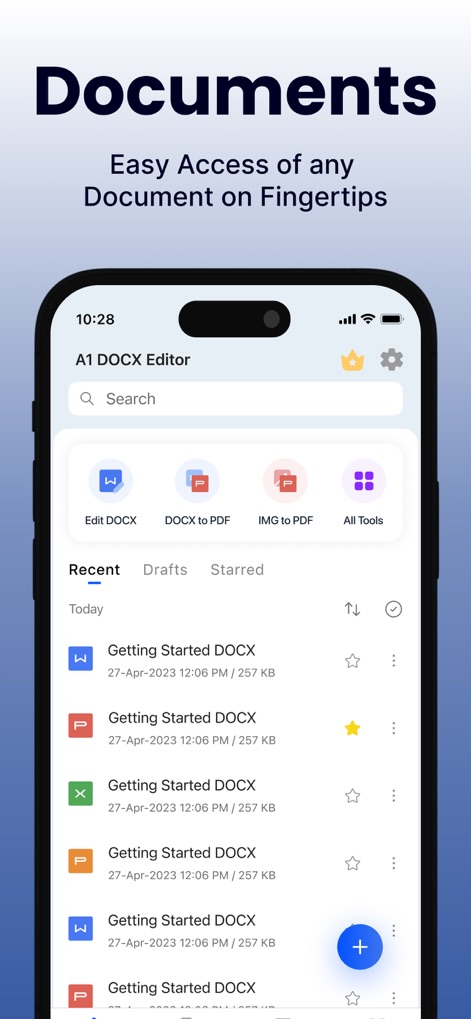
이 앱은 '어떤 문서든 손쉽게 접근'할 수 있도록 하며, 최근 문서 목록과 함께 DOCX 편집 및 PDF 변환과 같은 핵심 도구에 대한 빠른 접근을 제공합니다.
간편한 문서 접근성

사용자는 '파일을 쉽게 변환'할 수 있으며, DOCX에서 PDF로의 변환 과정과 '100% 고품질 변환'이라는 핵심 기능을 확인할 수 있습니다.
유연한 파일 변환
설명
Download
비슷한 앱
유사한 기능과 사용자 경험을 가진 앱

PDF PRO Scan Image & Documents
Balzo srl

The PDF Scanner, PDF editor HQ
NEXT K.U.M. LTD

CamScanner - PDF Scanner App
INTSIG Information Co., Ltd

Adobe Scan: PDF & OCR Scanner
Adobe Inc.

WPS Office: PDF, Docs, Sheets
KINGSOFT OFFICE SOFTWARE CORPORATION LIMITED

iLovePDF - PDF Editor & Scan
ILOVEPDF S.L.

Scanner App: Genius Scan
The Grizzly Labs

Microsoft Lens: PDF Scanner
Microsoft Corporation

Clear Scan: Doc Scanner App
INDY MOBILE APP COMPANY LIMITED
이 페이지는 앱이나 개발자의 공식 페이지가 아니며, 정보 제공 및 논평을 목적으로 작성된 독립 편집 간행물입니다. 명시적으로 달리 언급되지 않는 한, 해당 앱이나 개발자는 MWM, Apple, Google Play, 앱 퍼블리셔 또는 앱 개발자와 제휴, 보증, 후원, 승인 또는 공식적으로 연결되어 있지 않으며, 이 페이지의 어떤 내용도 해당 앱이 MWM의 서비스를 사용하여 개발되었음을 의미하지 않습니다. 모든 상표, 로고, 스크린샷 및 기타 콘텐츠는 해당 소유자의 자산입니다.