PDF Scanner App: Ai Scanner
다운로드: App Store

이 페이지는 앱이나 개발자의 공식 페이지가 아니며, 정보 제공 및 논평을 목적으로 작성된 독립 편집 간행물입니다. 명시적으로 달리 언급되지 않는 한, 해당 앱이나 개발자는 MWM, Apple, Google Play, 앱 퍼블리셔 또는 앱 개발자와 제휴, 보증, 후원, 승인 또는 공식적으로 연결되어 있지 않으며, 이 페이지의 어떤 내용도 해당 앱이 MWM의 서비스를 사용하여 개발되었음을 의미하지 않습니다. 모든 상표, 로고, 스크린샷 및 기타 콘텐츠는 해당 소유자의 자산입니다.

로고: PDF Scanner App: Ai Scanner
다운로드: App Store

PDF Scanner App: Ai Scanner

흐릿한 사진과 구겨진 페이지를 즉시 고해상도의 선명한 PDF로 변환하세요. 사무실 품질의 결과를 AI 기반 그림자 제거 및 온디바이스 개인 정보 보호 기능으로 경험해 보세요. 현대 전문가를 위해 설계되었습니다.

주요 수치

다운로드

74K+

사용자 평점

4.6/5

총 평가 수

1K+

개발사

Shanghai Zongchong Information Technology Co., Ltd

카테고리

Utilities

지원 언어

37

최신 버전

1.2.6

크기

211.7 MB

출시일

2025년 1월 7일
기능

모바일 사무실을 위한 전문가 도구

최첨단 AI를 활용하여 지저분한 스냅샷을 선명하고 전문적인 문서로 변환하세요. 품질과 개인 정보 보호가 필수적인 고속 워크플로우를 위해 구축되었습니다.

AI 기반 HD 선명도

그림자를 자동으로 제거하고 텍스트 가장자리를 선명하게 하며 질감을 향상시켜 저조도에서도 스튜디오 품질의 PDF를 즉시 생성합니다.

다국어 텍스트 OCR

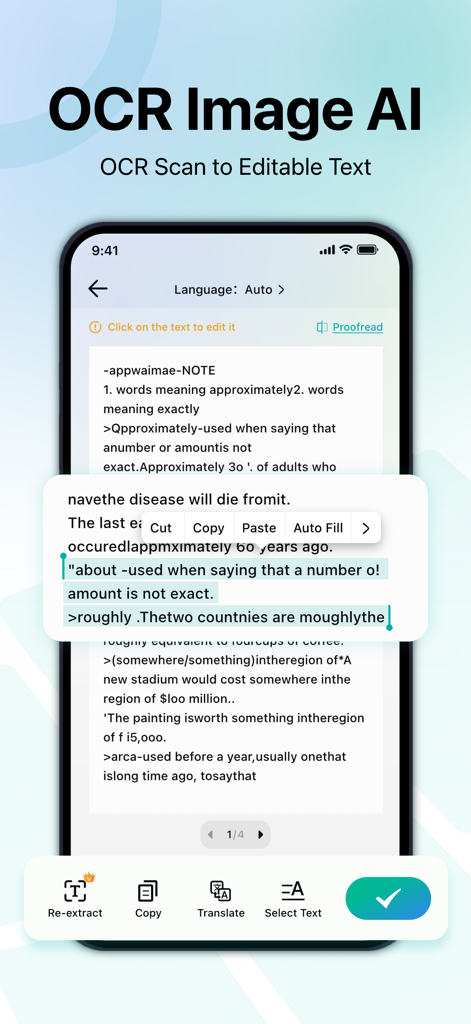
원본 레이아웃을 유지하면서 모든 스캔에서 편집 가능한 텍스트를 추출합니다. 수십 개 언어를 지원하여 국제 비즈니스에 완벽합니다.

다음 스크린샷과 설명은 앱의 공식 스토어 목록에서 직접 가져온 것이며 앱 개발자의 자산입니다.

앱 스토어

스크린샷
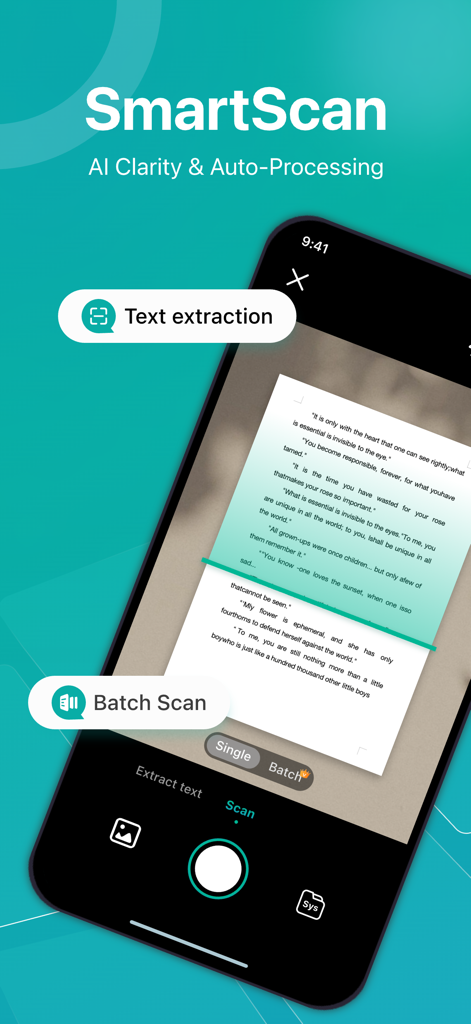
PDF Scanner App: Ai Scanner - AI 선명도와 텍스트 추출 기능이 있는 SmartScan 기능을 보여주는 PDF 스캐너 앱 인터페이스
AI 선명도와 텍스트 추출 기능이 있는 SmartScan 기능을 보여주는 PDF 스캐너 앱 인터페이스

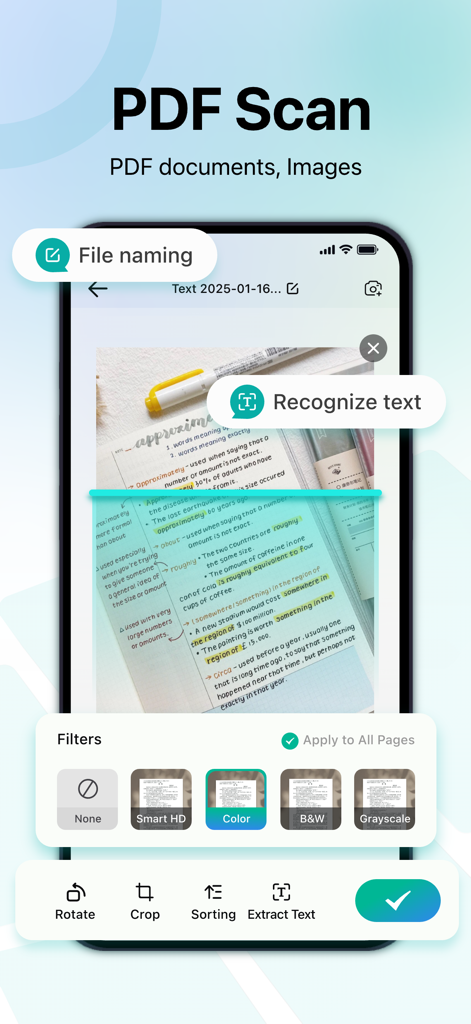
PDF Scanner App: Ai Scanner - 문서 필터 및 텍스트 인식 기능을 보여주는 PDF 스캐너 앱의 모바일 앱 인터페이스
문서 필터 및 텍스트 인식 기능을 보여주는 PDF 스캐너 앱의 모바일 앱 인터페이스

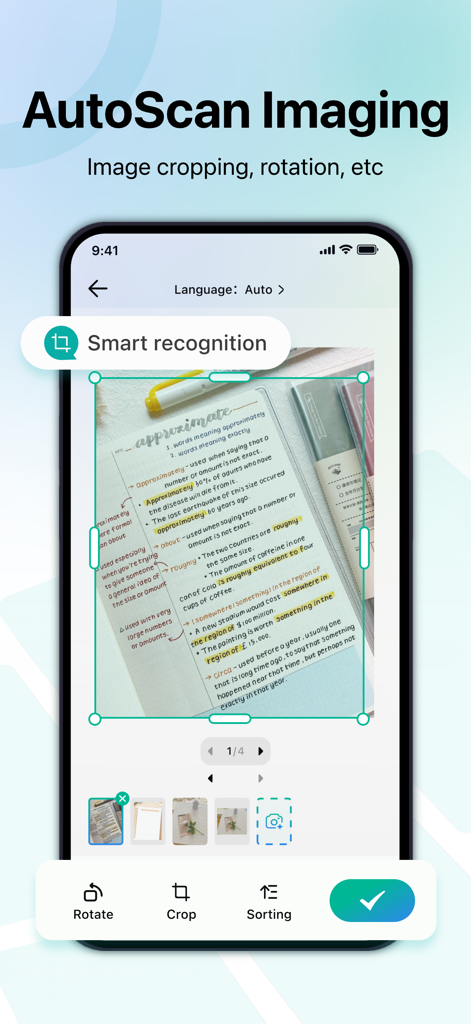
PDF Scanner App: Ai Scanner - 스캔된 문서의 자르기 및 회전을 위한 AutoScan Imaging 기능을 보여주는 스마트폰 화면
스캔된 문서의 자르기 및 회전을 위한 AutoScan Imaging 기능을 보여주는 스마트폰 화면

PDF Scanner App: Ai Scanner - 스캔된 문서 이미지를 편집 가능한 텍스트로 변환하는 PDF 스캐너 앱의 OCR 기능을 표시하는 iPhone 화면
스캔된 문서 이미지를 편집 가능한 텍스트로 변환하는 PDF 스캐너 앱의 OCR 기능을 표시하는 iPhone 화면

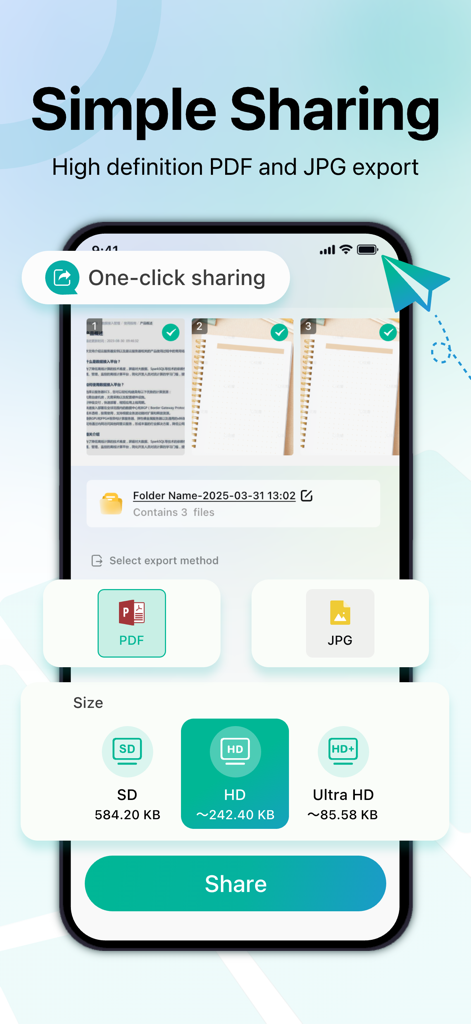
PDF Scanner App: Ai Scanner - 고화질 설정으로 PDF 및 JPG 내보내기 옵션을 보여주는 iPhone 화면

고화질 설정으로 PDF 및 JPG 내보내기 옵션을 보여주는 iPhone 화면

설명

PDF Scanner App — Make every scan clear PDF Scanner App converts and exports the self-trained super-resolution Python model to a CoreML smart HD model available for iOS, and uses AI to make the smart HD filter obtain super-resolution details and texture enhancements, turning ordinary pages shot by mobile phones into high-resolution documents instantly, making text and lines sharp regardless of dim light, shadows or paper folds. The simple interface and fully automatic process allow you to switch between "shoot → draft" in milliseconds, and completely say goodbye to tedious parameter adjustments. Core functions: AI smart HD The self-trained super-resolution smart HD model automatically enhances text edges and detailed textures, greatly reducing blur and noise, and making low-quality originals clear again. Intelligent binarization processing Adjust the black and white threshold according to the page lighting and color distribution to ensure that the fonts of documents such as forms and contracts are always clear and readable. Accurate scanning Capture clear and accurate scans of documents, receipts, business cards, etc. Intelligent edge detection and automatic cropping provide professional results every time. Multilingual Accurate OCR Built-in multilingual recognition engine, supports common languages ​​such as Chinese, English, French, Spanish, and Japanese, retains the original layout, and exports editable text or standard PDF. Flexible file management Save scans in PDF or image format (JPEG/PNG) to meet your needs. Easily merge multiple pages into a single document to simplify sharing. Easy sharing Instantly share your scans on major platforms such as email, messaging apps, and social networks. Enjoy high-resolution sharing for clear scans, ensuring that every detail is captured and delivered. Designed with privacy in mind All scans are securely stored on your device. The option to encrypt sensitive files gives you extra peace of mind. Why choose PDF Scanner App "One shot and done": fully automatic processing flow, from shadow removal, text edge sharpening to AI detail texture enhancement, instantly produce manuscripts. Extremely readable: Whether the paper is old and damaged or the picture is blurry, it can be intelligently processed to reproduce the clearest content. Professional application: A must-have for fast-paced offices in industries such as law, finance, and education. Quickly scan → identify → share, all in one go. Zero learning cost: Remove unnecessary settings, anyone can use it, and complete the first scanning experience in seconds. PDF Scanner App is not just a "scanner", but a smart tool that gives documents a "new lease of life". Subscription function service: 1. Subscription service: weekly subscription, lifetime subscription 2. Subscription price: subject to IAP application information Terms of Service 1. User terms of service: https://zonghong-termsofuse.pages.dev 2. Privacy Policy: https://zonghong-privacypolicy.pages.dev/ Contact us: zonghong_global@163.com

Download

다운로드: App Store

이 페이지는 앱이나 개발자의 공식 페이지가 아니며, 정보 제공 및 논평을 목적으로 작성된 독립 편집 간행물입니다. 명시적으로 달리 언급되지 않는 한, 해당 앱이나 개발자는 MWM, Apple, Google Play, 앱 퍼블리셔 또는 앱 개발자와 제휴, 보증, 후원, 승인 또는 공식적으로 연결되어 있지 않으며, 이 페이지의 어떤 내용도 해당 앱이 MWM의 서비스를 사용하여 개발되었음을 의미하지 않습니다. 모든 상표, 로고, 스크린샷 및 기타 콘텐츠는 해당 소유자의 자산입니다.








