PDF Scanner App: Scanner+ Docs
다운로드: App Store

이 페이지는 앱이나 개발자의 공식 페이지가 아니며, 정보 제공 및 논평을 목적으로 작성된 독립 편집 간행물입니다. 명시적으로 달리 언급되지 않는 한, 해당 앱이나 개발자는 MWM, Apple, Google Play, 앱 퍼블리셔 또는 앱 개발자와 제휴, 보증, 후원, 승인 또는 공식적으로 연결되어 있지 않으며, 이 페이지의 어떤 내용도 해당 앱이 MWM의 서비스를 사용하여 개발되었음을 의미하지 않습니다. 모든 상표, 로고, 스크린샷 및 기타 콘텐츠는 해당 소유자의 자산입니다.


로고: PDF Scanner App: Scanner+ Docs
다운로드: App Store

PDF Scanner App: Scanner+ Docs

iPhone을 고속 휴대용 사무실로 바꾸세요. 문서를 즉시 PDF로 변환하고, 이동 중에 계약에 서명하고, AI 기반 사진 복원으로 오래된 추억에 생명을 불어넣으세요.

주요 수치

다운로드

2M+

사용자 평점

4.6/5

총 평가 수

27K+

개발사

Codeway Dijital Hizmetler Anonim Sirketi

카테고리

Business

지원 언어

8

최신 버전

3.7.2

크기

200.9 MB

출시일

2020년 5월 26일
기능

페이퍼리스 라이프스타일을 위한 스마트 기능

iPhone을 고성능 모바일 사무실로 변환하세요. 법률 계약서 서명부터 빈티지 가족 사진 복원까지, 모든 것을 쉽고 완벽하게 비공개로 처리하세요.

즉석 전문 스캔

여러 페이지의 문서를 자동으로 자르고 향상시키세요. 몇 번의 탭으로 계약에 서명하고 PDF 또는 DOCX로 내보내세요.

스마트 OCR 및 검색

텍스트를 편집 가능한 디지털 데이터로 변환하세요. AI 기반 OCR을 사용하여 검색 가능한 문서로 필요한 것을 정확하게 찾으세요.

다음 스크린샷과 설명은 앱의 공식 스토어 목록에서 직접 가져온 것이며 앱 개발자의 자산입니다.

앱 스토어

스크린샷

PDF Scanner App: Scanner+ Docs - 스마트폰 인터페이스가 비즈니스 문서를 스캔하여 PDF 파일을 생성합니다.

스마트폰 인터페이스가 비즈니스 문서를 스캔하여 PDF 파일을 생성합니다.

PDF Scanner App: Scanner+ Docs - 스캐너 앱 인터페이스가 복원 및 색상화된 오래된 가족 사진의 이전 및 이후 비교를 보여줍니다.

스캐너 앱 인터페이스가 복원 및 색상화된 오래된 가족 사진의 이전 및 이후 비교를 보여줍니다.

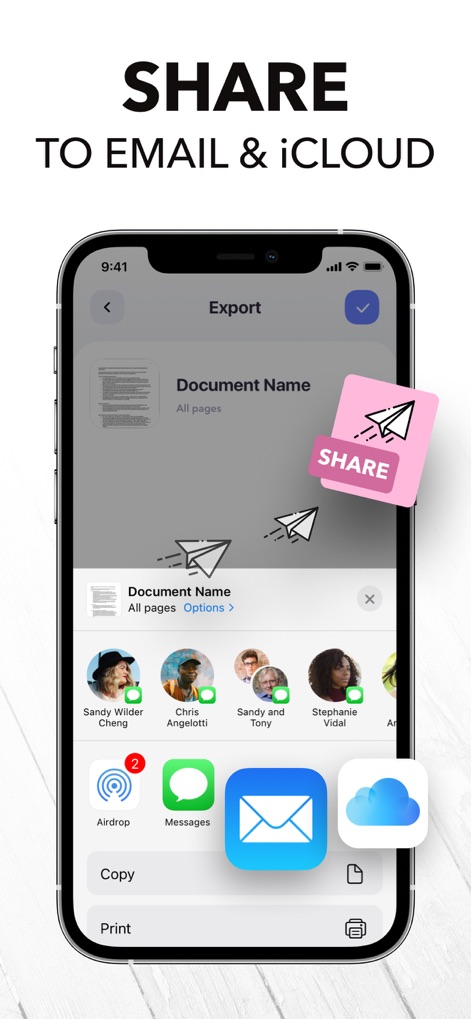
PDF Scanner App: Scanner+ Docs - 스캔한 문서를 이메일 및 iCloud를 통해 공유하는 옵션을 보여주는 스마트폰 화면.

스캔한 문서를 이메일 및 iCloud를 통해 공유하는 옵션을 보여주는 스마트폰 화면.

PDF Scanner App: Scanner+ Docs - 스캔한 등록 양식을 PDF, TXT 및 JPG로 저장하는 옵션을 보여주는 Scanner+ 앱의 스마트폰 인터페이스.

스캔한 등록 양식을 PDF, TXT 및 JPG로 저장하는 옵션을 보여주는 Scanner+ 앱의 스마트폰 인터페이스.

PDF Scanner App: Scanner+ Docs - PDF 스캐너 앱의 인터페이스가 휴대폰에서 디지털 서명 기능을 보여줍니다.

PDF 스캐너 앱의 인터페이스가 휴대폰에서 디지털 서명 기능을 보여줍니다.

PDF Scanner App: Scanner+ Docs - 스캔한 이미지를 편집 가능한 텍스트로 변환하는 OCR 기능을 시연하는 스마트폰 화면.

스캔한 이미지를 편집 가능한 텍스트로 변환하는 OCR 기능을 시연하는 스마트폰 화면.

PDF Scanner App: Scanner+ Docs - 스마트폰 화면이 PDF 스캐너 앱의 편집 메뉴를 보여주며 문서에서 텍스트를 숨기고 강조 표시하는 옵션을 제공합니다.

스마트폰 화면이 PDF 스캐너 앱의 편집 메뉴를 보여주며 문서에서 텍스트를 숨기고 강조 표시하는 옵션을 제공합니다.

PDF Scanner App: Scanner+ Docs - iPhone 화면이 PDF 스캐너 앱이 자동 가장자리 감지 기능으로 비즈니스 문서를 스캔하는 것을 보여줍니다.

iPhone 화면이 PDF 스캐너 앱이 자동 가장자리 감지 기능으로 비즈니스 문서를 스캔하는 것을 보여줍니다.

PDF Scanner App: Scanner+ Docs - iPhone의 스캐너 앱 인터페이스가 문서를 PDF TXT 및 JPEG 형식으로 변환하는 것을 보여줍니다.

iPhone의 스캐너 앱 인터페이스가 문서를 PDF TXT 및 JPEG 형식으로 변환하는 것을 보여줍니다.

PDF Scanner App: Scanner+ Docs - iPhone 화면이 Scanner plus 앱의 문서 구성 및 폴더 관리 인터페이스를 보여줍니다.

iPhone 화면이 Scanner plus 앱의 문서 구성 및 폴더 관리 인터페이스를 보여줍니다.

설명

Want to keep both your money & your scanner in your pocket? Get Scanner+ for free NOW & instantly start to SCAN, SIGN, and SHARE any document in PDF, JPG, or TXT formats. Scan any paper with your iPhone's camera: the Scanner+ app will automatically recognize the edges of your document, enhance it, and give you a perfectly scanned copy that's ready to share on your favorite platform! Scanner+ offers you 12 AMAZING FEATURES that other scanners won't: SCAN DOCUMENTS Scan multiple pages into one PDF document. Enjoy the Turbo Scan mode! Why waste hours on your computer when you can quickly do it with a tiny scanner in your pocket? SCAN & RESTORE PHOTOS Photo scan is the latest feature of Scanner+ that lets you scan and save your favorite printed photos using your phone’s camera. Don’t just take a picture of a picture. Create enhanced digital scans; the photo scanner auto-detects picture boundaries, crops, restores colors and saves them into a digital album. ENHANCE & COLORIZE PHOTOS Bring your scans to life with colorize & enhance features. Enhance old photos & fix blurs and turn them into high resolution digital versions. Colorize black & white old photos to bring back memories and share them with your loved ones. CREATE ALBUMS Scan an entire photo album in minutes. Back up your scans to keep them safe, searchable, and organized. CONVERT TO PDF Scanner+ is also a PDF Converter that turns photos & images into searchable digital documents! This way you can also ""CTRL+F"" across your documents! EXPORT & SHARE Export your scans as .PDF .DOCX or .TXT and share with iMessage, Adobe PDF, Email - Gmail - Outlook - Spark, Wi-Fi Printer, Box, Whatsapp, iCloud Drive, Facebook Messenger, Dropbox, Evernote, Google Drive, OneDrive, OneNote and any other app/platform! SIGN DOCUMENTS Sign PDF documents in less than a second. Transfer your signature across documents! SMART CROP (YOU'LL LOVE THIS!) Your docs will be automatically cropped from its edges right after you scan it. Don't waste your valuable time trying to crop every single document! RECOVER RUINED DOCUMENTS Spilled coffee to your doc? Your dog took a bite from your homework? Recover it with our scanner app using the Genius Scan mode and become a scan guru! HIGHLIGHT TEXTS Highlight important parts of your documents with Scanner+ doc scanner! Very useful while studying from your scanned textbook! EDIT DOCUMENTS HIDE and BLUR unwanted parts with Scanner+ document editor! This is a great feature for hiding confidential parts of your documents. Time to become a scanmaster! ADJUST THE BRIGHTNESS Need to scan documents in a dark room? No problem at all! TRANSLATE TEXTS TO 100+ LANGUAGES Not that you'll need to translate texts to Latin or Cambodian every other day, but in case you need it, Scanner+ got you covered! RECOGNIZE TEXTS WITH OCR Recognize texts from any scannable object with the OCR text scanner mode. And yes, you can even edit handwritten texts with Scanner+! KEEP YOUR DOCS ORGANIZED Scanner+ offers more than a powerful cam scanner, it also has a drag & drop file manager with smart tags. Never lose an important document again! == PRIVACY & SECURITY == All documents are stored locally on your iPhone, so ONLY YOU will be able to access your documents! Neither we nor any third parties will have access. == PRICING & LEGAL == Scanner+ is free to use, and it will always stay free. Should you choose to, you can subscribe to Scanner+ Premium to access more features. You can start a yearly subscription with a 3-day free trial. Subscriptions automatically renew unless auto-renew is turned off no later than 24 hours before the end of the current period. Manage subscriptions, disable auto-renewal in the iTunes account settings. Privacy Policy: http://scannerplus.com/privacy-policy Terms & Condition - EULA : http://scannerplus.com/terms-conditions For any questions or inquiries about our mobile pdf scanner, reach out to us at scanner@codeway.co

Download

다운로드: App Store

이 페이지는 앱이나 개발자의 공식 페이지가 아니며, 정보 제공 및 논평을 목적으로 작성된 독립 편집 간행물입니다. 명시적으로 달리 언급되지 않는 한, 해당 앱이나 개발자는 MWM, Apple, Google Play, 앱 퍼블리셔 또는 앱 개발자와 제휴, 보증, 후원, 승인 또는 공식적으로 연결되어 있지 않으며, 이 페이지의 어떤 내용도 해당 앱이 MWM의 서비스를 사용하여 개발되었음을 의미하지 않습니다. 모든 상표, 로고, 스크린샷 및 기타 콘텐츠는 해당 소유자의 자산입니다.