
이 페이지는 앱이나 개발자의 공식 페이지가 아니며, 정보 제공 및 논평을 목적으로 작성된 독립 편집 간행물입니다. 명시적으로 달리 언급되지 않는 한, 해당 앱이나 개발자는 MWM, Apple, Google Play, 앱 퍼블리셔 또는 앱 개발자와 제휴, 보증, 후원, 승인 또는 공식적으로 연결되어 있지 않으며, 이 페이지의 어떤 내용도 해당 앱이 MWM의 서비스를 사용하여 개발되었음을 의미하지 않습니다. 모든 상표, 로고, 스크린샷 및 기타 콘텐츠는 해당 소유자의 자산입니다.


Polaris Office - PDF & Docs
이 앱은 문서를 단순한 파일에서 강력한 무기로 탈바꿈시킵니다. 어디서든, 어떤 형식으로든 당신의 작업을 지배하게 만듭니다.
다운로드
10M+사용자 평점
총 평가 수
94.1K개발사
카테고리
Productivity지원 언어
17최신 버전
9.8.24크기
329.1 MB출시일
2013년 12월 14일전문가적 관점에서 본 'Polaris Office - PDF & Docs'의 핵심 역량
Polaris Office - PDF & Docs 앱 분석: 주요 기능
광범위한 문서 호환성
이 앱은 Word, Excel, PowerPoint, Adobe PDF 및 Google Docs를 포함한 광범위한 오피스 문서를 열고, 편집하고, 저장하며 공유할 수 있도록 지원합니다.
다중 기기 및 클라우드 동기화
이 도구는 데스크톱, iPhone, iPad 등 모든 기기에서 Polaris Drive, iCloud 및 기타 클라우드 서비스를 통해 문서를 항상 최신 상태로 유지하며 동기화할 수 있도록 지원합니다.
강력한 PDF 변환 및 편집
사용자는 iPhone 및 iPad에서 바로 PDF 파일을 보고, PDF를 오피스 문서로 변환하여 편집할 수 있는 강력한 PDF 관리 기능을 이용할 수 있습니다.
다양한 파일 형식 지원
DOC, DOCX, XLS, XLSX, PPT, PPTX, PDF 뿐만 아니라 HWP, HWPX, ODT, CSV와 같은 폭넓은 파일 형식을 지원하여 문서 활용도를 극대화합니다.
간편한 문서 공유 및 협업
이 앱은 클라우드 스토리지를 통해 SMS, 이메일, Facebook 등 다양한 채널로 문서 링크를 공유하여 다른 사용자를 초대하고 문서를 빠르게 공동 편집하거나 검토할 수 있도록 돕습니다.
풍부한 편집 도구 및 템플릿
이 앱은 33개의 무료 템플릿, 다양한 2D/3D 차트, 슬라이드 전환 효과, 173개의 도형 및 300개의 스프레드시트 수식을 제공하여 문서 작성 및 편집을 풍부하게 합니다.
효율적인 문서 검색
강력한 검색 기능을 통해 파일명뿐만 아니라 문서 내용을 기반으로 검색어를 확장하여 필요한 문서를 신속하게 찾아 시간을 절약할 수 있습니다.
ISO 27001 보안 인증
이 앱은 국제 클라우드 개인 정보 보호 표준인 ISO 27001 인증을 획득하여 사용자의 중요한 데이터에 대한 보안 신뢰도를 높여줍니다.
자주 묻는 질문
에 대해 알아야 할 모든 것 Polaris Office - PDF & Docs
Is Polaris Office compatible with Microsoft Office formats?
Yes, Polaris Office is compatible with Word, Excel, and PowerPoint documents. It supports editing and saving files in DOC, DOCX, XLS, XLSX, PPT, and PPTX formats.
What document types can Polaris Office edit?
Polaris Office edits various document types including Word, Excel, PowerPoint, and Google Docs. It also supports editing DOC, DOCX, XLS, XLSX, PPT, PPTX, TXT, HWP, HWPX, ODT, PDF, and CSV formats.
Does Polaris Office support PDF editing and viewing?
Yes, Polaris Office supports viewing PDFs directly from your iPhone and iPad. It also allows converting PDFs into editable Office documents. PDF annotation is available.
Can I use templates in Polaris Office?
Yes, Polaris Office provides 33 free templates. Users can save frequent templates in the 'My Template' folder and create their own custom templates anytime.
What cloud storage services does Polaris Office integrate with?
Polaris Office integrates with Polaris Drive as the default cloud service. It also supports iCloud, Google Drive, Dropbox, OneDrive, Box, WebDAV, and FTP for document syncing.
Can Polaris Office open compressed zip files?
Yes, Polaris Office allows users to easily open and read all types of documents from zip files without extracting them on iPhone and iPad.
What languages does Polaris Office support?
Polaris Office supports 18 global languages. These include English, French, Simplified Chinese, Japanese, Russian, German, Italian, Spanish, Polish, Portuguese (Europe, Brazil), among others.
Can users share documents using Polaris Office?
Yes, Polaris Office users can quickly and easily share documents. Sharing is possible by sending a link via SMS, email, Facebook, and other channels.
Is Polaris Office a free app?
Yes, Polaris Office is a free all-in-one office suite. However, some features may be limited based on cloud usage or chosen subscription options.
What is the size of the Polaris Office app?
The Polaris Office app is under 100 MB in size. It functions as a single application sufficient for managing various document types on iOS devices.
Does Polaris Office offer document synchronization across devices?
Yes, Polaris Office keeps all documents up-to-date and synced across devices like Desktop, iPhone, and iPad. This sync occurs via Polaris Drive, iCloud, and other cloud services.
How do I manage sharing permissions for Polaris Office?
To manage sharing options, go to Settings > Privacy > Allow additional permissions within your device. Select the category and then revoke access to Polaris Office.
What are the subscription plans for Polaris Office?
Polaris Office offers several plans: Smart Plan ($3.99/month, $39.99/year), Pro Plan ($5.99/month, $59.99/year), AI Plan ($12.99/month, $129.99/year), and AI-Plus Plan ($20.99/month, $209.99/year).
How much does the Polaris Office Smart Plan cost?
The Polaris Office Smart Plan costs $3.99 per month or $39.99 per year. These recurring payments are charged to your Apple Store account.
How do I stop auto-renewal for my Polaris Office subscription?
To turn off auto-renewal for your Polaris Office subscription, go to your user’s Account Settings within the App Store. Auto-renewal must be turned off at least 24 hours before the current period ends.
Is Polaris Office compliant with cloud privacy standards?
Yes, Polaris Office has earned ISO 27001 certification. This certification confirms compliance with the International Cloud Privacy Standard, ensuring robust data privacy measures.
다음 스크린샷과 설명은 앱의 공식 스토어 목록에서 직접 가져온 것이며 앱 개발자의 자산입니다.
앱 스토어
스크린샷

이 앱은 다양한 형식의 문서를 폴라리스 드라이브에서 관리하며, 하단에는 문서를 추가하고 메뉴에 접근할 수 있는 플로팅 버튼이 있습니다.
올인원 문서 관리

사용자는 워드, 엑셀, 파워포인트 등 여러 문서를 한 번에 열어 효율적으로 작업할 수 있으며, 하단의 서식 도구와 상단의 문서 탭을 통해 신속하게 전환하고 편집할 수 있습니다.
다중 문서 편집
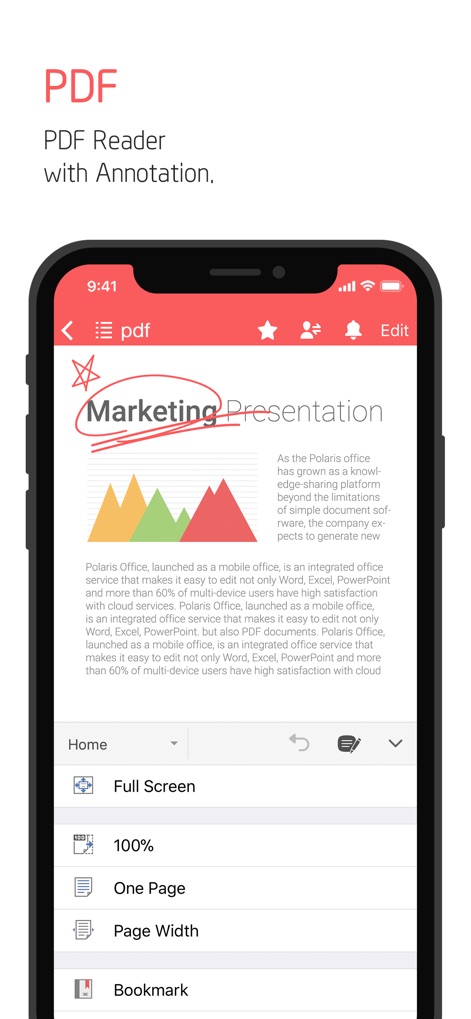
이 앱은 PDF 문서를 열람하고 편집할 수 있는 기능을 제공하며, 문서 내에 주석을 추가하거나 하단 메뉴를 통해 보기 옵션을 조정할 수 있습니다.
PDF 읽기 및 주석
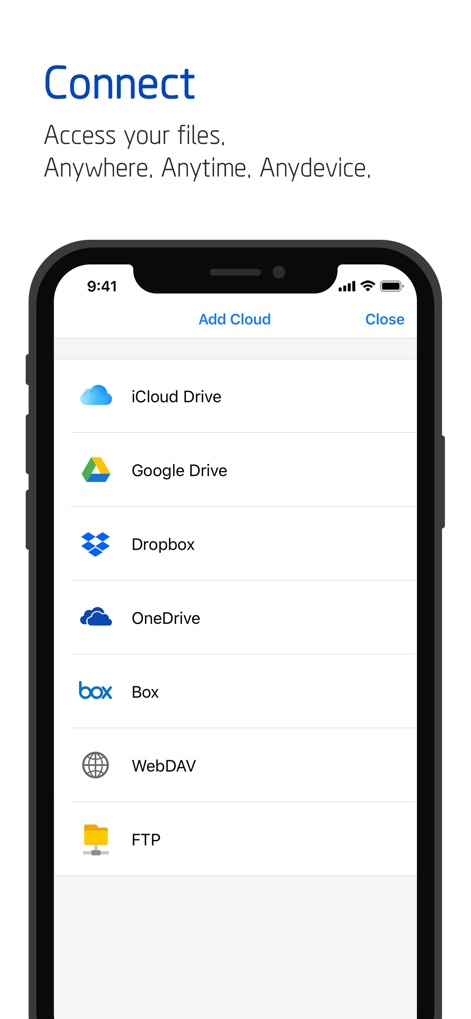
사용자는 다양한 클라우드 서비스에 쉽게 연결하여 파일을 관리할 수 있으며, 이 스크린샷은 iCloud Drive와 Google Drive를 포함한 여러 클라우드 플랫폼 목록을 보여줍니다.
클라우드 연동 접근

이 도구는 문서 공유를 위한 다양한 방법을 제공하여 협업을 용이하게 하며, 링크 공유를 통해 신속하게 접근 권한을 부여하거나 사용자 초대 기능을 활용할 수 있습니다.
간편한 협업 및 공유

사용자는 자신만의 템플릿을 저장하고 관리하여 문서 생성 시간을 단축할 수 있으며, 'My Template' 폴더를 통해 자주 사용하는 양식을 손쉽게 찾아 새로운 문서를 시작할 수 있습니다.
나만의 템플릿 활용
설명
Download
비슷한 앱
유사한 기능과 사용자 경험을 가진 앱

PDF PRO Scan Image & Documents
Balzo srl

The PDF Scanner, PDF editor HQ
NEXT K.U.M. LTD

CamScanner - PDF Scanner App
INTSIG Information Co., Ltd

Adobe Scan: PDF & OCR Scanner
Adobe Inc.

WPS Office: PDF, Docs, Sheets
KINGSOFT OFFICE SOFTWARE CORPORATION LIMITED

iLovePDF - PDF Editor & Scan
ILOVEPDF S.L.

Scanner App: Genius Scan
The Grizzly Labs

Microsoft Lens: PDF Scanner
Microsoft Corporation

Clear Scan: Doc Scanner App
INDY MOBILE APP COMPANY LIMITED
이 페이지는 앱이나 개발자의 공식 페이지가 아니며, 정보 제공 및 논평을 목적으로 작성된 독립 편집 간행물입니다. 명시적으로 달리 언급되지 않는 한, 해당 앱이나 개발자는 MWM, Apple, Google Play, 앱 퍼블리셔 또는 앱 개발자와 제휴, 보증, 후원, 승인 또는 공식적으로 연결되어 있지 않으며, 이 페이지의 어떤 내용도 해당 앱이 MWM의 서비스를 사용하여 개발되었음을 의미하지 않습니다. 모든 상표, 로고, 스크린샷 및 기타 콘텐츠는 해당 소유자의 자산입니다.