
This page is not an official page of the app or its developer, but an independent editorial publication created for informational and commentary purposes. Unless expressly stated otherwise, neither the app nor its developer is affiliated with, endorsed by, sponsored by, authorized by, or otherwise officially connected with MWM, Apple, Google Play, the app publisher, or the app's developer, and nothing on this page implies that the app was developed using MWM's services. Any trademarks, logos, screenshots, and other content remain the property of their respective owners.

7-Eleven Multicopy
Digital files often get stuck. This app gives users instant print and scan capability at any 7-Eleven in Japan, straight from their device.
Downloads
12.5M+User Rating
Total Ratings
41.3KPublisher
Category
UtilitiesLocales
2Latest Version
1.5.13Size
64.5 MBFirst Released
May 11, 20217-Eleven Multicopy App: A Technical Analysis of Core Features
Evaluating the application's key functionalities for mobile printing and scanning services in Japan.
On-Demand Mobile Printing
The app allows users to print photos, documents, and postcards directly from their smartphone to 7-Eleven Multi-copy machines via Wi-Fi, offering unparalleled convenience for on-demand printing.
Streamlined Secure Connectivity
This tool features simple, password-free operation and secure Wi-Fi connection for quick and easy printing and scanning, prioritizing user convenience and data security during transactions.
Direct Smartphone Scanning
The app provides the capability to scan physical documents using 7-Eleven Multi-copy machines and save the digitized images directly to the user's smartphone via Wi-Fi, simplifying document archival.
Versatile Print Media Support
It offers a range of printing options including document print, photograph print, and postcard print, with support for dedicated paper and the flexibility for users to bring their own postcard paper.
Multilingual Interface
The app supports both Japanese and English languages, making it highly accessible and user-friendly for a broad audience including local residents, tourists, and international business travelers.
Extensive File Format Compatibility
It supports a wide array of file formats for printing (JPEG, TIFF, BMP, PNG, PDF, XPS, XDW) and saving scanned data (PDF, XDW, JPEG, TIFF), ensuring broad usability for diverse user needs.
Frequently Asked Questions
Everything you need to know about 7-Eleven Multicopy
What is the primary function of the 7-Eleven Multicopy app?
The 7-Eleven Multicopy app prints photos and documents from smartphones and saves scanned physical documents to the device at 7-Eleven stores in Japan.
How do I print documents using the 7-Eleven Multicopy app?
Users send documents via Wi-Fi from the 7-Eleven Multicopy app to a Multi-copy machine in 7-Eleven stores in Japan. The process uses a QR code and requires no password.
Can I scan documents with the 7-Eleven Multicopy app?
Yes, the 7-Eleven Multicopy app scans physical documents to save images directly to your smartphone. It offers high-resolution scanning at 600dpi B&W or 400dpi full-color.
What file formats does the 7-Eleven Multicopy app support for printing?
For photos, the 7-Eleven Multicopy app supports JPEG, TIFF, BMP, and PNG. For documents and postcards, it supports PDF, XPS, XDW, JPEG, TIFF, BMP, and PNG.
Where can I use the 7-Eleven Multicopy app?
The 7-Eleven Multicopy app exclusively works with Multi-copy machines located at 7-Eleven stores in Japan. It does not operate outside this specific region.
What types of prints are available through the 7-Eleven Multicopy app?
The 7-Eleven Multicopy app offers Document Print, Photograph Print, and Postcard Print services. Users can also utilize their own postcard paper for printing.
Does the 7-Eleven Multicopy app require a password for operation?
No, the 7-Eleven Multicopy app provides simple operation without requiring any password. Security is ensured through its Wi-Fi connection method.
What are the supported operating systems for the 7-Eleven Multicopy app?
The 7-Eleven Multicopy app supports iOS/iPadOS versions 17 to 18, and 26.
What types of photo prints can the 7-Eleven Multicopy app produce?
The 7-Eleven Multicopy app produces various photo prints including 2L/L size, Shuffle print, ID photo, Share Print, and Square.
Is there a cost associated with using the 7-Eleven Multicopy app services?
Yes, users pay for printing documents or photos, and for saving scanned data using the 7-Eleven Multicopy app.
What is the maximum file size for printing with the 7-Eleven Multicopy app?
The maximum file size for Photograph, Document, or Postcard Print with the 7-Eleven Multicopy app is 30 MB per file. A maximum of 60 items is allowed.
What file formats are supported for saving scanned data using the 7-Eleven Multicopy app?
The 7-Eleven Multicopy app supports saving scanned data in PDF, XDW, JPEG, and TIFF formats.
The following screenshots and description are sourced directly from the app's official store listing and are the property of the app developer.
App Store
Screenshots

Seamless Printing Access
Explore the app's intuitive Top Menu, offering quick access to essential services like Photograph Print and Document Print.

Instant Print Activation
Discover the straightforward process of initiating prints by scanning the app's generated QR code and following the step-by-step instructions to connect to the Multicopy machine.
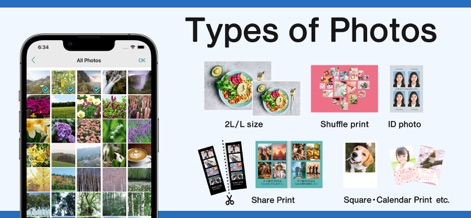
Versatile Photo Options
Users can select images from their All Photos gallery and explore diverse print layout options, including ID Photo and Shuffle Print, for personalized results.
Description
Download
More Like This
Apps with similar features and user experience

Photo Print: CVS Quick Prints
PlusMinusOne, Inc.

Princh
Princh ApS

COPIX
KOPIKS, OOO

Network Print
Sharp Corporation

ファミマネットワークプリント
FamilyMart Co.,Ltd.

FUJIFILM WPS Photo Transfer
FUJIFILM Corporation

printingbox
VISIONOTS Co.,Ltd

Wepa Print
WEPA Inc.

Xerox® Workplace
Xerox Corporation
This page is not an official page of the app or its developer, but an independent editorial publication created for informational and commentary purposes. Unless expressly stated otherwise, neither the app nor its developer is affiliated with, endorsed by, sponsored by, authorized by, or otherwise officially connected with MWM, Apple, Google Play, the app publisher, or the app's developer, and nothing on this page implies that the app was developed using MWM's services. Any trademarks, logos, screenshots, and other content remain the property of their respective owners.