
This page is not an official page of the app or its developer, but an independent editorial publication created for informational and commentary purposes. Unless expressly stated otherwise, neither the app nor its developer is affiliated with, endorsed by, sponsored by, authorized by, or otherwise officially connected with MWM, Apple, Google Play, the app publisher, or the app's developer, and nothing on this page implies that the app was developed using MWM's services. Any trademarks, logos, screenshots, and other content remain the property of their respective owners.


printingbox
Join the post-printer generation. Upload documents or photos directly from your phone and print instantly at any 24/7 kiosk with a simple 7-digit code—no ink, no cables, no hassle.
Downloads
324K+User Rating
Total Ratings
100Publisher
Category
ProductivityLocales
1Latest Version
1.0.10Size
0.4 MBFirst Released
Oct 20, 2023Print Anything, Anywhere, Instantly
Ditch the expensive ink and bulky home hardware. Upload your documents or photos to the cloud and collect professional-grade prints at any 24/7 kiosk in your neighborhood.
Seamless Mobile Uploads
Send PDFs, resumes, or Office docs directly from your iPhone to our secure cloud. No drivers, no cables, and no technical headaches required.
Studio-Quality Photo Prints
Turn your digital memories into high-gloss physical prints or get compliant ID and passport photos for a fraction of the cost of traditional retail shops.
Frequently Asked Questions
Everything you need to know about printingbox
What is the printingbox app?
The printingbox app is a self-service unmanned printing service. It allows users to instantly print documents and photos at nationwide printingbox machines using a 7-digit print code.
How do I print documents or photos using the printingbox app?
To print with printingbox, upload your file via the app, receive a 7-digit print code, then visit any printingbox machine within 24 hours. Enter the code and pay by card.
What types of documents can I print with printingbox?
The printingbox app supports A4 paper printing for documents. Supported file formats include MS Office files such as Word, Excel, PowerPoint, and PDF documents.
Can I print photos using the printingbox service?
Yes, the printingbox app allows smartphone photo printing, including general, ID, passport, or half-ID photos. Supported formats are JPG, PNG, BMP, and GIF.
How long is the printingbox print code valid for?
The 7-digit print code generated by printingbox is valid for 24 hours from issuance. Users must print their files within this timeframe before automatic deletion.
Does printingbox have a file size limit for uploads?
Yes, the printingbox app has a maximum file size limit of 30MB for uploads. Users must ensure their files do not exceed this limit for successful processing.
Where can I find a printingbox machine?
Users can locate nearby printingbox machines using the '프린팅박스 찾기' (Find Printing Box) feature available directly within the printingbox app interface.
What are the operating hours for printingbox customer support?
printingbox customer support operates from 9:00 AM to 10:00 PM on weekdays and from 10:00 AM to 10:00 PM on weekends and holidays, operating year-round.
What happens to uploaded files after printing with printingbox?
Files uploaded to printingbox are automatically deleted after 24 hours if not printed. Registered files are also not viewable by anyone other than the registrant.
Are optional access permissions required to use the printingbox app?
No, the printingbox app allows service usage even if users do not agree to optional access permissions, excluding features that specifically require those permissions.
The following screenshots and description are sourced directly from the app's official store listing and are the property of the app developer.
App Store
Screenshots
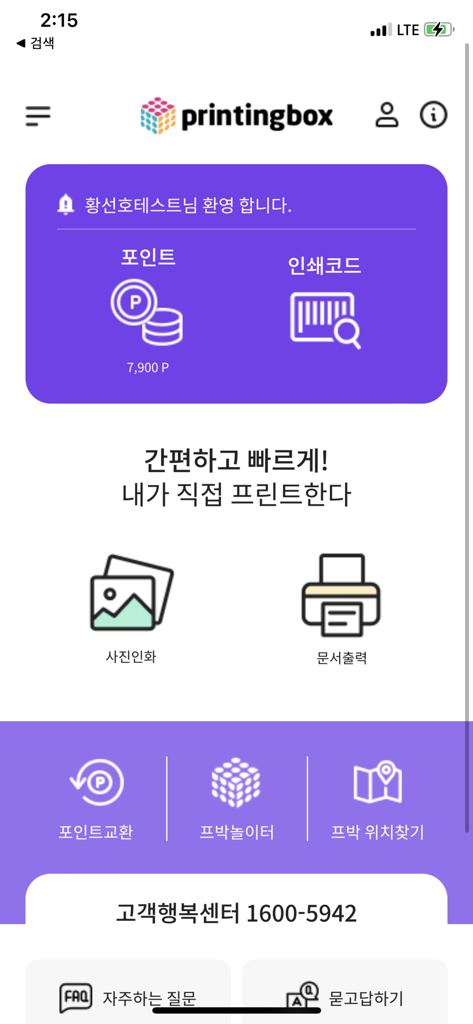
printingbox mobile app home screen showing photo and document printing features
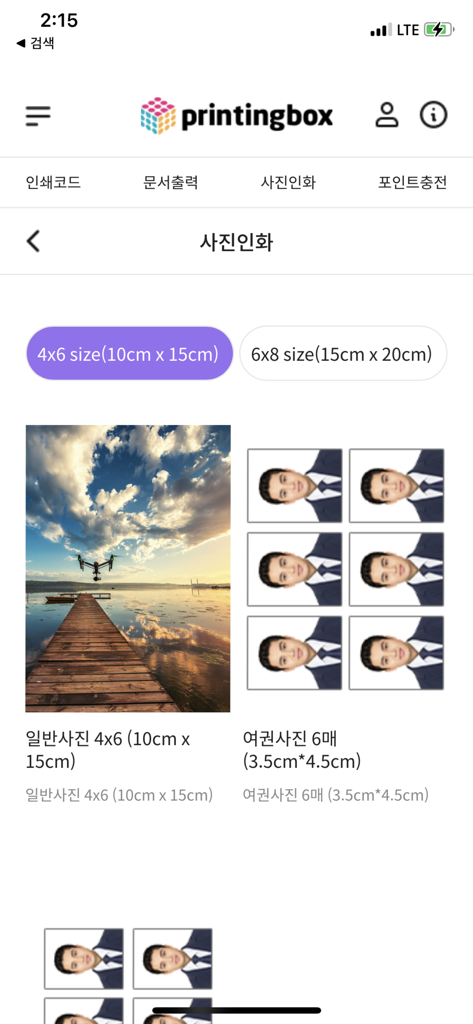
Interface of the printingbox app showing options for standard landscape prints and passport photo layouts
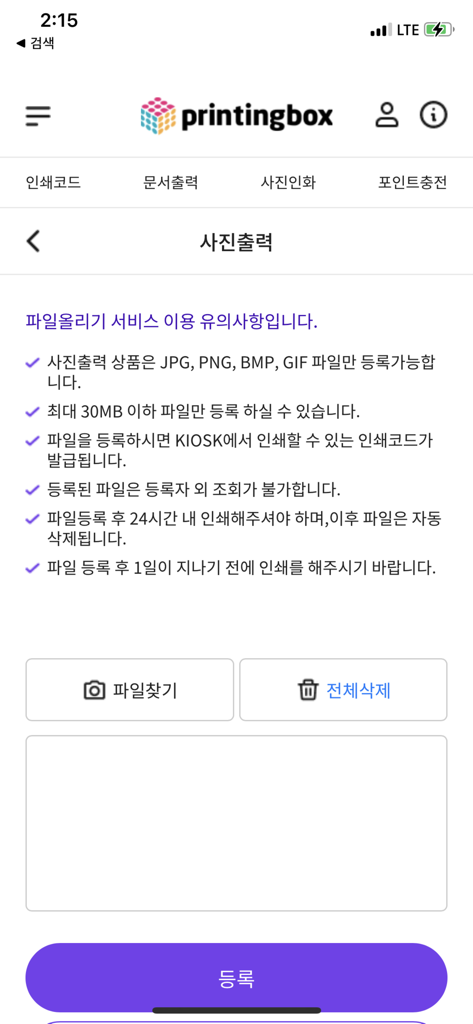
The photo printing upload screen of the printingbox mobile app showing file requirements and upload buttons.
Description
Download
More Like This
Apps with similar features and user experience

Photo Print: CVS Quick Prints
PlusMinusOne, Inc.

Princh
Princh ApS
7-Eleven Multicopy
FUJIFILM Business Innovation Corp.

COPIX
KOPIKS, OOO
Network Print
Sharp Corporation

ファミマネットワークプリント
FamilyMart Co.,Ltd.
FUJIFILM WPS Photo Transfer
FUJIFILM Corporation

Wepa Print
WEPA Inc.

Xerox® Workplace
Xerox Corporation
This page is not an official page of the app or its developer, but an independent editorial publication created for informational and commentary purposes. Unless expressly stated otherwise, neither the app nor its developer is affiliated with, endorsed by, sponsored by, authorized by, or otherwise officially connected with MWM, Apple, Google Play, the app publisher, or the app's developer, and nothing on this page implies that the app was developed using MWM's services. Any trademarks, logos, screenshots, and other content remain the property of their respective owners.