
This page is not an official page of the app or its developer, but an independent editorial publication created for informational and commentary purposes. Unless expressly stated otherwise, neither the app nor its developer is affiliated with, endorsed by, sponsored by, authorized by, or otherwise officially connected with MWM, Apple, Google Play, the app publisher, or the app's developer, and nothing on this page implies that the app was developed using MWM's services. Any trademarks, logos, screenshots, and other content remain the property of their respective owners.


Aerlink
The essential bridge for makers and DIY enthusiasts to connect, control, and automate. Seamlessly link your iPhone to custom electronics, remote triggers, and smart home projects with the power of Bluetooth Low Energy.
Downloads
256K+User Rating
Total Ratings
200Publisher
Category
UtilitiesLocales
1Latest Version
4.0Size
13.8 MBFirst Released
Jun 11, 2015Master Your IoT Ecosystem
Bridge the gap between your iPhone and any BLE-compatible hardware. Aerlink gives you the technical freedom to build, connect, and control custom DIY projects without the limits of walled gardens.
The Ultimate Maker Bridge
Connect your iPhone to Arduino, Raspberry Pi, or custom-built sensors. Aerlink acts as the perfect functional bridge for your DIY electronics and tinkering projects.
Custom Smart Home Utility
Don't pay for overpriced smart appliances. Sync your shopping lists and reminders to any BLE-enabled screen or dashboard in your home with ease.
Frequently Asked Questions
Everything you need to know about Aerlink
What is Aerlink?
Aerlink connects to any compatible devices through Bluetooth Low Energy (BLE). It allows users to send reminders over Bluetooth and take pictures remotely with connected devices.
Can Aerlink manage reminders?
Yes, Aerlink enables reminder management. You can choose a list of reminders to send over Bluetooth, and connected devices can navigate, check, and uncheck them.
Does Aerlink offer remote camera functionality?
Yes, Aerlink supports remote camera control. You can use your connected device to control the camera's shutter and remotely receive the pictures taken.
How does Aerlink connect to other devices?
Aerlink connects to compatible devices using Bluetooth Low Energy (BLE). This allows for functionalities such as sending reminders and remote camera operation.
What is the version number of the Aerlink app?
The current version of the Aerlink app is 4.0. This version number is listed within the application's 'Information' section.
How can I contact the Aerlink developer?
You can contact the developer of Aerlink through Twitter. Their Twitter handle, @GuiyeC, is provided in the app's 'Information' section.
The following screenshots and description are sourced directly from the app's official store listing and are the property of the app developer.
App Store
Screenshots
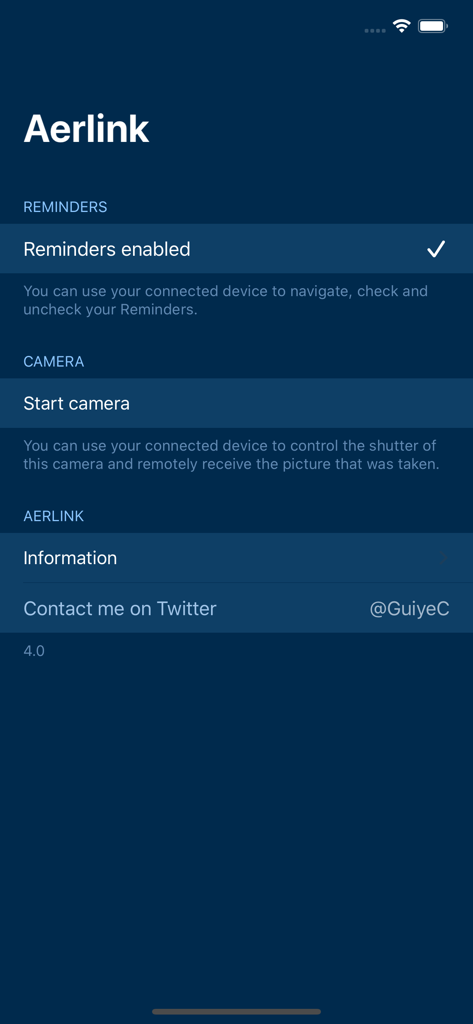
Aerlink mobile app interface showing options for Bluetooth reminders and remote camera trigger
Description
Download
More Like This
Top-ranked apps in the same category

Google LLC

Google Chrome
Google LLC

中国移动(手机营业厅)
China Mobile Online Services Co., Ltd.

Google Authenticator
Google LLC

CNH do Brasil
Servicos e Informacoes do Brasil

Cleanup: Phone Storage Cleaner
DEEP FLOW SOFTWARE SERVICES - FZCO

gov.br
Servicos e Informacoes do Brasil

中国电信-全国统一官方服务平台
CHINA TELECOM Corporation Ltd.

Microsoft Edge: AI Browser
Microsoft Corporation
This page is not an official page of the app or its developer, but an independent editorial publication created for informational and commentary purposes. Unless expressly stated otherwise, neither the app nor its developer is affiliated with, endorsed by, sponsored by, authorized by, or otherwise officially connected with MWM, Apple, Google Play, the app publisher, or the app's developer, and nothing on this page implies that the app was developed using MWM's services. Any trademarks, logos, screenshots, and other content remain the property of their respective owners.