
This page is not an official page of the app or its developer, but an independent editorial publication created for informational and commentary purposes. Unless expressly stated otherwise, neither the app nor its developer is affiliated with, endorsed by, sponsored by, authorized by, or otherwise officially connected with MWM, Apple, Google Play, the app publisher, or the app's developer, and nothing on this page implies that the app was developed using MWM's services. Any trademarks, logos, screenshots, and other content remain the property of their respective owners.


Яндекс Диск - Облако для фото
Local device storage is a relic. This platform liberates users' photo and document libraries, ensuring omnipresent access and unwavering digital command.
Downloads
12.5M+User Rating
Total Ratings
423.1KPublisher
Category
ProductivityLocales
4Latest Version
5.89.0Size
366.1 MBFirst Released
Aug 28, 2012Yandex Disk - Cloud Storage Evaluation
An analytical overview of key features for diverse digital users.
Cloud File Storage & Sync
The app provides secure storage for files and ensures real-time synchronization across various devices, including mobile, desktop, and web interfaces.
Robust Security & Data Backup
This tool ensures data security through automatic encryption and virus scanning, providing high availability and reliable access to stored information.
Automatic Photo & Document Upload
It allows users to automatically upload photos and documents to cloud storage immediately upon creation, freeing up device space and ensuring data safety.
Online Document Editing & Collaboration
The app enables the creation and editing of documents and spreadsheets directly within the cloud, supporting popular formats and real-time online collaboration.
Effortless File Sharing
It allows users to easily generate shareable links for documents, images, or spreadsheets, facilitating direct data transfer from the cloud without quality or size degradation.
Remote Cloud File Management
This tool features an integrated cloud-based file manager, enabling users to organize and manage their gallery, documents, and other content remotely.
Frequently Asked Questions
Everything you need to know about Яндекс Диск - Облако для фото
What is Yandex Disk and how does it work?
Yandex Disk stores, manages, and syncs files in the cloud across devices. It allows real-time access from phones, computers, or the web interface, serving as a secure storage solution for personal and work use.
Does Yandex Disk offer automatic photo backup and data upload?
Yes, Yandex Disk provides an automatic upload feature for photos and documents. This saves files to cloud storage as they are created, freeing up device space and ensuring data safety with automatic data backup.
Can I edit documents and spreadsheets directly in Yandex Disk?
Yes, users can create and edit documents and spreadsheets directly within Yandex Disk's cloud environment. It supports popular file formats and enables real-time online collaboration among users.
Is data stored on Yandex Disk secure and protected?
Yes, Yandex Disk ensures data security by automatically encrypting all files and scanning them for viruses. The cloud storage provides high availability and reliable access to your data whenever needed.
How can I share files using Yandex Disk?
Yandex Disk enables easy file sharing by allowing users to create direct links to documents, images, or spreadsheets. Data transfers from the cloud without quality or size loss, and sharing is unlimited.
Does Yandex Disk allow file synchronization across multiple devices?
Yes, Yandex Disk supports syncing files across various devices. It allows access to your files from your phone, computer, or via the web interface, ensuring all changes are saved in real-time.
The following screenshots and description are sourced directly from the app's official store listing and are the property of the app developer.
App Store
Screenshots
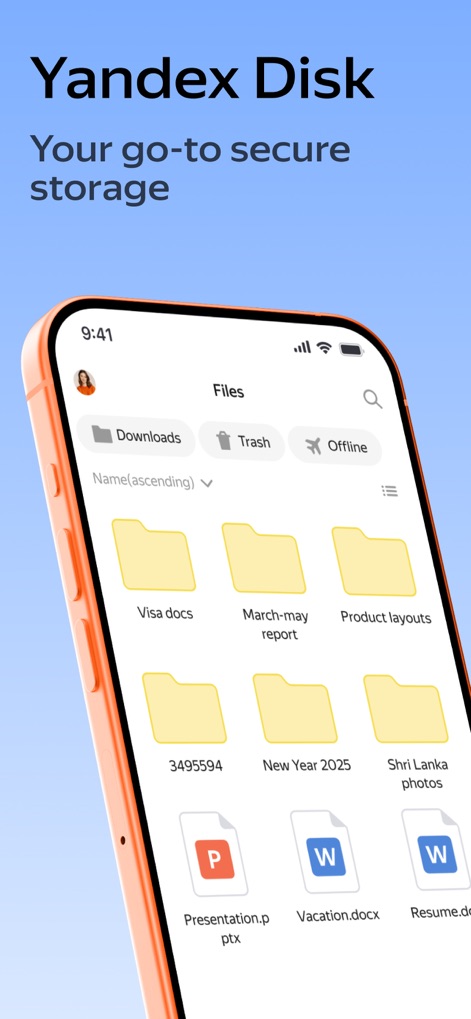
Organized File Hub
This screenshot highlights the app's intuitive file management interface, displaying clearly labeled folders and various document types for easy access.

Seamless Device Sync
Users can observe the seamless synchronization capability across devices, with a PDF document ("Gooseberry.pdf") accessible on both mobile and desktop interfaces.
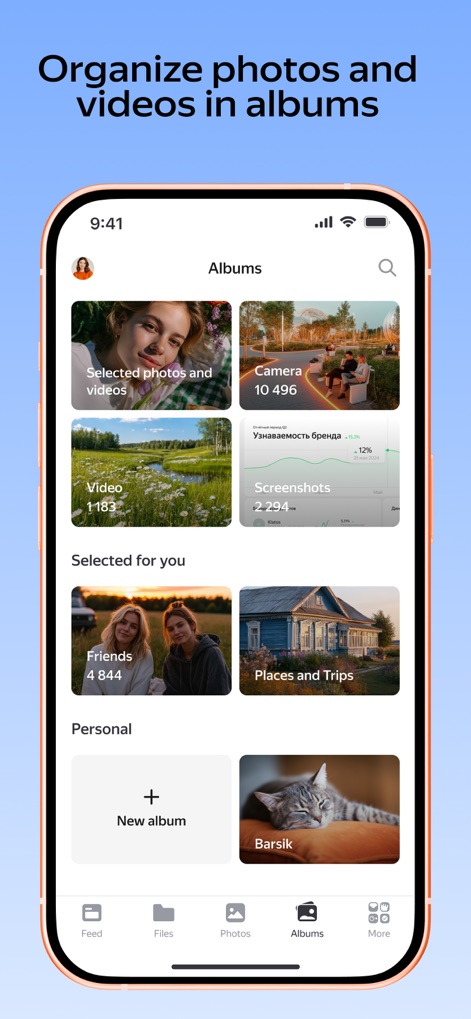
Smart Album Creation
The app demonstrates its robust photo and video organization, featuring automatically generated albums like "Selected photos and videos" and the option to create a "New album."
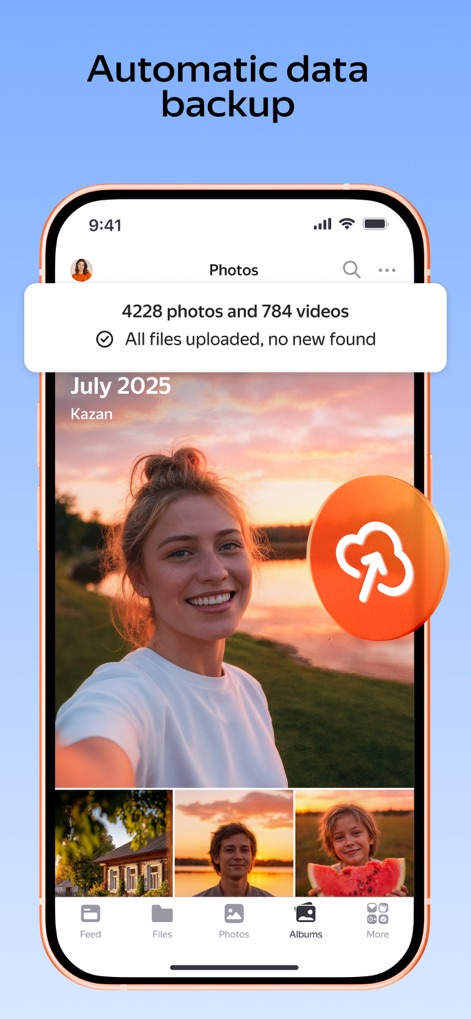
Effortless Photo Backup
This visual showcases the automatic data backup feature, indicated by the cloud upload icon and a clear notification confirming "4228 photos and 784 videos uploaded."

Instant File Search
The app's quick search functionality is visible, allowing users to efficiently find specific documents like "Passport scan.pdf" by typing into the dedicated search bar.
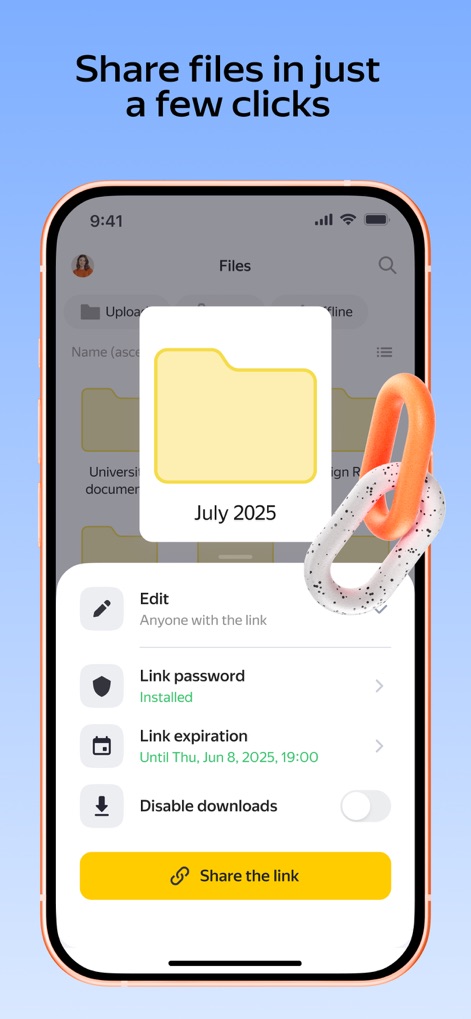
Secure Sharing Options
This screenshot illustrates the app's versatile file sharing capabilities, including advanced options like "Link password" and "Link expiration" directly from the folder view.
Description
Download
More Like This
Apps with similar features and user experience

Google Drive
Google LLC

Cloud: 1 drive - more storage
V Kontakte OOO

Nutstore-Cloud Storage&Backup
Yicun Network Technology Co. Ltd.

Microsoft OneDrive
Microsoft Corporation

Dropbox: Cloud Storage Backup
Dropbox, Inc.

Google One
Google LLC

Cloud Storage: Cloud Drive App
Fazcon PTY LTD

Lifebox: Storage & Backup
LIFECELL BULUT COZUMLERI ANONIM SIRKETI

JioAICloud - Storage & Photos
JIO PLATFORMS LIMITED
This page is not an official page of the app or its developer, but an independent editorial publication created for informational and commentary purposes. Unless expressly stated otherwise, neither the app nor its developer is affiliated with, endorsed by, sponsored by, authorized by, or otherwise officially connected with MWM, Apple, Google Play, the app publisher, or the app's developer, and nothing on this page implies that the app was developed using MWM's services. Any trademarks, logos, screenshots, and other content remain the property of their respective owners.