AT&T Secure Family® parent app

AT&T Secure Family® parent app


Download on App Store
Logo of AT&T Secure Family® parent app

AT&T Secure Family®: Your family’s safety, simplified.

The all-in-one location tracker and parental control app designed for your peace of mind. Monitor real-time locations, manage screen time, and filter digital content to protect your children wherever they go.

Download on App Store

Publisher

AT&T Services, Inc.

Category

Lifestyle

Downloads

586K+

User Rating

4.1/5

Total Ratings

27K+

Locales

2

Safety at a Glance

Discover the interface used by 586K+ users.
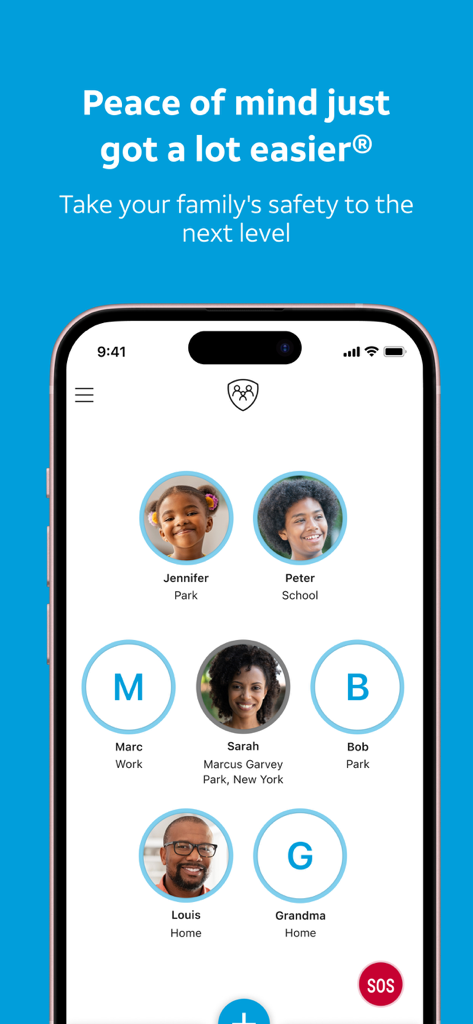
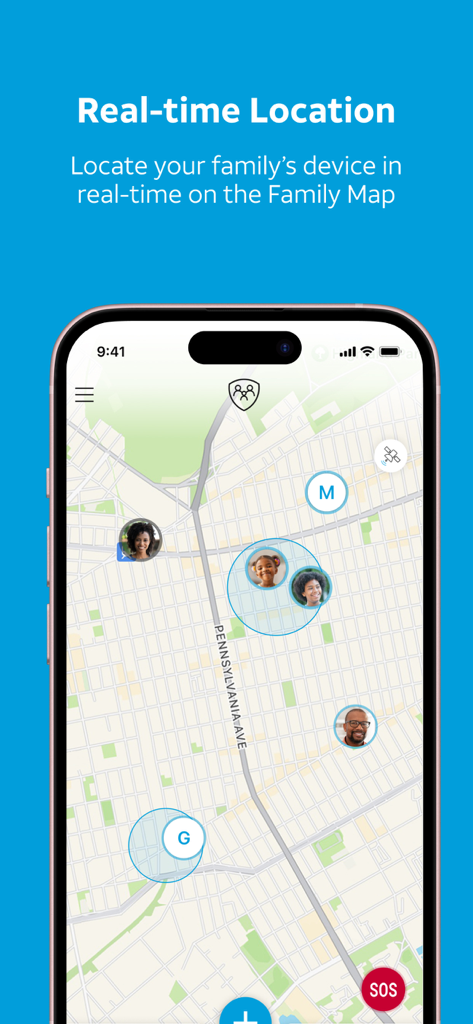
AT&T Secure Family parent app dashboard showing locations of family members

AT&T Secure Family parent app dashboard showing locations of family members

A smartphone screen showing the AT&T Secure Family app family map with real-time locations of family members.

A smartphone screen showing the AT&T Secure Family app family map with real-time locations of family members.

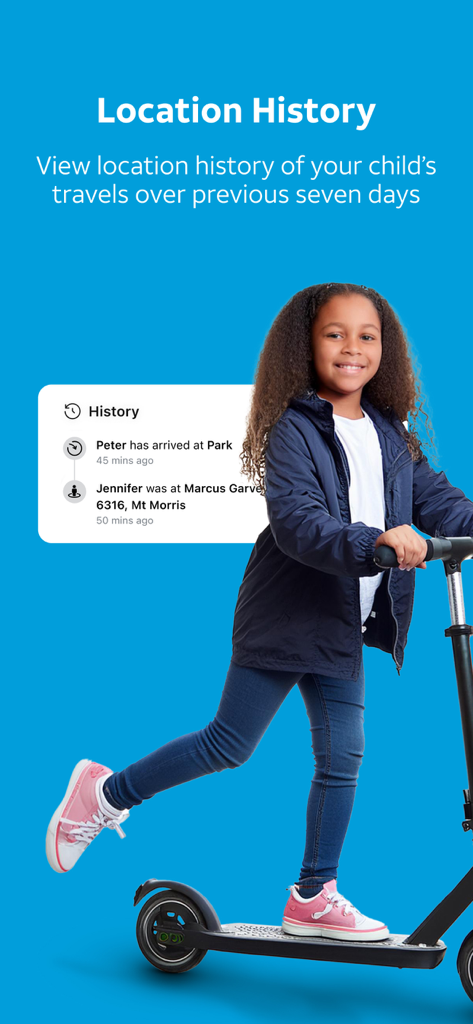
A young girl on an electric scooter with a location history notification overlay showing her movement

A young girl on an electric scooter with a location history notification overlay showing her movement

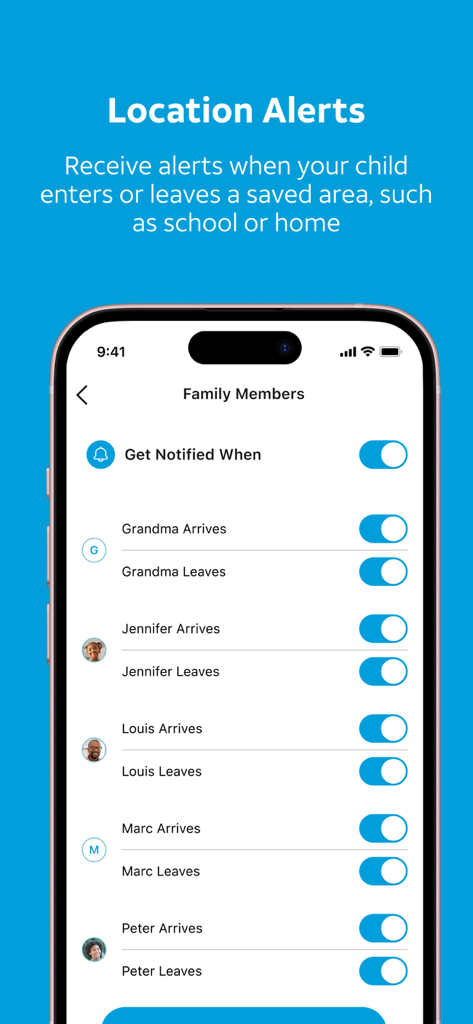
A smartphone screen showing the location alerts settings in the AT&T Secure Family app for multiple family members.

A smartphone screen showing the location alerts settings in the AT&T Secure Family app for multiple family members.

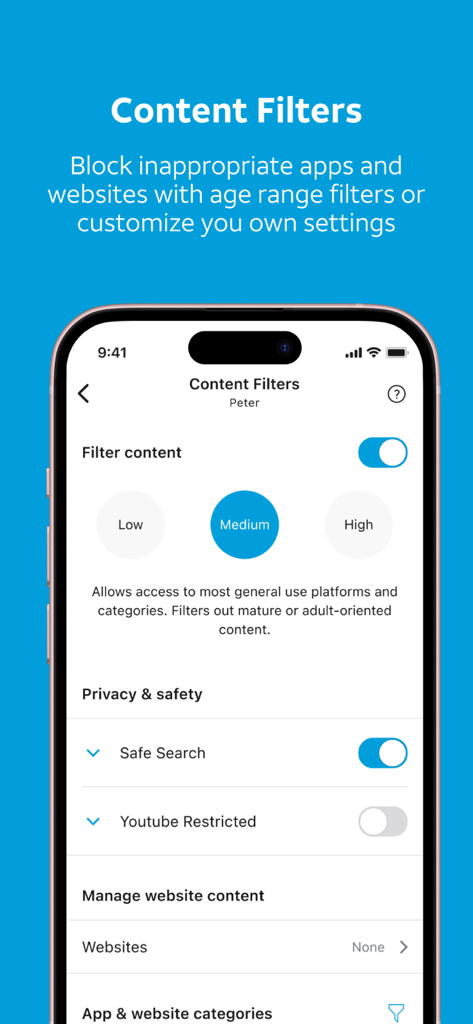
AT&T Secure Family app content filter settings screen showing medium protection level.

AT&T Secure Family app content filter settings screen showing medium protection level.

AT&T Secure Family app screen showing internet access blocked for a child reading a book

AT&T Secure Family app screen showing internet access blocked for a child reading a book

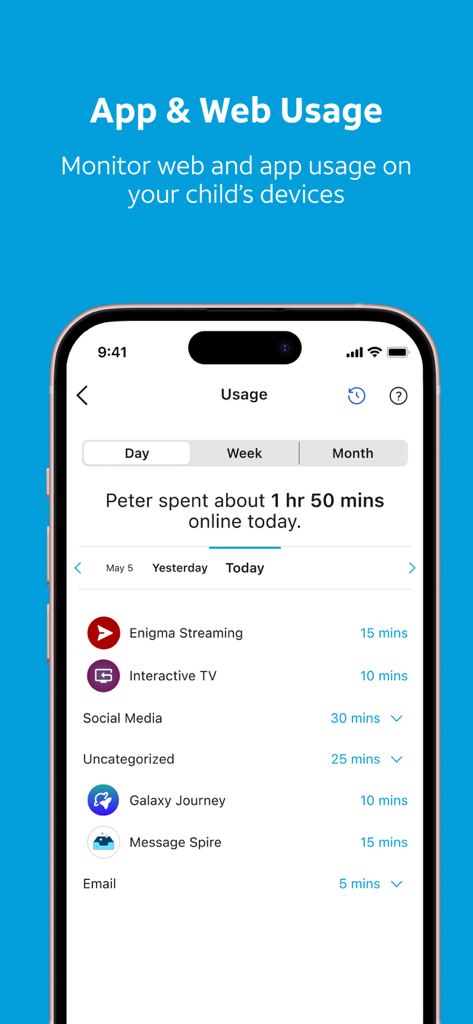
AT&T Secure Family app interface showing a childs daily web and app usage statistics

AT&T Secure Family app interface showing a childs daily web and app usage statistics

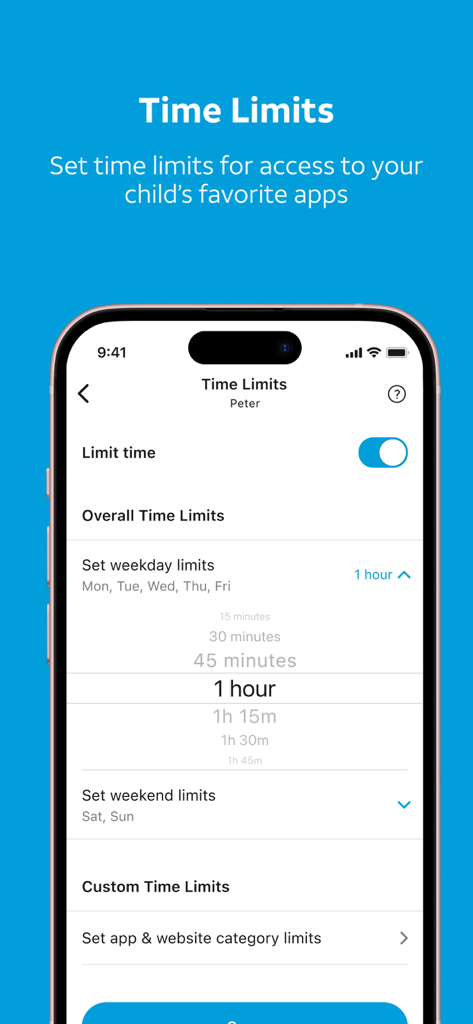
Interface of the AT&T Secure Family app showing daily screen time limit settings for a child

Interface of the AT&T Secure Family app showing daily screen time limit settings for a child

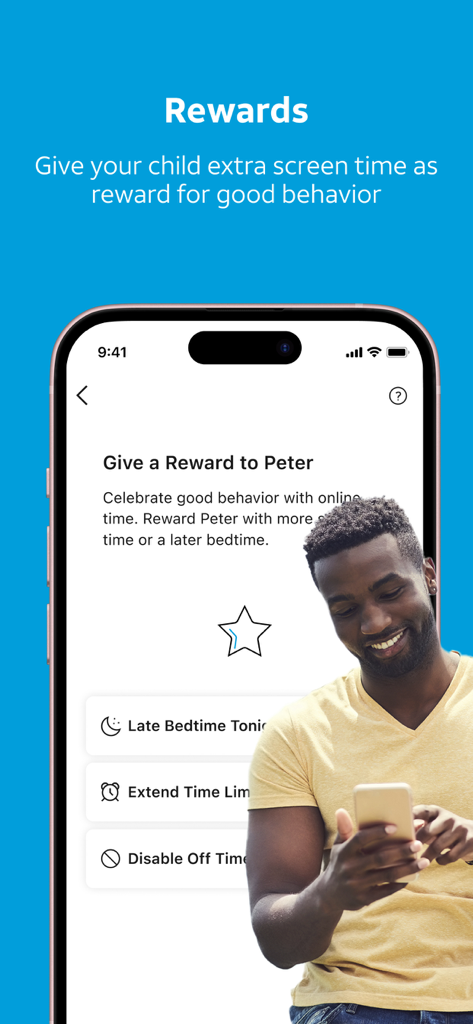
AT&T Secure Family app interface showing the rewards feature for extra screen time

AT&T Secure Family app interface showing the rewards feature for extra screen time

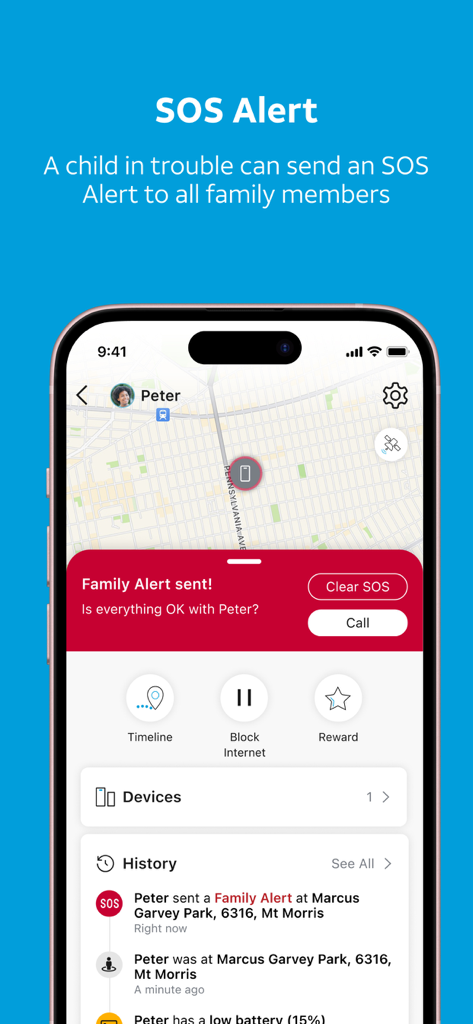
AT&T Secure Family app interface showing an SOS alert from a child with a real-time location map

AT&T Secure Family app interface showing an SOS alert from a child with a real-time location map

Protect What Matters Most

The tools that make this app stand out, trusted by 586K+ users.

📍

Precision Location Tracking

Know they’re safe without the constant texting. See your family on a live map and get automatic alerts when they arrive at school, home, or practice.

📵

Effortless Screen Time Control

End the bedtime battles by setting custom schedules, blocking inappropriate content, or pausing internet access instantly across all devices.

🆘

Instant Emergency Support

Give your kids a digital lifeline with one-touch SOS alerts and locate lost phones quickly with a remote ring that works even on silent mode.

About the app

Everything you need to know about AT&T Secure Family® parent app.

Description

AT&T Secure Family ® is a device locator & parental control app to help parents or guardians protect their family members by offering real-time device location tracking with safety alerts, screen time control, content blocker, website & app usage tracker, and ability to find a lost phone. Secure Family is available for all families, no matter which mobile provider you use. Take your family’s safety to the next level. KEEP TRACK OF YOUR FAMILY’S DEVICES * Locate devices in real-time on the family map and view location history * Get location alerts when your family member’s device enters or leaves a saved safety area, such as school or home * Set scheduled alerts on your family member’s device location. Are they home from school at 3PM? * Use breadcrumb map as a location tracker to know where your family member’s device was during the day * Get notified when a family member’s device has arrived at a destination with check in notifications CONTROL YOUR CHILD’S SCREEN TIME & BLOCK CONTENT * Parental controls to block apps and website content with age range filters * Block internet access instantly * Set time limits for access to your child’s favorite apps to control screen time * Track web and app usage on child devices FAMILY SAFETY AND REWARDS * Help children develop good digital habits by encouraging them to track their app usage * Parents, give your child extra screen time as a reward for good behavior * Family Members can send an emergency alert to everyone with the press of a button * Find a lost phone with a ring that enables a sound to play for two minutes to help locate the device * Support your child’s digital journey with expert-created content designed to promote safe online habits * Dual parent or guardian admin feature supports co-parenting needs Legal Disclaimers The AT&T Secure Family service is free for the first 30 days. After the first 30 days, you will be automatically billed $7.99 each month (includes support for up to 10 family members and up to 30 devices in total). Service auto renews every 30 days unless cancelled. To use the AT&T Secure Family service, you must download two Apps: the AT&T Secure Family App (adults, parents or guardians) and the AT&T Secure Family Companion App (family member). Visit att.com/securefamily for details. Install the Companion App on your child’s device and pair it with the Parent App on your device. Pairing is required to access all features. Only authorized app users have permission to use the App to locate a family member’s device. Requires iOS v.16 or higher. Note: Continued use of GPS running in the background can reduce battery life. Availability, timeliness, or accuracy of location is not guaranteed. Coverage not available in all areas. There is a compatibility conflict that can prevent the addition of AT&T Secure Family Companion App to your child’s companion device if you have AT&T ActiveArmor Advanced Mobile Security running on the same companion device.  If you wish to continue with the purchase, you must downgrade to the FREE version of AT&T ActiveArmor Mobile Security on the companion device before adding AT&T Secure Family Companion App. AT&T Secure Family FAQs: https://att.com/securefamilyguides The collection, use, and disclosure of any personal information through this application is governed by AT&T's Privacy Policy found at: att.com/privacypolicy and the App’s End User License Agreement found at att.com/legal/terms.secureFamilyEULA.html. * AT&T Postpaid Wireless customers: View, modify or cancel service anytime within the Secure Family app. AT&T does not provide credits or refunds for partial months. * AT&T PREPAID wireless customers and all other mobile networks billed by the App Store: See Apple’s polices regarding cancellation in the App Store at https://support.apple.com/en-us/HT202039

Latest Version

11.5.3

Size

154.6 MB

First Released

Feb 5, 2010

Ready for Total Peace of Mind?

Join thousands of parents and start your 30-day free trial today. Manage screen time, track locations, and protect your digital household with one simple app.

Download on App Store
FAQ

Frequently Asked Questions

Everything you need to know about AT&T Secure Family® parent app

What is AT&T Secure Family?

AT&T Secure Family is a parental control and device locator app. It helps parents protect family members with real-time location tracking, screen time control, content blocking, and the ability to find lost phones.

How does AT&T Secure Family track device location?

AT&T Secure Family tracks devices in real-time on a family map and provides location history. It also sends safety alerts when a device enters or leaves saved areas like school or home.

Can AT&T Secure Family block apps and content?

Yes, AT&T Secure Family offers parental controls to block apps and website content using age range filters. It also allows instant blocking of internet access on child devices.

What is the monthly cost for AT&T Secure Family?

After a 30-day free trial, AT&T Secure Family costs $7.99 per month. This subscription supports up to 10 family members and up to 30 devices in total.

Is there a free trial available for AT&T Secure Family?

Yes, AT&T Secure Family offers a free trial for the first 30 days. After this period, the service automatically bills $7.99 monthly unless cancelled.

How many family members and devices does AT&T Secure Family support?

AT&T Secure Family supports up to 10 family members and up to 30 devices in total. This is included in the monthly subscription cost.

Can I set screen time limits for apps with AT&T Secure Family?

Yes, AT&T Secure Family allows parents to set time limits for access to children's favorite apps. This feature helps control screen time and promotes balanced digital habits.

What are the two apps required for AT&T Secure Family to function?

To use the service, you must download the AT&T Secure Family App for parents or guardians and the AT&T Secure Family Companion App for the family member's device. Pairing is essential.

Does AT&T Secure Family work with any mobile provider?

Yes, AT&T Secure Family is available for all families, regardless of their mobile provider. This ensures broad accessibility for parental control and device location.

Can AT&T Secure Family help locate a lost phone?

Yes, AT&T Secure Family includes a "find a lost phone" feature. It can make the device play a sound for two minutes to help locate it.

Can a child send an emergency alert using AT&T Secure Family?

Yes, family members can send an emergency alert to everyone with the press of a button. This SOS feature enhances family safety.

Are there compatibility issues with AT&T Secure Family and other apps?

Yes, there is a compatibility conflict if AT&T ActiveArmor Advanced Mobile Security runs on the companion device. Users must downgrade to the FREE version of ActiveArmor.

What iOS version is required for AT&T Secure Family?

AT&T Secure Family requires iOS v.16 or higher to operate. This ensures compatibility with the latest features and security updates.

App information, icons, screenshots, and descriptions displayed on this page are sourced from the Apple App Store and are the property of their respective developers. Download estimates and rankings are based on MWM's proprietary models and may not reflect actual figures. This page is provided for informational and analytical purposes only.

Believe this page infringes your intellectual property? File a dispute