
This page is not an official page of the app or its developer, but an independent editorial publication created for informational and commentary purposes. Unless expressly stated otherwise, neither the app nor its developer is affiliated with, endorsed by, sponsored by, authorized by, or otherwise officially connected with MWM, Apple, Google Play, the app publisher, or the app's developer, and nothing on this page implies that the app was developed using MWM's services. Any trademarks, logos, screenshots, and other content remain the property of their respective owners.


Audio Editor : Audiolab
Unleash your audio potential. This app transforms your device into a pocket-sized sound studio.
Downloads
1M+User Rating
Total Ratings
4.0KPublisher
Category
MusicLocales
12Latest Version
1.8.6Size
97.5 MBFirst Released
Mar 16, 2023An evaluation of core functionalities empowering mobile audio production for diverse creators.
Key Features Analysis: Audio Editor : Audiolab
Multitrack Audio Editing & Mixing
The app provides professional multitrack audio editing and mixing capabilities, allowing users to layer sounds, arrange complex projects, and achieve polished results with anti-interference filters.
AI Vocal & Instrument Separation
It features an AI-powered vocal remover and instrument extractor, enabling users to separate vocals, accompaniment, and other stems from any audio file for remixing or practice.
Advanced Audio Effects Suite
This tool offers a rich collection of audio enhancement effects, including Reverb, Chorus, Gain, Time Stretch, Pitch, Tempo, Distortion, Delay, and Denoise (RNN), for comprehensive sound manipulation.
Non-Linear Audio Editing
The app supports comprehensive non-linear editing with high-precision zoom, enabling users to perform precise cuts, clips, mergers, and mixes, with full undo/redo functionality for error correction.
Professional 10-Band Equalizer
It includes a customizable 10-band equalizer, allowing users to fine-tune frequencies for bass boost, vocal clarity, and overall acoustic balance.
Integrated High-Quality Recorder
This tool features an integrated voice recorder for capturing audio with a single tap, supporting external devices like AirPods and other Bluetooth headsets for flexible recording setups.
Video to Audio Extraction & Conversion
The app allows users to extract audio tracks automatically from video files and convert audio into various formats like MP3, WAV, and AIFF, with multi-track extraction support.
Video Dubbing & Soundtrack Composition
It provides a simple video dubbing feature, allowing users to add custom voiceovers, background music, and sound effects to videos, with volume adjustment for precise mixing.
Frequently Asked Questions
Everything you need to know about Audio Editor : Audiolab
What is Audio Editor : Audiolab?
Audio Editor : Audiolab is a powerful audio editing tool that mixes music, creates ringtones, and provides features like vocal removal, audio enhancement, multi-track editing, and format conversion.
Can Audio Editor : Audiolab remove vocals from a song?
Yes, Audio Editor : Audiolab extracts vocals, accompaniment, and various instruments from any audio using its AI-powered vocal remover. It supports splitting tracks into 2, 4, or 5 stems for precise control.
Does Audio Editor : Audiolab support multi-track audio editing?
Yes, Audio Editor : Audiolab supports multitrack audio editing and mixing, allowing an unlimited number of tracks. Users can perform non-linear editing actions including splicing, cutting, copying, pasting, and moving segments.
What audio effects are available in Audio Editor : Audiolab?
Audio Editor : Audiolab offers Pitch, Tempo, Reverb with various scenarios, Distortion, Delay, and a 10-section Equalizer with presets. It also includes a Denoise feature for clear audio.
Can I record audio directly within Audio Editor : Audiolab?
Yes, Audio Editor : Audiolab includes a voice recorder for one-tap recording. It supports AirPods and other Bluetooth headsets. Users can also monitor live audio with in-ear monitoring while recording or overdubbing.
What audio formats does Audio Editor : Audiolab support for import and export?
Audio Editor : Audiolab supports importing and exporting M4A, MP3, WAV, and AAC media files. It also offers format conversion for MP3, WAV, and AIFF to meet various user needs.
How do I get Audio Editor : Audiolab Pro features?
Audio Editor : Audiolab Pro features are obtained via a subscription. Users can access a free trial, after which monthly or annual charges apply through iTunes, unless the subscription is canceled beforehand.
Does Audio Editor : Audiolab allow setting edited audio as a ringtone?
Yes, Audio Editor : Audiolab allows users to set their edited audio as a phone ringtone directly within the application. This feature is accessible after completing audio modifications.
Can Audio Editor : Audiolab extract audio from video files?
Yes, Audio Editor : Audiolab extracts lossless MP3 or other audio formats from videos. It includes a built-in audio extractor that automatically separates audio tracks when importing from video files.
Does Audio Editor : Audiolab provide denoise functionality?
Yes, Audio Editor : Audiolab includes a Denoise feature. It utilizes Recurrent Neural Network Noise Reduction to enhance audio clarity by effectively reducing unwanted background noise from recordings.
The following screenshots and description are sourced directly from the app's official store listing and are the property of the app developer.
App Store
Screenshots

Users can achieve multitrack mastery with unlimited audio tracks and precise waveform controls for detailed editing operations like fade and split.
Multitrack Mastery

This tool empowers users with an extensive sound effects suite, featuring intuitive sliders for Pitch and Tempo adjustments and various reverb environments.
Dynamic Effects Rack

The app offers advanced audio processing with detailed Delay parameters and a 10-band Equalizer with genre presets for fine-tuning sound.
Advanced EQ & Delay

Witness the power of AI as the app intelligently separates audio into multiple stems like Vocals and Instruments, all accessible through a clear waveform preview.
AI Stem Separation

Users can discover the intuitive mixing console with individual faders for elements like vocals and drums, alongside an integrated FX button for real-time adjustments.
Creative Mixing Console
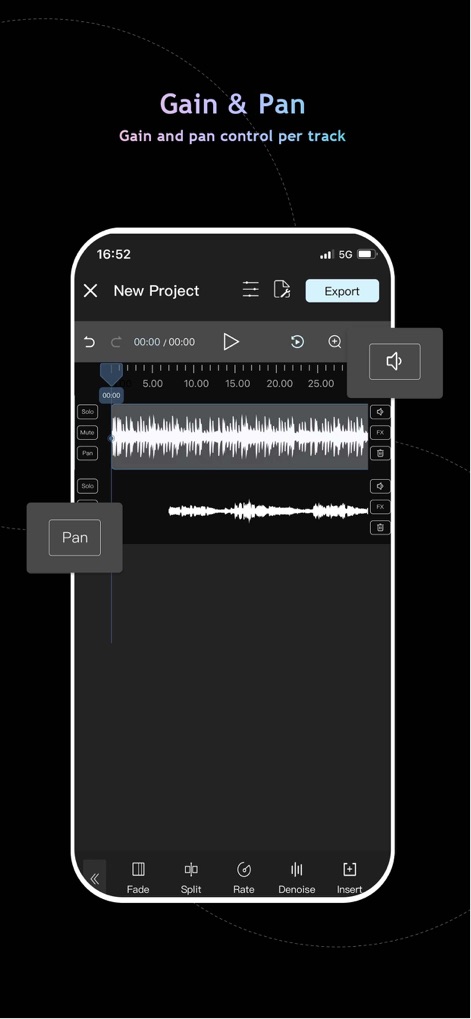
The app provides granular control over each track with dedicated Gain and Pan adjustments, easily accessible within the multitrack editing interface.
Precision Track Control

Users can utilize the app's integrated recording studio with real-time monitoring via headphones and options to import background music for seamless dubbing.
Integrated Recording Studio

The app enables effortless audio file management within its library, supporting multiple audio formats like MP3 and WAV, and offering quick actions like setting as ringtone.
Flexible File Management
Description
Download
More Like This
Apps with similar features and user experience

WavePad音频和音乐编辑器
NCH Software

Audio Editor - Music editor
苏娟 陈

SoundLab - Audio Editor
孛 刘

Microphone Live-Voice Recorder
Arpenik Katikyan

Ferrite Recording Studio
Wooji Juice Ltd

WavePad Music and Audio Editor
NCH Software

Audio Editor - AudioLab, Mixer
Innovation Software Development 360 LLC

au editor - audio cutter
龙刚 李

Audio Editor: Video to Audio
文 夏
This page is not an official page of the app or its developer, but an independent editorial publication created for informational and commentary purposes. Unless expressly stated otherwise, neither the app nor its developer is affiliated with, endorsed by, sponsored by, authorized by, or otherwise officially connected with MWM, Apple, Google Play, the app publisher, or the app's developer, and nothing on this page implies that the app was developed using MWM's services. Any trademarks, logos, screenshots, and other content remain the property of their respective owners.