
This page is not an official page of the app or its developer, but an independent editorial publication created for informational and commentary purposes. Unless expressly stated otherwise, neither the app nor its developer is affiliated with, endorsed by, sponsored by, authorized by, or otherwise officially connected with MWM, Apple, Google Play, the app publisher, or the app's developer, and nothing on this page implies that the app was developed using MWM's services. Any trademarks, logos, screenshots, and other content remain the property of their respective owners.


eBoox - fb2 ePub book reader
Finally, a reader that doesn't treat your digital library like a prison. It offers an ad-free escape, letting you read anything, anywhere.
Downloads
2.5M+User Rating
Total Ratings
77.6KPublisher
Category
BooksLocales
12Latest Version
2.23.2Size
177.3 MBFirst Released
Dec 23, 2019An analysis of the core functionalities that define its user experience and value proposition for digital readers.
Key Capabilities of eBoox - fb2 ePub book reader
Ad-Free Reading Experience
The app provides an uninterrupted and distraction-free reading environment, which is highly valued by its target audience.
Comprehensive E-Book Format Support
It supports an extensive array of e-book formats including EPUB, MOBI, DOC, TXT, FB2, AZW, and even ZIP archives, catering to diverse e-book collections without format limitations.
Cross-Device Reading Synchronization
The tool features online auto-synchronization for e-books and reading progress, enabling a seamless reading experience across multiple devices for its users.
Extensive Reading Customization
It allows users to extensively customize their reading experience with settings for fonts, text size, screen brightness, page scrolling, and field adjustments.
Flexible Book Import Options
The app offers multiple convenient methods for importing e-books, including via iTunes, email, web browsers, popular cloud storage services, and AirDrop.
Pleasant User Interface
It presents a clean, intuitive, and user-friendly interface that enhances the overall pleasantness and ease of navigation for readers.
Versatile Reading Modes
This tool features essential functionalities like dark mode for comfortable reading in low light and offline reading capabilities, ensuring accessibility anywhere, anytime.
Advanced Reading Tools
The app provides effective reading aids such as bookmarks, three-color highlights, interactive links, and note-taking functions to enrich the reader's engagement with the text.
Frequently Asked Questions
Everything you need to know about eBoox - fb2 ePub book reader
What e-book formats does eBoox support?
eBoox supports EPUB, MOBI, DOC, DOCX, TXT, FB2, PRC, RTF, ODT, HTML, AZW, AZW3, and ZIP files. It also offers beta support for PDF documents, ensuring wide compatibility for your entire e-book library.
Is the eBoox e-reader application ad-free?
Yes, eBoox is completely ad-free. The application description clearly states this, ensuring users have an uninterrupted and pleasant reading experience without any advertisements.
Does eBoox sync reading progress across multiple devices?
Yes, eBoox offers online auto SYNC for ebooks and reading progress. This feature allows users to continue reading seamlessly on different devices, maintaining their place, bookmarks, and quotes via cloud services.
What reading customization options are available in eBoox?
eBoox offers extensive reading customization, including adjustable fonts, fields, text size, screen brightness, and page scrolling. It also features a dark mode and allows users to choose from multiple background colors for a personalized reading experience.
How can I add my own books to eBoox?
Users can add books to eBoox by uploading them via iTunes, importing from email or web browsers, or connecting to cloud storages like iCloud, Google Drive, Dropbox, and Yandex.Disk. AirDrop sharing is also supported.
Does eBoox provide a free web e-reader for online access?
Yes, eBoox offers a free web e-reader. This allows users to access and read their books directly through a web browser, extending the reading experience beyond the mobile application.
Can users highlight text and add notes in eBoox?
Yes, eBoox includes features for highlighting text with three colors, adding interactive links, and creating notes. Users can also save and share their highlights directly within the application.
Is there a way to transfer data from the old eBoox app to the new version?
Yes, users can transfer books, progress, quotes, and bookmarks from the old eBoox app to the upgraded version. Install the new app, run it, and wait for data transfer. Sync can also back up data.
The following screenshots and description are sourced directly from the app's official store listing and are the property of the app developer.
App Store
Screenshots
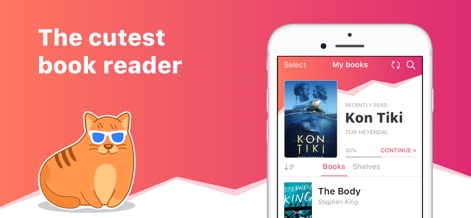
See how the app presents a clean "My books" interface and prominently displays your "Recently Read" title with progress.
Your Digital Bookshelf
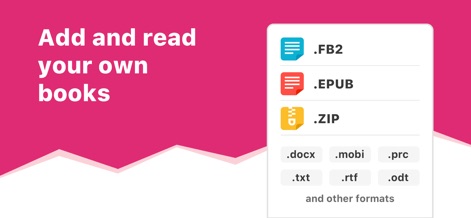
Discover the app's extensive compatibility with diverse e-book formats like .FB2 and .EPUB, allowing users to import their entire digital library.
Broad Format Support
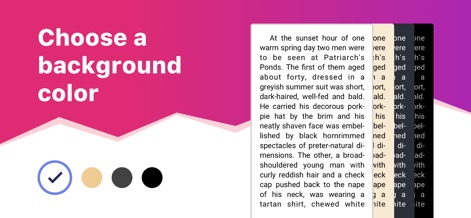
Explore how users can personalize their reading experience by selecting from multiple background colors, including a classic white or a cozy sepia tone.
Custom Reading Themes

This screenshot illustrates the intuitive highlight selection and the convenient sharing options available for marked text, alongside various highlight color choices.
Effortless Highlighting & Sharing
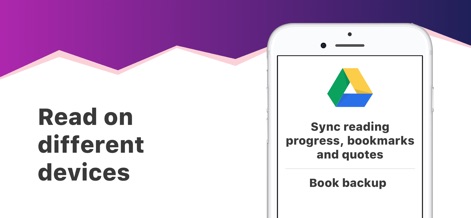
Witness the app's capability to synchronize reading progress and bookmarks across devices, utilizing cloud services like Google Drive for reliable data backup.
Seamless Cross-Device Sync
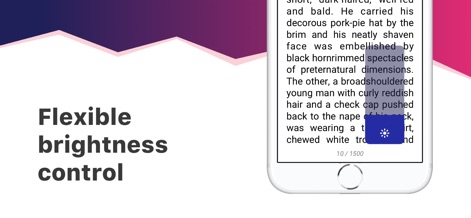
Observe the app's easily accessible brightness adjustment overlay, ensuring optimal reading comfort in any lighting condition with a simple swipe.
Optimized Brightness Control

Delve into the app's detailed settings panel, offering granular control over reading parameters such as font size and interlinear spacing for a tailored experience.
Comprehensive Customization Options

This final visual emphasizes the app's endearing and user-centric design, highlighted by the charming mascot and an overall welcoming aesthetic.
A Delightful Reading Companion
Description
Download
More Like This
Apps with similar features and user experience

PureLibro: ebook reader
添欢 谢

Summit Reader
三英 郑

Readingo
哲魁 左

YACReader - Comic Reader
Luis Ángel San Martín

KRed Reader
Kingjet Network Co., Ltd.

Epub Reader -read epub,chm,txt
俊杰 阮

Yomu EBook Reader
Beat Raess

KyBook 3 Ebook Reader
Konstantin Bukreev

KyBook 2 Ebook Reader
Konstantin Bukreev
This page is not an official page of the app or its developer, but an independent editorial publication created for informational and commentary purposes. Unless expressly stated otherwise, neither the app nor its developer is affiliated with, endorsed by, sponsored by, authorized by, or otherwise officially connected with MWM, Apple, Google Play, the app publisher, or the app's developer, and nothing on this page implies that the app was developed using MWM's services. Any trademarks, logos, screenshots, and other content remain the property of their respective owners.