
This page is not an official page of the app or its developer, but an independent editorial publication created for informational and commentary purposes. Unless expressly stated otherwise, neither the app nor its developer is affiliated with, endorsed by, sponsored by, authorized by, or otherwise officially connected with MWM, Apple, Google Play, the app publisher, or the app's developer, and nothing on this page implies that the app was developed using MWM's services. Any trademarks, logos, screenshots, and other content remain the property of their respective owners.


Epson Creative Print
No more digital dead ends. This app liberates your images, turning pixels into tangible keepsakes and personalized projects, directly from your device.
Downloads
1M+User Rating
Total Ratings
50.0KPublisher
Category
Photo & VideoLocales
13Latest Version
7.10.0Size
113.7 MBFirst Released
Sep 19, 2013An analysis of key functionalities and their value for creative printing.
Epson Creative Print: Core Features Evaluation
Custom Greeting Cards
The app enables the creation of personalized greeting cards using user photos and even simulated handwriting, offering a heartfelt and unique way to celebrate occasions.
Coloring Book
It transforms personal photos into printable coloring book pages, offering an engaging and personalized artistic activity for children and families.
Collage
It allows users to combine multiple cherished photos into a single, printable collage, perfect for sharing memories and decorating.
Personal Stationery
This tool features customizable stationery options, including various templates and the ability to embed personal photos as watermarks, ideal for unique correspondence or personalized planning.
Design Paper
It provides the functionality to print custom design papers from various patterns, suitable for unique gift wrapping, decorative crafts, or book covers.
Print on CD/DVDs
The app provides the unique ability to design and print custom labels directly onto compatible inkjet-printable CDs or DVDs, enhancing personal media projects or small business branding.
ID Card Creation
The app offers the capability to design and print custom ID cards, including direct printing onto PVC cards, catering to small business or organizational identification requirements.
Photo ID Printing
This feature allows users to generate and print photo IDs with custom sizes and background colors directly from their mobile device, useful for various personal identification needs.
Frequently Asked Questions
Everything you need to know about Epson Creative Print
What is the Epson Creative Print app used for?
The Epson Creative Print app helps you express creativity by printing photos, creating collages, printing on CD/DVDs, making coloring books, custom stationery, greeting cards, design paper, photo IDs, and ID cards directly from your mobile device.
How do I check if my Epson printer is compatible with Epson Creative Print?
You can check for compatible printers by visiting the official Epson support website provided in the app's description. The link is https://support.epson.net/appinfo/creative/list/en/.
Can I create photo collages with the Epson Creative Print app?
Yes, the Epson Creative Print app allows you to create and print collages of your favorite photos directly from your phone or tablet. This feature is listed among the key functionalities.
Is it possible to print directly onto CDs or DVDs using Epson Creative Print?
Yes, Epson Creative Print enables you to design artwork from your photos and print it directly onto inkjet printable CDs or DVDs. This functionality requires a compatible Epson printer.
How can I turn a photo into a coloring book page with Epson Creative Print?
The Epson Creative Print app includes a Coloring Book feature that transforms your chosen photo into an outlined project. You can then print this page for coloring.
Does Epson Creative Print offer options for personalized stationery?
Yes, Epson Creative Print provides tools for personalized stationery. You can select lined templates, calendars, or embed photos as watermarks for custom designs.
Can I design and print my own greeting cards using Epson Creative Print?
Yes, the Epson Creative Print app allows you to make customized greeting cards. You can use your photos and personalize them further with your own handwriting before printing.
What types of design paper can I print with Epson Creative Print?
The Epson Creative Print app enables you to choose a favorite pattern and print design paper. This versatile paper is suitable for uses like gift wrapping or book covers.
Can I create and print Photo IDs using the Epson Creative Print app?
Yes, Epson Creative Print includes a Photo ID function. It allows you to print Photo IDs from your mobile device at a custom size and change the background color.
Does Epson Creative Print support printing custom ID cards?
Yes, the Epson Creative Print app supports designing custom ID cards. Users can create these designs and print them specifically on PVC cards.
The following screenshots and description are sourced directly from the app's official store listing and are the property of the app developer.
App Store
Screenshots
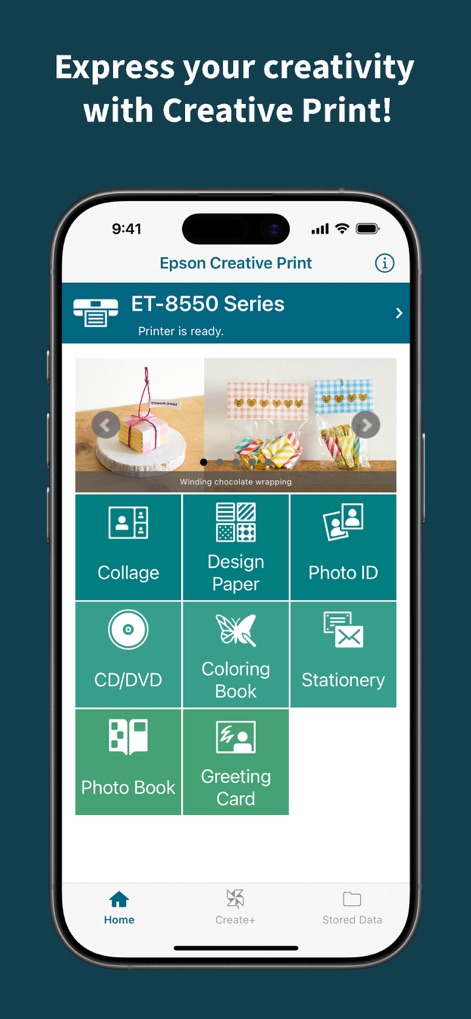
The app's main screen clearly presents the "Collage" and "CD/DVD" creation options, giving users quick access to a variety of creative projects directly from their mobile device.
Main Project Selector
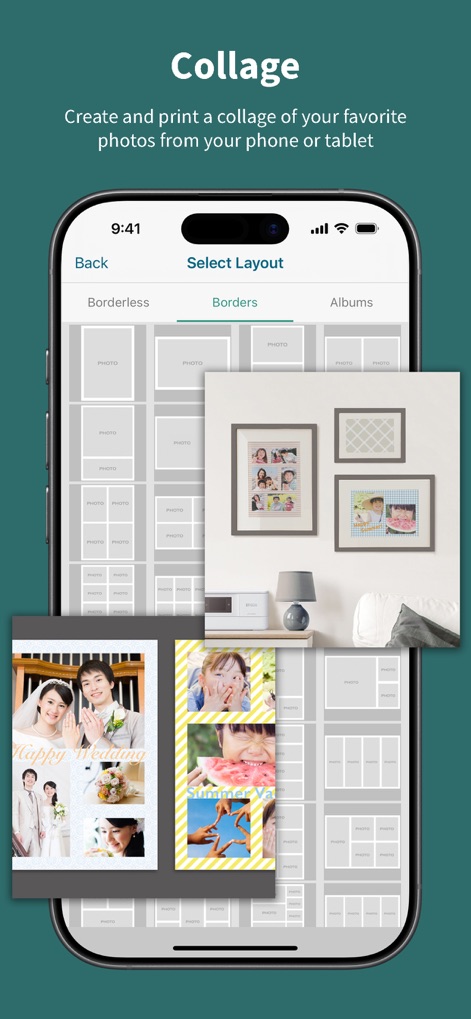
This screen demonstrates the powerful "Collage" tool, enabling users to effortlessly combine photos within a customizable grid layout and choose between "Borderless" or "Borders" display options.
Collage Creation

This view demonstrates the versatile "Design Paper" feature, where users can browse numerous "pattern" options and visualize their chosen designs applied to practical items like custom "gift wrapping."
Custom Design Paper
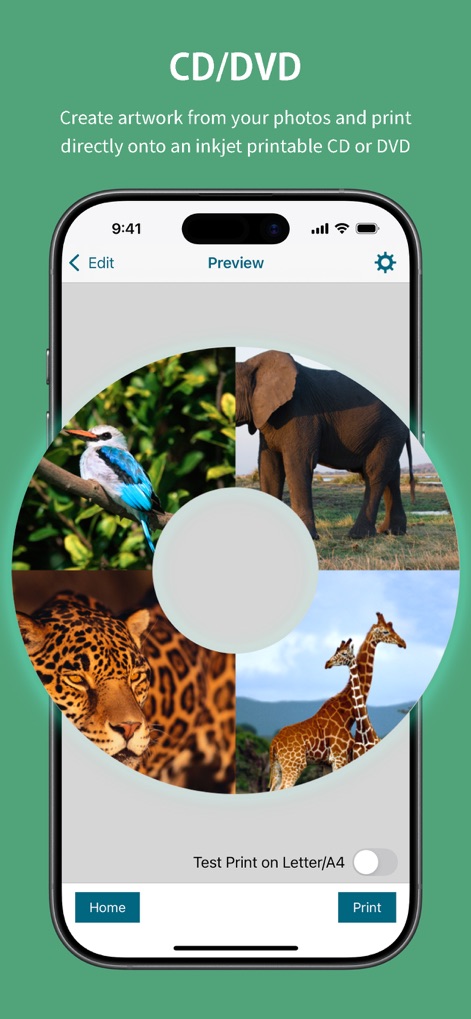
This screen exemplifies the "CD/DVD" creation process, allowing users to effortlessly arrange multiple "photos" in a circular design and preview their artwork before utilizing the "Test Print" option.
CD/DVD Customization

This captivating screen reveals the "Coloring Book" feature, where any photo is instantly converted into an "outlined drawing" ready for printing, with an adjustable "slider" to fine-tune the artistic effect.
Photo Coloring Book
Description
Download
More Like This
Apps with similar features and user experience

instax mini Link
FUJIFILM Corporation

instax mini Evo
FUJIFILM Corporation

Canon Mini Print
Canon U.S.A., Inc.

Polaroid
Polaroid International B.V.

SELPHY Photo Layout
Canon Inc.

KODAK Photo Printer
Prinics Co., Ltd

Phomemo
PHOMEMO PTE. LTD.

HP Sprocket
C&A Marketing Inc.
NokoPrint - Mobile Printing
NokoPrint LLC
This page is not an official page of the app or its developer, but an independent editorial publication created for informational and commentary purposes. Unless expressly stated otherwise, neither the app nor its developer is affiliated with, endorsed by, sponsored by, authorized by, or otherwise officially connected with MWM, Apple, Google Play, the app publisher, or the app's developer, and nothing on this page implies that the app was developed using MWM's services. Any trademarks, logos, screenshots, and other content remain the property of their respective owners.