
This page is not an official page of the app or its developer, but an independent editorial publication created for informational and commentary purposes. Unless expressly stated otherwise, neither the app nor its developer is affiliated with, endorsed by, sponsored by, authorized by, or otherwise officially connected with MWM, Apple, Google Play, the app publisher, or the app's developer, and nothing on this page implies that the app was developed using MWM's services. Any trademarks, logos, screenshots, and other content remain the property of their respective owners.


instax mini Link
It transforms transient digital moments into tangible keepsakes. The app gives users command over instant, shareable prints, elevating casual snaps.
Downloads
2.5M+User Rating
Total Ratings
98.7KPublisher
Category
Photo & VideoLocales
10Latest Version
7.0.2Size
937.5 MBFirst Released
Sep 29, 2019An evaluation of core functionalities tailored for mobile photography enthusiasts and creative expression.
Key Features Analysis: instax mini Link App
instaxAiR™
Exclusive to Link 2, this feature enables users to express creativity by drawing in the air with the printer, generating unique light art effects on their photos.
Frame Print / Collage Print
It allows users to personalize photos with creative frames and combine multiple images into a collage, enhancing tangible memory sharing.
Simple Print
The app provides a straightforward method to print images directly from a smartphone, including stills from videos.
Click to Collage
The app recreates a photobooth experience, allowing users to capture a sequence of six images at short intervals, ideal for fun, instant memories.
Content Printing Mode
It allows seamless import of images and content from external apps like Pinterest or the smartphone's gallery, with a preview function before printing.
instax AiR Studio™
It provides a platform for users to decorate their environment with augmented reality content and capture photos within these decorated AR scenes.
instax Camera™
This tool enables users to take photos remotely via their smartphone, utilizing the printer as a shutter button for convenient group shots or creative angles.
Match Test
This feature offers an engaging 'Match Test' game, adding an element of fun and social interaction to the app.
Frequently Asked Questions
Everything you need to know about instax mini Link
What is the instax mini Link app?
The instax mini Link app connects to FUJIFILM instax mini Link™ series printers via Bluetooth, enabling smartphone image and video printing and creative features.
Which instax mini Link printers are compatible with the instax mini Link app?
The instax mini Link app is compatible with the FUJIFILM instax mini Link™ printer series, including Link, Link 2, Link 3, and Link+.
How do I print photos using the instax mini Link app?
Yes, the instax mini Link app's Simple Print feature allows users to easily print images and videos directly from their smartphone via Bluetooth connection to the printer.
Can I add frames to my photos with the instax mini Link app?
Yes, the instax mini Link app includes a Frame Print feature that allows users to add fun, creative frames to their images before printing.
Does the instax mini Link app offer a collage printing option?
Yes, the instax mini Link app features Collage Print, which combines multiple photos into a single instax™ print for a stylish look.
How can I take photos remotely using the instax mini Link app?
The instax mini Link app features an instax Camera™ mode, enabling users to take photos with their smartphone remotely by using the printer's power button as a shutter release.
What is instax AiR Studio in the instax mini Link app?
instax AiR Studio allows users to decorate their space with AR content and capture photos with these decorated AR effects. It provides built-in 3D AR effects to create unique images.
How does the Click to Collage feature work in the instax mini Link app?
The Click to Collage feature creates a photobooth experience by taking a series of six images at three-second intervals, automatically combining them into an instant collage.
Does the instax mini Link app have a "Match Test" feature?
Yes, the instax mini Link app includes a "Match Test" feature designed to help users find their perfect match.
Can I print images from Pinterest with the instax mini Link app?
Yes, the instax mini Link app's Content Printing Mode allows users to import images and content saved in the Pinterest® app or their smartphone's photo app for printing.
What is the instaxAiR™ feature for the instax mini Link 2 printer?
The instaxAiR™ feature, exclusive to the instax mini Link 2™, allows users to draw in the air with the printer by pressing and holding its feature button, showcasing creativity.
What operating systems does the instax mini Link app support?
The instax mini Link app supports iOS 17.0 or later.
Can I preview prints before printing with the instax mini Link app?
Yes, the instax mini Link app allows users to simulate image content within various display options before printing, such as a photo in a frame or on a wall.
Does the instax mini Link app support different appearance modes?
Yes, the instax mini Link app allows users to switch appearance modes, including Dark Mode and Light Mode, to match the stock image. This applies to Link, Link 2, Link 3, and Link+ models.
What is "Design Print" in the instax mini Link app?
Design Print is an exclusive feature for the instax mini Link+™ printer within the instax mini Link app, engineered for text-rich layouts and intricate illustrative artwork, such as magazines or posters.
The following screenshots and description are sourced directly from the app's official store listing and are the property of the app developer.
App Store
Screenshots
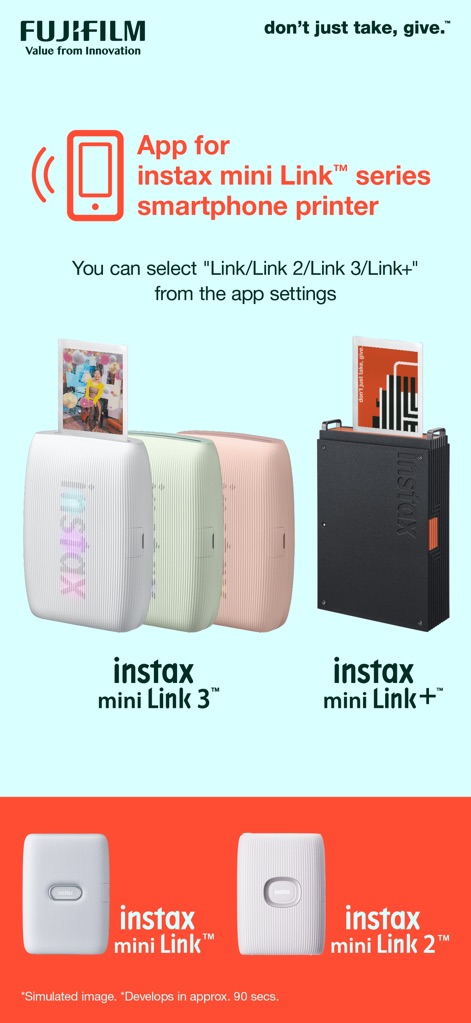
This visual presents the full instax mini Link printer lineup and illustrates how the smartphone app seamlessly connects to various models like the instax mini Link 3 and instax mini Link+.
Link Printer Ecosystem

The app's instax AiR Studio™ empowers users to stack multiple AR effects, as seen with the floating balloons and decorative elements, transforming photos into unique compositions.
Creative AR Studio

This visual guide illustrates the straightforward workflow of instax AiR Studio™, from detecting the instax™ logo to setting the scene using 'Back' and 'Décor' options.
Step-by-Step AR

This section highlights the 'Click to Collage' mode, enabling users to capture a series of six images at 3-second intervals and automatically combine them into a fun, photobooth-style print.
Photobooth Collages

This view introduces core printing functionalities, showcasing 'Simple Print' for seamless Bluetooth transfers and 'Frame Print' to embellish images with artistic designs.
Streamlined Printing Options

Explore 'Collage Print' for combining multiple images into a single layout and discover the 'instax Camera™' feature that allows remote photo capture by tilting the printer to zoom.
Advanced Print & Capture

Users can personalize their experience with 'Appearance Mode', selecting between Dark Mode and Light Mode, and efficiently 'Collect' images through bulk import from Pinterest® or the phone's photo app.
Interface & Content Management

This section reveals the 'Simulate' feature for previewing printed content in various displays and introduces the 'Design Print' mode, exclusive to instax mini Link+, which enhances text-rich layouts and intricate visuals.
Pre-Print Simulation & Print Specialization
Description
Download
More Like This
Apps with similar features and user experience

instax mini Evo
FUJIFILM Corporation

Canon Mini Print
Canon U.S.A., Inc.

Polaroid
Polaroid International B.V.

SELPHY Photo Layout
Canon Inc.

KODAK Photo Printer
Prinics Co., Ltd

Phomemo
PHOMEMO PTE. LTD.

Epson Creative Print
Seiko Epson Corporation

HP Sprocket
C&A Marketing Inc.

NokoPrint - Mobile Printing
NokoPrint LLC
This page is not an official page of the app or its developer, but an independent editorial publication created for informational and commentary purposes. Unless expressly stated otherwise, neither the app nor its developer is affiliated with, endorsed by, sponsored by, authorized by, or otherwise officially connected with MWM, Apple, Google Play, the app publisher, or the app's developer, and nothing on this page implies that the app was developed using MWM's services. Any trademarks, logos, screenshots, and other content remain the property of their respective owners.