
This page is not an official page of the app or its developer, but an independent editorial publication created for informational and commentary purposes. Unless expressly stated otherwise, neither the app nor its developer is affiliated with, endorsed by, sponsored by, authorized by, or otherwise officially connected with MWM, Apple, Google Play, the app publisher, or the app's developer, and nothing on this page implies that the app was developed using MWM's services. Any trademarks, logos, screenshots, and other content remain the property of their respective owners.


GlideX
Observations suggest: This app hands users direct command over their entire digital workspace, breaking device barriers.
Downloads
500k+User Rating
Total Ratings
13.2KPublisher
Category
ProductivityLocales
29Latest Version
4.0.2Size
127.4 MBFirst Released
Dec 14, 2021An analytical overview of GlideX's core functionalities designed to optimize cross-device workflows for professionals and remote workers.
Key Features of GlideX for Enhanced Productivity
Remote Access
The app provides secure remote access to files and desktop on an ASUS PC from a mobile device, effectively turning the PC into a personal cloud accessible anywhere, which is critical for professionals needing on-the-go access to office files.
Unify Control
It enables users to control multiple devices with a single mouse and keyboard, even across different operating systems, and facilitates file transfers, eliminating the need to switch peripherals.
Screen Extend
This tool features the ability to extend the PC display to a phone or tablet, turning it into a secondary monitor. This is highly beneficial for dual-display convenience, expanding workspace, and multitasking, especially for cross-referencing documents.
File Transfer
The app provides rapid file transfer capabilities between PCs and mobile devices via drag-and-drop, offering a much faster and more user-friendly alternative to traditional methods like Bluetooth.
Screen Mirror
The app allows users to mirror their phone's screen onto their PC, enabling the use of the PC's keyboard and mouse for navigation and text input, significantly boosting productivity and providing a richer visual experience.
Hands-Free Phone Calls
It allows users to make and receive phone calls directly through their PC's speakers and microphone, with access to their phone's contacts, improving workflow by keeping the focus on the PC.
Shared Cam
This tool features the functionality to transform a mobile device's camera into a high-quality webcam for PC video conferencing, offering a flexible and convenient video source.
URL Share
This tool features seamless URL sharing, allowing users to instantly send a webpage link from their PC browser to another connected PC or mobile device, where it opens automatically for continuous browsing.
Frequently Asked Questions
Everything you need to know about GlideX
What is the GlideX Screen Mirror feature?
GlideX Screen Mirror projects your phone's screen onto your PC, enabling control with your PC's keyboard and mouse. This improves productivity and offers a richer visual experience.
Can GlideX extend my PC display to my mobile device?
Yes, GlideX Screen Extend uses your phone or tablet as a secondary display. This expands your screen space for dual-display convenience, especially useful for cross-referencing documents.
How does GlideX Unify Control work?
GlideX Unify Control lets you manage multiple devices and transfer files using a single mouse and keyboard across different operating systems. This eliminates the need to switch between devices.
Does GlideX support file transfer between devices?
Yes, GlideX provides a File Transfer feature. Users can simply drag and drop files between PCs and mobile devices, offering a faster and more seamless experience than traditional Bluetooth.
Can I use my phone's camera as a webcam with GlideX?
Yes, GlideX Shared Cam turns your mobile device camera into a webcam. Select "GlideX – Shared Cam" as the video source in your PC video conference app for seamless sharing.
Does GlideX allow hands-free phone calls?
Yes, GlideX enables hands-free phone calls. You can make and take calls routed through your PC's speakers and microphone, and access phone contacts directly from your PC.
What is GlideX Remote Access?
GlideX Remote Access allows your mobile device to access files stored on your ASUS PC remotely. It serves as a personal cloud replacement, including Remote File Access and Remote Desktop features.
Is GlideX Remote Desktop compatible with Windows 10 Home?
No, GlideX Remote Desktop is not supported on Windows 10 Home edition. It is important to check your Windows version for full compatibility with this feature.
How do I share URLs using GlideX?
To share URLs, click the Share icon in your PC's browser and select GlideX. The webpage link instantly sends to another PC or connected mobile device, opening automatically.
How do I connect mobile devices to my PC using GlideX?
GlideX supports connecting mobile devices to your PC via Wi-Fi and/or USB. This offers flexible options for establishing a link between your devices for various features.
Do I need a separate app for GlideX on Windows?
Yes, the GlideX mobile app must be used together with GlideX for Windows. The Windows application is available for Windows 10/11 devices to ensure full functionality.
The following screenshots and description are sourced directly from the app's official store listing and are the property of the app developer.
App Store
Screenshots

See how GlideX transforms a mobile device into a secondary display, expanding a user's digital canvas for enhanced productivity.
Extend Your Workspace

Discover how the app projects mobile content onto a larger PC screen, allowing for effortless navigation and input using the computer's keyboard and mouse.
Seamless Screen Mirroring

Explore the mirrored phone interface on a PC, showcasing how users can interact with mobile apps and manage device notifications directly from their desktop.
Unified Device View

Witness the power of Unify Control, enabling users to seamlessly operate multiple devices and transfer files with a single mouse and keyboard across different operating systems.
Cross-Device Control

Observe the intuitive drag-and-drop interface of the File Transfer feature, facilitating rapid and secure sharing of documents and media between devices.
Instant File Sharing

See how the app prepares for seamless communication, displaying options for connecting mobile devices and managing integrated features.
Connected Communication

Witness the integrated Communication hub, providing users with a PC dial pad and access to phone contacts, alongside the ability to utilize mobile cameras for video conferencing.
Enhanced Connectivity

Discover the Shared Cam feature, allowing users to transform their mobile device camera into a high-quality webcam for video calls and online meetings.
Versatile Camera Use
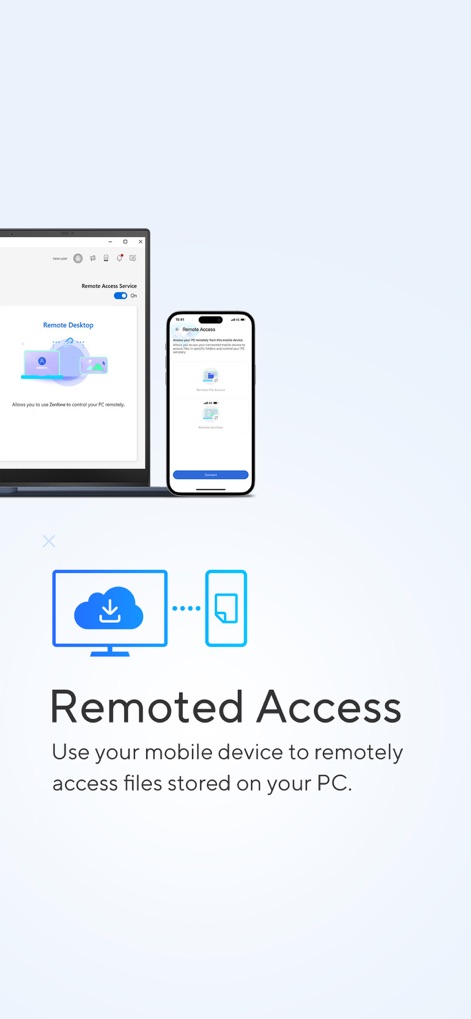
Examine the Remote Desktop functionality, offering users the capability to access and control their PC from a mobile device for flexible work from anywhere.
Remote Desktop Access
Description
Download
More Like This
Apps with similar features and user experience



This page is not an official page of the app or its developer, but an independent editorial publication created for informational and commentary purposes. Unless expressly stated otherwise, neither the app nor its developer is affiliated with, endorsed by, sponsored by, authorized by, or otherwise officially connected with MWM, Apple, Google Play, the app publisher, or the app's developer, and nothing on this page implies that the app was developed using MWM's services. Any trademarks, logos, screenshots, and other content remain the property of their respective owners.