
This page is not an official page of the app or its developer, but an independent editorial publication created for informational and commentary purposes. Unless expressly stated otherwise, neither the app nor its developer is affiliated with, endorsed by, sponsored by, authorized by, or otherwise officially connected with MWM, Apple, Google Play, the app publisher, or the app's developer, and nothing on this page implies that the app was developed using MWM's services. Any trademarks, logos, screenshots, and other content remain the property of their respective owners.


Xiaomi Interconnectivity
Finally, a bridge. This app grants Apple users true command over their Xiaomi gear, breaking down walled gardens with effortless data movement and screen shares.
Downloads
1M+User Rating
Total Ratings
17.7KPublisher
Category
UtilitiesLocales
17Latest Version
2.9.0Size
185.0 MBFirst Released
Feb 25, 2025An analytical overview of key features for a seamless multi-device experience between Apple and Xiaomi.
Xiaomi Interconnectivity: Bridging Ecosystems
Data Flow Synchronization
It allows users to synchronize data across their Apple and Xiaomi devices, ensuring consistent access to information and a unified digital experience without manual transfers.
Cross-Device Collaboration
The app enables collaborative workflows across Apple and Xiaomi ecosystems, fostering a more integrated and productive environment for users managing tasks on multiple device types.
File Transfer
The app provides efficient transfer of files between Apple and Xiaomi devices, overcoming traditional ecosystem barriers and streamlining data management for users with mixed device ownership.
Unified Device Control
It allows users to control their Xiaomi products directly from their Apple devices, offering centralized management and enhancing convenience within a multi-ecosystem setup.
Frequently Asked Questions
Everything you need to know about Xiaomi Interconnectivity
What is Xiaomi Interconnectivity?
Xiaomi Interconnectivity is an application for Apple devices that enables seamless cross-device collaboration and control with Xiaomi products, offering features like file transfer, data flow synchronization, and screen sharing.
What are the key features of the Xiaomi Interconnectivity app?
The Xiaomi Interconnectivity app offers file transfer, data flow synchronization, screen sharing, notification sync, hotspot sharing, device finding, and cloud album access between Apple and Xiaomi devices.
Which devices does Xiaomi Interconnectivity support?
The Xiaomi Interconnectivity app supports Apple devices and enables interconnection with Xiaomi products. Specific Xiaomi phones must run HyperOS 2 with Device Interconnectivity Services version ≥ 16.00.50 and Xiaomi Share version ≥ 3.3.0.
How does Xiaomi Interconnectivity enhance device interaction?
Xiaomi Interconnectivity enhances device interaction by allowing seamless interconnection of photos and notifications between iPhone and MiPhone, enabling functions like file sharing, network sync, and remote device management.
Can I transfer files between my iPhone and Xiaomi phone using the Xiaomi Interconnectivity app?
Yes, the Xiaomi Interconnectivity app enables file transfer between your iPhone and Xiaomi phone. You can quickly share photos, Wi-Fi, and other files by bringing the devices' NFC areas close.
Does Xiaomi Interconnectivity sync notifications between devices?
Yes, Xiaomi Interconnectivity syncs notifications. Users receive MiPhone's app notifications on their iPhone and can directly open the MiPhone's app to reply from their iPhone.
What are the software requirements for Xiaomi phones to use Interconnectivity?
Xiaomi phones must run Xiaomi HyperOS 2. Additionally, the Device Interconnectivity Services version must be ≥ 16.00.50, and Xiaomi Share version must be ≥ 3.3.0.
Can I use Xiaomi Interconnectivity to find my Xiaomi device?
Yes, the Xiaomi Interconnectivity app allows you to find your Xiaomi device. You can view its location on your iPhone and control its sound or remotely lock it.
How do I check the app versions for Xiaomi Interconnectivity requirements?
Users check app versions required for Xiaomi Interconnectivity via Phone Settings > Apps on their Xiaomi device. This ensures compatibility for optimal performance.
Does Xiaomi Interconnectivity support cloud albums?
Yes, Xiaomi Interconnectivity supports cloud albums. The app allows users to view or use photos from the other phone anytime, offering a shared album experience.
The following screenshots and description are sourced directly from the app's official store listing and are the property of the app developer.
App Store
Screenshots
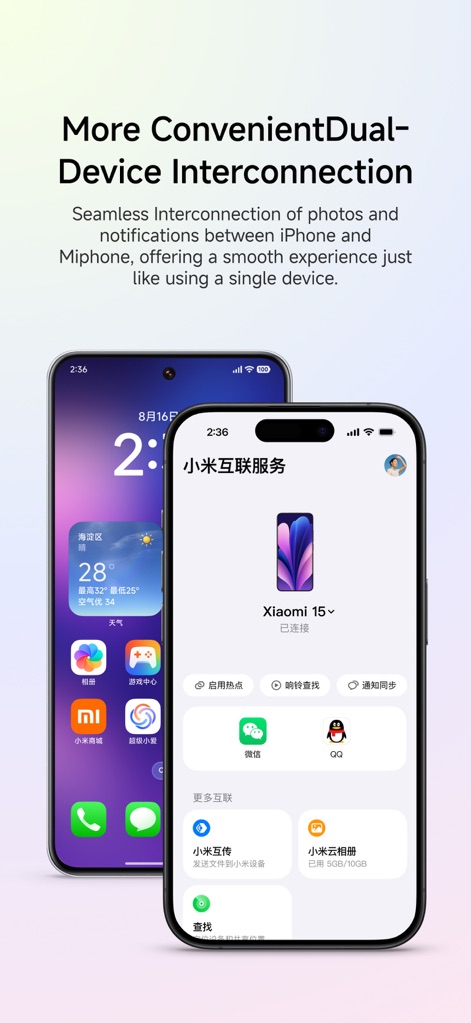
The app demonstrates seamless interoperability through its intuitive interface, connecting an iPhone to a Xiaomi device and displaying key features like 'Notification Sync' and 'Turn on Hotspot' controls.
Dual Device Harmony
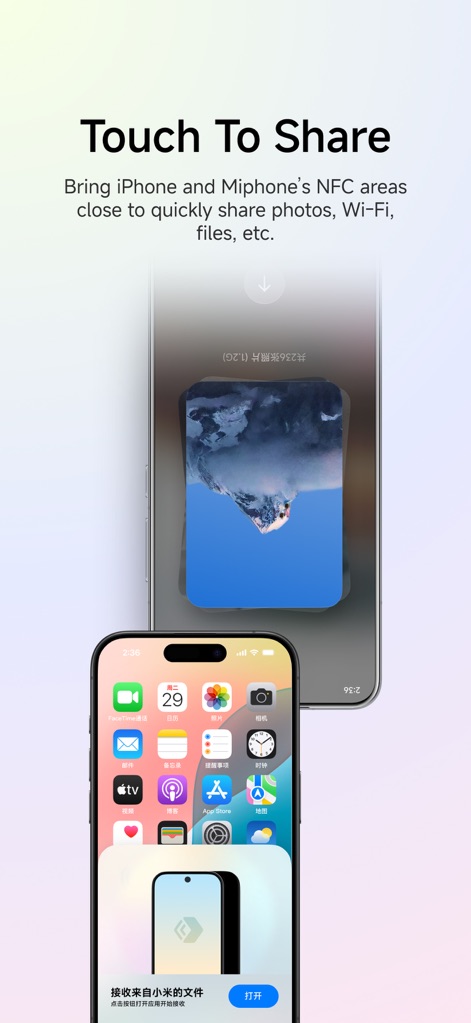
This tool showcases its efficient file sharing capabilities, illustrating a prompt for 'receiving files from Xiaomi' on an iPhone and an animated 'file transfer' process in action.
Instant File Transfer
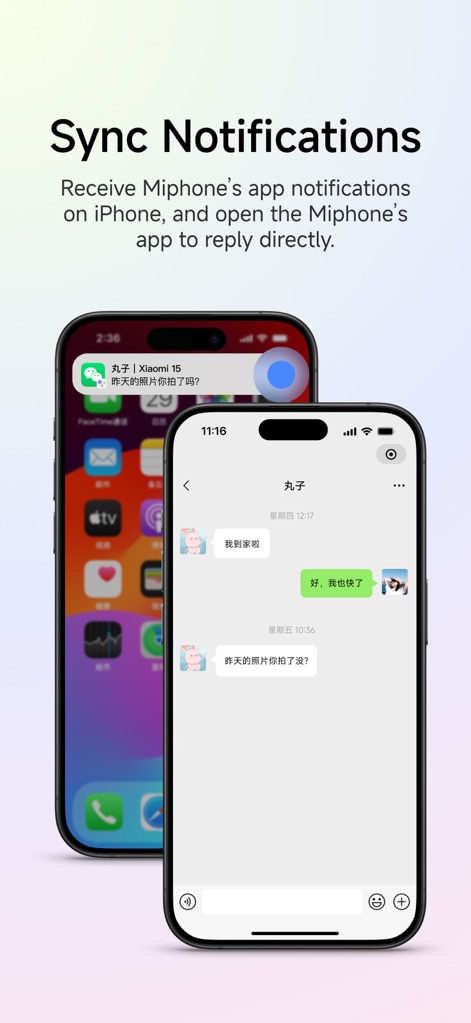
Users can see how notifications from a Xiaomi device, like the 'chat message notification' displayed on the iPhone's Dynamic Island, seamlessly integrate for direct interaction within the synced messaging app.
Synchronized Alerts
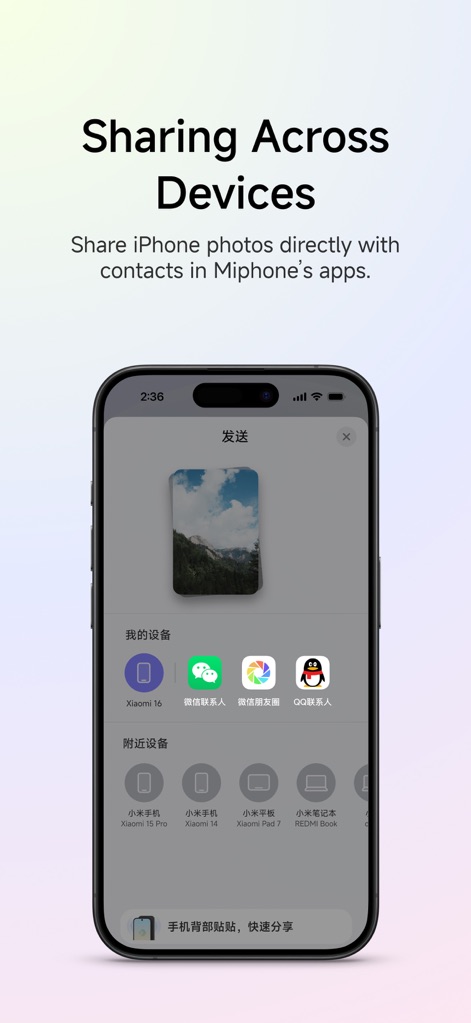
The screenshot highlights the app's robust sharing framework, allowing users to effortlessly share an 'iPhone photo' with contacts through 'WeChat and QQ apps' on their Xiaomi device.
Cross-Device Sharing
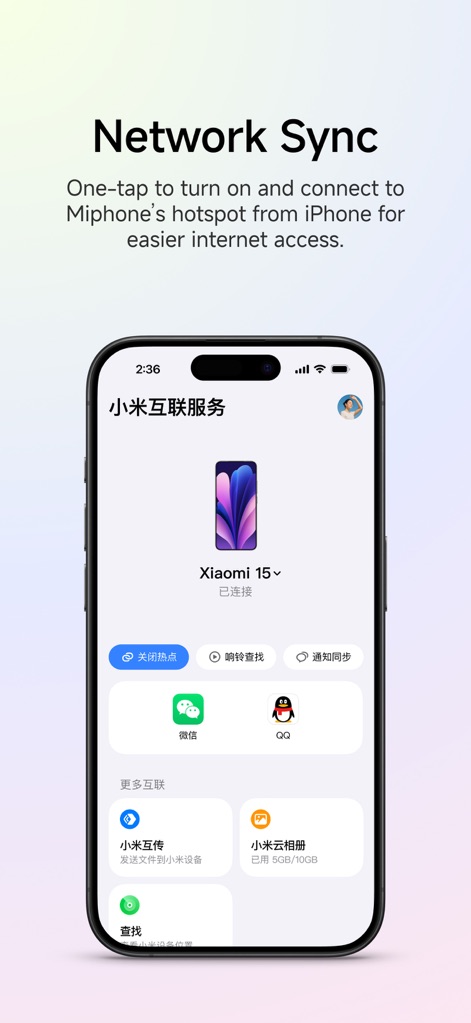
This visual demonstrates the app's convenient network management, featuring a prominent 'Turn off Hotspot' button for connected Xiaomi devices and access to features like 'Notification Sync' from the iPhone interface.
Unified Network Access
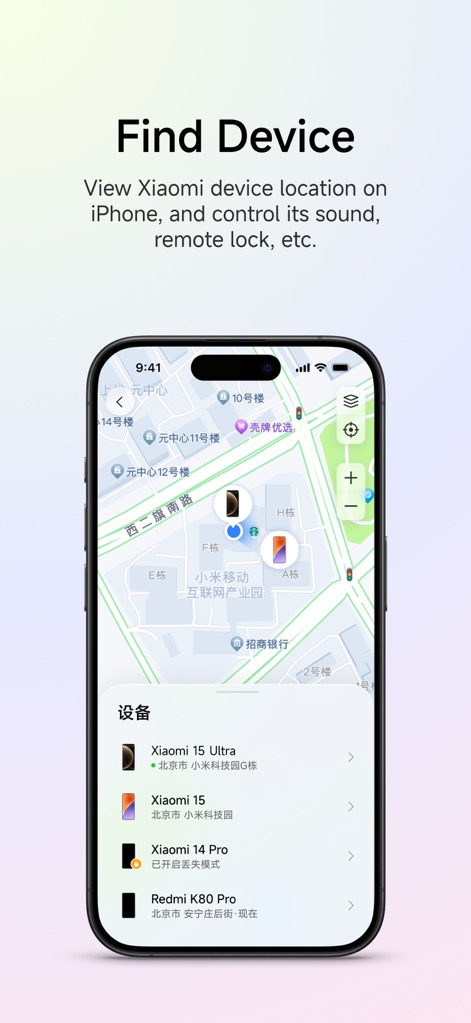
The app provides comprehensive device tracking, visually presenting the 'location of multiple Xiaomi devices' on a map interface and a detailed 'list of connected devices' for easy management.
Locate Xiaomi Devices

This image illustrates the app's cross-device photo management, showcasing the 'Xiaomi Cloud Album' feature accessible via the iPhone interface and a 'gallery of images' displayed on a connected Xiaomi device.
Integrated Photo Albums
Description
Download
More Like This
Apps with similar features and user experience






This page is not an official page of the app or its developer, but an independent editorial publication created for informational and commentary purposes. Unless expressly stated otherwise, neither the app nor its developer is affiliated with, endorsed by, sponsored by, authorized by, or otherwise officially connected with MWM, Apple, Google Play, the app publisher, or the app's developer, and nothing on this page implies that the app was developed using MWM's services. Any trademarks, logos, screenshots, and other content remain the property of their respective owners.