
This page is not an official page of the app or its developer, but an independent editorial publication created for informational and commentary purposes. Unless expressly stated otherwise, neither the app nor its developer is affiliated with, endorsed by, sponsored by, authorized by, or otherwise officially connected with MWM, Apple, Google Play, the app publisher, or the app's developer, and nothing on this page implies that the app was developed using MWM's services. Any trademarks, logos, screenshots, and other content remain the property of their respective owners.


HandModel
The ultimate 3D reference tool for digital illustrators and character designers. Pose instantly using your camera, adjust professional lighting, and create perfect anatomy for your next masterpiece.
Downloads
144K+User Rating
Total Ratings
0Publisher
Category
UtilitiesLocales
2Latest Version
1.1.1Size
81.8 MBFirst Released
Feb 10, 2021Master Hand Anatomy with Ease
The ultimate 3D reference tool designed to help digital artists tackle the most challenging part of character design with speed and precision.
Instant Camera Posing
Skip the tedious sliders—simply show your hand to your device's camera and the 3D model will instantly mimic your pose.
Dynamic 4-Point Lighting
Perfect your shading by positioning up to four independent light sources to see exactly how shadows fall on organic shapes.
Frequently Asked Questions
Everything you need to know about HandModel
What is the HandModel app?
HandModel is a 3D model viewing tool for artists. It serves as a reference for drawing hands, allowing users to edit poses using camera-based hand detection.
How do I edit 3D model poses in HandModel?
Users edit poses in HandModel by detecting their hand with the device's camera. The app tracks the user's hand movements to adjust the 3D model's pose.
Does HandModel include lighting features for its 3D models?
Yes, HandModel offers lighting options for its 3D models. Users have access to 4 different lights to enhance their reference images.
What are the in-app purchases for HandModel?
HandModel offers in-app purchases to remove advertisements and to unlock the function for recording editing sessions. These purchases enhance the app's core features.
Can I record my pose edits in HandModel?
Yes, HandModel can record edited poses, but this function requires an in-app purchase to unlock. The paid feature allows users to save their pose editing sessions.
How do I control the 3D model's camera view in HandModel?
Users control the 3D model view in HandModel by swiping to rotate the model and pinching-in/out to change the Field of View (FOV). Double-tapping resets the view.
The following screenshots and description are sourced directly from the app's official store listing and are the property of the app developer.
App Store
Screenshots
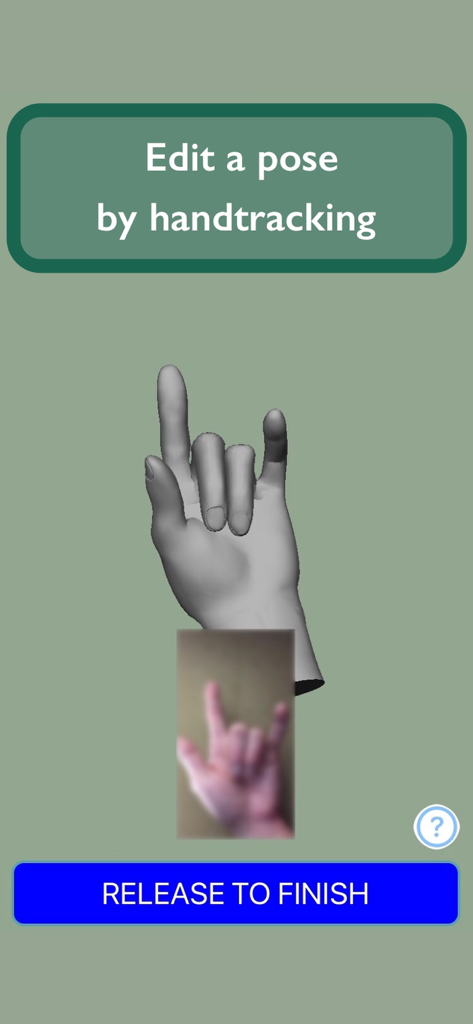
Interface of the HandModel app demonstrating 3D hand pose editing through real-time camera handtracking for artist reference.
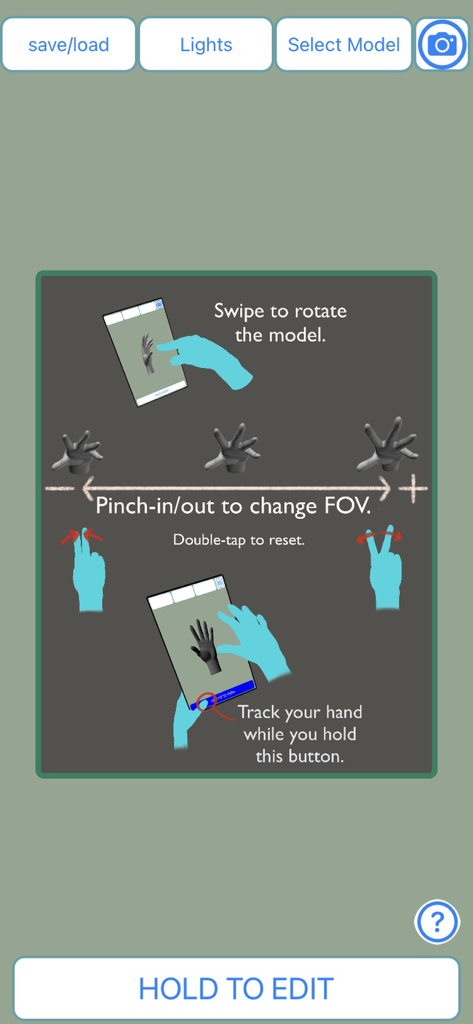
Tutorial interface showing how to rotate and zoom the 3D hand model using touch gestures
Description
Download
More Like This
Apps with similar features and user experience

Handy Art Reference Tool
Scott McKie

Previs Pro - Storyboard Fast
Ghostwheel LLC

Moblo - 3D furniture modeling
MYTIforge

Head Model Studio - Art Study
Wes Castain

Manikin
UNSH VOF

Magic Poser - Art Pose Tool
Wombat Studio, Inc.

ArtPose
shawn ogle

ArtPose Female Edition
shawn ogle

Pose Croquis
Kazuaki Matsuda
This page is not an official page of the app or its developer, but an independent editorial publication created for informational and commentary purposes. Unless expressly stated otherwise, neither the app nor its developer is affiliated with, endorsed by, sponsored by, authorized by, or otherwise officially connected with MWM, Apple, Google Play, the app publisher, or the app's developer, and nothing on this page implies that the app was developed using MWM's services. Any trademarks, logos, screenshots, and other content remain the property of their respective owners.