
This page is not an official page of the app or its developer, but an independent editorial publication created for informational and commentary purposes. Unless expressly stated otherwise, neither the app nor its developer is affiliated with, endorsed by, sponsored by, authorized by, or otherwise officially connected with MWM, Apple, Google Play, the app publisher, or the app's developer, and nothing on this page implies that the app was developed using MWM's services. Any trademarks, logos, screenshots, and other content remain the property of their respective owners.


抠图软件-酷雀抠图&智能证件照制作改尺寸换背景&清晰度修复
Tired of clunky photo editors? This app empowers users to achieve professional-grade image manipulation with zero learning curve.
Downloads
250k+User Rating
Total Ratings
2.3KPublisher
Category
Photo & VideoLocales
1Latest Version
2.11.1Size
161.1 MBFirst Released
Oct 24, 2023An evaluation of the application's primary functionalities for diverse users.
Key Features Analysis
AI Intelligent Background Removal
The app provides advanced AI segmentation technology for "hair-level" precision, allowing users to automatically identify subjects and remove backgrounds in just 3 seconds across various scenes like portraits, objects, and animals. It also offers multiple built-in backgrounds and sizes.
Smart ID Photo Creation
It allows users to quickly generate standard ID photos by intelligently changing background colors, adjusting sizes, and cropping, adhering to various platform upload rules for work, academic, or professional profile pictures.
Image Clarity & Quality Restoration
This tool features AI technology to optimize image texture details and enhance text, effectively repairing blurry or low-quality pictures to make them look more natural and clear.
Lossless Image Upscaling
The app enables users to magnify image details 2 to 16 times in length and width using AI intelligent repair technology, ensuring high-definition quality without any loss of clarity.
AI Skin Enhancement
It provides AI-powered skin beautification features to enhance portraits, making them look more polished and appealing for social media or personal use.
Cartoon Avatar Creation
This tool allows users to transform their photos into fun and creative cartoon avatars, perfect for unique profile pictures or social media engagement.
Frequently Asked Questions
Everything you need to know about 抠图软件-酷雀抠图&智能证件照制作改尺寸换背景&清晰度修复
What is 酷雀AI智能抠图?
酷雀AI智能抠图 is a professional AI intelligent cutout software. It uses powerful AI segmentation technology to automatically identify subjects, remove backgrounds, and create standard ID photos.
Does 酷雀AI智能抠图 provide precise hair-level cutout and how fast is it?
Yes, 酷雀AI智能抠图 features powerful AI segmentation technology, including hair-level segmentation. This precisely outlines subjects for accurate background removal in approximately 3 seconds.
Can 酷雀抠图 be used to create standard ID photos?
Yes, 酷雀抠图 includes a feature for ID photo production. It allows users to AI-intelligently change background colors, adjust sizes, and crop to create standard ID photos.
Does 酷雀AI智能抠图 offer image clarity enhancement?
Yes, 酷雀AI智能抠图 offers image clarity enhancement. It optimizes image texture details, enhances text, and repairs low-quality or blurry pictures, making them clearer and more natural.
Can I enlarge images without losing quality using 酷雀抠图?
Yes, 酷雀抠图 provides AI intelligent repair technology for lossless image enlargement. It supports magnifying images by 2-16 times while maintaining high-definition quality without loss.
Does 酷雀AI智能抠图 protect user privacy during image processing?
Yes, 酷雀AI智能抠图 ensures user privacy and security. The software supports local cutout processing, which allows image handling directly on the device.
What types of subjects can 酷雀AI智能抠图 cut out?
酷雀AI智能抠图 supports various cutout scenarios, including portraits, objects, and animals. It also provides specialized tools for people, items, signatures, and logos.
How does 酷雀抠图's image memory enlargement feature work?
酷雀抠图 allows image memory enlargement, which modifies file storage space to increase resolution without clarity loss. This differs from lossless image enlargement, which increases physical dimensions.
The following screenshots and description are sourced directly from the app's official store listing and are the property of the app developer.
App Store
Screenshots

The app's intuitive home screen showcases the prominent 'AI Smart Cutout' feature alongside a convenient 'Hot Tools' section, offering quick access to diverse image editing functionalities.
Intuitive AI Tools
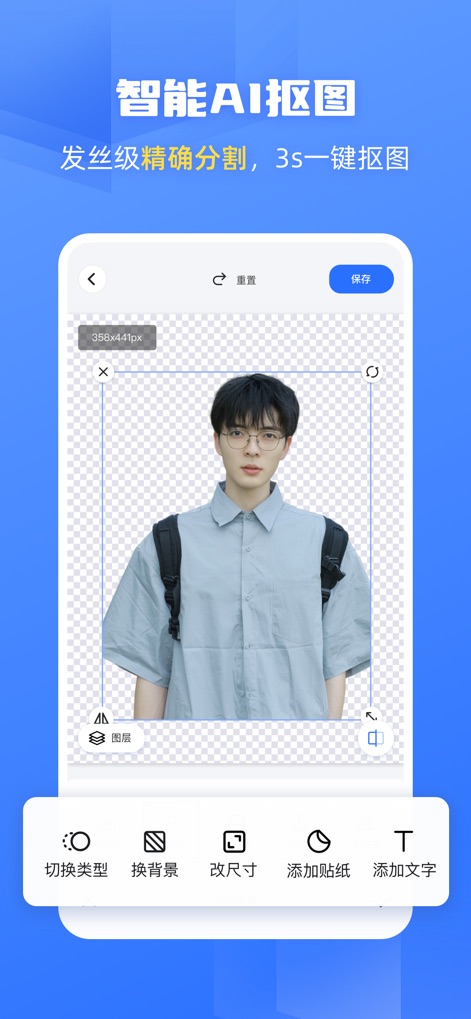
Users can achieve precise background removal with 'hair-level precise segmentation' and further refine their images using accessible bottom editing tools for changing backgrounds and resizing.
Precision Cutouts

This tool simplifies ID photo creation, allowing users to effortlessly select from various 'background color options' and apply standard 'size presets' for perfect compliance.
Smart ID Photos

See the dramatic transformation of images using the interactive 'before/after slider comparison', complemented by distinct options for 'Detail Enhancement' and 'Text Enhancement' to restore clarity.
Crystal Clear Images

The powerful AI allows for 'lossless image enlargement', effectively scaling images up to '8x magnification ratios' while preserving high-definition quality without any degradation.
Lossless Zoom
Description
Download
More Like This
Apps with similar features and user experience

EPIK - AI Photo & Video Editor
SNOW Corporation

Citrus: AI 1 Tap Perfect Photo
Wemagine.ai LLP

SnapEdit: Photo Editor AI
SilverAI Joint Stock Company

Background Eraser 〜 Stickers
handyCloset Inc.

PhotoScan by Google Photos
Google LLC

Magic Eraser - Remove Object
Creatix Technology Global Limited

Magic Eraser Background Editor
Honk Honk Punch Pty Ltd

ProKnockOut-Cut Paste Photos
Shenzhen Qianhai Happy Tour Network Technology Co., Ltd.

Background Eraser - Remove BG*
SHANTANU PTE. LTD.
This page is not an official page of the app or its developer, but an independent editorial publication created for informational and commentary purposes. Unless expressly stated otherwise, neither the app nor its developer is affiliated with, endorsed by, sponsored by, authorized by, or otherwise officially connected with MWM, Apple, Google Play, the app publisher, or the app's developer, and nothing on this page implies that the app was developed using MWM's services. Any trademarks, logos, screenshots, and other content remain the property of their respective owners.