
This page is not an official page of the app or its developer, but an independent editorial publication created for informational and commentary purposes. Unless expressly stated otherwise, neither the app nor its developer is affiliated with, endorsed by, sponsored by, authorized by, or otherwise officially connected with MWM, Apple, Google Play, the app publisher, or the app's developer, and nothing on this page implies that the app was developed using MWM's services. Any trademarks, logos, screenshots, and other content remain the property of their respective owners.


Libero Mail
Email chaos? This app gives users absolute control, consolidating disparate inboxes into one decisive hub.
Downloads
1M+User Rating
Total Ratings
100.1KPublisher
Category
ProductivityLocales
2Latest Version
50.10.5Size
79.8 MBFirst Released
May 20, 2015An evaluation of key functionalities for efficient, secure, and personalized digital communication.
Libero Mail: Core Features Analysis
Multi-Account Management
The app allows users to centralize all email accounts from various providers (e.g., Gmail, Yahoo, Hotmail) into a single application, even without a Libero account.
Integrated News and Daily Information
The app offers a dedicated news section featuring important daily updates across various topics, local weather, events, and personalized horoscopes.
App Security PIN
This tool features the ability to protect emails with an exclusive PIN code, allowing users to block app access upon closing or after a specified duration.
Customizable Quick Actions
It provides swipe gestures for frequently performed actions like deleting, marking as read/unread, moving to folders, or flagging as spam, with customizable options.
Smart Contact Suggestions
It provides quick access to phone contacts and intelligent suggestions for recipients when composing emails, improving efficiency.
Account Color Customization
This tool allows users to assign distinct colors to each email account for quick visual identification and personalization.
Email Priority and Read Receipts
The app allows users to set high priority flags for urgent emails and request read receipts, catering to professional communication needs.
Customizable Sender Display Name
The app enables users to define a custom sender name for their emails, enhancing personalization in communication.
Frequently Asked Questions
Everything you need to know about Libero Mail
Is the Libero Mail app compatible with tablets?
Yes, the Libero Mail app offers multi-device compatibility with an interface specifically designed and optimized for tablet use.
Can I add external email providers like Gmail to Libero Mail?
Yes, the Libero Mail app supports multi-account functionality. Users add accounts from any provider, including Gmail, Yahoo, and Hotmail, even without a Libero account.
How can I personalize account colors in the Libero Mail app?
Libero Mail allows users to customize each added account with a distinct color from a palette. This feature helps visually differentiate accounts at a glance.
How do I set a custom sender name in Libero Mail?
The Libero Mail app includes a "Display name" feature. This allows users to decide which name appears as the sender for their emails instead of the raw email address.
Does Libero Mail offer app security with a PIN?
Yes, the Libero Mail app provides PIN protection. Users can set an exclusive code to block access, either every time the app closes or after a chosen time interval.
Are swipe actions customizable in the Libero Mail app?
Yes, the Libero Mail app features customizable quick actions through swiping. Users can personalize actions like deleting, marking as read/unread, moving emails, or labeling them as spam.
How does Libero Mail assist with adding email recipients?
Libero Mail offers quick contacts functionality. It suggests recipients by accessing the phone's address book and includes a "+" button for rapid access to contacts during email composition.
Can I request a read receipt for emails in Libero Mail?
Yes, the Libero Mail app enables users to request a read receipt for their sent emails. It also provides the option to set messages with high priority.
Does the Libero Mail app show message previews in the inbox?
Yes, Libero Mail allows users to choose message snippet display. They can view an email preview or opt for a cleaner inbox layout without previews.
Can I group email conversations in Libero Mail?
Yes, the Libero Mail app supports conversation management. Users can decide whether to group multiple related emails into a single conversation thread for better organization.
How do I log out of an account in the Libero Mail app?
Users can log out of their accounts in the Libero Mail app by selecting the "Esci" (Log Out) option. This is accessible from the Menu or the "Gestione account" page.
Does the Libero Mail app feature a news section?
Yes, the Libero Mail app includes a dedicated News section. It provides daily news across various topics, local weather updates, events, and personalized horoscopes.
The following screenshots and description are sourced directly from the app's official store listing and are the property of the app developer.
App Store
Screenshots
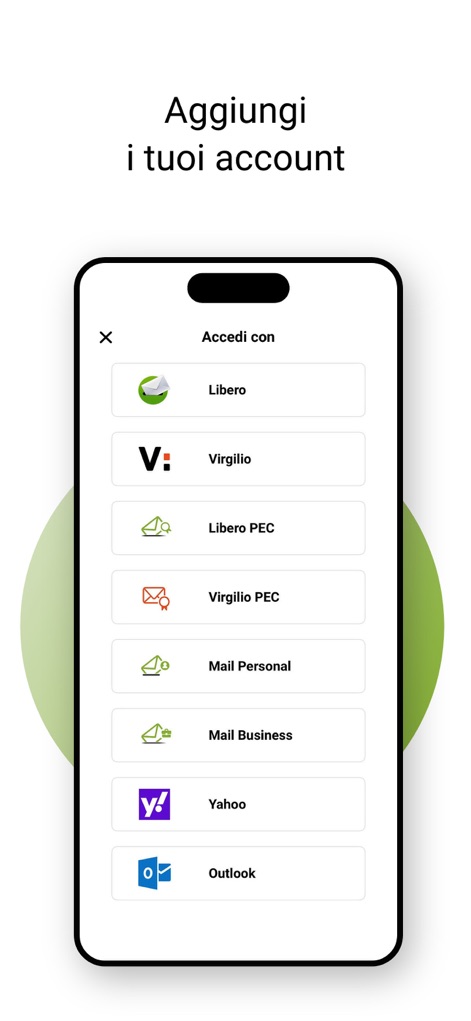
See how the app streamlines account addition with a clear list of diverse email providers, allowing users to effortlessly connect services like Libero and Yahoo.
Multi-Account Setup

Users can customize their identity by setting a display name like "Paola Rossi" and selecting a distinct color for their account.
Account Personalization

This tool offers a centralized view of multiple accounts, displaying profile pictures and options to "Aggiungi account" (Add account) or manage existing ones.
Unified Account Management

The app enables quick message handling with customizable swipe actions like "Elimina" (Delete) and features a convenient bottom navigation bar for different sections.
Efficient Inbox Actions

When composing, users gain granular control through options like "Imposta priorità alta" (Set high priority) and "Richiedi conferma di lettura" (Request read receipt) to manage message importance.
Compose with Control

This feature simplifies finding recipients by allowing users to search their contact list directly and view names like "Daniele" and "Evergreen" alongside their email addresses.
Effortless Contact Search

The app enhances message discovery with advanced filters for "Data di inizio" (start date) and "Con allegati" (with attachments), streamlining the search process.
Advanced Search Filters

Users can safeguard their privacy by setting a protective PIN code, displayed with a clear numeric keypad for easy input.
Secure App Access
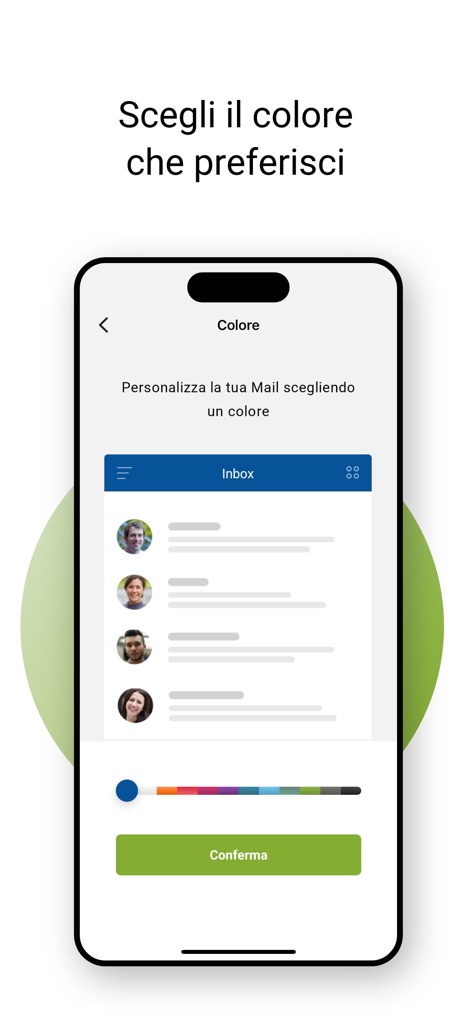
The app allows users to personalize their interface by selecting a preferred color from a diverse palette, instantly updating the inbox preview.
Visual Theme Customization
Description
Download
More Like This
Apps with similar features and user experience

Microsoft Outlook
Microsoft Corporation

Mail: Email, Cloud, Calendar
V Kontakte OOO

Yandex Mail: Email & Cloud
DIRECT CURSUS COMPUTER SYSTEMS TRADING LLC

Gmail - Email by Google
Google LLC

Yahoo Mail
Yahoo Inc.

Proton Mail - Encrypted Email
Proton AG

Email - Edison Mail
Edison Software Inc.

Zoho Mail - Email and Calendar
Zoho Corporation

GMX - Mail & Cloud
1&1 Mail & Media GmbH
This page is not an official page of the app or its developer, but an independent editorial publication created for informational and commentary purposes. Unless expressly stated otherwise, neither the app nor its developer is affiliated with, endorsed by, sponsored by, authorized by, or otherwise officially connected with MWM, Apple, Google Play, the app publisher, or the app's developer, and nothing on this page implies that the app was developed using MWM's services. Any trademarks, logos, screenshots, and other content remain the property of their respective owners.