
This page is not an official page of the app or its developer, but an independent editorial publication created for informational and commentary purposes. Unless expressly stated otherwise, neither the app nor its developer is affiliated with, endorsed by, sponsored by, authorized by, or otherwise officially connected with MWM, Apple, Google Play, the app publisher, or the app's developer, and nothing on this page implies that the app was developed using MWM's services. Any trademarks, logos, screenshots, and other content remain the property of their respective owners.

LightBlue®
The industry-standard app to scan, debug, and simulate Bluetooth Low Energy peripherals. Effortlessly test your firmware, explore device services, and bridge the gap between hardware and software.
Downloads
1M+User Rating
Total Ratings
2K+Publisher
Category
UtilitiesLocales
1Latest Version
5.3.5Size
21.3 MBFirst Released
Sep 8, 2012The Swiss Army Knife for BLE Development
LightBlue® provides hardware engineers and IoT developers with total transparency into the Bluetooth Low Energy ecosystem, acting as both a powerful scanner and a versatile peripheral simulator.
Deep Peripheral Inspection
Scan, connect, and explore. Browse every service and characteristic with full support for reading, writing, and subscribing to notifications with real-time RSSI tracking.
Virtual Device Emulation
Accelerate development by advertising as a BLE peripheral. Clone existing hardware profiles or create custom virtual devices to test your mobile apps without physical prototypes.
Frequently Asked Questions
Everything you need to know about LightBlue®
What is LightBlue®?
LightBlue® is an application that connects to devices using Bluetooth Low Energy (BLE). It enables users to scan for, connect to, and interact with BLE peripherals in both central and peripheral modes.
How does LightBlue® connect to BLE devices?
LightBlue® operates in central mode to scan for and connect to BLE devices nearby. Once connected, users can view detailed device profiles, read, write to characteristics, and subscribe to notifications.
Can LightBlue® function as a BLE peripheral?
Yes, LightBlue® functions as a BLE peripheral. Users can navigate to the 'Virtual Devices' tab to create and advertise a virtual device, customizing its services and characteristics.
What types of BLE devices can I test with LightBlue®?
LightBlue® supports testing various BLE devices, including Heart Rate Monitors, temperature sensors, Microchip AVR-BLE and PIC-BLE development boards, TI CC2540 Keyfobs, Nordic uBlue, and Panasonic PAN1720.
How can I view signal strength (RSSI) with LightBlue®?
LightBlue® displays the signal strength (RSSI) of connected peripherals, helping users determine their proximity to the BLE device.
Does LightBlue® support logging of BLE events?
Yes, LightBlue® includes a log tab that tracks all significant BLE events, such as device discovery, connection, reading, and writing. Users can also share the log content.
Can LightBlue® send data to cloud services?
Yes, LightBlue® can send data from notifications and indications to AWS IoT or Adafruit IO. This functionality is available through the app's Cloud Connect feature.
How do I write values to characteristics in LightBlue®?
LightBlue® allows writing to characteristics in Hex, Oct, Bin, Decimal, or ASCII formats. Users perform this action within the characteristic detail view.
Can I clone existing peripheral profiles in LightBlue®?
Yes, LightBlue® supports cloning peripheral profiles. Users connect to a device in central mode, then tap the 'Clone' button to save its profile as a virtual peripheral.
What information does LightBlue® provide about discovered devices?
LightBlue® provides basic device information for discovered peripherals, including the UUID and RSSI. It also allows browsing available services and characteristics.
The following screenshots and description are sourced directly from the app's official store listing and are the property of the app developer.
App Store
Screenshots
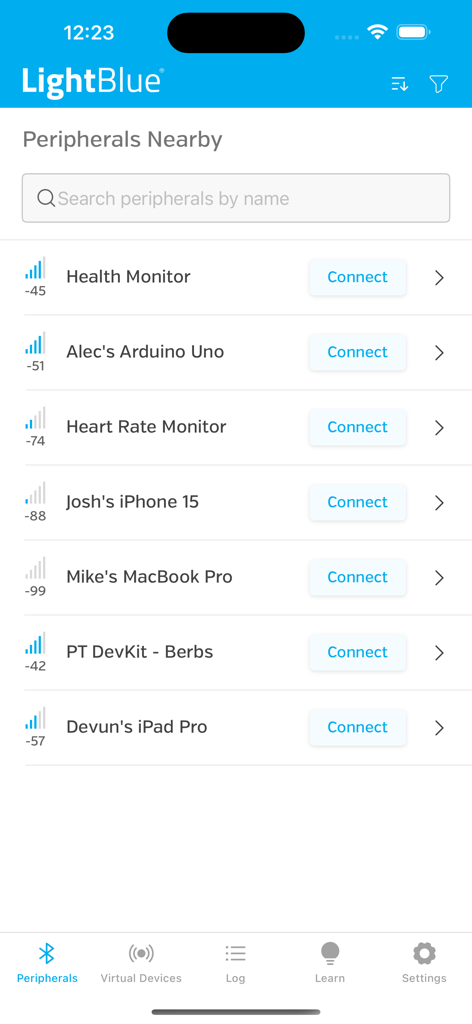
LightBlue app showing a list of discovered Bluetooth Low Energy peripherals with signal strength
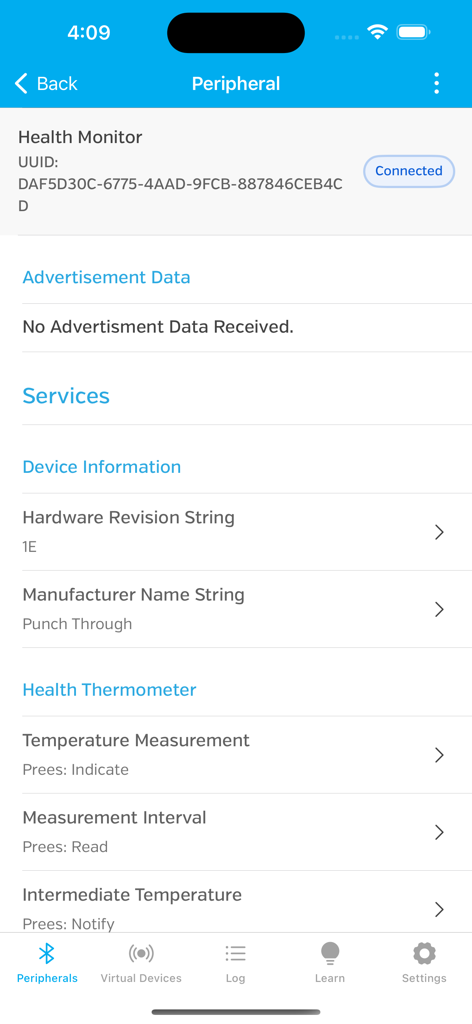
LightBlue app interface showing services and characteristics for a connected health monitor peripheral
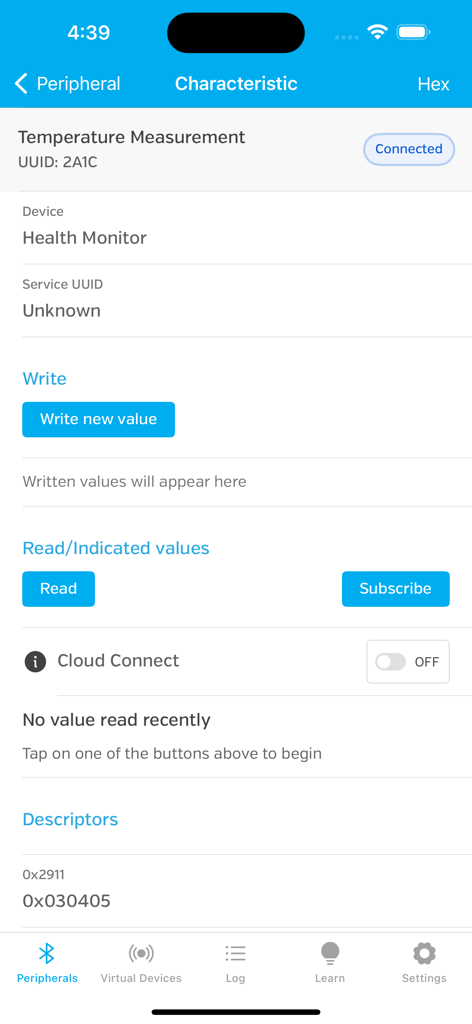
LightBlue app interface showing Bluetooth characteristic details for a connected temperature measurement device
Description
Download
More Like This
Apps with similar features and user experience
Proxyman - Capture HTTPS
Proxyman LLC

ProxyPin - Open Source Capture
Minimalist Network Co., Ltd.

BluetoothAssistant
Hangzhou OrangeJuice Technology Co., Ltd.

StikDebug
Stephen Bove

Onmi: Networking & API Request
Vuong Anh

Shizuku
Ahammam Lahcen

Stream - Network Debug Tool
Stream Lab Inc.

Web Inspector
And a Dinosaur

Surge 5
Surge Networks Inc.
This page is not an official page of the app or its developer, but an independent editorial publication created for informational and commentary purposes. Unless expressly stated otherwise, neither the app nor its developer is affiliated with, endorsed by, sponsored by, authorized by, or otherwise officially connected with MWM, Apple, Google Play, the app publisher, or the app's developer, and nothing on this page implies that the app was developed using MWM's services. Any trademarks, logos, screenshots, and other content remain the property of their respective owners.