
This page is not an official page of the app or its developer, but an independent editorial publication created for informational and commentary purposes. Unless expressly stated otherwise, neither the app nor its developer is affiliated with, endorsed by, sponsored by, authorized by, or otherwise officially connected with MWM, Apple, Google Play, the app publisher, or the app's developer, and nothing on this page implies that the app was developed using MWM's services. Any trademarks, logos, screenshots, and other content remain the property of their respective owners.


Luminar: Image Editor&Enhancer
This app hands users the power of a professional studio, shrink-wrapped for their Apple device. Its AI doesn't just edit; it radically redefines images, bringing audacious visions to life with a tap.
Downloads
750k+User Rating
Total Ratings
12.2KPublisher
Category
Photo & VideoLocales
21Latest Version
3.5.1Size
682.3 MBFirst Released
Mar 5, 2024An analytical overview of the app's powerful AI-driven and intuitive photo editing capabilities, tailored for users within the Apple ecosystem.
Luminar: Key Features for Apple-Centric Creators
Apple Ecosystem Integration
This tool features seamless integration within the Apple ecosystem, supporting iPhone, iPad (with Apple Pencil), and Vision Pro for an optimized, immersive editing experience.
Intuitive Gestural Interface
The app provides a streamlined design with an interactive, gestural interface, allowing users to edit photos with smoothly gliding sliders and spinning dials that respond realistically to touch.
AI Smart Enhancements
It allows users to effortlessly enhance photo quality with AI, automatically adjusting color, tone, clarity, and unlocking hidden details for professional results in seconds.
AI Portrait Retouching
This tool includes AI capabilities like FaceAI, SkinAI, and BodyAI to automatically enhance facial features, brighten faces, refine proportions, remove skin imperfections, and subtly reshape subjects.
AI Dynamic Relighting
It allows users to take full control over exposure and light sources with RelightAI, dynamically adjusting lighting conditions to suit their artistic vision.
AI Sky Replacement
The app features SkyAI, enabling users to seamlessly replace dull skies with brilliant ones, offering impressive backdrops and transforming landscapes with ease.
AI Bokeh Effects
This tool features BokehAI, allowing users to blur backgrounds, adjust focus, and customize bokeh shapes for creative depth of field effects.
RAW File Editing
The app provides support for RAW files, allowing semi-professional content creators to edit high-quality images directly on their mobile devices while preserving maximum detail.
Frequently Asked Questions
Everything you need to know about Luminar: Image Editor&Enhancer
What is Luminar Mobile AI Photo Editor?
Luminar Mobile is an all-in-one, on-the-go photo editor and creative companion for iPhone, iPad, and Vision Pro. It offers powerful AI-driven tools and an interactive interface for an engaging photo editing experience.
Which devices are compatible with Luminar Mobile AI Photo Editor?
Luminar Mobile is compatible with iPhone, iPad, and Vision Pro. It is optimized for devices running iOS/iPadOS 17 and newer. On iPad 6-gen, certain advanced features are unavailable.
Does Luminar Mobile AI Photo Editor offer AI photo enhancements?
Yes, Luminar Mobile features several AI enhancements, including SkyAI, EnhanceAI, StructureAI, RelightAI, SkinAI, and BodyAI. These tools provide smart, cutting-edge photo editing capabilities.
How does SkyAI work in Luminar Mobile AI Photo Editor?
SkyAI seamlessly replaces dull skies with brilliant ones, creating impressive backdrops. Users can select new skies from available options within the app.
Can I remove unwanted objects with Luminar Mobile AI Photo Editor?
Yes, Luminar Mobile includes an "Erase" tool. This feature allows users to effortlessly remove distracting elements from photos, placing focus on the main subjects.
What subscription options are available for Luminar Mobile AI Photo Editor?
Luminar Mobile offers a 1-week subscription, a 12-month subscription with a 7-day free trial, and a lifetime license. Subscriptions auto-renew unless canceled.
Is there a free trial for Luminar Mobile AI Photo Editor?
Yes, Luminar Mobile offers a 7-day free trial, which is included specifically with the 12-month subscription plan. After the trial, users are charged the yearly subscription fee.
Can Luminar Mobile AI Photo Editor edit RAW photos?
Yes, Luminar Mobile supports RAW file editing. Users can edit RAW photos directly on their mobile device, preserving maximum image quality and flexibility in post-processing.
Does Luminar Mobile AI Photo Editor have a feature to reshape body parts?
Yes, Luminar Mobile includes BodyAI. This AI tool allows users to realistically shape a subject’s midsection by either adding or removing volume for desired results.
How does EnhanceAI work in Luminar Mobile AI Photo Editor?
EnhanceAI improves photo quality with a single slide, adjusting color, tone, and clarity for professional results in seconds. It allows simultaneous adjustment of up to a dozen controls.
Can I get professional photo effects with Luminar Mobile AI Photo Editor?
Yes, Luminar Mobile provides "Photo Filters" and "Presets." These features offer a diverse collection of effects and allow users to achieve pro-level edits in a single tap.
What iOS version does Luminar Mobile AI Photo Editor require?
Luminar Mobile is optimized for devices running iOS/iPadOS 17 and newer. It requires this operating system version for full functionality.
Does Luminar Mobile AI Photo Editor work with Apple Pencil?
Yes, Luminar Mobile integrates seamlessly with Apple devices. On the iPad, users can add personal touches using the Apple Pencil for sharper details and convenient edits.
How can I manage my Luminar Mobile AI Photo Editor subscription?
You can manage your Luminar Mobile subscription and turn off auto-renewal by accessing your Account Settings after purchase. This allows control over billing preferences.
Does Luminar Mobile AI Photo Editor have a privacy policy?
Yes, Luminar Mobile has a privacy policy. It is available for review at https://skylum.com/legal, providing details on data handling and user privacy.
The following screenshots and description are sourced directly from the app's official store listing and are the property of the app developer.
App Store
Screenshots

See how the app uses a 'Before/After' split view and an interactive slider dial for effortless one-slide enhancements.
AI Enhancement Power

Users can gain full control over light conditions with a 'Before/After' comparison and specialized Relight AI ribbon-like sliders.
Mastering Illumination

Discover seamless sky replacement with a clear 'Before/After' split view and a selection of multiple sky preset thumbnails.
Dynamic Sky Swaps

This tool allows users to effortlessly remove distracting elements from photos, visible through highlighted areas for removal and simple confirm/cancel buttons.
Flawless Image Cleanup
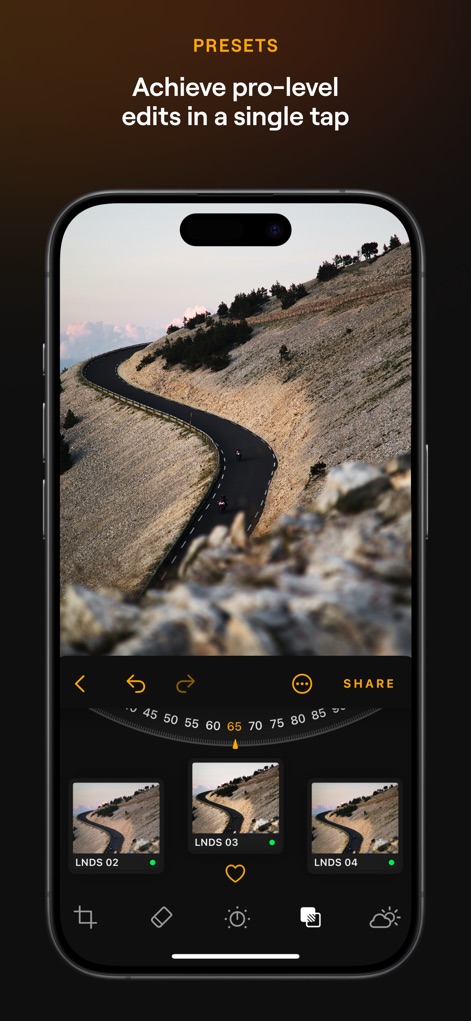
Achieve professional-level edits in a single tap, showcased by a rotary dial for strength adjustment and intuitive thumbnail previews of presets.
Instant Pro Edits

The app offers automatic skin retouching with a 'Before/After' split view and precise dedicated sliders for fine-tuning imperfections.
Refined Portraiture
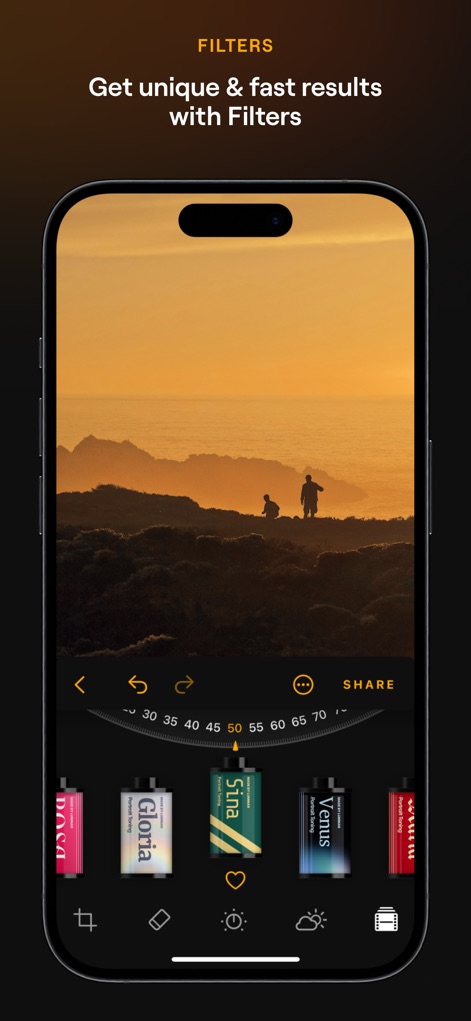
Explore a diverse collection of photo effects, presented through film-roll style filter previews and an intensity adjustment dial.
Creative Filter Collection
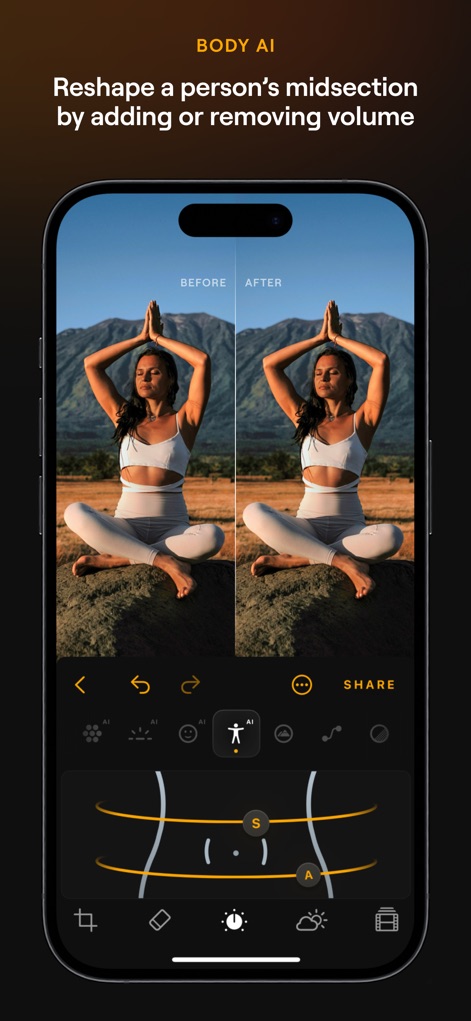
The app provides realistic body reshaping capabilities, demonstrated by a 'Before/After' split view and intuitive body outline manipulation tools.
Body Reshaping Control

Unlock hidden details and clarity in images, evident in the 'Before/After' split view and the precision slider for texture enhancement.
Detail & Clarity Boost
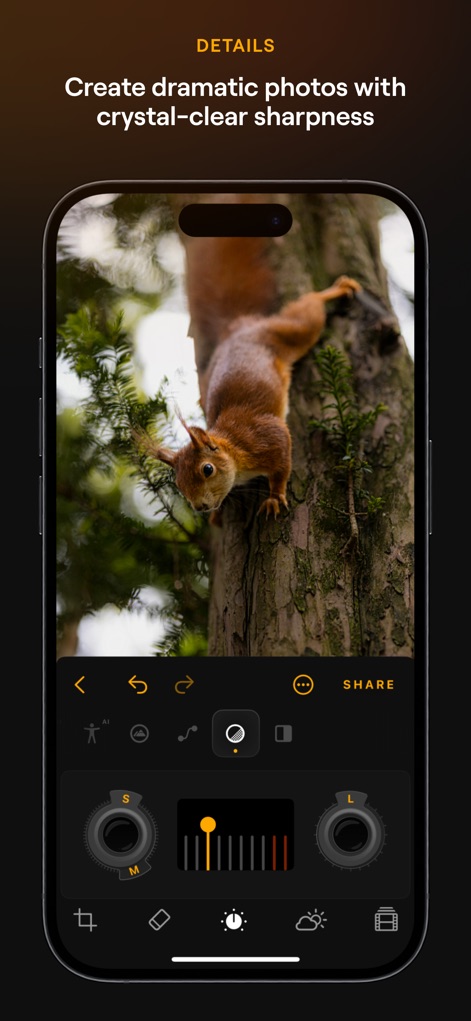
Users can create dramatic photos with crystal-clear sharpness using dedicated sliders for small/medium/large details and specific control dials.
Sharpen Every Pixel
Description
Download
More Like This
Apps with similar features and user experience

EPIK - AI Photo & Video Editor
SNOW Corporation

Citrus: AI 1 Tap Perfect Photo
Wemagine.ai LLP

SnapEdit: Photo Editor AI
SilverAI Joint Stock Company

Background Eraser 〜 Stickers
handyCloset Inc.

PhotoScan by Google Photos
Google LLC

Magic Eraser - Remove Object
Creatix Technology Global Limited

Magic Eraser Background Editor
Honk Honk Punch Pty Ltd

ProKnockOut-Cut Paste Photos
Shenzhen Qianhai Happy Tour Network Technology Co., Ltd.

Background Eraser - Remove BG*
SHANTANU PTE. LTD.
This page is not an official page of the app or its developer, but an independent editorial publication created for informational and commentary purposes. Unless expressly stated otherwise, neither the app nor its developer is affiliated with, endorsed by, sponsored by, authorized by, or otherwise officially connected with MWM, Apple, Google Play, the app publisher, or the app's developer, and nothing on this page implies that the app was developed using MWM's services. Any trademarks, logos, screenshots, and other content remain the property of their respective owners.