
This page is not an official page of the app or its developer, but an independent editorial publication created for informational and commentary purposes. Unless expressly stated otherwise, neither the app nor its developer is affiliated with, endorsed by, sponsored by, authorized by, or otherwise officially connected with MWM, Apple, Google Play, the app publisher, or the app's developer, and nothing on this page implies that the app was developed using MWM's services. Any trademarks, logos, screenshots, and other content remain the property of their respective owners.


MobiOffice・Word Docs・Excel・PDF
Unshackle your workflow. This app puts genuine office power in your pocket, not just a scaled-down imitation.
Downloads
10M+User Rating
Total Ratings
134.7KPublisher
Category
BusinessLocales
17Latest Version
13.3Size
229.4 MBFirst Released
Oct 25, 2014An Analytical Overview of Key Features for On-the-Go Professionals
MobiOffice: Comprehensive Mobile Productivity Suite
Universal Document Compatibility
The app ensures seamless interoperability with Microsoft Office (Word, Excel, PowerPoint), Google Docs, Sheets, Slides, OpenOffice, LibreOffice, and Adobe PDF formats, enabling users to work with existing documents without compatibility issues.
Comprehensive PDF Toolkit
It allows users to open, view, and annotate PDF files, along with advanced features like viewing table of contents and accessing various reading options, catering to comprehensive PDF interaction.
Seamless Cloud Integration
This tool features direct links to popular cloud services such as Google Drive, OneDrive, Box, and Dropbox, facilitating easy access and saving of all user files across different platforms.
Sophisticated Word Processor
The app provides powerful word processing features, including rich text formatting, font packages, insertion of tables, pictures, and symbols, alongside advanced document structuring with notes, headers, and page settings.
Dynamic Spreadsheet Editor
It offers comprehensive spreadsheet functionalities, including over 250 functions, formula editing, advanced chart creation, data filtering, sorting, and validation, crucial for detailed data analysis.
Interactive Presentation Builder
This tool enables users to create engaging presentations with features like inserting charts, tables, and media, changing themes and layouts, and a dedicated presenter mode for interactive delivery.
Camera Document Scanner
The app allows users to convert physical paper documents into digital files directly using their device's camera, streamlining the process of digitizing information anywhere.
Versatile File Type Support
It supports a wide array of common file types beyond office documents, including various image (.png, .jpg), audio (.mp3, .m4a), video (.mov, .mp4), and archive (.zip) formats, enhancing its utility as a general file manager.
Frequently Asked Questions
Everything you need to know about MobiOffice・Word Docs・Excel・PDF
What is MobiOffice?
MobiOffice is an office productivity suite designed to create, edit, comment, format, convert, and protect documents, spreadsheets, and presentations. It also allows viewing and signing of PDF files.
Is MobiOffice compatible with Microsoft Office files?
Yes, MobiOffice is compatible with Microsoft Office formats including Word (.doc, .docx, .docm), Excel (.XLS, .XLSX, .XLSM), and PowerPoint (.PPT, .PPTX, .PPS, .PPSX, .PPTM, .PPSM).
Does MobiOffice provide cloud storage?
Yes, MobiOffice offers 5GB of free cloud space in MobiDrive upon sign-in. Premium users receive an extended 50GB of cloud storage.
What cloud services can MobiOffice link to?
MobiOffice allows users to link their Google Drive, OneDrive, Box, or Dropbox accounts. It also supports WebDAV and FTP connections.
Can MobiOffice scan paper documents?
Yes, MobiOffice includes a feature to scan paper documents to digital ones using the device's camera.
What word processing features does MobiDocs offer?
MobiDocs offers rich text and paragraph formatting, insertion of tables, pictures, text boxes, shapes, bookmarks, and symbols. It also creates and edits notes, headers/footers, and page numbers.
Can I edit formulas in spreadsheets using MobiOffice?
Yes, MobiOffice's MobiSheets application allows users to use over 250 functions and edit formulas. It also supports creating, previewing, and editing advanced charts.
Does MobiOffice offer a free trial?
Yes, MobiOffice offers a free trial. It automatically renews to a paid subscription unless auto-renew is turned off at least 24 hours prior to the trial period's end.
How much does a MobiOffice subscription cost?
A MobiOffice subscription costs $39.99 per year. This is an auto-renewable yearly subscription according to the pricing information.
How do I cancel a MobiOffice subscription?
Users can cancel a subscription anytime by turning off auto-renewal through their iTunes account settings at least 24 hours before the current subscription period ends.
Can MobiOffice convert PDF files?
Yes, the Premium MobiOffice PDF feature allows conversion of PDFs to Word, Excel, and ePub formats.
Does MobiOffice allow handwritten signatures on PDFs?
Yes, Premium MobiOffice PDF includes Quick Sign functionality, enabling handwritten signatures on fillable PDF forms.
Does MobiOffice support spell checking?
Yes, MobiOffice includes a spell check feature with options for language and learned words, as shown in its writing interface.
What file types can MobiOffice work with beyond Office documents and PDFs?
MobiOffice works with .zip, .png, .jpg, .tiff, .mp3, .mov, .mp4, .m4a, and OpenDocument formats, in addition to standard office documents and PDFs.
The following screenshots and description are sourced directly from the app's official store listing and are the property of the app developer.
App Store
Screenshots

The app's interface highlights widespread user adoption and a high Trustpilot rating, showcasing its reputation as a reliable productivity tool.
Trusted Productivity Hub

This tool provides a comprehensive overview of its varied document capabilities and convenient quick action buttons for seamless workflow.
Integrated Document Suite

MobiDocs empowers users with rich text formatting options and an integrated spell check feature for professional document crafting.
Effortless Document Creation

MobiSheets enables users to efficiently manage spreadsheets with a robust formula bar and detailed cell formatting options for precise data presentation.
Advanced Data Analysis

MobiSlides helps users create compelling presentations by offering easy insertion of images and versatile slide layout options.
Dynamic Presentations Crafted

MobiOffice PDF streamlines document workflows with quick signing capabilities and comprehensive annotation tools for efficient review.
Seamless PDF Management

The app transforms physical documents into digital files using its integrated camera scan function with adjustable corner selection for accuracy.
Instant Document Digitization

This tool ensures broad compatibility, displaying a diverse list of document types and easily accessible file management options.
Universal File Compatibility
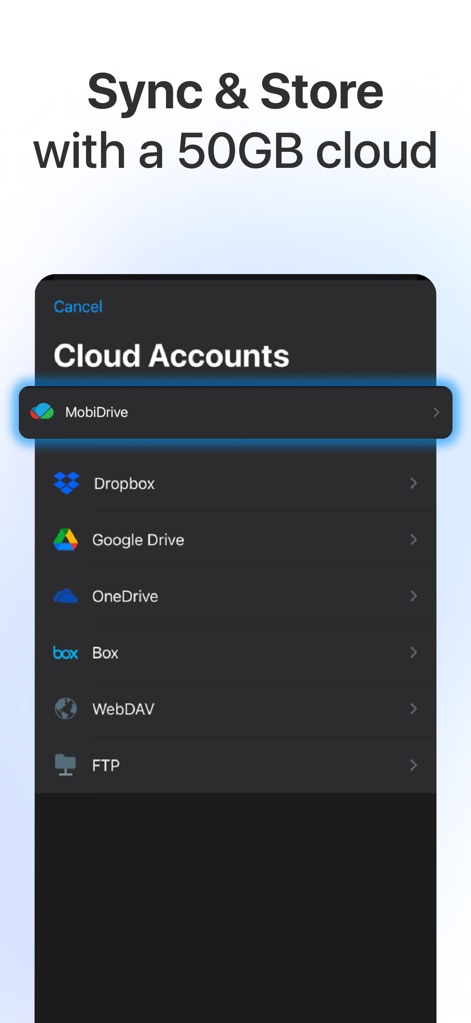
Users can seamlessly integrate various cloud storage services and utilize MobiDrive's dedicated cloud space for secure file synchronization and storage.
Secure Cloud Integration
Description
Download
More Like This
Apps with similar features and user experience

PDF PRO Scan Image & Documents
Balzo srl

The PDF Scanner, PDF editor HQ
NEXT K.U.M. LTD

CamScanner - PDF Scanner App
INTSIG Information Co., Ltd

Adobe Scan: PDF & OCR Scanner
Adobe Inc.

WPS Office: PDF, Docs, Sheets
KINGSOFT OFFICE SOFTWARE CORPORATION LIMITED

iLovePDF - PDF Editor & Scan
ILOVEPDF S.L.

Scanner App: Genius Scan
The Grizzly Labs

Microsoft Lens: PDF Scanner
Microsoft Corporation

Clear Scan: Doc Scanner App
INDY MOBILE APP COMPANY LIMITED
This page is not an official page of the app or its developer, but an independent editorial publication created for informational and commentary purposes. Unless expressly stated otherwise, neither the app nor its developer is affiliated with, endorsed by, sponsored by, authorized by, or otherwise officially connected with MWM, Apple, Google Play, the app publisher, or the app's developer, and nothing on this page implies that the app was developed using MWM's services. Any trademarks, logos, screenshots, and other content remain the property of their respective owners.