
This page is not an official page of the app or its developer, but an independent editorial publication created for informational and commentary purposes. Unless expressly stated otherwise, neither the app nor its developer is affiliated with, endorsed by, sponsored by, authorized by, or otherwise officially connected with MWM, Apple, Google Play, the app publisher, or the app's developer, and nothing on this page implies that the app was developed using MWM's services. Any trademarks, logos, screenshots, and other content remain the property of their respective owners.


My Scans, best PDF Scanner App
Your pocket now holds every document you need. This app eradicates paper clutter, digitizing your workflow with ruthless efficiency.
Downloads
2.5M+User Rating
Total Ratings
121.1KPublisher
Category
ProductivityLocales
20Latest Version
5.10Size
112.9 MBFirst Released
Jul 30, 2015An analytical overview of essential functionalities enhancing digital document management and collaboration.
Key Features of My Scans App for Productivity Professionals
Searchable PDF Generation
The app allows users to create searchable PDF documents, significantly improving data retrieval and document management efficiency for professionals. This is crucial for quick information access within scanned files.
Intelligent Scanning
It automatically detects document edges and crops images, ensuring high-quality, professional-looking scans without manual adjustments, which saves time for busy users.
Seamless Multi-Device Sync
This tool features synchronized documents across multiple devices, ensuring that users always have access to their latest files, whether on iPhone, iPad, or other platforms, supporting mobile and hybrid work environments.
Cloud-Based Collaboration
It allows users to collaborate on documents through shared cloud folders, facilitating teamwork and improving productivity for businesses and projects requiring shared access.
Advanced Document Organization
The app provides an amazing file and folder organizer, enabling users to efficiently categorize and manage their digital documents, which is vital for maintaining order and quick retrieval.
Reliable Cloud Backup
This tool offers cloud backup for all documents, providing a secure and reliable way to protect important files from loss and ensuring business continuity.
Web Access to Documents
It enables users to access their documents via a web browser on any computer, eliminating the need for the app and offering greater flexibility and accessibility.
Versatile Document Sharing
The app allows users to easily share documents as images or PDFs via email or shareable links, simplifying distribution and communication with clients or colleagues.
Frequently Asked Questions
Everything you need to know about My Scans, best PDF Scanner App
What is the primary function of the My Scans app?
My Scans is a document scanner and organizer for iPhone and iPad. It converts photos of documents into searchable PDFs by detecting edges, allowing users to efficiently manage and share their digital documents.
Can My Scans create searchable PDF documents?
Yes, My Scans detects document edges from photos and converts them into searchable PDF documents. This advanced feature is available when the My Scans Free version is upgraded to the full version.
Does My Scans offer cloud synchronization and collaboration?
Yes, My Scans provides cloud collaboration, sharing, backup, and cross-device syncing via Top App Cloud. Users can access files through a web browser and work with shared folders when the cloud service is enabled.
What is the subscription cost for My Scans Cloud?
The Top App Cloud Subscription for My Scans costs $2.99 per month or $19.99 annually. This payment is processed through your iTunes Account and automatically renews unless turned off.
Are export functions included in the free version of My Scans?
No, export functions in My Scans require an in-app purchase to 'Upgrade to PRO' or enabling the 'Top App Cloud' service. The free version allows testing but restricts export capabilities.
How can I share documents from the My Scans app?
My Scans allows sharing documents as images or PDFs, direct printing, and sending faxes. Cloud sharing links are also available with the Top App Cloud service to easily distribute your scanned files.
How do I cancel my Top App Cloud subscription for My Scans?
To cancel your Top App Cloud Subscription for My Scans, access your user Account Settings after purchase. Auto-renewal can be turned off there, but no cancellation is permitted during the active subscription period.
Does My Scans provide tools to edit scanned documents?
Yes, My Scans includes tools for editing scanned documents. Users can apply blur, use a pencil, add signatures, and insert text directly onto their documents within the app interface.
The following screenshots and description are sourced directly from the app's official store listing and are the property of the app developer.
App Store
Screenshots
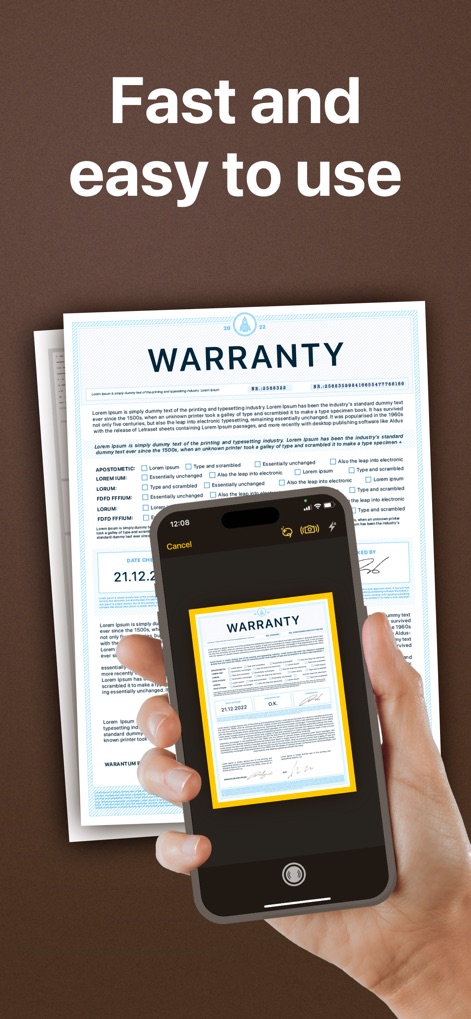
Observe how the app's automatic edge detection efficiently crops documents like the 'WARRANTY' form, streamlining the scanning process.
Instant Document Capture

Explore the intuitive file and folder organizer, showcasing documents like 'Office Documents' and 'Driving Study Article' for easy access and management.
Organized Document Hub

Discover the app's robust editing capabilities, featuring tools like the 'Pencil' for annotations and percentage sliders for precise adjustments to scanned documents.
Refine & Annotate
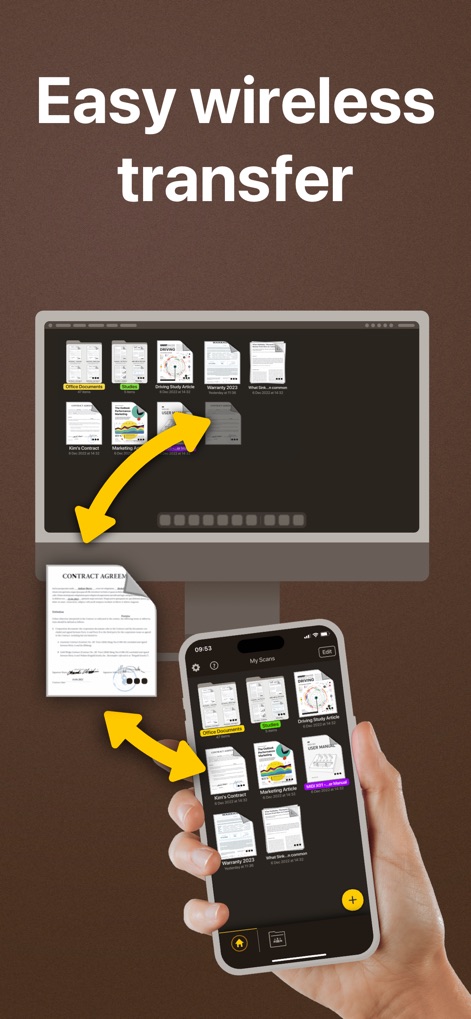
Witness how documents effortlessly transfer between a user's mobile device and desktop computer, demonstrating the app's cross-device synchronization and accessibility.
Seamless Device Sync

Examine the straightforward fax interface, allowing users to specify a 'Country' and 'Fax Number' directly from their device for quick document transmission.
Direct Fax Functionality
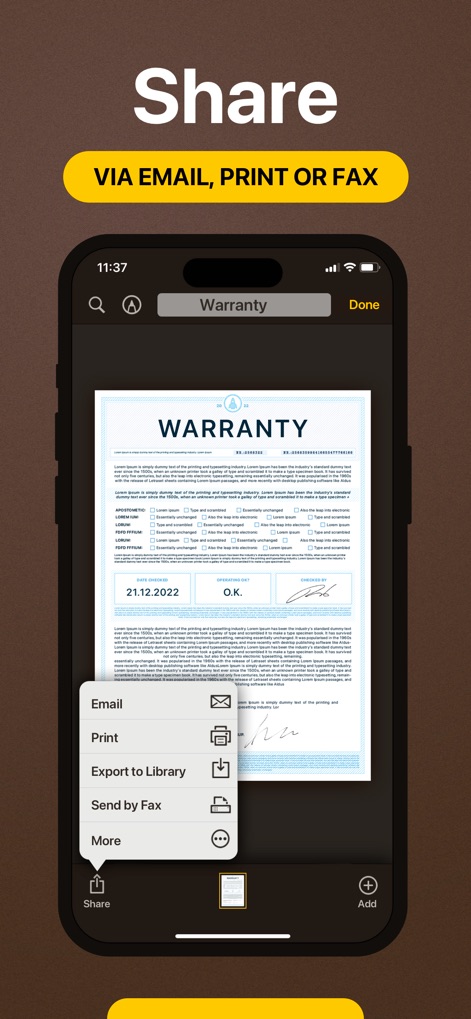
View the comprehensive sharing menu, enabling users to easily 'Email' or 'Print' their scanned documents for collaborative and administrative needs.
Versatile Sharing Options
Description
Download
More Like This
Apps with similar features and user experience

PDF PRO Scan Image & Documents
Balzo srl

The PDF Scanner, PDF editor HQ
NEXT K.U.M. LTD

CamScanner - PDF Scanner App
INTSIG Information Co., Ltd

Adobe Scan: PDF & OCR Scanner
Adobe Inc.

WPS Office: PDF, Docs, Sheets
KINGSOFT OFFICE SOFTWARE CORPORATION LIMITED

iLovePDF - PDF Editor & Scan
ILOVEPDF S.L.

Scanner App: Genius Scan
The Grizzly Labs

Microsoft Lens: PDF Scanner
Microsoft Corporation

Clear Scan: Doc Scanner App
INDY MOBILE APP COMPANY LIMITED
This page is not an official page of the app or its developer, but an independent editorial publication created for informational and commentary purposes. Unless expressly stated otherwise, neither the app nor its developer is affiliated with, endorsed by, sponsored by, authorized by, or otherwise officially connected with MWM, Apple, Google Play, the app publisher, or the app's developer, and nothing on this page implies that the app was developed using MWM's services. Any trademarks, logos, screenshots, and other content remain the property of their respective owners.