
This page is not an official page of the app or its developer, but an independent editorial publication created for informational and commentary purposes. Unless expressly stated otherwise, neither the app nor its developer is affiliated with, endorsed by, sponsored by, authorized by, or otherwise officially connected with MWM, Apple, Google Play, the app publisher, or the app's developer, and nothing on this page implies that the app was developed using MWM's services. Any trademarks, logos, screenshots, and other content remain the property of their respective owners.


myPhonak
Take back control. The app puts granular hearing adjustments and health data directly in users' hands.
Downloads
2.5M+User Rating
Total Ratings
221.8KPublisher
Category
MedicalLocales
35Latest Version
7.4.0Size
202.7 MBFirst Released
Apr 22, 2018An analytical overview of functionalities enhancing hearing aid personalization and user experience.
Key Features of myPhonak App
Remote Support
It allows users to meet with their hearing care professional through a live video call and have their hearing aids adjusted remotely, enhancing convenience and access to expert care.
Advanced Remote Control
The app provides granular control over hearing aid settings, allowing users to personalize volume, noise reduction, microphone directionality, and sound pitch for various listening situations.
Battery & Connectivity Status
It keeps users informed about their hearing aid's battery level and connection status, ensuring uninterrupted use and peace of mind.
Integrated Health Tracking
This tool features a health section that tracks steps, wearing time, activity levels, and optionally heart rate, helping users monitor their overall well-being.
Tap Control Configuration
The app provides options to configure tap control settings, enabling users to manage hearing aid functions with simple, intuitive gestures.
Cleaning Reminders
It allows users to set up cleaning reminders, promoting proper maintenance of their hearing aids for consistent performance and extended lifespan.
Frequently Asked Questions
Everything you need to know about myPhonak
What is the myPhonak app?
The myPhonak app offers enhanced controls, personalization for Phonak hearing aids, and health data tracking. It improves the hearing experience by providing access to various settings and information.
How can I control my Phonak hearing aids with the myPhonak app?
The myPhonak app's Remote Control adjusts volume, noise reduction, and microphone directionality. Users select pre-defined programs or use equalizer presets (bass, middle, treble) to personalize sound for various listening situations.
Does myPhonak offer remote support for hearing aid adjustments?
Yes, myPhonak provides Remote Support. This feature enables live video calls with a hearing care professional, allowing for remote hearing aid adjustments by appointment.
What health tracking features are available in the myPhonak app?
The myPhonak app's Health section tracks steps, wearing time, and activity levels. Optional features include goal setting, heart rate tracking (Audéo Fit only), and distance walked or ran.
Which Phonak hearing aids support health data tracking in myPhonak?
Health tracking in myPhonak is available on Paradise Rechargeable, Audéo Fit, Lumity, and Infinio devices. Heart rate tracking is exclusively supported by Audéo Fit.
What additional features does the myPhonak app provide?
myPhonak offers Tap Control configuration, cleaning reminders, and displays essential information. This includes battery levels and connection status for connected hearing aids and accessories.
What Phonak hearing aids are compatible with the myPhonak app?
myPhonak is compatible with various Bluetooth®-enabled Phonak hearing aids, including models like Virto I, Audéo I, CROS I, Sky L, Naída L, Audéo Fit, and others listed in the description.
What iOS devices are compatible with the myPhonak app?
The myPhonak app is compatible with iPhone 6s and newer, running iOS 15.0 or newer. Devices must also possess Bluetooth Low Energy (BT-LE) capability.
Does myPhonak support advanced remote control for all compatible devices?
No, the myPhonak app does not support advanced remote control and remote support features for Phonak Audéo B-Direct hearing aids. These functions are unavailable for that model.
Does myPhonak integrate with Apple Health?
Yes, myPhonak supports integration with Apple Health. This functionality activates when the app connects to a compatible hearing aid, such as the Phonak Audéo Fit.
Can I locate my Phonak hearing aids using the myPhonak app?
Yes, the myPhonak app includes a "Find my Hearing Aids" feature. It displays the last recorded location of your hearing aids on a map.
Can users customize hearing programs in the myPhonak app?
Yes, users customize programs in myPhonak. This includes adjusting equalizer presets, volume, noise reduction, and speech focus. Custom settings can be saved as new personalized programs.
Does the myPhonak app show battery status?
Yes, myPhonak displays the battery percentage for both the left and right connected hearing aids. This information is visible on the home screen and device management sections.
The following screenshots and description are sourced directly from the app's official store listing and are the property of the app developer.
App Store
Screenshots
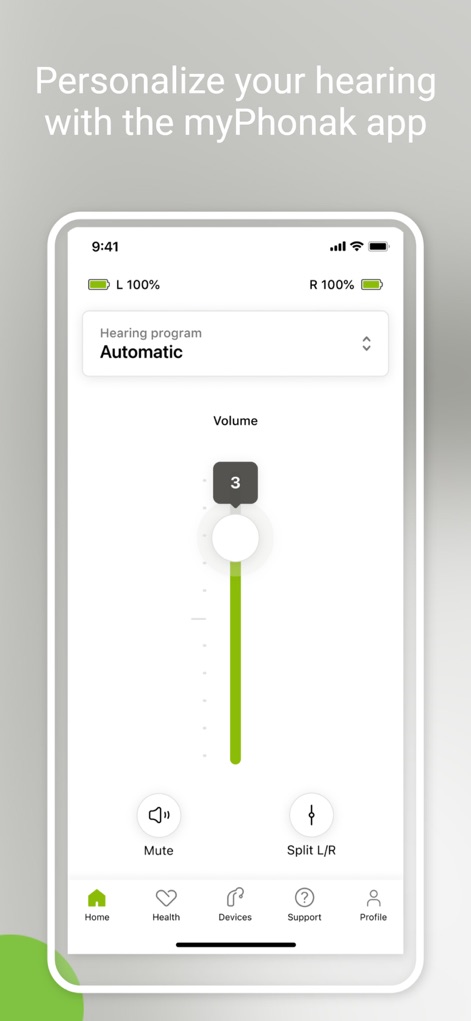
Users can effortlessly manage their hearing experience by adjusting the volume slider and selecting different hearing programs directly from the home screen.
Intuitive Sound Control
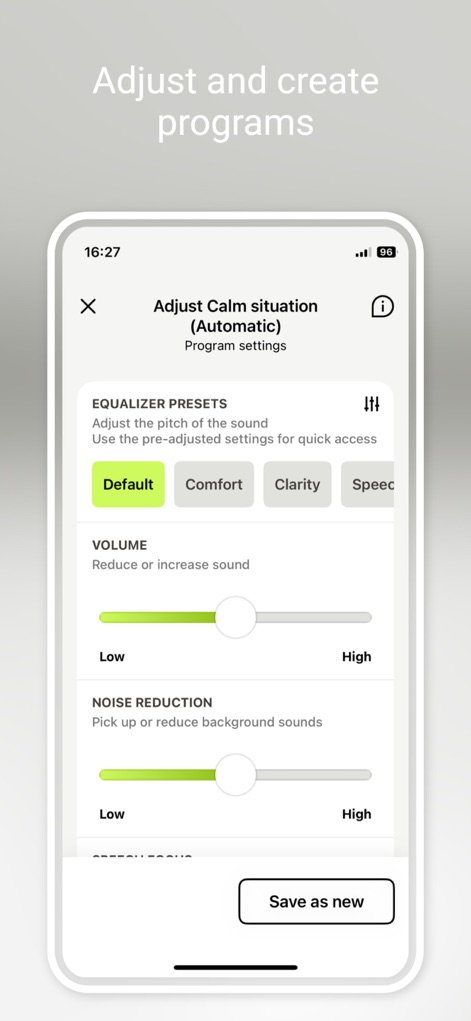
The app provides detailed control over audio settings, allowing users to select from equalizer presets and fine-tune noise reduction levels for optimal clarity.
Advanced Sound Shaping
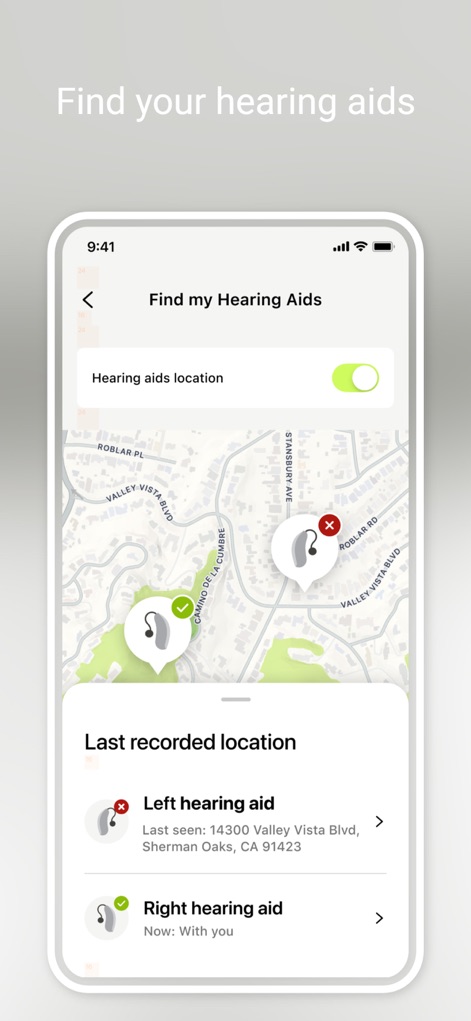
This feature helps users track their hearing aids, displaying their last recorded location on a map and providing precise address details.
Locate Your Devices
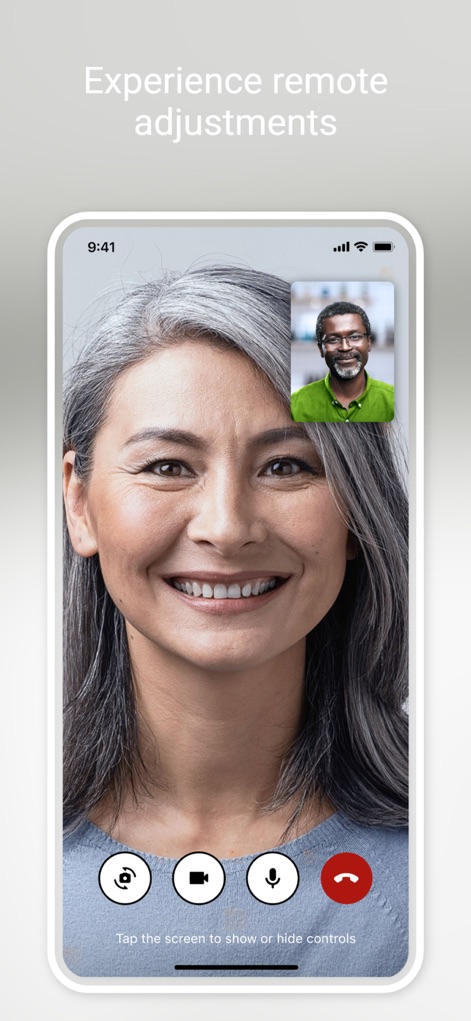
Users can access professional hearing care through a live video call, utilizing the integrated call controls for seamless remote adjustments.
Remote Expert Support
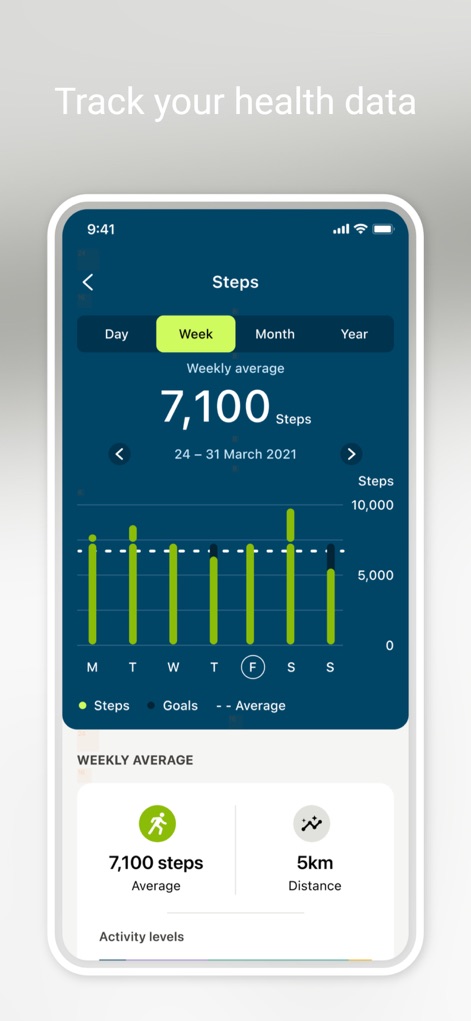
The app enables users to monitor their well-being, presenting a weekly average of steps and a detailed bar chart of daily activity.
Integrated Health Tracking
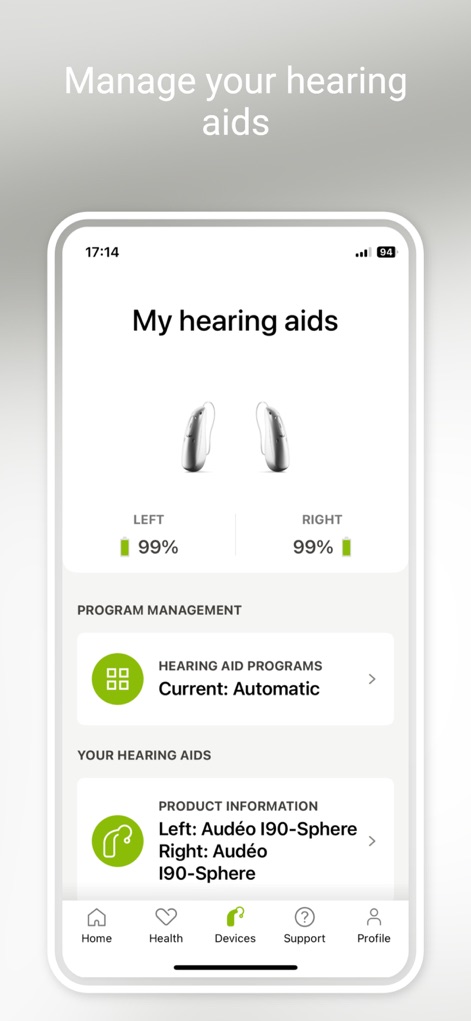
This section offers a comprehensive view of connected hearing aids, showing their individual battery levels and the active hearing aid program.
Device Status Overview
Description
Download
More Like This
Apps with similar features and user experience

ReSound Smart 3D
GN Resound A/S
Braun IPL app
P&G Productions
Philips HearLink 2
SBO Hearing AS

BeMore – for your hearing aids
GN Hearing Care Corporation
Jabra Enhance Pro
GN Hearing Care Corporation

Miracle-Ear App
Miracle-Ear, Inc.

Amplifon App
Amplifon S.p.A.

Hearing Remote
Sonova AG

Oticon Companion
Oticon
This page is not an official page of the app or its developer, but an independent editorial publication created for informational and commentary purposes. Unless expressly stated otherwise, neither the app nor its developer is affiliated with, endorsed by, sponsored by, authorized by, or otherwise officially connected with MWM, Apple, Google Play, the app publisher, or the app's developer, and nothing on this page implies that the app was developed using MWM's services. Any trademarks, logos, screenshots, and other content remain the property of their respective owners.