Noting Pro - 专业手写笔记,支持图层和渐变色
Download on App Store

This page is not an official page of the app or its developer, but an independent editorial publication created for informational and commentary purposes. Unless expressly stated otherwise, neither the app nor its developer is affiliated with, endorsed by, sponsored by, authorized by, or otherwise officially connected with MWM, Apple, Google Play, the app publisher, or the app's developer, and nothing on this page implies that the app was developed using MWM's services. Any trademarks, logos, screenshots, and other content remain the property of their respective owners.

Logo of Noting Pro - 专业手写笔记,支持图层和渐变色
Download on App Store

Noting Pro - 专业手写笔记,支持图层和渐变色

Experience the next-gen engine with layers, custom gradients, and crystal-clear 20x zoom. Elevate your digital planning and PDF annotations with a pro-grade tool—all for a one-time purchase.

Key Figures

Downloads

0

User Rating

4.6/5

Total Ratings

0

Publisher

裕坤 张

Category

Productivity

Locales

3

Latest Version

1.118

Size

49.8 MB

First Released

Aug 9, 2023
Features

Professional Note-Taking, Reimagined

Ditch the subscriptions and the pixelation. Noting Pro brings professional vector tools and beautiful aesthetics to your daily study and design workflow.

Infinite Vector Clarity

Create crystal-clear notes that stay sharp even at 20x zoom. Use pressure-sensitive gradient ink for an artistic, Pinterest-worthy finish.

Pro-Grade Layer System

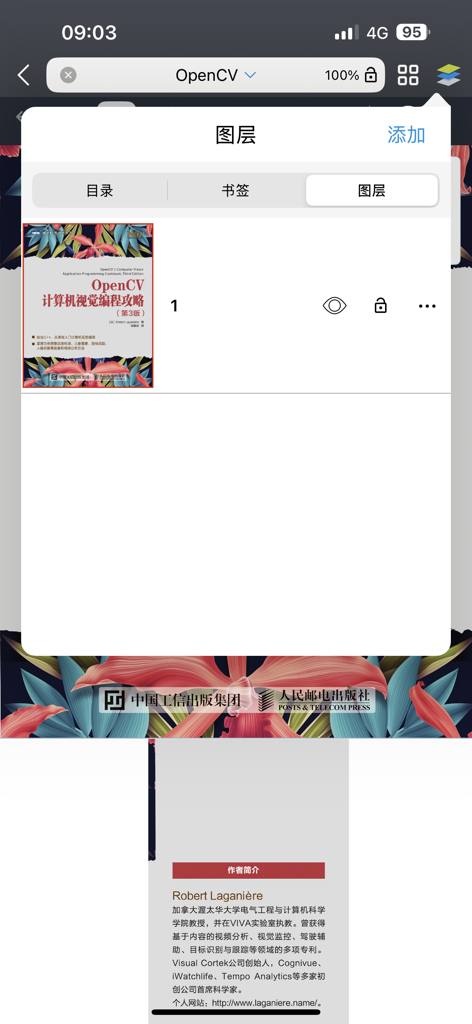
Organize complex sketches and annotations with ease. Reorder, merge, and manage layers just like your favorite professional design software.

The following screenshots and description are sourced directly from the app's official store listing and are the property of the app developer.

App Store

Screenshots
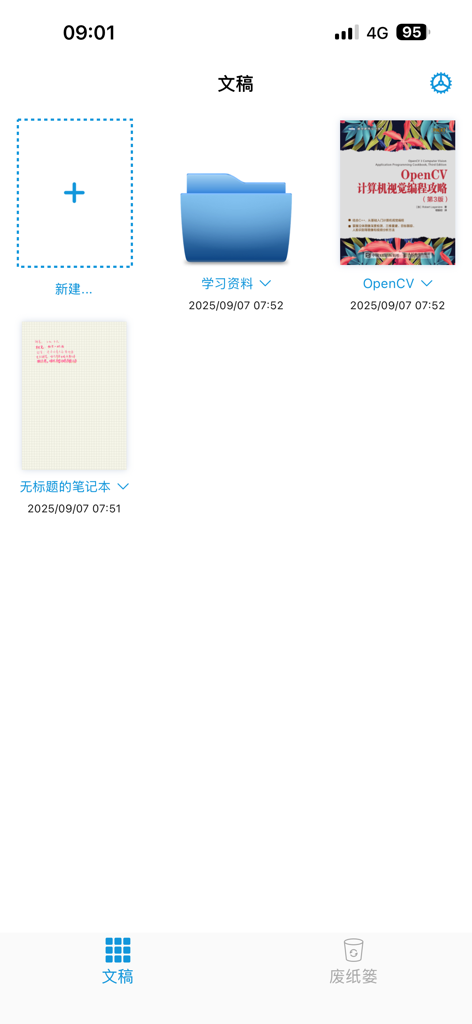
Noting Pro - 专业手写笔记,支持图层和渐变色 - Noting Pro app document library showing folders and digital notes
Noting Pro app document library showing folders and digital notes

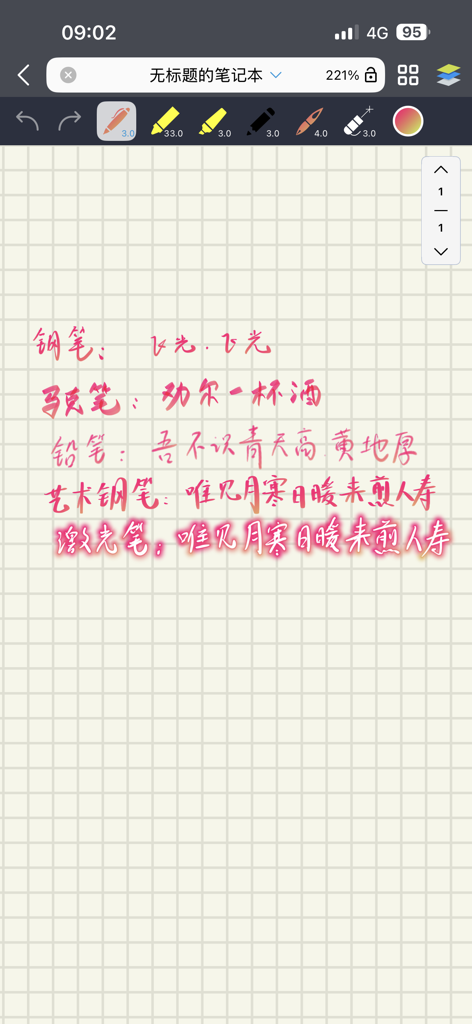
Noting Pro - 专业手写笔记,支持图层和渐变色 - Noting Pro app interface showing various vector gradient ink brushes and handwritten text on grid paper
Noting Pro app interface showing various vector gradient ink brushes and handwritten text on grid paper

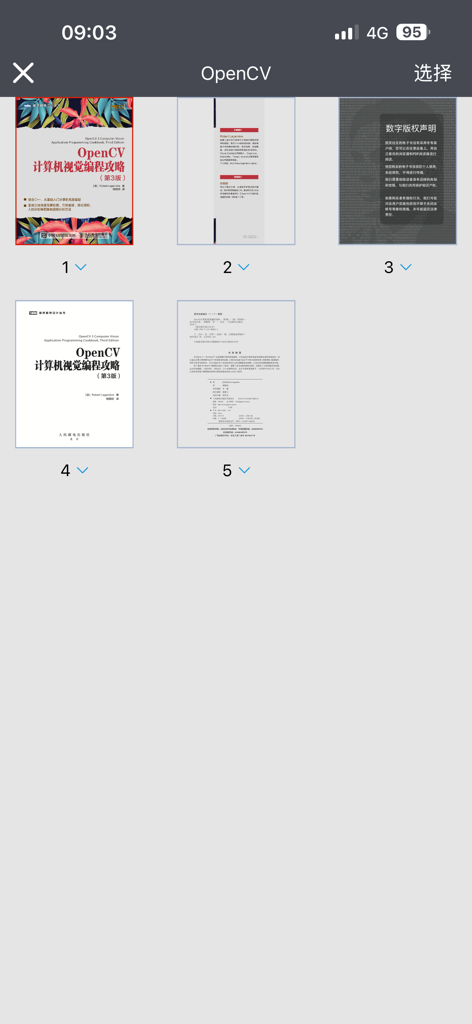
Noting Pro - 专业手写笔记,支持图层和渐变色 - A grid view of PDF page thumbnails within the Noting Pro document manager interface.
A grid view of PDF page thumbnails within the Noting Pro document manager interface.

Noting Pro - 专业手写笔记,支持图层和渐变色 - Noting Pro app interface showing the layers management menu over an open PDF document
Noting Pro app interface showing the layers management menu over an open PDF document

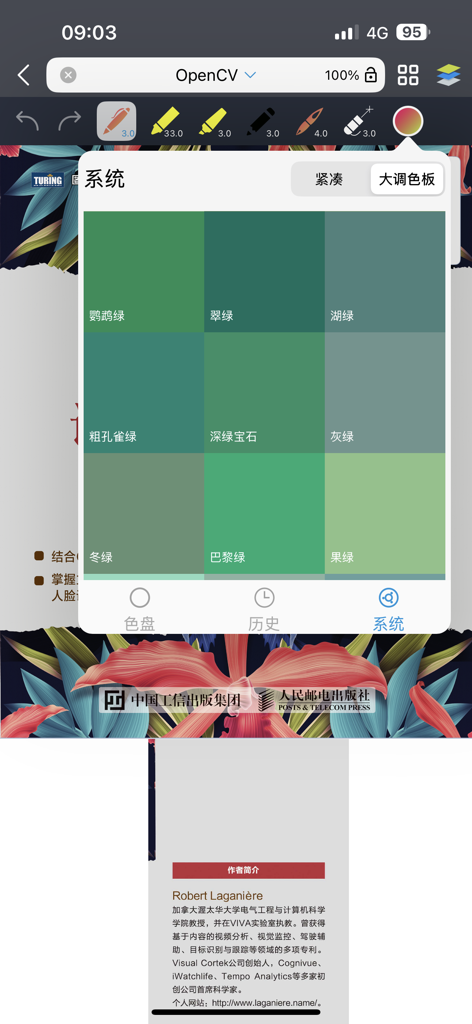
Noting Pro - 专业手写笔记,支持图层和渐变色 - Noting Pro app interface showing a color picker menu with various green shades for creative digital note taking

Noting Pro app interface showing a color picker menu with various green shades for creative digital note taking

Description

Noting Pro: The Ultimate Vector Gradient Ink Note-Taking App Noting Pro is a premier iPad note-taking app that allows you to create stunning vector strokes with gradient colors. Powered by our self-developed low-latency vector ink engine, the app responds to Apple Pencil pressure to produce professional-grade strokes that remain crystal clear even at 20x zoom. Core Features: - Next-Gen Ink Engine: Experience silky-smooth, low-latency writing. - Pressure-Sensitive Tools: Pens and erasers support pressure sensitivity. Customize stroke size, opacity, and color—including vibrant gradient effects. - Diverse Brush Set: Includes Pencils, Highlighters (Round & Square), Art Pens, and more. - Smart Laser Pointer: Functions like a standard pen with pressure sensitivity and gradients. Supports cross-page writing, lasso selection, shape fitting, and undo/redo. - Shape Recognition & Editing: Automatically recognize lines, curves, triangles, rectangles, stars, ellipses, circles, and polygons. Fill shapes with color and tap to re-edit at any time. - Advanced Fill Tool: Fill closed areas by tapping or dragging color swatches. Supports gradient fills. - Custom Gradients: Set start and end colors in the color picker. Save your favorite palettes and sync them across all your devices. - Functional Stationery: Includes "Tape" with customizable gradients—tap to hide or reveal content underneath. - Powerful Document Management - Flexible Canvas: Continuous cross-page writing with A4 templates in Yellow, Black, or White. - Layer System: Insert, reorder (drag-and-drop), delete, and merge layers downward. - Intuitive Lasso Tool: Fully customizable. Translate, scale, rotate, and move content across pages instantly. - Page Management: Insert new pages anywhere and reorder them with simple drag-and-drop actions. - Image Integration: Insert multiple images across pages. Edit via tapping (scale/rotate) or using the lasso. - PDF & Professional Workflow - PDF Annotations: Long-press to extract text. Supports copying, translation, highlighting (line/block), strikethroughs, underlines, and squiggly lines. All annotations remain editable and support gradients. - Extended Capabilities: PDF margin expansion, multi-level outlines, and bookmarks. - Efficiency: Unlimited Undo/Redo, Multi-window support, and Split-view. - Cloud & Sharing: iCloud sync across all devices. Import PDFs via the system share sheet and export your notes as PDFs. - Scrolling: Supports both vertical and horizontal page turning. ********************** Please Note ********************** Free Version Limits: You can create up to 5 notebooks, each with a maximum of 5 pages and 5 layers. Please delete carefully; if you exceed these limits, you will not be able to create new notebooks/pages until you upgrade. One-Time Purchase: Pay once to unlock all features forever. Final Price: ¥30.0 Launch Promotion: ¥15.0 (50% OFF) for the first version! Feedback & Support: For immediate assistance, please reach out via social media (App Store reviews have a delay). Weibo: @NotingPro Bilibili: NotingPro Xiaohongshu (Red): NotingPro

Download

Download on App Store

This page is not an official page of the app or its developer, but an independent editorial publication created for informational and commentary purposes. Unless expressly stated otherwise, neither the app nor its developer is affiliated with, endorsed by, sponsored by, authorized by, or otherwise officially connected with MWM, Apple, Google Play, the app publisher, or the app's developer, and nothing on this page implies that the app was developed using MWM's services. Any trademarks, logos, screenshots, and other content remain the property of their respective owners.