
This page is not an official page of the app or its developer, but an independent editorial publication created for informational and commentary purposes. Unless expressly stated otherwise, neither the app nor its developer is affiliated with, endorsed by, sponsored by, authorized by, or otherwise officially connected with MWM, Apple, Google Play, the app publisher, or the app's developer, and nothing on this page implies that the app was developed using MWM's services. Any trademarks, logos, screenshots, and other content remain the property of their respective owners.


PDF Hero - PDF Editor & Reader
Stop wrestling with PDFs. This app delivers the power to command documents from any device.
Downloads
1M+User Rating
Total Ratings
30.6KPublisher
Category
BusinessLocales
7Latest Version
2.14.21Size
535.6 MBFirst Released
Jul 21, 2020An in-depth look at PDF Hero's core functionalities.
Key Features Analysis: PDF Hero - PDF Editor & Reader
PDF Editing & Annotation
The app allows users to edit text within PDF files, correct typos, and modify paragraphs. It provides tools for adding comments, annotations, highlighting key ideas, shapes, and handwritten notes using a finger or stylus. Users can also insert, crop, resize, and adjust images within documents.
Form Filling & Digital Signatures
This tool enables users to fill out PDF forms directly on their device. It also supports signing documents electronically on the screen, streamlining paperless workflows for legal and business documents.
OCR Text Recognition
It features Optical Character Recognition (OCR) technology, which transforms scanned PDF files into editable text. This functionality is invaluable for digitizing physical documents and making them searchable and editable.
Advanced Page Management
The app offers robust page management capabilities, including adding, deleting, rotating, and reordering pages within multi-page PDF documents. It also allows users to merge multiple PDF pages into a single file and share selected pages.
Comprehensive PDF Viewer
It provides a comprehensive PDF viewer, allowing users to open and read any PDF file with features like zooming, text search, bookmarks, and a convenient Read Mode for an enhanced viewing experience.
Cloud & Local File Import
Users can import files seamlessly from their device's local storage or integrate with popular online storage services such as iCloud and Dropbox, ensuring easy access to documents from various sources.
Document Security & Optimization
This tool offers options to password-protect sensitive data within PDF documents, enhancing security. It also allows users to compress PDFs and share them as ZIP files, optimizing file size for storage and transmission.
Document to PDF Conversion
The app enables the conversion of images and other document types into PDF files, offering flexibility in standardizing document formats for consistent handling and sharing.
Seamless Sharing & Printing
It facilitates the sharing of PDF files, with or without annotations, for collaborative review and further commenting. The app also supports printing documents directly from the user's device.
Blank PDF Creation
The app provides the functionality to create new, blank PDF documents from scratch, serving as a versatile tool for initiating new projects or forms directly within the application.
Frequently Asked Questions
Everything you need to know about PDF Hero - PDF Editor & Reader
What is PDF Hero?
PDF Hero is a mobile application for iPhone and iPad, designed to view, edit, annotate, fill, sign, and manage PDF files. It facilitates comprehensive digital document handling on the go.
Can I edit text in PDF documents with PDF Hero?
Yes, PDF Hero allows users to directly edit text within PDF files. Features include fixing typos and correcting paragraphs to update document content.
How can I annotate PDFs using PDF Hero?
PDF Hero enables annotations through text notes, highlighting key ideas, and adding shapes. Users can also write directly on PDFs with a finger or stylus.
Does PDF Hero support filling out PDF forms?
Yes, PDF Hero supports filling out PDF forms. Users can input information into various fields within PDF documents directly on their iPhone or iPad.
Can I sign documents electronically with PDF Hero?
Yes, PDF Hero offers electronic document signing as a Premium feature. Users can place their signature directly on the device screen.
How do I manage pages in a PDF using PDF Hero?
PDF Hero allows users to manage PDF pages by adding, rotating, reordering, deleting, and merging them. This feature is part of the Premium Management toolkit.
Can PDF Hero convert images to PDF format?
Yes, PDF Hero converts images and documents to PDF files. This is a Premium feature, facilitating the digitization of various file types into PDF format.
Is OCR technology available in PDF Hero?
Yes, PDF Hero includes OCR (Optical Character Recognition) technology as a Premium feature. It transforms PDF files into editable text, enabling content modification.
Can I password-protect my PDF documents in PDF Hero?
Yes, PDF Hero provides the ability to password-protect sensitive data within PDF documents. This Premium feature enhances the security of confidential files.
What devices are compatible with the PDF Hero app?
The PDF Hero app is compatible with Apple iPhone and iPad devices. It provides full PDF editing and reading functionalities on these mobile platforms.
How do PDF Hero subscriptions work?
PDF Hero subscriptions automatically renew and are charged to your App Store account. To cancel, auto-renew must be turned off at least 24 hours before the current period ends.
Can I add images to a PDF document using PDF Hero?
Yes, PDF Hero allows users to insert images into PDF documents. Users can also crop, resize, or adjust the angle of inserted images as required.
The following screenshots and description are sourced directly from the app's official store listing and are the property of the app developer.
App Store
Screenshots

See how users can efficiently annotate PDF documents with precise highlighting and an intuitive editing toolbar for quick adjustments.
On-the-Go Editing

Discover the flexibility of adding handwritten notes or drawings directly to documents, complemented by comprehensive text formatting controls for custom content.
Handwritten Notes

Observe how easily users can fill out forms and apply freehand annotations using varied brush widths and colors.
Seamless Annotation

Witness the simplicity of adding digital signatures with precise placement and customizable line width and color.
Effortless Digital Signatures

Explore how the app supports rich content integration, allowing users to insert images and dynamically adjust shapes with precise control over ratio and opacity.
Rich Content Integration

This tool provides robust document management features, enabling users to effortlessly reorder and add pages within multi-page PDF files.
Document Management
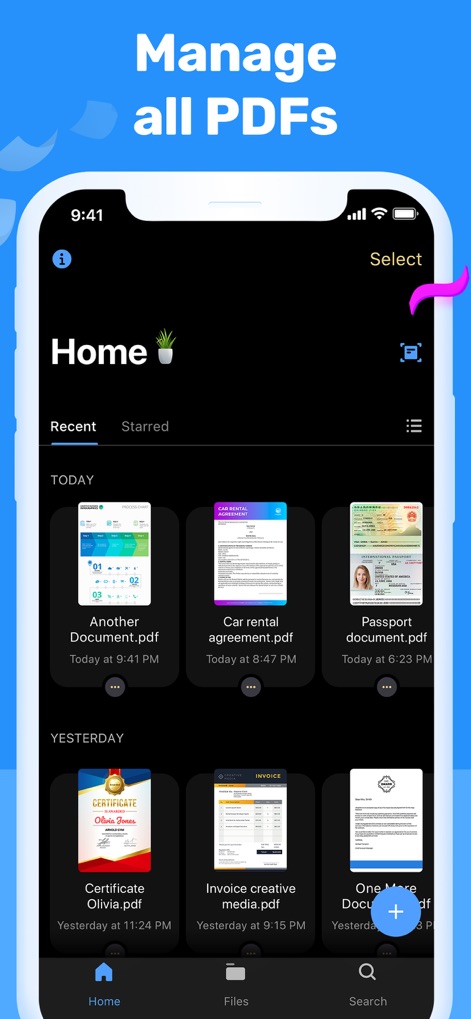
The app offers a centralized hub for all PDF documents, featuring quick access to recent files and efficient search functionality.
Centralized PDF Hub
Description
Download
More Like This
Apps with similar features and user experience

PDF PRO Scan Image & Documents
Balzo srl

The PDF Scanner, PDF editor HQ
NEXT K.U.M. LTD

CamScanner - PDF Scanner App
INTSIG Information Co., Ltd

Adobe Scan: PDF & OCR Scanner
Adobe Inc.

WPS Office: PDF, Docs, Sheets
KINGSOFT OFFICE SOFTWARE CORPORATION LIMITED

iLovePDF - PDF Editor & Scan
ILOVEPDF S.L.

Scanner App: Genius Scan
The Grizzly Labs

Microsoft Lens: PDF Scanner
Microsoft Corporation

Clear Scan: Doc Scanner App
INDY MOBILE APP COMPANY LIMITED
This page is not an official page of the app or its developer, but an independent editorial publication created for informational and commentary purposes. Unless expressly stated otherwise, neither the app nor its developer is affiliated with, endorsed by, sponsored by, authorized by, or otherwise officially connected with MWM, Apple, Google Play, the app publisher, or the app's developer, and nothing on this page implies that the app was developed using MWM's services. Any trademarks, logos, screenshots, and other content remain the property of their respective owners.