
This page is not an official page of the app or its developer, but an independent editorial publication created for informational and commentary purposes. Unless expressly stated otherwise, neither the app nor its developer is affiliated with, endorsed by, sponsored by, authorized by, or otherwise officially connected with MWM, Apple, Google Play, the app publisher, or the app's developer, and nothing on this page implies that the app was developed using MWM's services. Any trademarks, logos, screenshots, and other content remain the property of their respective owners.


PDF Scanner Pro ⊟
Complexity with documents vanishes; users gain total control over their paper workflow, digitized and simplified.
Downloads
2.5M+User Rating
Total Ratings
74.2KPublisher
Category
UtilitiesLocales
32Latest Version
2.3.0Size
120.7 MBFirst Released
Jun 11, 2017An evaluation of core functionalities designed for efficient document management and enhanced productivity for professionals and students.
Key Features Analysis: PDF Scanner Pro ⊟
OCR (Optical Character Recognition)
It allows users to convert scanned documents into editable and searchable text formats, significantly enhancing data usability and productivity.
E-Signature Functionality
The app provides a seamless way to sign documents electronically, accelerating approval processes and reducing the need for physical paperwork.
PDF Compression
This tool features the ability to compress PDF files, optimizing them for faster sharing via email and saving storage space.
User-Friendly Interface
It ensures effortless navigation and an intuitive user experience, allowing users to quickly access powerful scanning and management functionalities.
Multi-Page Scanning
The app efficiently supports scanning multiple pages into a single document, ideal for digitizing extensive reports, books, or contracts.
Document Highlighting Tools
This tool allows users to highlight crucial sections within scanned documents, aiding in review, study, and emphasis of key information.
Offline Scanning Capability
The app provides the ability to scan documents without an internet connection, ensuring continuous productivity in any environment.
Direct PDF Printing
It allows users to print PDF documents directly from the app, offering convenience for physical copies without additional steps.
Frequently Asked Questions
Everything you need to know about PDF Scanner Pro ⊟
Is PDF Scanner Pro easy to use?
Yes, PDF Scanner Pro offers a user-friendly interface for easy navigation and smooth scanning of documents, ensuring a straightforward experience for its users.
Can I scan multiple pages with PDF Scanner Pro?
Yes, PDF Scanner Pro allows you to scan multiple pages smoothly, supporting comprehensive document scanning needs within the app.
Does PDF Scanner Pro support e-signatures?
Yes, PDF Scanner Pro includes an e-signature feature, allowing users to sign documents with ease directly within the application.
How does PDF Scanner Pro convert scans to editable text?
PDF Scanner Pro uses OCR (Optical Character Recognition) to convert scanned documents into editable text formats, enabling easy modification and reuse of content.
Can I highlight text in PDF Scanner Pro?
Yes, PDF Scanner Pro provides new tools for highlighting crucial sections within your documents, helping users emphasize important information.
Can I print documents using PDF Scanner Pro?
Yes, PDF Scanner Pro allows you to print PDFs directly from the app, offering extra convenience for managing your scanned documents.
Does PDF Scanner Pro compress PDF files?
Yes, PDF Scanner Pro offers the functionality to compress PDF files, making them smaller and easier for emailing and sharing.
What are the benefits of PDF Scanner Pro Premium?
Upgrading to the Premium version of PDF Scanner Pro grants unlimited access to all app features and removes advertisements for an uninterrupted experience.
Does PDF Scanner Pro offer a free trial?
Yes, PDF Scanner Pro offers a free trial period. However, any unused portion of this free trial is forfeited if you purchase a premium subscription during the trial.
How do I cancel my PDF Scanner Pro subscription?
You can cancel your PDF Scanner Pro subscription or free trial in your iTunes settings at least 24-hours before the end of the current period.
What happens when I cancel my PDF Scanner Pro subscription?
Cancelling your PDF Scanner Pro subscription downgrades you to the free service. The cancellation takes effect the day after the last day of the current subscription period.
Can I crop my scanned documents in PDF Scanner Pro?
PDF Scanner Pro allows users to crop scanned documents using both AI Crop and Manual Crop options, providing flexibility for precise image adjustments.
Can I add emojis to documents with PDF Scanner Pro?
Yes, PDF Scanner Pro offers the ability to add emojis to documents, as indicated by an emoji icon available in the editing toolbar.
Where can I find the Terms of Use for PDF Scanner Pro?
The Terms of Use (EULA) for PDF Scanner Pro are available at https://www.levelclashapps.com/TermsOfUse.html.
The following screenshots and description are sourced directly from the app's official store listing and are the property of the app developer.
App Store
Screenshots
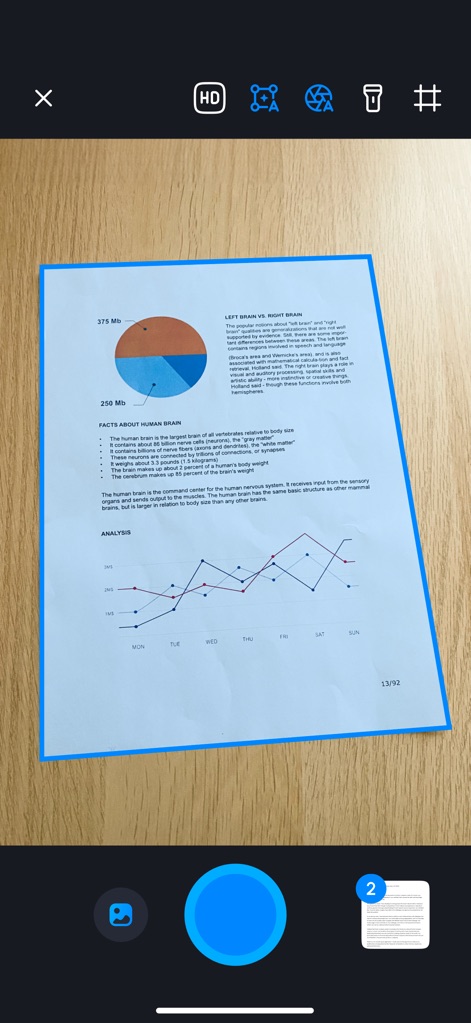
Users can quickly prepare documents for scanning, with clear visual cues like the blue bounding box and the accessible capture button.
Scan Setup Simplified
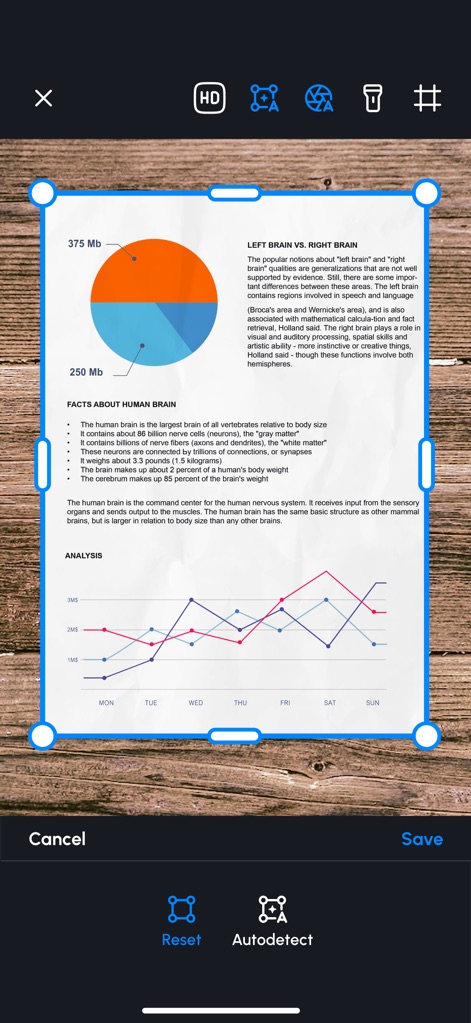
This tool offers precise cropping with draggable handles and intelligent auto-detection, ensuring perfect document framing before saving.
Precision Crop Controls
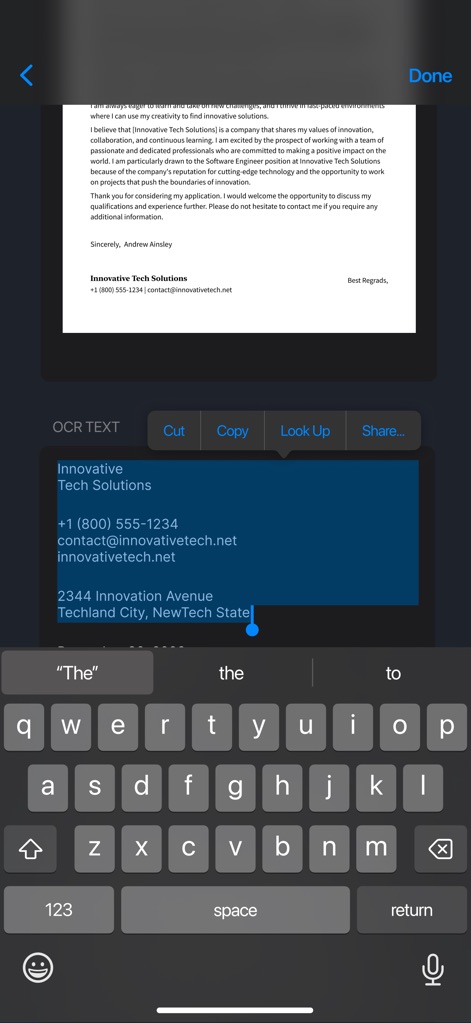
The app's OCR capability extracts editable text sections, allowing users to effortlessly copy identified information and interact with it.
Instant Text Recognition
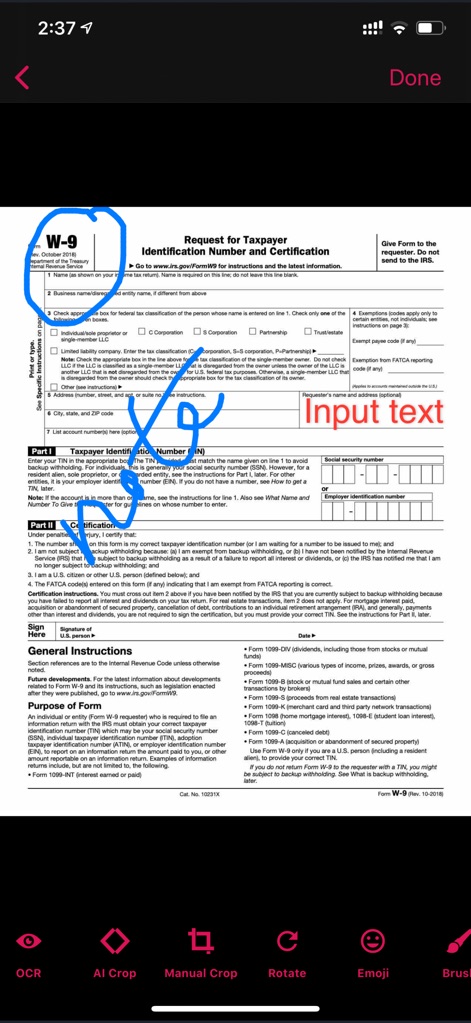
Users can annotate documents with freehand drawings like the blue circular scribble and utilize various editing tools including AI Crop and an eraser.
Enhance Documents Digitally
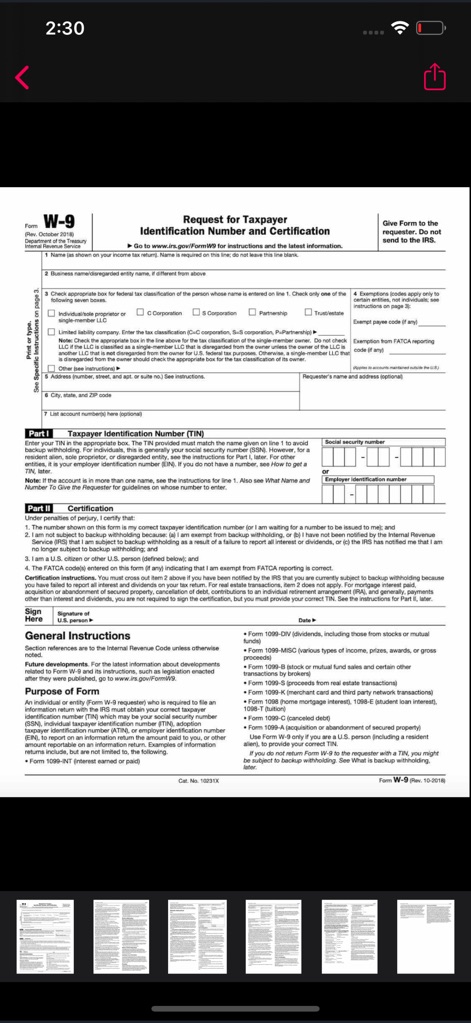
This tool simplifies managing multi-page documents, offering a clear scrollable thumbnail view of all scanned pages for easy navigation.
Multi-Page Management

The app provides straightforward sharing and deletion options for compiled PDF documents, clearly showing the multi-page layout.
Effortless Document Sharing
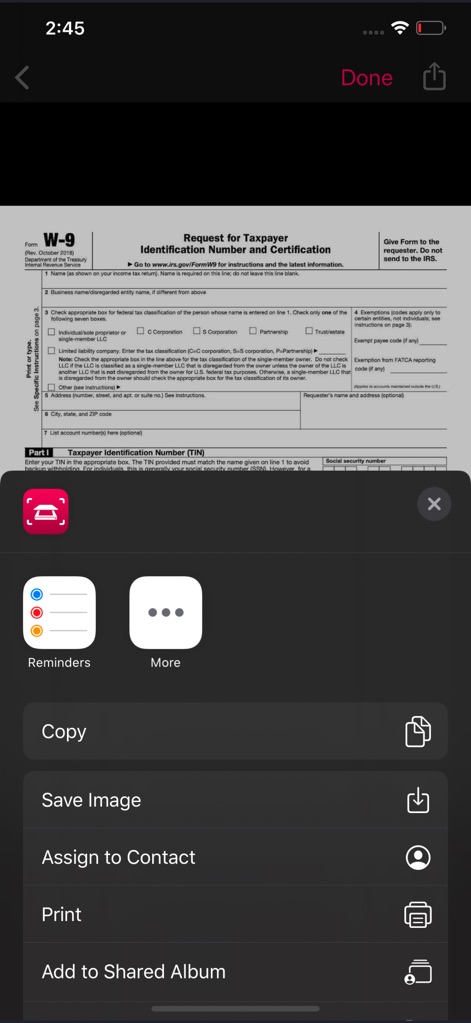
Users benefit from comprehensive sharing options directly within the app, including functionalities like printing and saving images.
Integrated Sharing Options
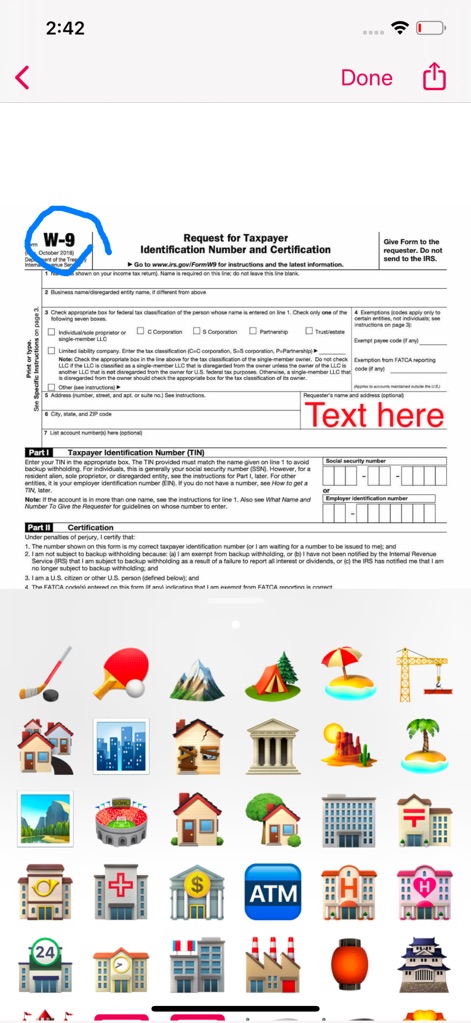
The app allows for creative document annotation with freehand drawing and an extensive emoji keyboard for visual emphasis.
Expressive Annotation Tools
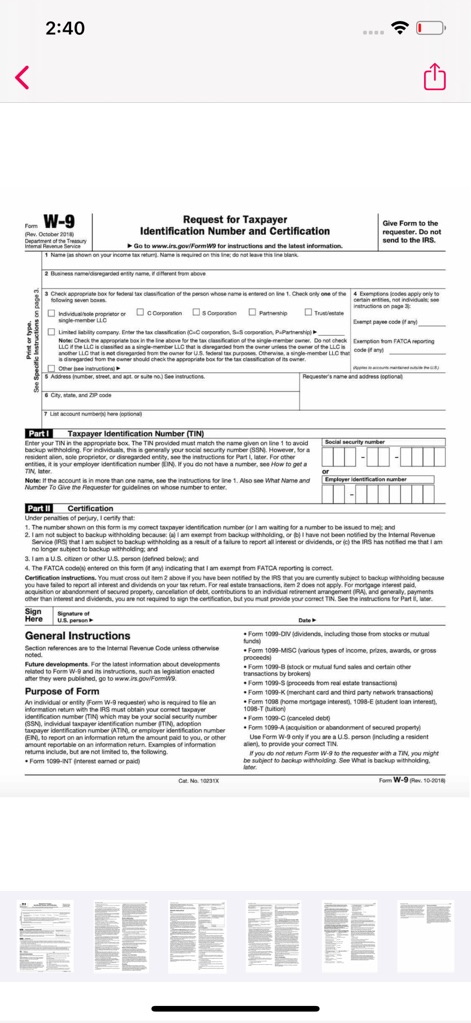
This tool offers a clear overview of multi-page scanned documents via bottom thumbnails, ready for final review and sharing.
Streamlined Document Review
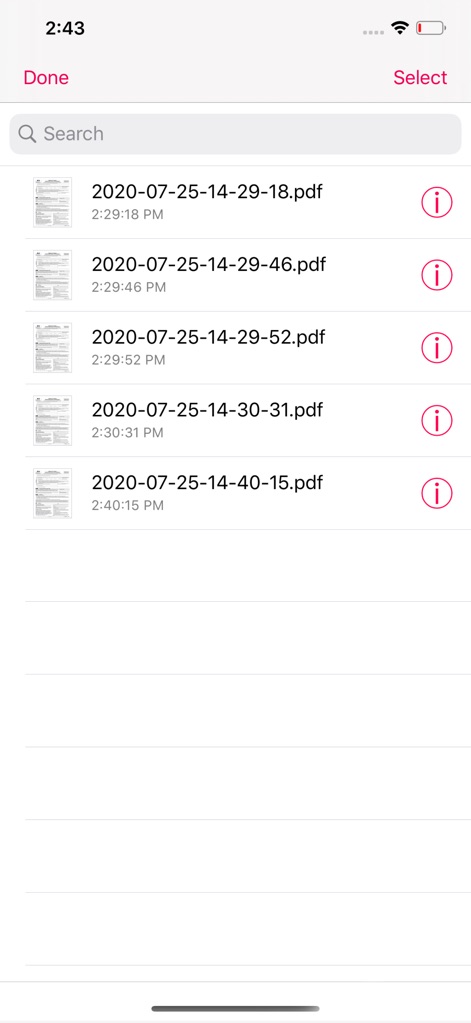
The app provides an organized library view of scanned PDFs, featuring clear file names, creation dates, and a search bar for quick retrieval.
Organized Document Library
Description
Download
More Like This
Apps with similar features and user experience

PDF PRO Scan Image & Documents
Balzo srl

The PDF Scanner, PDF editor HQ
NEXT K.U.M. LTD

CamScanner - PDF Scanner App
INTSIG Information Co., Ltd

Adobe Scan: PDF & OCR Scanner
Adobe Inc.

WPS Office: PDF, Docs, Sheets
KINGSOFT OFFICE SOFTWARE CORPORATION LIMITED

iLovePDF - PDF Editor & Scan
ILOVEPDF S.L.

Scanner App: Genius Scan
The Grizzly Labs

Microsoft Lens: PDF Scanner
Microsoft Corporation

Clear Scan: Doc Scanner App
INDY MOBILE APP COMPANY LIMITED
This page is not an official page of the app or its developer, but an independent editorial publication created for informational and commentary purposes. Unless expressly stated otherwise, neither the app nor its developer is affiliated with, endorsed by, sponsored by, authorized by, or otherwise officially connected with MWM, Apple, Google Play, the app publisher, or the app's developer, and nothing on this page implies that the app was developed using MWM's services. Any trademarks, logos, screenshots, and other content remain the property of their respective owners.