
This page is not an official page of the app or its developer, but an independent editorial publication created for informational and commentary purposes. Unless expressly stated otherwise, neither the app nor its developer is affiliated with, endorsed by, sponsored by, authorized by, or otherwise officially connected with MWM, Apple, Google Play, the app publisher, or the app's developer, and nothing on this page implies that the app was developed using MWM's services. Any trademarks, logos, screenshots, and other content remain the property of their respective owners.


Polaris Office - PDF & Docs
Stop wrestling with file formats. This app gives users instant command over every document, everywhere.
Downloads
10M+User Rating
Total Ratings
94.1KPublisher
Category
ProductivityLocales
17Latest Version
9.8.24Size
329.1 MBFirst Released
Dec 14, 2013An analytical overview of the application's most impactful features for its target professional and student user base.
Polaris Office - PDF & Docs: Core Capabilities
Broad Document Compatibility & Editing
The app provides comprehensive support for creating, editing, and viewing a wide array of document formats including Word, Excel, PowerPoint, PDF, and Google Docs, ensuring seamless workflow regardless of the file type.
Cross-Device Synchronization & Cloud Integration
It allows users to keep documents synchronized across all their devices (desktop, iPhone, iPad) and integrates with major cloud storage services, ensuring access and up-to-date files anytime, anywhere.
Advanced PDF Management
This tool features robust PDF capabilities, enabling users to view, convert PDFs into editable Office documents, and make direct edits, streamlining document workflows.
Streamlined Collaboration & Sharing
The app provides intuitive features for sharing documents quickly via links and inviting collaborators to view or edit, facilitating efficient teamwork and feedback loops.
Enhanced Productivity & Usability Features
It offers features like Split View for efficient multitasking, a powerful search function to quickly locate files, and the ability to open zip files without extraction, enhancing overall user productivity.
ISO 27001 Certified Security
The app adheres to the ISO 27001 standard for international cloud privacy, ensuring a secure environment for sensitive documents and user data.
Frequently Asked Questions
Everything you need to know about Polaris Office - PDF & Docs
Is Polaris Office compatible with Microsoft Office formats?
Yes, Polaris Office is compatible with Word, Excel, and PowerPoint documents. It supports editing and saving files in DOC, DOCX, XLS, XLSX, PPT, and PPTX formats.
What document types can Polaris Office edit?
Polaris Office edits various document types including Word, Excel, PowerPoint, and Google Docs. It also supports editing DOC, DOCX, XLS, XLSX, PPT, PPTX, TXT, HWP, HWPX, ODT, PDF, and CSV formats.
Does Polaris Office support PDF editing and viewing?
Yes, Polaris Office supports viewing PDFs directly from your iPhone and iPad. It also allows converting PDFs into editable Office documents. PDF annotation is available.
Can I use templates in Polaris Office?
Yes, Polaris Office provides 33 free templates. Users can save frequent templates in the 'My Template' folder and create their own custom templates anytime.
What cloud storage services does Polaris Office integrate with?
Polaris Office integrates with Polaris Drive as the default cloud service. It also supports iCloud, Google Drive, Dropbox, OneDrive, Box, WebDAV, and FTP for document syncing.
Can Polaris Office open compressed zip files?
Yes, Polaris Office allows users to easily open and read all types of documents from zip files without extracting them on iPhone and iPad.
What languages does Polaris Office support?
Polaris Office supports 18 global languages. These include English, French, Simplified Chinese, Japanese, Russian, German, Italian, Spanish, Polish, Portuguese (Europe, Brazil), among others.
Can users share documents using Polaris Office?
Yes, Polaris Office users can quickly and easily share documents. Sharing is possible by sending a link via SMS, email, Facebook, and other channels.
Is Polaris Office a free app?
Yes, Polaris Office is a free all-in-one office suite. However, some features may be limited based on cloud usage or chosen subscription options.
What is the size of the Polaris Office app?
The Polaris Office app is under 100 MB in size. It functions as a single application sufficient for managing various document types on iOS devices.
Does Polaris Office offer document synchronization across devices?
Yes, Polaris Office keeps all documents up-to-date and synced across devices like Desktop, iPhone, and iPad. This sync occurs via Polaris Drive, iCloud, and other cloud services.
How do I manage sharing permissions for Polaris Office?
To manage sharing options, go to Settings > Privacy > Allow additional permissions within your device. Select the category and then revoke access to Polaris Office.
What are the subscription plans for Polaris Office?
Polaris Office offers several plans: Smart Plan ($3.99/month, $39.99/year), Pro Plan ($5.99/month, $59.99/year), AI Plan ($12.99/month, $129.99/year), and AI-Plus Plan ($20.99/month, $209.99/year).
How much does the Polaris Office Smart Plan cost?
The Polaris Office Smart Plan costs $3.99 per month or $39.99 per year. These recurring payments are charged to your Apple Store account.
How do I stop auto-renewal for my Polaris Office subscription?
To turn off auto-renewal for your Polaris Office subscription, go to your user’s Account Settings within the App Store. Auto-renewal must be turned off at least 24 hours before the current period ends.
Is Polaris Office compliant with cloud privacy standards?
Yes, Polaris Office has earned ISO 27001 certification. This certification confirms compliance with the International Cloud Privacy Standard, ensuring robust data privacy measures.
The following screenshots and description are sourced directly from the app's official store listing and are the property of the app developer.
App Store
Screenshots

Explore the app's central file management, showcasing diverse document types and intuitive quick action buttons for streamlined mobile productivity.
Unified Document Hub

Witness the app's robust editing capabilities across multiple document formats, with active tabs for Word, Excel, and PowerPoint files demonstrated.
Seamless Editing Flow
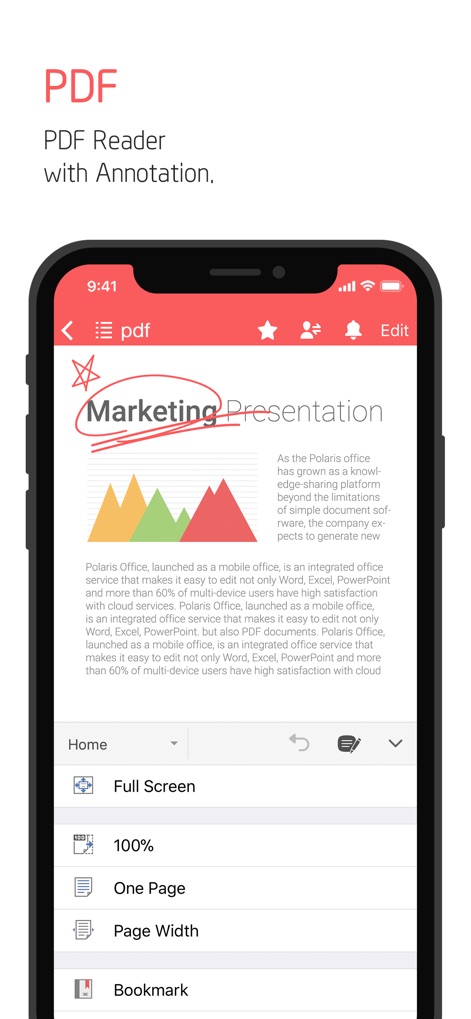
Observe the app's comprehensive PDF reader, featuring visual annotation tools and a customizable viewing options menu for enhanced document interaction.
Advanced PDF Handling
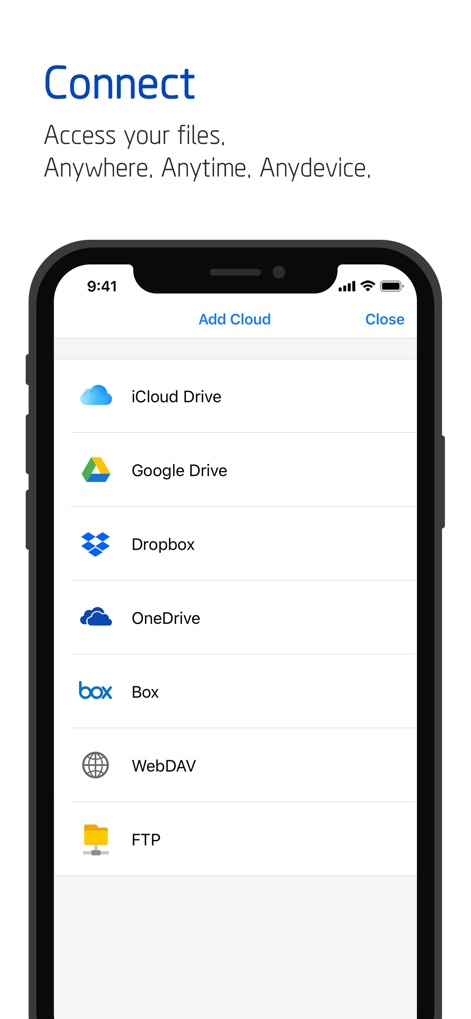
Discover the app's extensive cloud integration, displaying a wide array of supported services like Google Drive and Dropbox for ubiquitous file access.
Universal Cloud Access

Examine the app's straightforward sharing interface, highlighting options to share links and invite people for seamless collaborative workflows.
Effortless Sharing Options

View the app's dedicated 'My Template' folder, enabling users to efficiently organize and utilize pre-designed templates and favorite documents for quick creation.
Custom Template Creation
Description
Download
More Like This
Apps with similar features and user experience

PDF PRO Scan Image & Documents
Balzo srl

The PDF Scanner, PDF editor HQ
NEXT K.U.M. LTD

CamScanner - PDF Scanner App
INTSIG Information Co., Ltd

Adobe Scan: PDF & OCR Scanner
Adobe Inc.

WPS Office: PDF, Docs, Sheets
KINGSOFT OFFICE SOFTWARE CORPORATION LIMITED

iLovePDF - PDF Editor & Scan
ILOVEPDF S.L.

Scanner App: Genius Scan
The Grizzly Labs

Microsoft Lens: PDF Scanner
Microsoft Corporation

Clear Scan: Doc Scanner App
INDY MOBILE APP COMPANY LIMITED
This page is not an official page of the app or its developer, but an independent editorial publication created for informational and commentary purposes. Unless expressly stated otherwise, neither the app nor its developer is affiliated with, endorsed by, sponsored by, authorized by, or otherwise officially connected with MWM, Apple, Google Play, the app publisher, or the app's developer, and nothing on this page implies that the app was developed using MWM's services. Any trademarks, logos, screenshots, and other content remain the property of their respective owners.