
This page is not an official page of the app or its developer, but an independent editorial publication created for informational and commentary purposes. Unless expressly stated otherwise, neither the app nor its developer is affiliated with, endorsed by, sponsored by, authorized by, or otherwise officially connected with MWM, Apple, Google Play, the app publisher, or the app's developer, and nothing on this page implies that the app was developed using MWM's services. Any trademarks, logos, screenshots, and other content remain the property of their respective owners.


Presets for Lightroom - Editor
Stop settling. The app hands users instant, polished aesthetics, transforming average shots into scroll-stopping content.
Downloads
2.5M+User Rating
Total Ratings
53Publisher
Category
Photo & VideoLocales
11Latest Version
1.2.20Size
163.5 MBFirst Released
Nov 24, 2019Key Features for Social Media Content Creators
App Analysis: Presets for Lightroom - Editor
One-Tap Pro-Level Photo Editing
The app allows users to transform ordinary photos into professional-grade images with just a few taps, catering to the need for quick and impactful visual enhancements.
User-Friendly Editing Workflow
It offers a straightforward and intuitive interface, making photo editing accessible and quick even for users without advanced skills, which is crucial for efficiency-driven content creators.
Seamless Social Media Sharing
The app enables users to easily share their edited photos directly to popular social media platforms like Instagram, TikTok, Twitter, and Facebook, streamlining the content publishing process.
Diverse Preset Collections
It provides access to a wide array of themed preset packages, offering various aesthetic styles to suit different preferences and helping users establish a unique visual brand.
Frequently Asked Questions
Everything you need to know about Presets for Lightroom - Editor
What is "Presets for Lightroom - Editor"?
"Presets for Lightroom - Editor" is a photo editing tool that transforms regular photos into professional-level images using advanced presets. It helps users create unique color stories for social media sharing.
How many users utilize "Presets for Lightroom - Editor"?
"Presets for Lightroom - Editor" is used by over 10 million people. This application enables users to enhance their photos with professional-grade presets and filters for easy editing.
What types of presets does "Presets for Lightroom - Editor" offer?
"Presets for Lightroom - Editor" offers various collections like Azure, Bali, Caribbean, Cinnamon, Moody, and Street. These advanced presets are crafted by professional filmmakers, video makers, and bloggers.
Does "Presets for Lightroom - Editor" include filters?
Yes, "Presets for Lightroom - Editor" includes over 200 filters. These filters are integral to the app's photo editing capabilities, allowing users to apply diverse effects and styles.
What are the subscription costs for "Presets for Lightroom - Editor" Pro Version?
The Pro Version of "Presets for Lightroom - Editor" offers a 1-month subscription for $9.99/monthly or a 1-year subscription for $29.99/yearly. These auto-renewable options unlock all content.
How can I cancel my "Presets for Lightroom - Editor" subscription?
To manage or cancel your "Presets for Lightroom - Editor" subscription, go to your Account Settings after purchase. Auto-renewal must be turned off at least 24 hours before the current period ends.
Does "Presets for Lightroom - Editor" provide weekly updates?
Yes, "Presets for Lightroom - Editor" receives weekly updates. These updates ensure users always have access to new content and features, keeping their photo editing options current.
Can I share edited photos from "Presets for Lightroom - Editor" to social media?
Yes, users can share photos edited with "Presets for Lightroom - Editor" directly to social media. Supported platforms include Instagram, Twitter, Facebook, Pinterest, Snapchat, and TikTok.
Who designs the presets available in "Presets for Lightroom - Editor"?
Professional filmmakers, video makers, and bloggers design the advanced presets in "Presets for Lightroom - Editor." This guarantees high-quality, professional-level photo effects for users.
Is a privacy policy available for "Presets for Lightroom - Editor"?
Yes, a privacy policy is available for "Presets for Lightroom - Editor." The official link to review the policy details is provided within the app's description.
The following screenshots and description are sourced directly from the app's official store listing and are the property of the app developer.
App Store
Screenshots

See the powerful impact of Presets for Lightroom - Editor through compelling BEFORE/AFTER comparisons and named preset collections like Hawaii and Bali.
Instant Photo Magic

This tool showcases a seamless BEFORE/AFTER slider for real-time adjustments and offers a diverse range of filter options, including the 'Summer' series.
Endless Filter Choices

Explore a professional preset library, featuring curated collections like 'Adventure' and 'Pastel,' easily browsable through intuitive category navigation such for 'Travel' and 'Lifestyle'.
Professional Preset Library
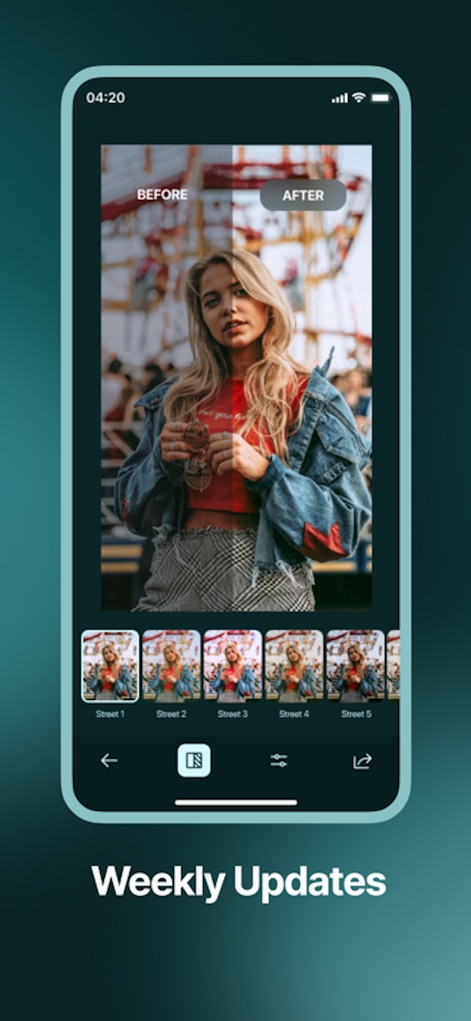
Experience the power of the interactive BEFORE/AFTER slider for precise control, complemented by regularly updated preset collections like the 'Street' series, ensuring fresh creative options.
Fresh Styles Daily

Users can easily access diverse preset packages like 'Teal & Orange' and 'Dark Brown,' then utilize the integrated sharing functionality to quickly publish their enhanced photos.
Effortless Sharing
Description
Download
More Like This
Apps with similar features and user experience

Lightroom: AI Photo Editor
Adobe Inc.

MIX-Photo Editor & Filters
灏 徐

Presets for Lightroom - FLTR
Onelight Apps CY Ltd

Colorby: AI Photo Color Editor
Zhanghan Ke

PRESETS: Filters for Pictures
Gustas Brazaitis

Edith: Presets for Lightroom
MWM

Soft Focus Lite 〜beauty selfie
handyCloset Inc.

BerryFilm - Korean Style Cam
Seungyun Kim

Presets for Lightroom: Filters
Alenrom sp. z o.o.
This page is not an official page of the app or its developer, but an independent editorial publication created for informational and commentary purposes. Unless expressly stated otherwise, neither the app nor its developer is affiliated with, endorsed by, sponsored by, authorized by, or otherwise officially connected with MWM, Apple, Google Play, the app publisher, or the app's developer, and nothing on this page implies that the app was developed using MWM's services. Any trademarks, logos, screenshots, and other content remain the property of their respective owners.