
This page is not an official page of the app or its developer, but an independent editorial publication created for informational and commentary purposes. Unless expressly stated otherwise, neither the app nor its developer is affiliated with, endorsed by, sponsored by, authorized by, or otherwise officially connected with MWM, Apple, Google Play, the app publisher, or the app's developer, and nothing on this page implies that the app was developed using MWM's services. Any trademarks, logos, screenshots, and other content remain the property of their respective owners.


Scanner: Document Scan App
Stop wrestling with paper. This app weaponizes your phone into a document command center.
Downloads
2.5M+User Rating
Total Ratings
126.9KPublisher
Category
ProductivityLocales
5Latest Version
8.9Size
11.1 MBFirst Released
Jun 14, 2018An evaluation of key functionalities designed for digital document management and mobile productivity.
Comprehensive Analysis: Scanner: Document Scan App Features
Advanced Document Scanning & PDF Creation
The app provides sophisticated document scanning capabilities that automatically detect edges, crop, and correct perspective, allowing for rapid digitization of physical documents into high-quality, editable PDFs with customizable watermarks and password protection.
Intelligent Optical Character Recognition (OCR)
This tool features high-precision OCR technology, transforming scanned images or photos into editable, searchable text. It allows users to modify, copy, export, and translate the recognized content into various languages.
Multi-Language Photo Translation
It allows users to translate text directly from photos or image albums into multiple languages. This feature facilitates instant understanding, editing, saving, and sharing of translated content.
Robust Document Management
The app provides powerful file management tools that enable efficient organization of digital documents. Users can perform batch exports, copy, and move files across different folders seamlessly.
Frequently Asked Questions
Everything you need to know about Scanner: Document Scan App
What are the core functionalities of the Scanner: Document Scan App?
The Scanner: Document Scan App provides document scanning, high-precision text recognition (OCR), PDF creation with editing tools, and photo translation capabilities. It efficiently processes various documents for work and study.
Does the Scanner: Document Scan App feature OCR (Optical Character Recognition)?
Yes, the Scanner app offers high-precision OCR technology. It converts text from images into editable content, allowing users to modify, copy, export, and translate the recognized text into many languages.
How does the Scanner app improve document scanning quality and options?
The Scanner app enhances scans with advanced image recognition, automatic edge detection, cropping, and perspective correction. It offers various filters and options for watermarks or PDF passwords to optimize output.
Can I create PDF documents using the Scanner: Document Scan App?
Yes, the Scanner app generates PDF files from scanned documents or existing photos. Users define conversion areas and can export the resulting PDFs via email, mobile, or various sharing platforms.
Does the Scanner: Document Scan App provide photo translation services?
The Scanner app offers photo translation for text content within pictures or albums. It supports multiple languages, and users can directly edit, save, and share the translated content.
Is ID card scanning supported by the Scanner: Document Scan App?
Yes, the Scanner app includes ID scanning functionality. It performs a 1:1 reduction of ID documents to A4 paper size, which is practical for various official and study purposes.
What are the automatic renewal terms for the Scanner app subscription?
The Scanner app subscription automatically renews unless cancelled at least 24 hours before the current period ends. iTunes directly deducts the subscription fee. Cancelling mid-period is not possible.
How can I manage or cancel my Scanner app subscription?
Users manage or cancel their Scanner app subscription through their iTunes account settings. Cancellation must occur at least 24 hours before the current subscription period concludes to prevent automatic renewal.
The following screenshots and description are sourced directly from the app's official store listing and are the property of the app developer.
App Store
Screenshots
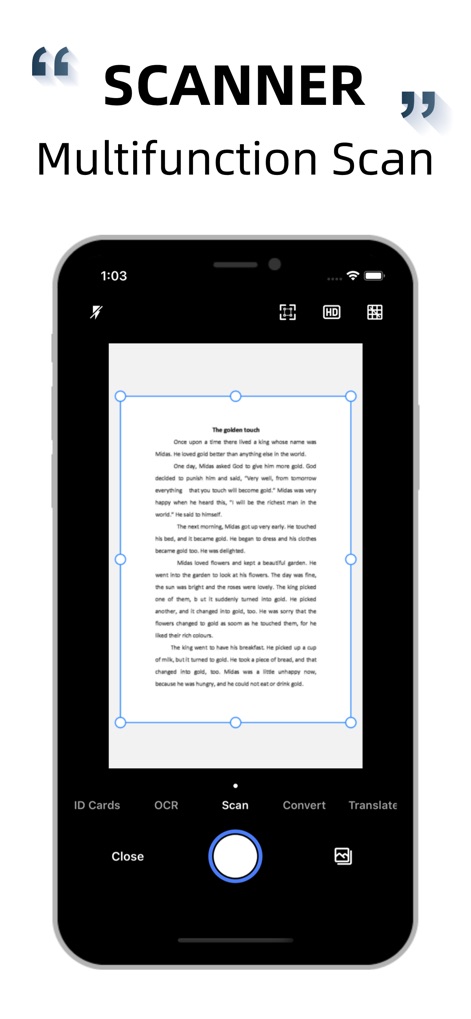
See how the app provides automatic edge recognition and a versatile bottom navigation bar for quick access to core functions.
Smart Document Scan
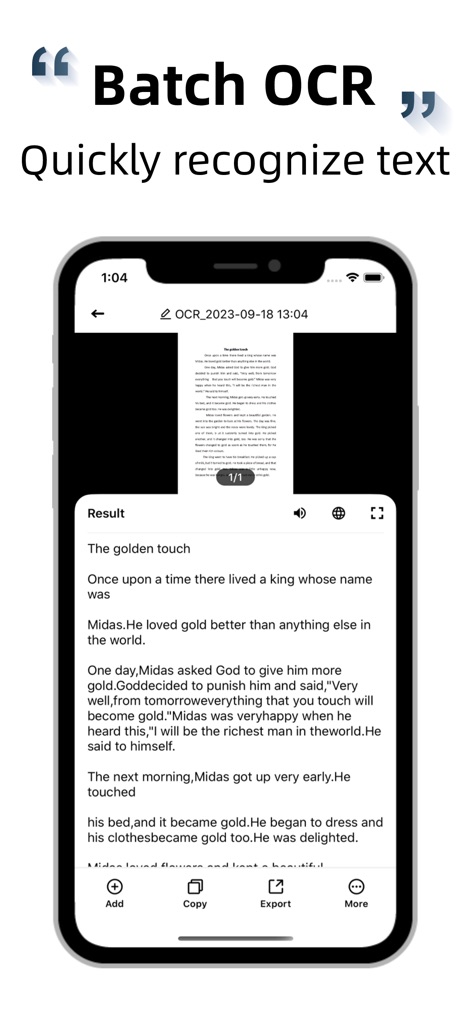
Observe how the app's advanced OCR extracts editable text, complemented by easy options for copying and exporting the recognized content.
Instant Text Recognition

Discover the app's extensive PDF editing kit, enabling users to add watermarks and set open passwords for enhanced document security.
Comprehensive PDF Toolkit

Explore the diverse range of document filters, including 'Enhance' and 'B/W', and image editing tools such as 'Clip' for perfecting scans.
Visual Enhancement Options
Description
Download
More Like This
Apps with similar features and user experience

PDF PRO Scan Image & Documents
Balzo srl

The PDF Scanner, PDF editor HQ
NEXT K.U.M. LTD

CamScanner - PDF Scanner App
INTSIG Information Co., Ltd

Adobe Scan: PDF & OCR Scanner
Adobe Inc.

WPS Office: PDF, Docs, Sheets
KINGSOFT OFFICE SOFTWARE CORPORATION LIMITED

iLovePDF - PDF Editor & Scan
ILOVEPDF S.L.

Scanner App: Genius Scan
The Grizzly Labs

Microsoft Lens: PDF Scanner
Microsoft Corporation

Clear Scan: Doc Scanner App
INDY MOBILE APP COMPANY LIMITED
This page is not an official page of the app or its developer, but an independent editorial publication created for informational and commentary purposes. Unless expressly stated otherwise, neither the app nor its developer is affiliated with, endorsed by, sponsored by, authorized by, or otherwise officially connected with MWM, Apple, Google Play, the app publisher, or the app's developer, and nothing on this page implies that the app was developed using MWM's services. Any trademarks, logos, screenshots, and other content remain the property of their respective owners.