Sony | Creators' App

Sony | Creators' App


Download on App StoreDownload on Google Play
Logo of Sony | Creators' App

Sony | Creators' App: Your Professional Workflow, Reimagined for Mobile

Bridge the gap between your Sony camera and the world. Transfer high-quality files instantly, control your gear remotely, and leverage cloud AI to deliver stunning content faster than ever.

Publisher

Sony Corporation

Category

Photo & Video

Downloads

3M+

User Rating

4.2/5

Total Ratings

13K+

Locales

21

Your Pro Studio, Visualized

Discover the interface used by 3M+ users.
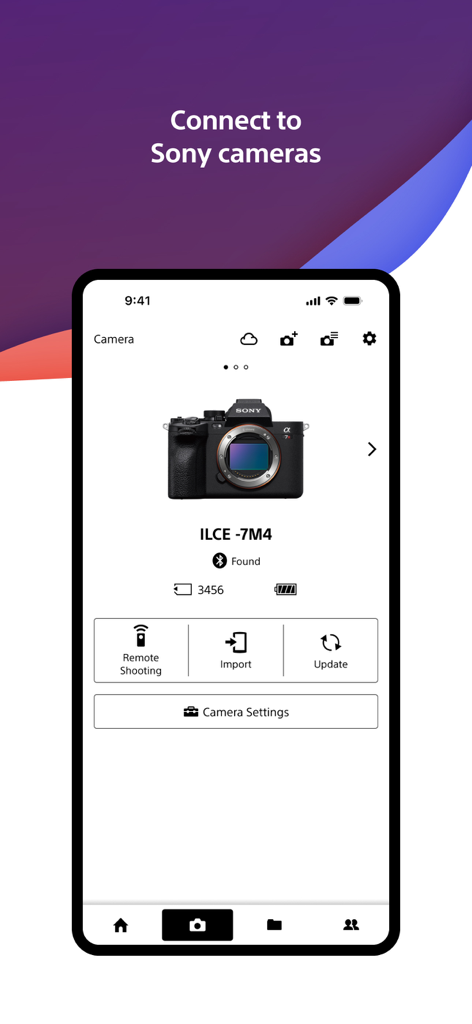
Sony Creators App interface showing a connected Sony Alpha camera with options for remote shooting and importing

Sony Creators App interface showing a connected Sony Alpha camera with options for remote shooting and importing

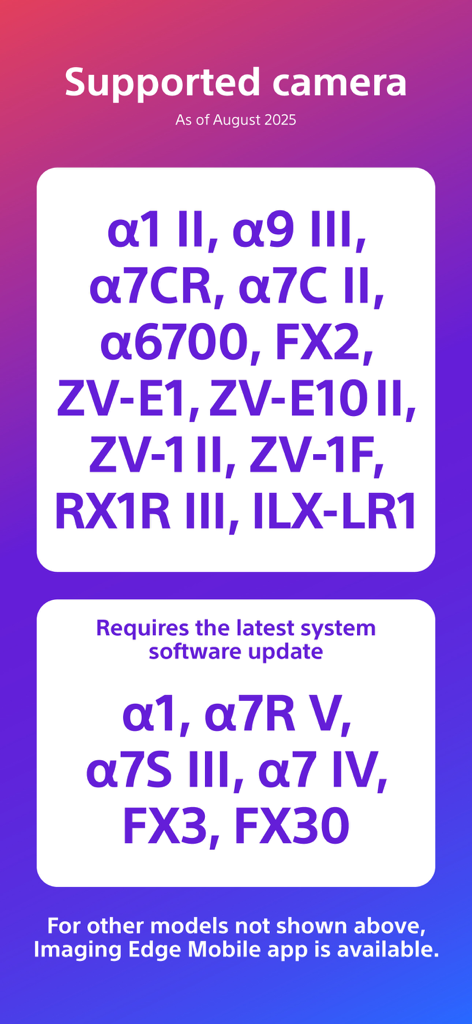
List of compatible Sony camera models for the Creators App

List of compatible Sony camera models for the Creators App

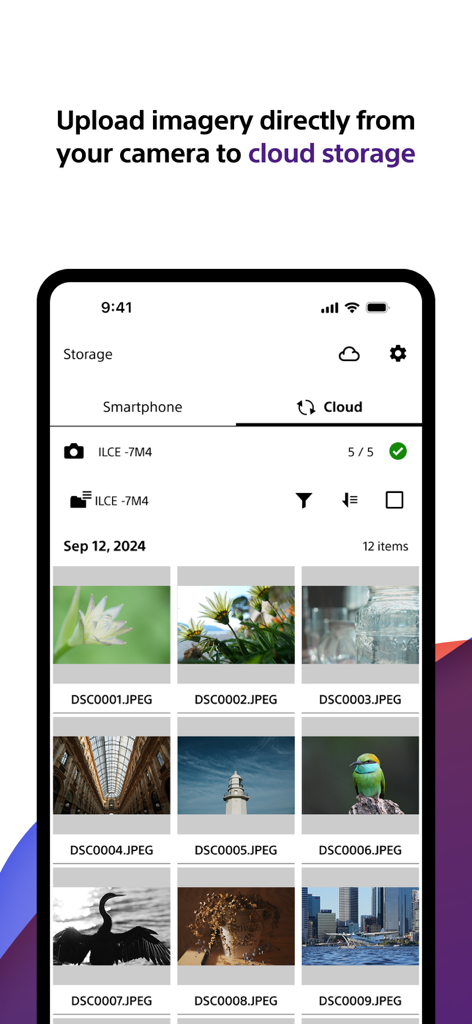
Sony Creators App interface showing a gallery of high quality photos being uploaded to cloud storage from a camera

Sony Creators App interface showing a gallery of high quality photos being uploaded to cloud storage from a camera

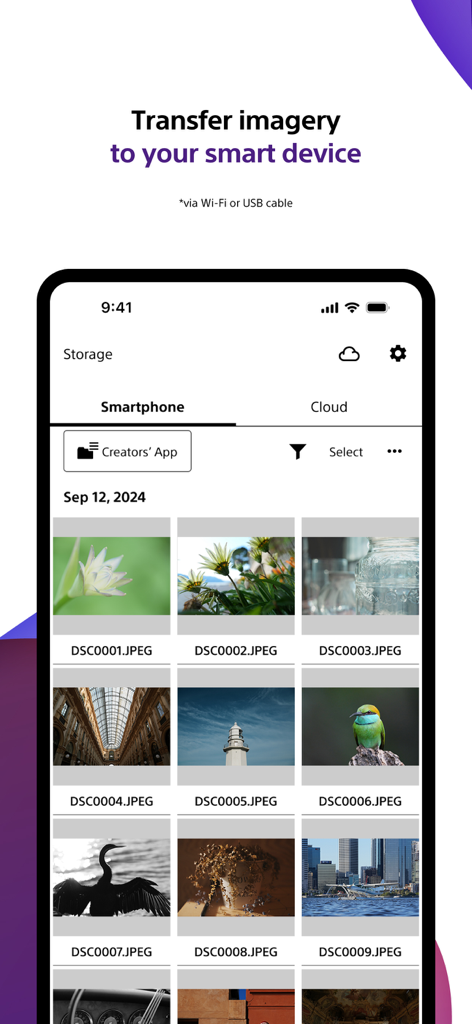
Sony Creators App screen showing photo transfer from camera to smartphone

Sony Creators App screen showing photo transfer from camera to smartphone

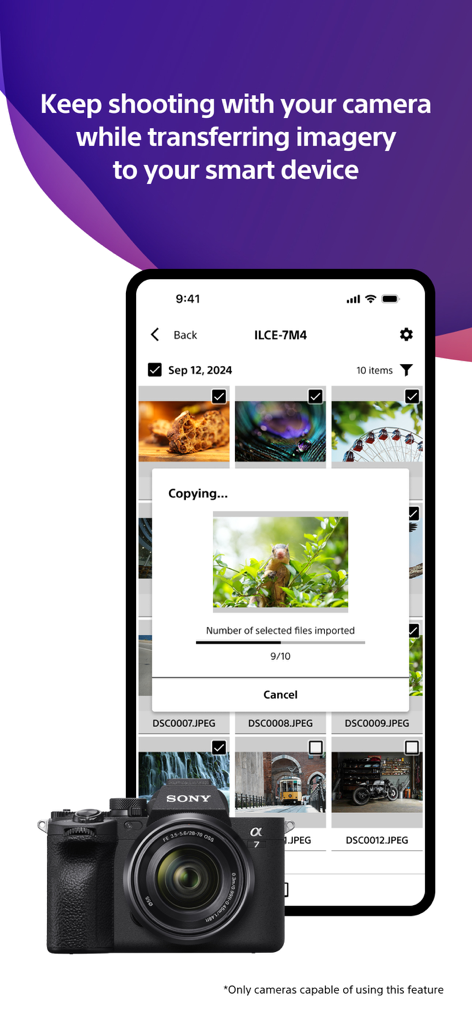
Smartphone screen showing the Sony Creators App transferring photos from a Sony Alpha camera.

Smartphone screen showing the Sony Creators App transferring photos from a Sony Alpha camera.

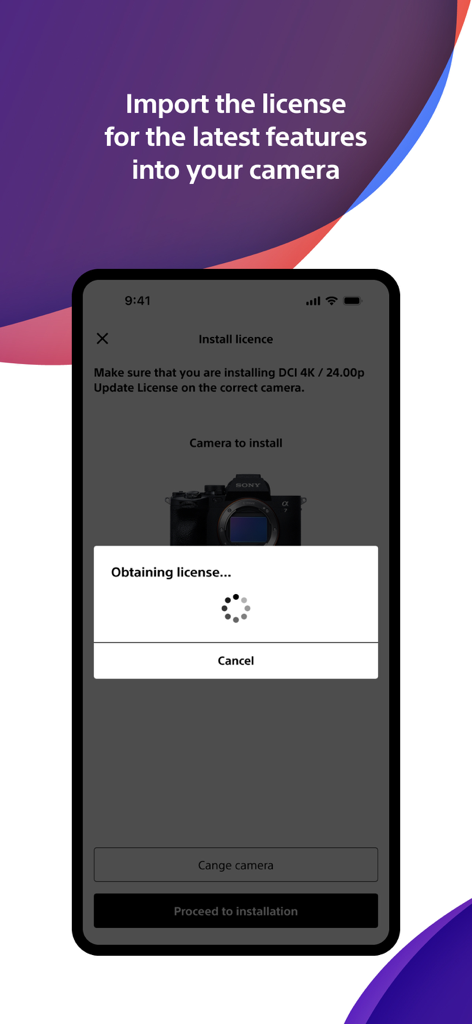
Smartphone screen showing the Sony Creators App importing a camera license for new features

Smartphone screen showing the Sony Creators App importing a camera license for new features

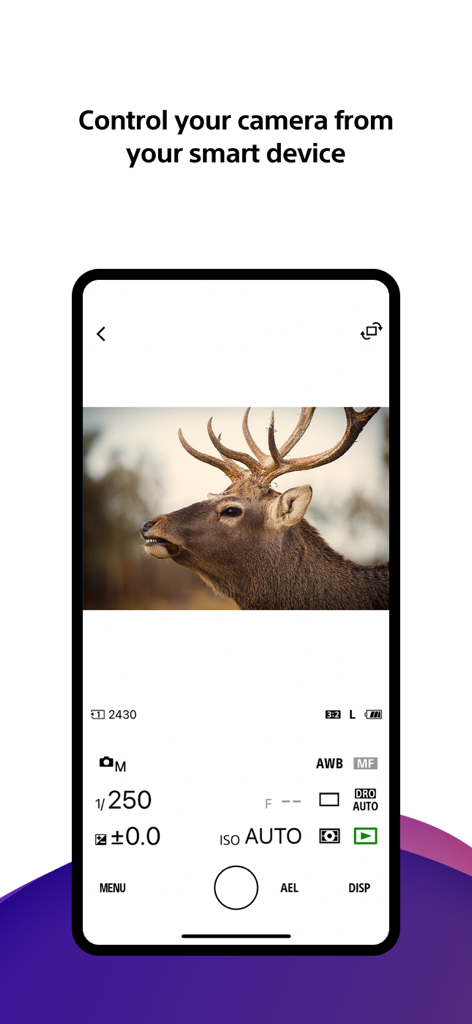
Smartphone screen showing the Sony Creators App remote camera control interface with manual photo settings and a live view of a deer

Smartphone screen showing the Sony Creators App remote camera control interface with manual photo settings and a live view of a deer

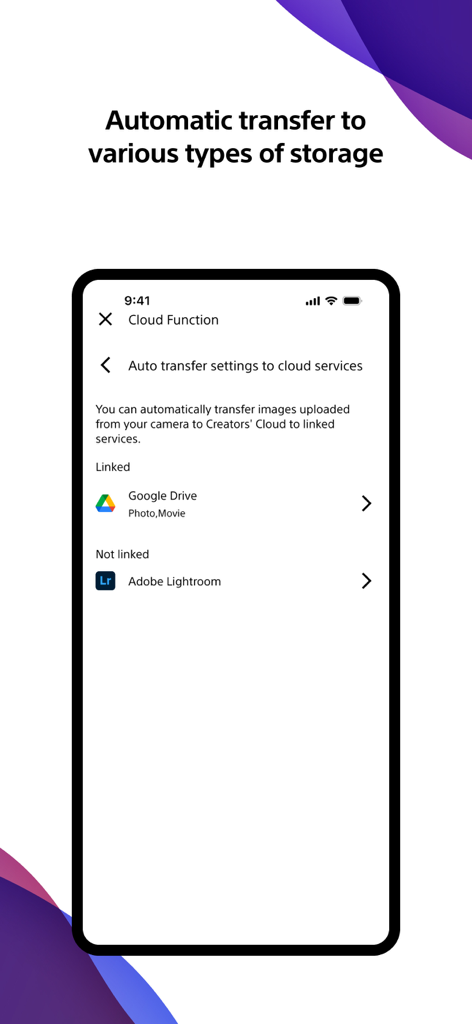
Sony Creators App interface for setting up automatic photo and video transfers to cloud services like Google Drive and Adobe Lightroom.

Sony Creators App interface for setting up automatic photo and video transfers to cloud services like Google Drive and Adobe Lightroom.

Master Your Creative Workflow

The tools that make this app stand out, trusted by 3M+ users.

Instant Mobile Transfer

Move your shots to your phone automatically—even while your camera is off—so you can edit and share on social media in seconds.

🤳

Pro Remote Control

Take command of your camera from a distance. Frame your shots, adjust settings, and hit record directly from your smartphone screen.

☁️

Creators' Cloud Synergy

Securely upload your library to the cloud and access AI-driven editing services designed to streamline your professional production.

Review Analysis

Insights from user reviews.

Sentiment Score

20%
Negative

Summary

Users generally express significant frustration with the mobile app, primarily due to persistent and widespread connectivity issues between their devices and Sony cameras, often leading to black screens, app crashes, and failed photo/video transfers. While some users appreciate its capabilities for remote camera control, easy photo transfer, and free RAW image import, these positive aspects are frequently overshadowed by complaints about a convoluted user interface, slow performance, and intrusive privacy requests for full photo library access. Several users also reported problems with specific camera model support (e.g., ZVE10, a7C II 10-bit video), and version-specific bugs such as rotated thumbnails and disabled GPS data transfer on iOS 26 or after firmware updates (e.g., A7iv).

Common Themes

Photo Transfer Functionality(2)
Remote Camera Control(1)
Ease of Use(1)
Free RAW Import(1)
App Features(1)
Connection Stability(1)
Performance(1)

About the app

Everything you need to know about Sony | Creators' App.

Description

■ Please refer to the "Support Page" for the connection process and list of supported models. https://www.sony.net/ca/help/camera/ ■For app/service availability of countries and regions, please check here. https://creatorscloud.sony.net/catalog/servicearea.html This application allows anytime, anywhere smartphone access to the Creators' Cloud, a platform that provides powerful support for creators from shooting to production with Sony's camera technology and cloud AI. By connecting this application to your camera, you can easily operate convenient functions such as photo and video transfer from your smartphone. ■ Anytime access to Creators' Cloud Experience the various functions offered by Creators' Cloud, including file storage and management in cloud storage, a wide range of services and applications including video editing services using cloud AI, and access to articles and content that will serve as a source of inspiration. You can experience a variety of functions provided by Creators' Cloud. ■ Extend the shooting experience and manage shooting files more easily You can transfer and save photos and videos you have already taken, and use your smartphone as a remote control for the camera for remote shooting. In addition, the smartphone can be used to check the camera's battery and media information, set the date, time, and camera name, and easily update the camera's software. - Easy transfer of photos and videos taken anytime, anywhere Photos and videos taken can be transferred to cloud storage or a smartphone for centralized management. Data transfer can be performed while shooting or while the camera is turned off or charging. The camera also supports a variety of user shooting styles, such as transferring only those photos and videos that have been rated or marked as shots in advance. - Operate the camera from your smartphone By connecting the camera to a smartphone, the smartphone can be used as a remote control for the camera. This allows you to take pictures from a distance, such as group photos, or take pictures of night scenes without causing vibrations to the camera. In addition, you can easily check the camera's battery and media information, and set the date, time, and camera name from your smartphone. - Save camera settings and reflect changes Camera settings that change with each shooting scene can be saved to the smartphone and reflected in the camera. The ability to save settings for multiple cameras greatly streamlines setting changes during shooting. - Important announcements and software updates are also available from your smartphone. Important notifications such as software updates can be checked, and updates to the camera itself can be easily performed from a smartphone. ■ Operating environment: iOS17.7-26.1 ■ Remarks - This application is not guaranteed to work on all smartphones and tablets. ■ Terms of use https://creatorscloud.sony.net/locales_termsofuse_cc.html ■ Privacy policy https://creatorscloud.sony.net/locales_privacypolicy_cc.html

Latest Version

3.2.1

Size

137.9 MB

First Released

Oct 13, 2022

Elevate Your Workflow from Lens to Cloud

Seamlessly bridge the gap between your Sony camera and your mobile studio. Join millions of creators who shoot, transfer, and share with professional speed.

Download on App StoreDownload on Google Play
FAQ

Frequently Asked Questions

Everything you need to know about Sony | Creators' App

What is the Sony | Creators' App?

The Sony | Creators' App provides smartphone access to the Creators' Cloud platform. It enables photo and video transfer from Sony cameras, cloud storage management, remote camera operation, and software updates, supporting creators from shooting to production.

How does the Sony | Creators' App connect to my camera?

The Sony | Creators' App connects your smartphone to Sony cameras to enable convenient functions. For detailed connection steps and a list of compatible camera models, refer to the official support page at sony.net/ca/help/camera/.

What Sony camera models are supported by the Sony | Creators' App?

The Sony | Creators' App supports models such as α1 II, α9 III, α7CR, FX2, and ZV-E1 II, as of August 2025. Some models like α1 and α7R V require the latest system software update.

Can I transfer images and videos from my camera with the Sony | Creators' App?

Yes, the Sony | Creators' App allows easy transfer of photos and videos to cloud storage or your smartphone. This includes transferring only rated or marked shots, even while shooting or during camera charging.

Can I remotely control my camera using the Sony | Creators' App?

Yes, the Sony | Creators' App allows you to use your smartphone as a remote control for your Sony camera. This feature supports remote shooting and enables checking camera battery and media information.

Does the Sony | Creators' App support automatic image transfer to other cloud services?

Yes, the Sony | Creators' App features automatic transfer settings to linked cloud services. For instance, it can integrate with Google Drive for photos and movies, as shown in the cloud function settings.

How do I update my Sony camera's software using the Sony | Creators' App?

The Sony | Creators' App allows you to easily perform software updates for your Sony camera directly from your smartphone. It also displays important notifications regarding these updates.

Can the Sony | Creators' App save and apply camera settings?

Yes, the Sony | Creators' App saves camera settings to your smartphone. This allows you to apply saved settings to your Sony camera, streamlining configuration changes for different shooting scenarios or multiple cameras.

App information, icons, screenshots, and descriptions displayed on this page are sourced from the Apple App Store and are the property of their respective developers. Download estimates and rankings are based on MWM's proprietary models and may not reflect actual figures. This page is provided for informational and analytical purposes only.

Believe this page infringes your intellectual property? File a dispute