
This page is not an official page of the app or its developer, but an independent editorial publication created for informational and commentary purposes. Unless expressly stated otherwise, neither the app nor its developer is affiliated with, endorsed by, sponsored by, authorized by, or otherwise officially connected with MWM, Apple, Google Play, the app publisher, or the app's developer, and nothing on this page implies that the app was developed using MWM's services. Any trademarks, logos, screenshots, and other content remain the property of their respective owners.


Teachme Biz
Empower your deskless workforce with visual, step-by-step guides. Turn photos into professional SOPs instantly—no design skills or IT training required.
Downloads
606K+User Rating
Total Ratings
100Publisher
Category
BusinessLocales
6Latest Version
6.9.1Size
62.3 MBFirst Released
Oct 25, 2013Empower Your Team with Visual SOPs
Replace outdated manuals with high-impact, visual guides created in minutes. Teachme Biz turns complex workflows into simple, actionable steps that your deskless workforce will actually use.
Snap-and-Step Creation
No design skills needed. Capture photos of any task on the fly and add quick captions to build professional training guides right from the shop floor.
Instant Team Distribution
Stop the 'brain drain' during employee turnover. Sync your manuals to the cloud so every team member has the latest instructions in their pocket, anywhere, anytime.
Frequently Asked Questions
Everything you need to know about Teachme Biz
What is Teachme Biz?
Teachme Biz is an application designed to easily create, share, and manage step-by-step manuals for teams. It allows users to document procedures using photos and text, accessible across various devices.
How do I create a manual with Teachme Biz?
To create a manual with Teachme Biz, you first use photos for each step. Next, write clear explanations for each step. Finally, share the completed manual with your group through the internet.
Can I use images and videos in Teachme Biz manuals?
Yes, Teachme Biz allows users to create steps using photos and add text explanations. Screenshots demonstrate the integration of images and video frames within the manual steps.
Does Teachme Biz support team collaboration?
Yes, Teachme Biz supports team collaboration. Users can share manuals with their group, and team members can edit and update manuals. It also includes message and 'Good job' features for appreciation.
Can Teachme Biz track task progress for teams?
Yes, Teachme Biz provides task progress tracking. It displays summaries, manual viewing status, and completion rates for users who have opened, viewed, or completed assigned tasks.
What devices are compatible with Teachme Biz?
Teachme Biz is compatible with smartphones, tablets, and PCs. Users can create and access manuals from various devices, enabling flexibility for creation and viewing.
Do I need IT or design skills to use Teachme Biz?
No, you do not need special IT education or design sense to use Teachme Biz. The app features an easy slide format, designed for fuss-free manual creation.
The following screenshots and description are sourced directly from the app's official store listing and are the property of the app developer.
App Store
Screenshots
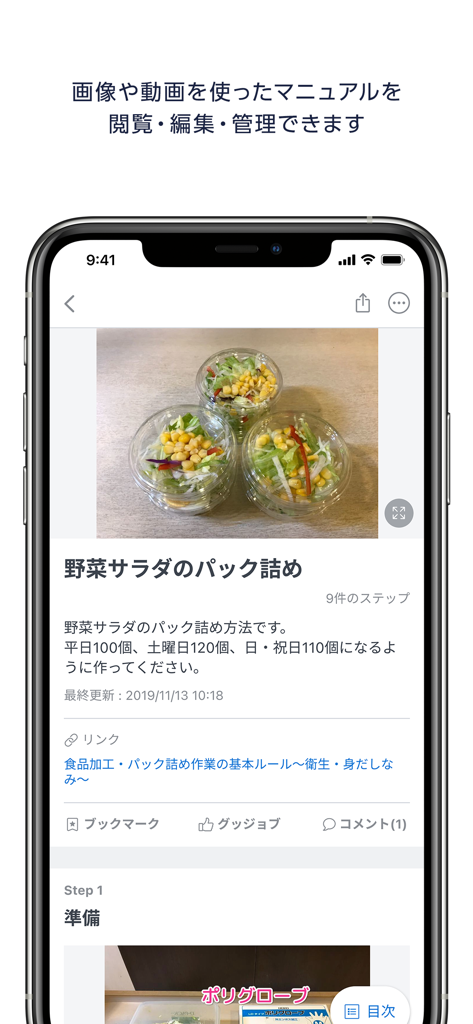
Mobile app interface of Teachme Biz showing a visual step by step manual for food preparation.
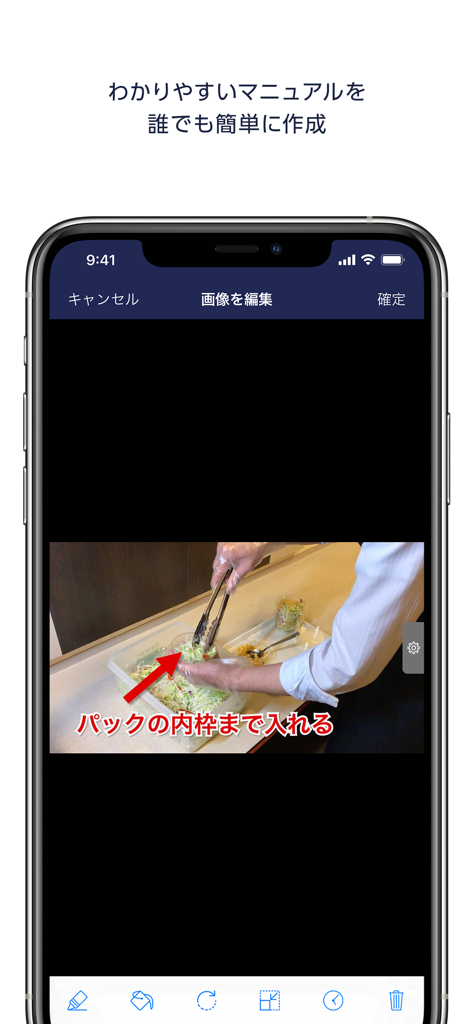
A smartphone screen displaying the Teachme Biz image editor for creating visual standard operating procedures.
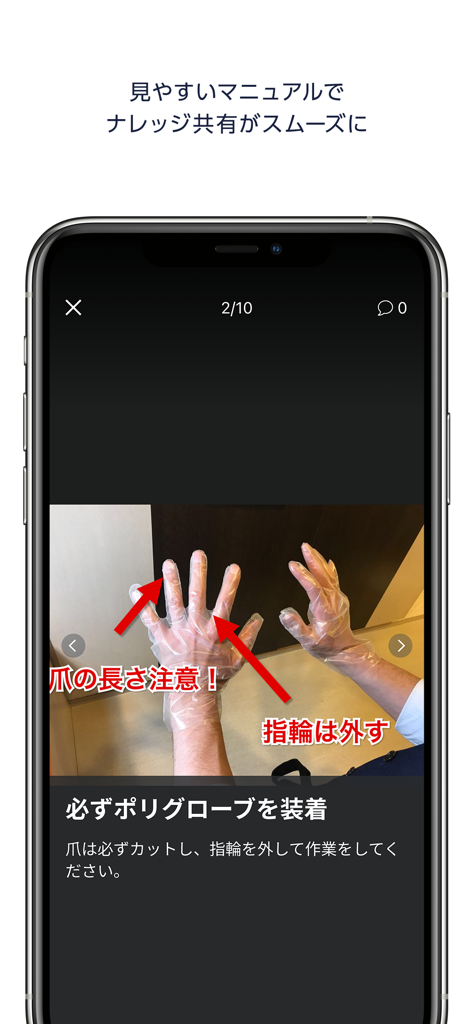
Teachme Biz app screenshot showing a visual training manual step with annotated photos and instructions for wearing protective gloves
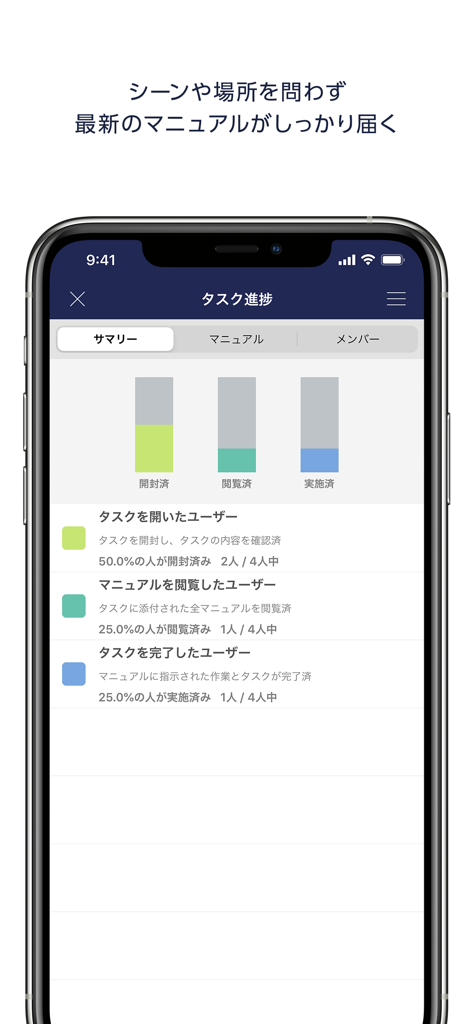
A mobile dashboard showing task progress and manual completion rates for a business team
Description
Download
More Like This
Apps with similar features and user experience

Site Audit Pro
Veam Studios Ltd

Fieldwire - Construction App
Hilti Fieldwire, Inc.

magicplan
Technologies magicplan Inc.
SafetyCulture (iAuditor)
SafetyCulture Pty Ltd

BrightSafe On The Go
Peninsula Online Services Limited

Рососмотр
KALKUL.RU, OOO

Archipad ™
Bigsool

Archireport
ArchiReport SAS
iCertifi
iCertifi
This page is not an official page of the app or its developer, but an independent editorial publication created for informational and commentary purposes. Unless expressly stated otherwise, neither the app nor its developer is affiliated with, endorsed by, sponsored by, authorized by, or otherwise officially connected with MWM, Apple, Google Play, the app publisher, or the app's developer, and nothing on this page implies that the app was developed using MWM's services. Any trademarks, logos, screenshots, and other content remain the property of their respective owners.