
This page is not an official page of the app or its developer, but an independent editorial publication created for informational and commentary purposes. Unless expressly stated otherwise, neither the app nor its developer is affiliated with, endorsed by, sponsored by, authorized by, or otherwise officially connected with MWM, Apple, Google Play, the app publisher, or the app's developer, and nothing on this page implies that the app was developed using MWM's services. Any trademarks, logos, screenshots, and other content remain the property of their respective owners.

Total Connect Comfort
Seamlessly manage your Honeywell Home thermostats with the reliability of a legacy brand. Monitor settings, schedule efficiency, and receive real-time alerts to ensure your home is always perfect—and your energy bills are optimized.
Downloads
2M+User Rating
Total Ratings
84K+Publisher
Category
LifestyleLocales
2Latest Version
3.17.1Size
19.2 MBFirst Released
Oct 6, 2011Total Control Over Your Home Environment
Experience the perfect balance of comfort and efficiency with professional-grade climate management designed for your busy lifestyle.
Remote Access Anytime
Adjust your heating, cooling, and humidity from anywhere in the world to ensure your home is perfect before you walk through the door.
Multi-Property Management
Effortlessly monitor multiple thermostats across different floors or different properties, perfect for second-home owners and busy families.
Frequently Asked Questions
Everything you need to know about Total Connect Comfort
Can I remotely control my heating and cooling system with the Total Connect Comfort app?
Yes, the Total Connect Comfort app allows users to remotely monitor and manage their heating and cooling system. Users can view and change system settings, indoor temperature, fan settings, and humidifier/dehumidifier controls from anywhere.
What devices are compatible with the Total Connect Comfort app?
The Total Connect Comfort app works with Honeywell Home Wi-Fi Thermostats and Honeywell Home Redlink Comfort Systems when connected with a Redlink Internet Gateway. It provides remote management capabilities for these specific devices.
Does the Total Connect Comfort app support managing multiple thermostats and locations?
Yes, the Total Connect Comfort app allows users to access multiple smart thermostats and multiple locations. Screenshot #1 displays various locations like 'Downtown Store' and 'My Home', each managing several thermostats.
Can I view the weather forecast within the Total Connect Comfort app?
Yes, the Total Connect Comfort app provides a 5-day weather forecast. Screenshot #3 shows a link to '5-Day' weather, and Screenshot #4 displays a detailed 5-day forecast with daily high/low temperatures.
How do I adjust the indoor temperature using the Total Connect Comfort app?
Yes, the Total Connect Comfort app allows users to view and set the indoor temperature. Screenshot #3 clearly shows 'Heat Setpoint 68°' and 'Cool Setpoint 78°' with up/down arrows for adjustment.
Does the Total Connect Comfort app provide thermostat alerts?
Yes, the Total Connect Comfort app displays thermostat alerts. It allows users to view alerts such as high or low temperature notifications directly within the application.
Does the Total Connect Comfort app offer a demo mode?
Yes, the Total Connect Comfort app includes a Demo Mode. This feature allows potential users to explore the app's functionalities before purchasing a compatible thermostat.
The following screenshots and description are sourced directly from the app's official store listing and are the property of the app developer.
App Store
Screenshots
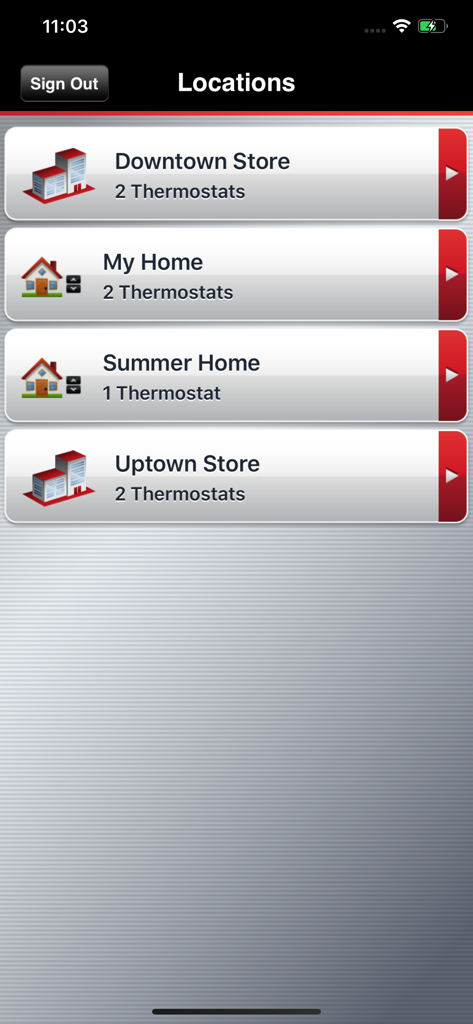
Total Connect Comfort app interface showing a list of managed locations including residential and commercial properties with thermostat counts.
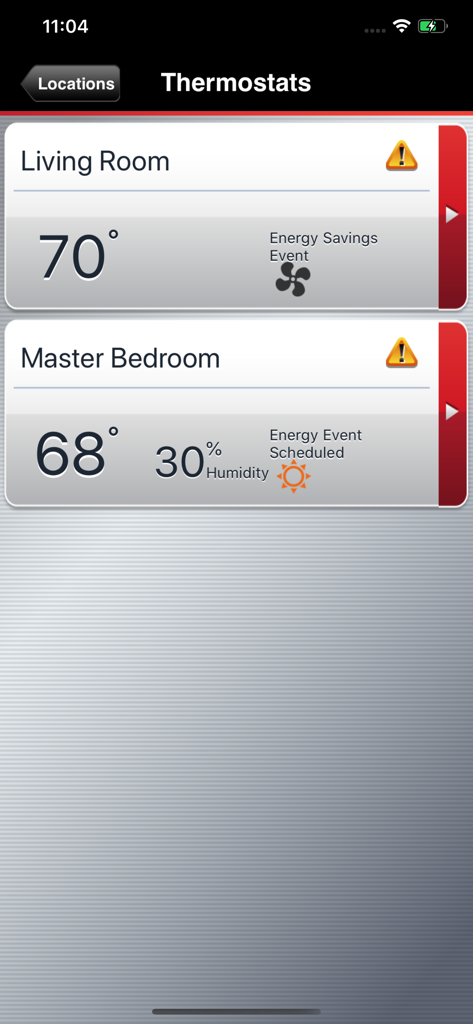
Total Connect Comfort app interface displaying temperature and humidity readings for living room and master bedroom thermostats.
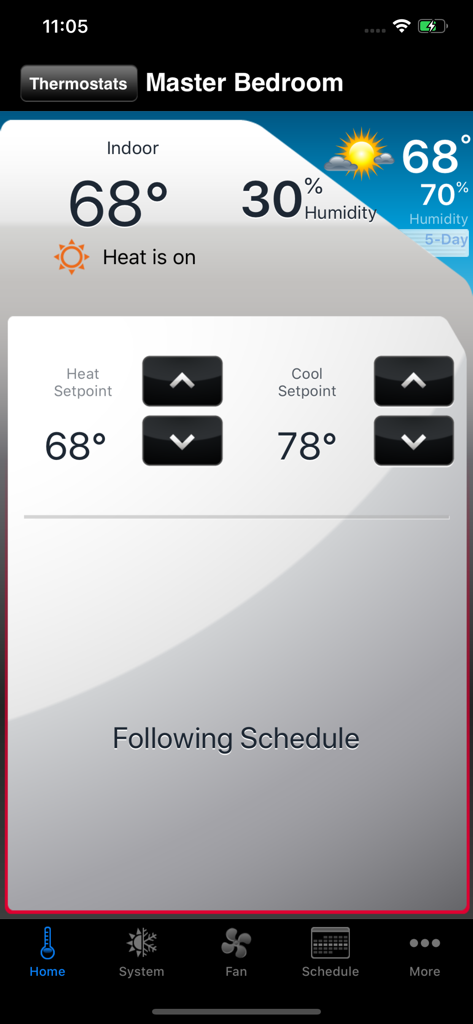
Total Connect Comfort app interface showing indoor temperature and thermostat controls for the master bedroom
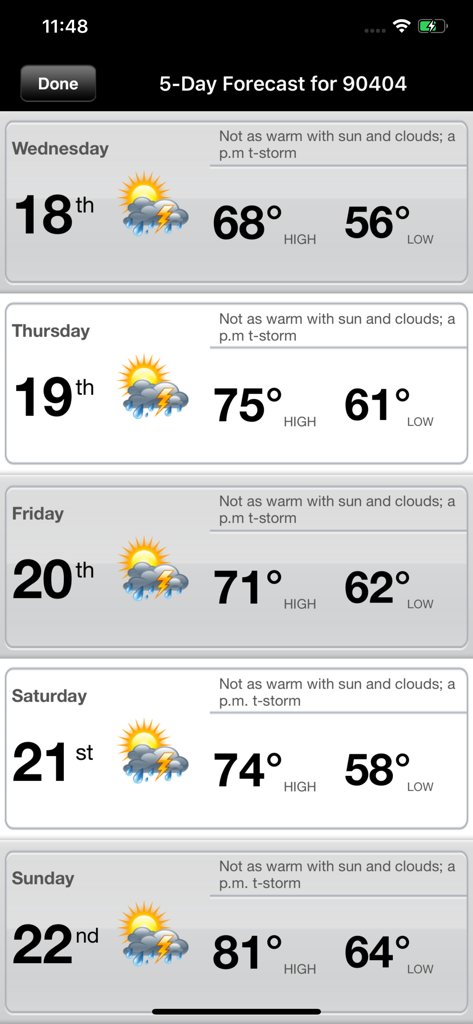
A five day weather forecast screen on the Total Connect Comfort app showing daily high and low temperatures
Description
Download
More Like This
Apps with similar features and user experience
Universal AC Remote Control +
JOKOPRO LTD

Sensi
Copeland LP

tado°
tado GmbH

NetHome Plus
Guangdong Meizhi Compressor Co., Ltd.

Netatmo Energy
Netatmo

SkyportHome
Goodman Global Holdings, Inc.

ViCare
Viessmann IT Service GmbH
Panasonic Comfort Cloud
Panasonic Holdings Corporation
Ariston NET
Ariston SpA
This page is not an official page of the app or its developer, but an independent editorial publication created for informational and commentary purposes. Unless expressly stated otherwise, neither the app nor its developer is affiliated with, endorsed by, sponsored by, authorized by, or otherwise officially connected with MWM, Apple, Google Play, the app publisher, or the app's developer, and nothing on this page implies that the app was developed using MWM's services. Any trademarks, logos, screenshots, and other content remain the property of their respective owners.