
This page is not an official page of the app or its developer, but an independent editorial publication created for informational and commentary purposes. Unless expressly stated otherwise, neither the app nor its developer is affiliated with, endorsed by, sponsored by, authorized by, or otherwise officially connected with MWM, Apple, Google Play, the app publisher, or the app's developer, and nothing on this page implies that the app was developed using MWM's services. Any trademarks, logos, screenshots, and other content remain the property of their respective owners.


WatchApp+ for Watch
Finally, the wrist-bound WhatsApp you actually wanted. It makes your Apple Watch the ultimate chat hub, freeing you from phone dependence.
Downloads
2.5M+User Rating
Total Ratings
64.4KPublisher
Category
Social NetworkingLocales
7Latest Version
2.9.0Size
95.7 MBFirst Released
Nov 15, 2020An evaluation of core functionalities designed for tech-savvy Apple Watch users, prioritizing efficient and robust WhatsApp communication.
WatchApp+ for Watch: Key Features Analysis
Virtual Keyboard Input
The app provides a virtual keyboard, enabling users to compose and send full text messages directly from their Apple Watch with ease and precision.
Comprehensive Messaging
It allows users to seamlessly send and receive WhatsApp messages, serving as the primary communication bridge between the watch and the WhatsApp platform.
Full Chat History Access
This tool features the ability to access all chat histories, including group conversations, providing users with complete context for their ongoing discussions.
HD Image Viewing
The app supports viewing high-definition pictures, enhancing the rich media experience for users who prioritize visual content on their wrist.
HD Video Playback
It allows for the playback of high-definition videos, ensuring users can consume video content directly from their Apple Watch.
Voice Message Sending
This tool enables users to send voice messages, offering a convenient and quick alternative for communication when typing is not feasible.
Voice Message Listening
The app provides the capability to listen to incoming voice messages, ensuring users can consume audio content directly on their Apple Watch.
Customizable Quick Replies
It features a quick replies list that users can customize, allowing for efficient and rapid responses to messages without extensive typing.
Sticker Viewing Support
The app supports the viewing of stickers within chat conversations, enriching the expressive capabilities of messaging on the Apple Watch.
Profile Picture Display
This tool displays contact profile pictures, offering immediate visual identification and a more personalized chat experience on the wrist.
Frequently Asked Questions
Everything you need to know about WatchApp+ for Watch
What is WatchApp+ for Watch?
WatchApp+ for Watch is an application that allows Apple Watch users to send and receive WhatsApp messages directly from their wrist. It provides quick access to conversations, notifications, and chat histories.
Can I send messages on WhatsApp using WatchApp+ for Watch?
Yes, WatchApp+ for Watch allows users to send messages directly from their Apple Watch. It includes a virtual keyboard for typing and options for sending voice messages.
Does WatchApp+ for Watch support voice messages?
Yes, WatchApp+ for Watch supports voice messages. Users can send and listen to voice messages directly on their Apple Watch for convenient communication.
Can I view chat history and groups with WatchApp+ for Watch?
Yes, WatchApp+ for Watch provides access to all chat histories, including group chats, directly on the Apple Watch. Users can view past conversations effortlessly.
Does WatchApp+ for Watch collect user data?
No, WatchApp+ for Watch is designed for user privacy. The application explicitly states that none of your data is being collected.
Can WatchApp+ for Watch display photos and videos?
Yes, WatchApp+ for Watch displays photos and videos. Users can view pictures and watch videos in HD quality directly on their Apple Watch.
How does WatchApp+ for Watch improve messaging on Apple Watch?
WatchApp+ for Watch enhances messaging by enabling WhatsApp use directly from the Apple Watch. It offers features like chat history access, QWERTY keyboard, voice messages, and HD media viewing.
Can I use quick replies with WatchApp+ for Watch?
Yes, WatchApp+ for Watch allows users to set a quick replies list. This feature provides fast response options for convenient communication from the Apple Watch.
Does WatchApp+ for Watch offer a virtual keyboard?
Yes, WatchApp+ for Watch offers a Virtual Keyboard. This allows users to type and send messages directly from their Apple Watch.
Is WatchApp+ for Watch compatible with iPad for Dual WhatsApp?
Yes, WatchApp+ for Watch supports Dual WhatsApp functionality for iPad. This feature allows users to manage multiple WhatsApp accounts on their iPad.
The following screenshots and description are sourced directly from the app's official store listing and are the property of the app developer.
App Store
Screenshots
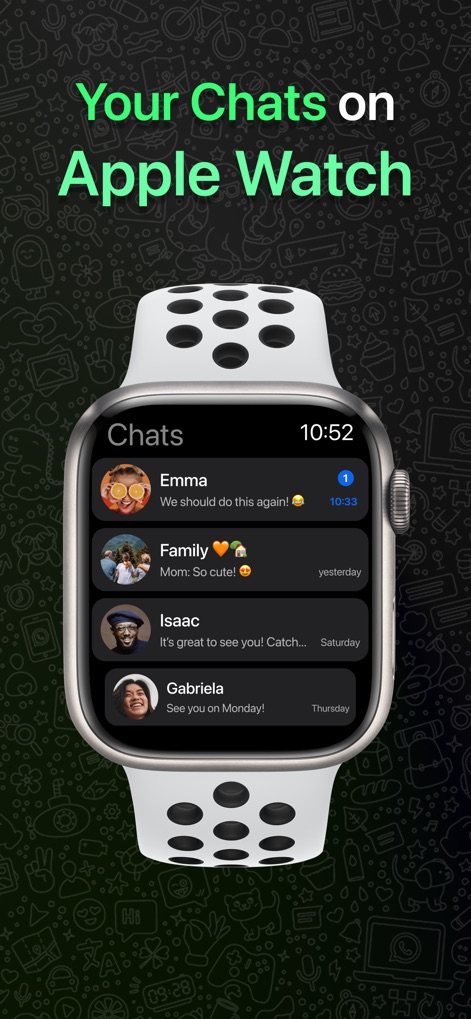
See how the app neatly organizes chat histories and displays profile pictures directly on the Apple Watch for instant access.
Conversations At Hand
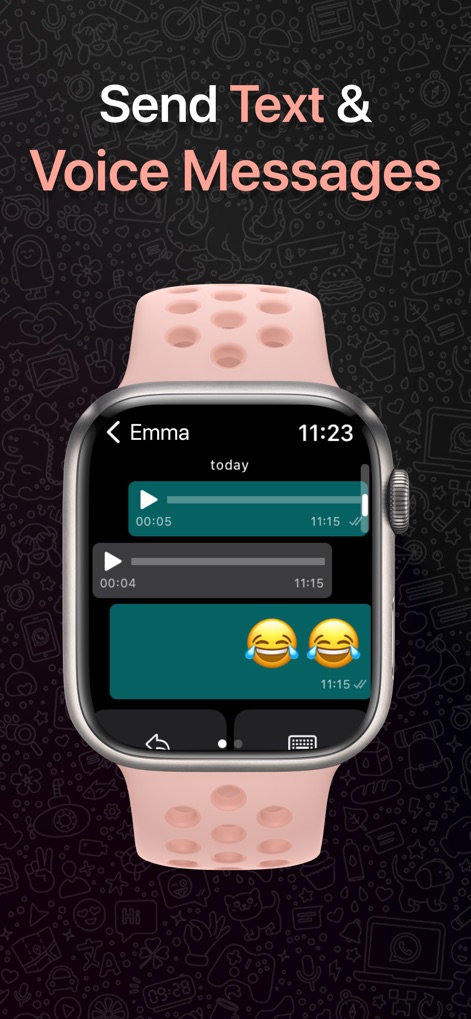
Discover how users can easily send and listen to voice messages, along with viewing expressive emojis within their chat conversations.
Voice Message Power

Explore the innovative virtual QWERTY keyboard that enables precise text input and seamless message composition directly from the wrist.
Full Keyboard Input

This tool allows users to both send and listen to voice messages directly from their Apple Watch, enhancing on-the-go communication with quick reply options.
Voice Chat Control

Experience how the app facilitates viewing high-definition pictures and enjoying rich multimedia content directly on the Apple Watch screen.
Rich Media Viewing
Description
Download
More Like This
Apps with similar features and user experience

WatchsApp - Chat for Watch
BEYLER SAGLIK BILISIM SAVUNMA DANISMANLIK SANAYI VE TICARET LIMITED SIRKETI

Battery Life - check runtimes
RBT Digital LLC

Web Scanner - Dual App
Kokila Ukani
Whats-App Web Scanner
Sudhir Donga
WatchsApp - Chat on Watch
芳 王

WatchTalk: Chat on Watch
Bitsbaker LLC.

WristTube for YouTube
ALL RADIO DEVELOPMENT TECHNOLOGY JOINT STOCK COMPANY

WatchChat 2: Chat on Watch
XAN Software GmbH & Co. KG

Whats Messenger App
Michael Knochen
This page is not an official page of the app or its developer, but an independent editorial publication created for informational and commentary purposes. Unless expressly stated otherwise, neither the app nor its developer is affiliated with, endorsed by, sponsored by, authorized by, or otherwise officially connected with MWM, Apple, Google Play, the app publisher, or the app's developer, and nothing on this page implies that the app was developed using MWM's services. Any trademarks, logos, screenshots, and other content remain the property of their respective owners.