
This page is not an official page of the app or its developer, but an independent editorial publication created for informational and commentary purposes. Unless expressly stated otherwise, neither the app nor its developer is affiliated with, endorsed by, sponsored by, authorized by, or otherwise officially connected with MWM, Apple, Google Play, the app publisher, or the app's developer, and nothing on this page implies that the app was developed using MWM's services. Any trademarks, logos, screenshots, and other content remain the property of their respective owners.


WatchsApp - Chat on Watch
Unshackle yourself. This app liberates users from constant phone-checking, putting core WhatsApp where it belongs: on the wrist.
Downloads
100k+User Rating
Total Ratings
421Publisher
Category
Social NetworkingLocales
17Latest Version
1.2.5Size
46.7 MBFirst Released
Apr 15, 2025An evaluation of key features enhancing WhatsApp communication on Apple Watch.
WatchsApp - Chat on Watch: Core Functionality Review
Instant WhatsApp Messaging
The app provides direct sending and receiving of WhatsApp messages on the Apple Watch, enabling convenient communication without needing an iPhone.
Flexible Reply Options
This tool allows users to respond to messages using voice input, text, or customizable pre-set quick replies, streamlining wrist-based interactions.
Seamless Chat Synchronization
It ensures continuous synchronization of WhatsApp chat histories across all linked devices, providing an up-to-date conversation experience directly on the Apple Watch.
Optimized Watch Interface
The app features an intuitive and sleek design specifically tailored for the Apple Watch, offering an efficient and user-friendly experience on its compact display.
Rapid Performance & Delivery
This tool boasts lightning-fast pairing and message delivery speeds, ensuring a highly responsive and fluid communication experience directly from the wrist.
Comprehensive Contact Access (Premium)
For premium users, the app provides full access to WhatsApp contacts, enabling the initiation of new conversations and management of existing chats directly from the Apple Watch.
Frequently Asked Questions
Everything you need to know about WatchsApp - Chat on Watch
What is WatchChat for Apple Watch?
WatchChat is a leading application for WhatsApp messaging on your Apple Watch. It enables users to send and receive WhatsApp messages directly from their wrist, syncing seamlessly with their iPhone without needing the phone.
Can WatchChat send and receive WhatsApp messages on Apple Watch?
Yes, WatchChat supports sending and receiving WhatsApp messages directly from your Apple Watch. This feature ensures instant communication, allowing users to stay in touch without using their iPhone.
How do I set up WatchChat on my Apple Watch?
To set up WatchChat, open the app on your Apple Watch. Then, launch WhatsApp on your iPhone, go to WhatsApp Settings > Linked Devices > Link a Device, and scan the QR code displayed on your Apple Watch.
Does WatchChat support quick replies for WhatsApp messages?
Yes, WatchChat offers quick reply capabilities. Users can respond to messages using voice, text input, or choose from pre-set responses directly on their Apple Watch for faster communication.
Is WatchChat free to use, or does it have premium options?
WatchChat provides core Apple Watch features for free. Advanced functionalities, including unlimited chats, full contact access, HD photos/videos, and handwriting/voice input, require a paid Premium subscription.
What premium features does WatchChat offer?
Premium WatchChat features include unlimited chats, full contact access, HD photos and videos, handwriting and voice input, and an ad-free experience. These advanced options are available via paid subscription.
How fast is WatchChat's performance for pairing and message delivery?
WatchChat demonstrates lightning-fast performance. It achieves 2.3-second pairing with WhatsApp and 0.4-second message delivery between your Apple Watch and iPhone, ensuring smooth operation.
Does WatchChat collect personal user data?
No, WatchChat explicitly states it protects user privacy. The app does not collect personal data such as chats, phone numbers, or any other sensitive information from its users.
Is WatchChat officially associated with WhatsApp?
No, WatchChat is not officially associated with WhatsApp. It functions as a third-party application developed to integrate WhatsApp messaging features with the Apple Watch.
Does WatchChat allow viewing photos and videos on Apple Watch?
Yes, WatchChat supports viewing photos and videos on your Apple Watch. This capability is part of the premium subscription, providing HD quality for media viewing directly on your wrist.
The following screenshots and description are sourced directly from the app's official store listing and are the property of the app developer.
App Store
Screenshots
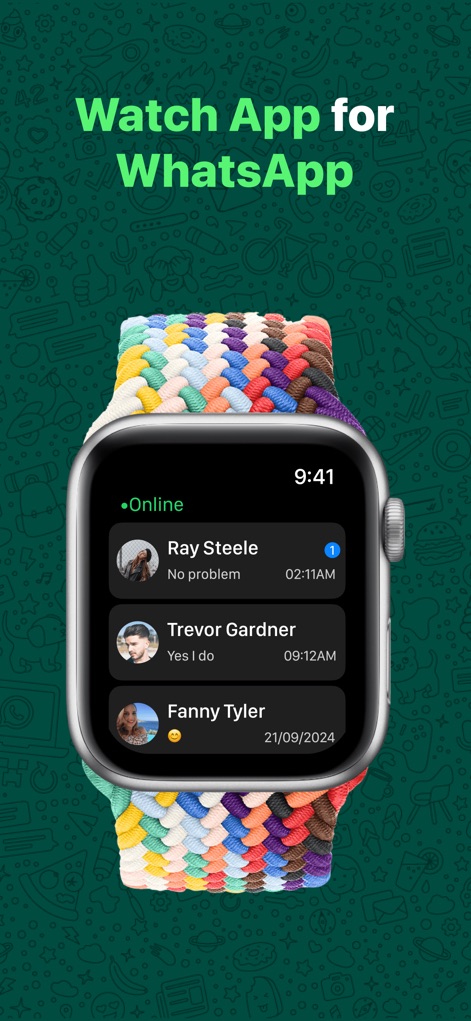
The app presents a clear list of active chats and an 'Online' indicator, allowing users to effortlessly monitor their WhatsApp conversations directly on their wrist.
Seamless Chat Access
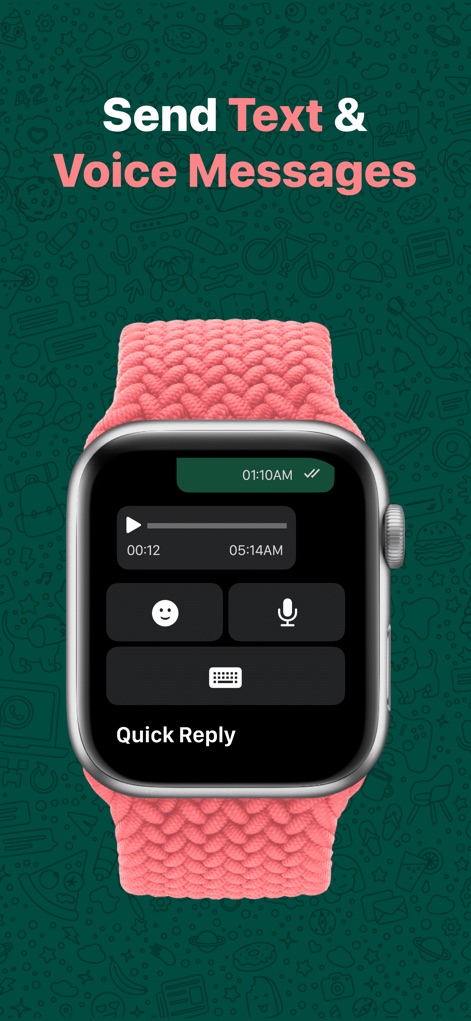
This tool provides flexible input methods, featuring a clear voice message recording interface and a dedicated quick reply icon, empowering users to communicate efficiently from their watch.
Diverse Messaging Input
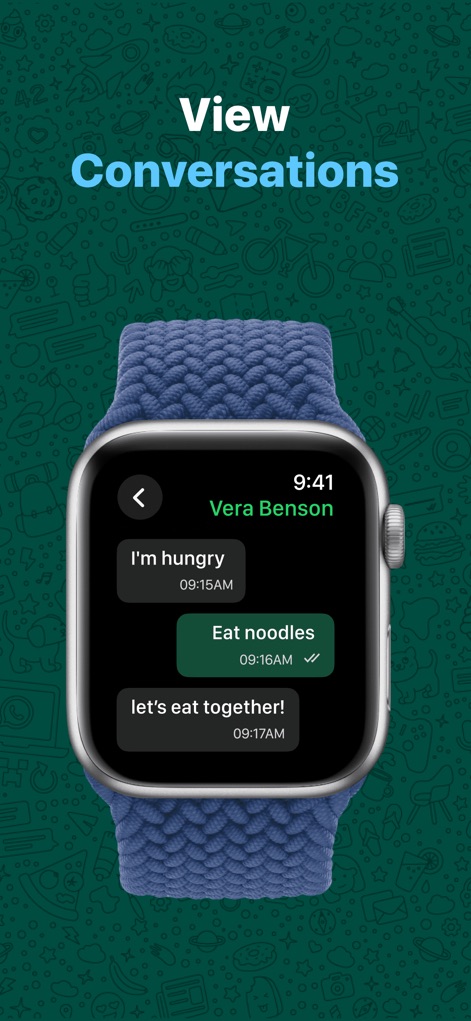
Users can comfortably follow ongoing discussions, with individual message bubbles clearly displaying the exchange and precise message timestamps for complete context.
Immersive Conversation View
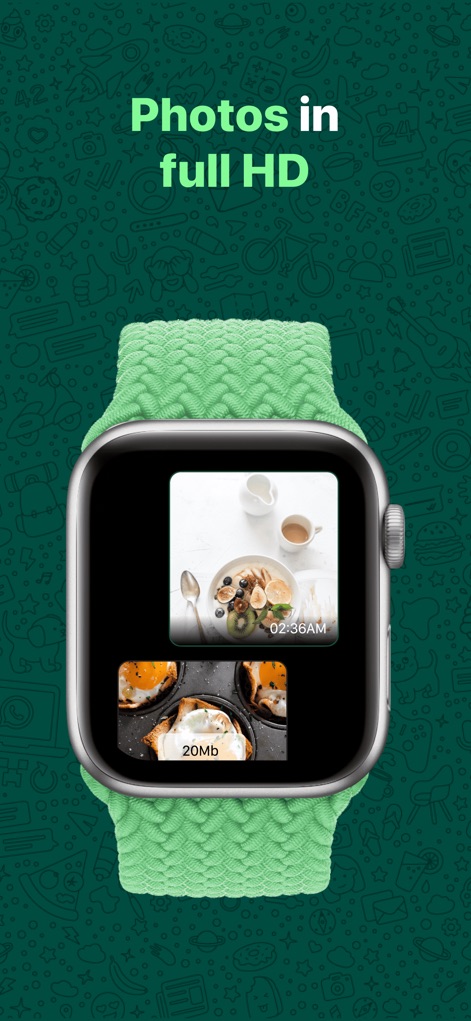
Experience visual content directly on the watch, with multiple image previews showcasing high-resolution photos and a visible file size indicator for larger media.
Crystal Clear Media
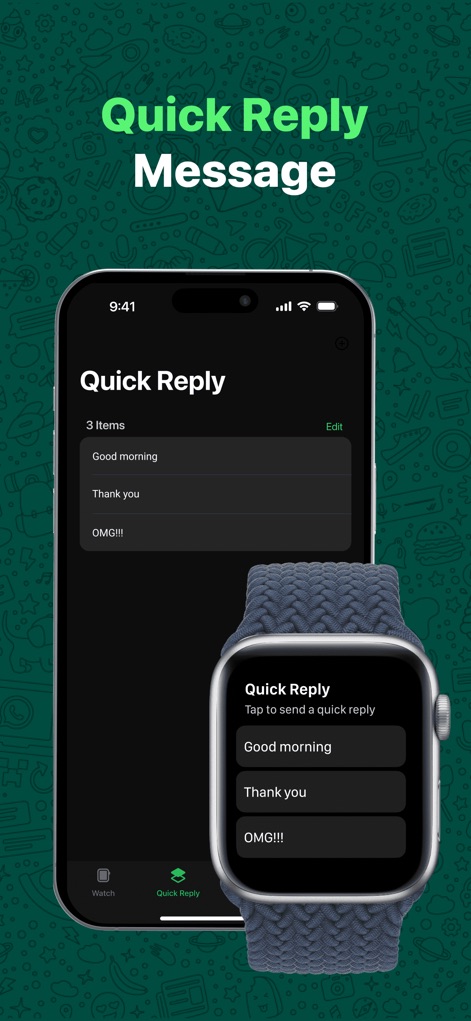
The app enables users to tailor their communication, allowing for a customizable quick reply list on the iPhone and convenient pre-set reply options directly on the Apple Watch.
Personalized Quick Responses
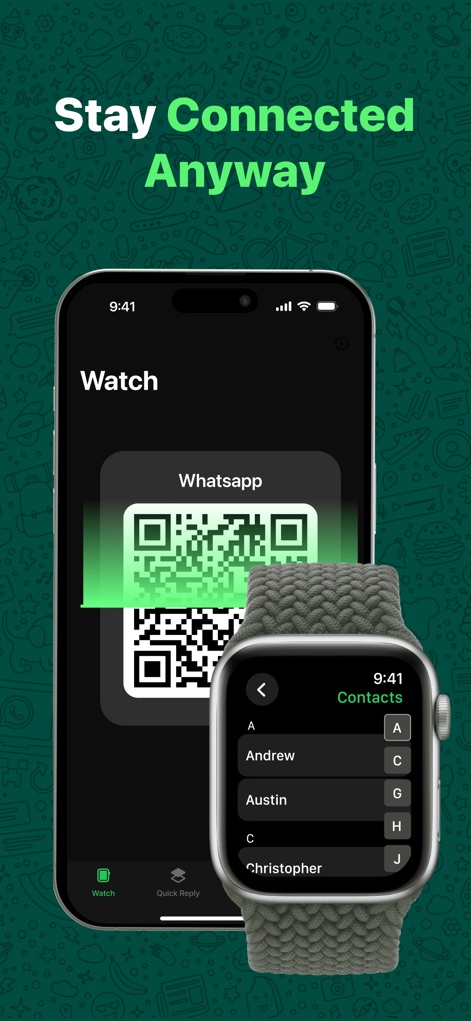
This tool ensures continuous connectivity by illustrating the efficient QR code linking process on the iPhone and providing immediate access to an alphabetical contact list on the Apple Watch.
Instant Setup, Full Control
Description
Download
More Like This
Apps with similar features and user experience

WatchsApp - Chat for Watch
BEYLER SAGLIK BILISIM SAVUNMA DANISMANLIK SANAYI VE TICARET LIMITED SIRKETI

Battery Life - check runtimes
RBT Digital LLC

Web Scanner - Dual App
Kokila Ukani
Whats-App Web Scanner
Sudhir Donga

WatchTalk: Chat on Watch
Bitsbaker LLC.

WristTube for YouTube
ALL RADIO DEVELOPMENT TECHNOLOGY JOINT STOCK COMPANY

WatchChat 2: Chat on Watch
XAN Software GmbH & Co. KG

WatchApp+ for Watch
Jennifer Kirby

Whats Messenger App
Michael Knochen
This page is not an official page of the app or its developer, but an independent editorial publication created for informational and commentary purposes. Unless expressly stated otherwise, neither the app nor its developer is affiliated with, endorsed by, sponsored by, authorized by, or otherwise officially connected with MWM, Apple, Google Play, the app publisher, or the app's developer, and nothing on this page implies that the app was developed using MWM's services. Any trademarks, logos, screenshots, and other content remain the property of their respective owners.