
This page is not an official page of the app or its developer, but an independent editorial publication created for informational and commentary purposes. Unless expressly stated otherwise, neither the app nor its developer is affiliated with, endorsed by, sponsored by, authorized by, or otherwise officially connected with MWM, Apple, Google Play, the app publisher, or the app's developer, and nothing on this page implies that the app was developed using MWM's services. Any trademarks, logos, screenshots, and other content remain the property of their respective owners.


Whats Messenger App
Finally, the iPad becomes a true messaging hub. Users report reclaiming their communication across Apple devices.
Downloads
1M+User Rating
Total Ratings
1.4KPublisher
Category
Social NetworkingLocales
14Latest Version
3.083Size
69.9 MBFirst Released
Apr 30, 2021Key features for Apple iPad and iPhone users
Whats Messenger App Evaluation
iPad Messenger Access
The app provides the capability to utilize web versions of popular messaging services directly on the iPad, bridging the gap for tablet users seeking multi-device communication.
Seamless Chat Synchronization
This tool features instant synchronization of all chats, contacts, and media from a user's iPhone to their iPad, ensuring continuity and a streamlined workflow across Apple devices.
Comprehensive Media Support
It allows users to send and receive various media types, including camera captures, voice messages, pictures, and videos, ensuring a full-featured messaging experience on the iPad.
Integrated PDF Handling
The app supports the handling of PDF documents, which are conveniently saved within the iPad's native Files App, enhancing document management and productivity.
Frequently Asked Questions
Everything you need to know about Whats Messenger App
What is the Whats Messenger App?
The Whats Messenger App enables users to access web versions of popular messengers directly on their iPad, synchronizing chats, contacts, and media from their iPhone or smartphone.
Does Whats Messenger App support media functions like camera and voice messages?
Yes, the Whats Messenger App supports all functions, including the camera, voice messages, pictures, videos, and PDF documents, on the iPad.
How do I set up Whats Messenger App on my iPad?
To set up Whats Messenger App, launch it on your iPad. On your iPhone/Smartphone, open the messenger, select "Settings" -> Web/Desktop, then hold the camera on the iPad to scan the code.
Does Whats Messenger App synchronize chat history from iPhone to iPad?
Yes, Whats Messenger App transfers all chats, contacts, and media from your iPhone to your iPad, making your conversation history accessible.
Where are PDF documents saved by Whats Messenger App on the iPad?
PDF documents saved using the Whats Messenger App are stored within the Files App, specifically under the path "On my iPad -> Messenger Pro".
The following screenshots and description are sourced directly from the app's official store listing and are the property of the app developer.
App Store
Screenshots

This tool highlights its user-friendly chat list on the left pane and the clear, inviting connection prompt on the right, facilitating quick account linking.
Initial Setup Guide
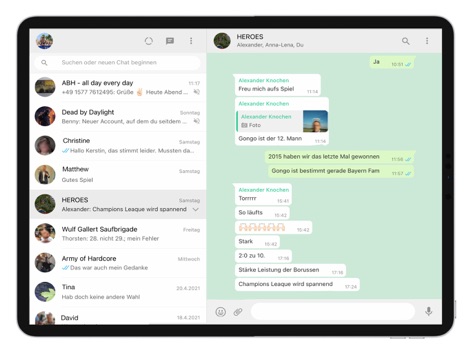
The app showcases a comprehensive conversation view with interactive message bubbles and convenient media sharing access, empowering seamless communication.
Active Chat Experience
Description
Download
More Like This
Apps with similar features and user experience

WatchsApp - Chat for Watch
BEYLER SAGLIK BILISIM SAVUNMA DANISMANLIK SANAYI VE TICARET LIMITED SIRKETI

Battery Life - check runtimes
RBT Digital LLC

Web Scanner - Dual App
Kokila Ukani
Whats-App Web Scanner
Sudhir Donga

WatchsApp - Chat on Watch
芳 王

WatchTalk: Chat on Watch
Bitsbaker LLC.

WristTube for YouTube
ALL RADIO DEVELOPMENT TECHNOLOGY JOINT STOCK COMPANY

WatchChat 2: Chat on Watch
XAN Software GmbH & Co. KG

WatchApp+ for Watch
Jennifer Kirby
This page is not an official page of the app or its developer, but an independent editorial publication created for informational and commentary purposes. Unless expressly stated otherwise, neither the app nor its developer is affiliated with, endorsed by, sponsored by, authorized by, or otherwise officially connected with MWM, Apple, Google Play, the app publisher, or the app's developer, and nothing on this page implies that the app was developed using MWM's services. Any trademarks, logos, screenshots, and other content remain the property of their respective owners.